

Despite substantial investments in observability tools and automation, IT operations teams still spend critical incident response minutes context-switching across dashboards, copying data into chat channels, and evaluating whether a potential fix is safe to run in production.
Integrating LogicMonitor Edwin AI with Red Hat Ansible Automation Platform can help bridge the gap between incident diagnosis and remediation. Edwin AI analyzes incident context to pinpoint root causes and correlate alerts, while Ansible Automation Platform provides a secure execution layer across hybrid infrastructure, upholding your organization’s security policies and access controls.
By enforcing existing enterprise governance over AI-driven recommendations, IT Operations Directors and Site Reliability Engineer (SRE) Managers can incorporate AI into production workflows without compromising stability.
Moving from incident context to action
When a critical alert fires, your team needs immediate answers to several basic questions before executing remediation:
- Which specific service or component broke?
- Which downstream systems and users are affected?
- Has this issue occurred before?
- Is there an approved, standardized playbook to resolve it?
Edwin AI streamlines and speeds up this investigation by deduplicating events, correlating related alerts, enriching incidents with service topology, and identifying likely root causes.
Once context is established, Edwin AI connects to Ansible Automation Platform via the Ansible API to search for relevant automation playbooks.
Streamlining remediation: Matching playbooks to incidents
Many operational problems repeat, whether it is a known service failure, an expired certificate, or configuration drift. Recurring infrastructure conditions require the same diagnostic or remediation steps every time. These are ideal candidates for existing Ansible Playbooks.
In the joint workflow, Edwin AI identifies the incident, establishes the surrounding context, and recommends the automation that best matches the situation. Ansible Automation Platform then runs the playbook according to the defined permissions and policies defined for the environment.
Teams spend less time searching repositories, checking documentation, or coordinating across the organization to find the right automation. Bringing incident context and remediation paths into a single workflow makes existing automation easier to reuse across multiple operational domains, eliminating the need for every responder to know the deep history or storage location of every playbook.
When no suitable playbook, role, or job template is available, teams can use the automation coding assistant within Ansible Automation Platform to generate new Ansible content directly from the incident context assembled by Edwin AI. It supplies the diagnostic analysis and operational details, while Ansible Automation Platform manages, tests, and executes. Drafted content follows standard review and approval gates before production use. Over time, incident remediations become reusable playbooks, systematically reducing one-off manual fixes.
Governing workflows with confidence
Bringing AI into IT operations requires that recommendations adhere to the same security controls and policies as manual operational changes. Ansible Automation Platform provides this essential oversight by combining role-based access control (RBAC), managed credentials, audit trails, policy enforcement, and human-in-the-loop approvals where needed. Because you can tailor execution policies to the risk level of each action, your organization can take a crawl-walk-run approach, gradually increasing AI autonomy as your automated procedures demonstrate consistent reliability.
Automating with event-driven automation
While Edwin AI excels at complex incidents requiring contextual interpretation, event-driven automation handles predictable conditions where the triggering event and required response are pre-defined.
Here is how the LogicMonitor and Ansible Automation Platform integration connects monitoring with automated resolution:
- The LogicMonitor platform detects the event and sends an alert through a webhook.
- The Event-Driven Ansible feature of Ansible Automation Platform receives the event.
- Event-Driven Ansible evaluates the conditions against an Ansible Rulebook. A rulebook is an automated if-this-then-that guide that determines whether to execute a specific fix.
- If desired, Ansible Automation Platform can create and update IT service management (ITSM) tickets via ITSM integration using the platform API. Once the automation runs, the ticket is updated and closed if successful.
- Rulebooks are reviewed so conditional decision rules are met.
- The corresponding playbook or job template is launched.
- The issue is remediated and continuous monitoring resumes.
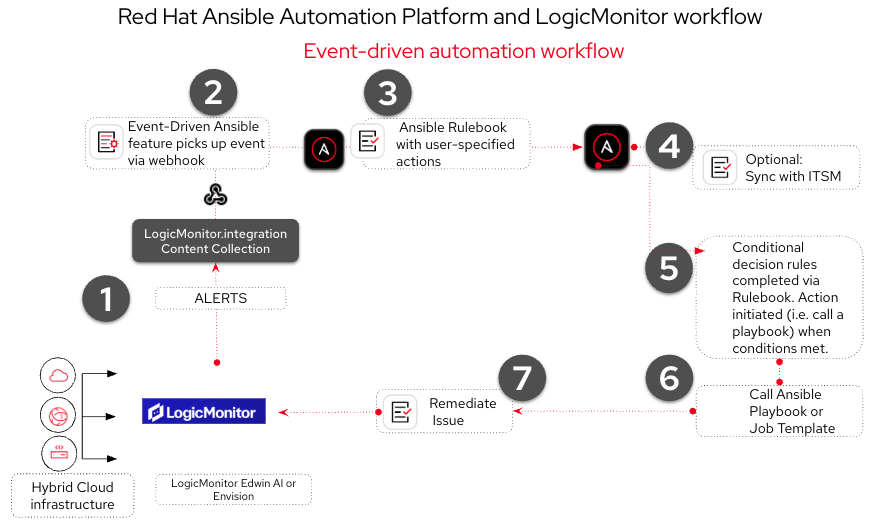
Figure 1: Event-driven automation workflow with Ansible Automation Platform and LogicMonitor
Both approaches can operate together, giving teams deterministic automation for known events and AI-assisted reasoning for incidents that require more context.
Getting started with practical use cases
We recommend a phased approach to getting started:
Phase 1: Low-risk context enrichment. Use Edwin AI to gather diagnostics, enrich tickets, attach topology data, and recommend playbooks without initiating changes.
Phase 2: Automated standard operating procedures. Automate routine tasks with clear rollback paths and known outcomes.
Phase 3: Governed self-healing. Expand automated execution with event-driven automation and approval-gated playbooks.
Managed service providers like Nexon Asia Pacific are already using Edwin AI and Ansible Automation Platform across customer environments. By generating dynamic playbooks and pinpointing the most effective actions for every scenario, their approach enables change control while empowering frontline teams to deliver on customer experiences.
Next steps:
Ready to bring governed AI automation to your incident response? See how AI and automation work together in your environment:
- Read the solution brief to learn how Red Hat and LogicMonitor can help bridge the gap between insights and automation to improve operational resilience.
- Watch the joint Red Hat and LogicMonitor webinar to see the LogicMonitor platform and Ansible Automation Platform in action.
Use case
AIOps automation with Red Hat Ansible Automation Platform
About the authors
Stephen Fulmer is a Product Manager at Red Hat, leading Ansible content strategy. With a background in virtualization and IT operations, he works closely with customers, partners, and engineering teams to deliver trusted, scalable automation content for platforms like OpenShift, Windows, and public cloud. Stephen is passionate about enabling organizations to simplify complex workflows and accelerate their automation journeys with Red Hat Ansible Automation Platform.
Margo Poda leads content strategy for Edwin AI at LogicMonitor. With a background in both enterprise tech and AI startups, she focuses on making complex topics clear, relevant, and worth reading—especially in a space where too much content sounds the same. She’s not here to hype AI; she’s here to help people understand what it can actually do.
More like this
Moving Lightwell patches into production by orchestrating the release lifecycle
An IT manager’s guide to leading an automation-driven culture
Random Acts Of Automation | Compiler
Untangling Networks | Compiler
Keep exploring
- The automated enterprise
E-book - Try Red Hat Ansible Automation Platform with self-paced, hands-on labsInteractive lab
- Red Hat Ansible Automation Platform: A beginner’s guide
E-book
Browse by channel

Automation
The latest on IT automation for tech, teams, and environments

Artificial intelligence
Updates on the platforms that free customers to run AI workloads anywhere

Open hybrid cloud
Explore how we build a more flexible future with hybrid cloud

Security
The latest on how we reduce risks across environments and technologies

Edge computing
Updates on the platforms that simplify operations at the edge

Infrastructure
The latest on the world’s leading enterprise Linux platform

Applications
Inside our solutions to the toughest application challenges

Virtualization
The future of enterprise virtualization for your workloads on-premise or across clouds
