

Managing vulnerabilities across a fleet of Red Hat Enterprise Linux (RHEL) systems is a continuous challenge. Between tracking Common Vulnerabilities and Exposures (CVEs), prioritizing by business risk, planning RHEL upgrades, and remediating issues, operations teams juggle multiple tools and workflows daily. Red Hat Lightspeed brings a greater level of situational awareness into your on-premise environment to help you discover, prioritize, and fix security and other issues, without your system data ever leaving your network.
In a previous blog post we’ve outlined how to install Red Hat Lightspeed on premise, and in this post, we'll talk about what capabilities on-premise Red Hat Lightspeed provides and how you use it.
We'll walk through how to:
- Manage system health through recommendations
- Identify and triage vulnerabilities
- Apply proactive remediations efficiently
Applying Red Hat Lightspeed recommendations
Within Red Hat Satellite, the recommendations page under the Red Hat Lightspeed tab serves as a proactive hub for managing the health of your systems. The primary benefit is the "total risk" visualization, which helps you to assess the overall impact of potential issues across the entire fleet. Instead of scrolling through endless lists of alerts, you'll see a clearly prioritized overview where risk is calculated based on the severity of the issue and the number of affected systems.
A practical example is the "In-place Upgrade Inhibitor" recommendation (see Figure 1). This tool automatically identifies obstacles that could cause failures when upgrading a RHEL system. With Red Hat Lightspeed, administrators can more easily resolve these blockers before they become real problems during scheduled maintenance, increasing upgrade success rates and reducing infrastructure downtime.

Figure 1. The recommendations panel in Red Hat Lightspeed on premise
Modify and filter recommendations
With filter panes, you can filter for specific categories, such as incidents, to isolate high-priority items that require immediate attention, helping you identify moderate risk recommendations in the security category more quickly.
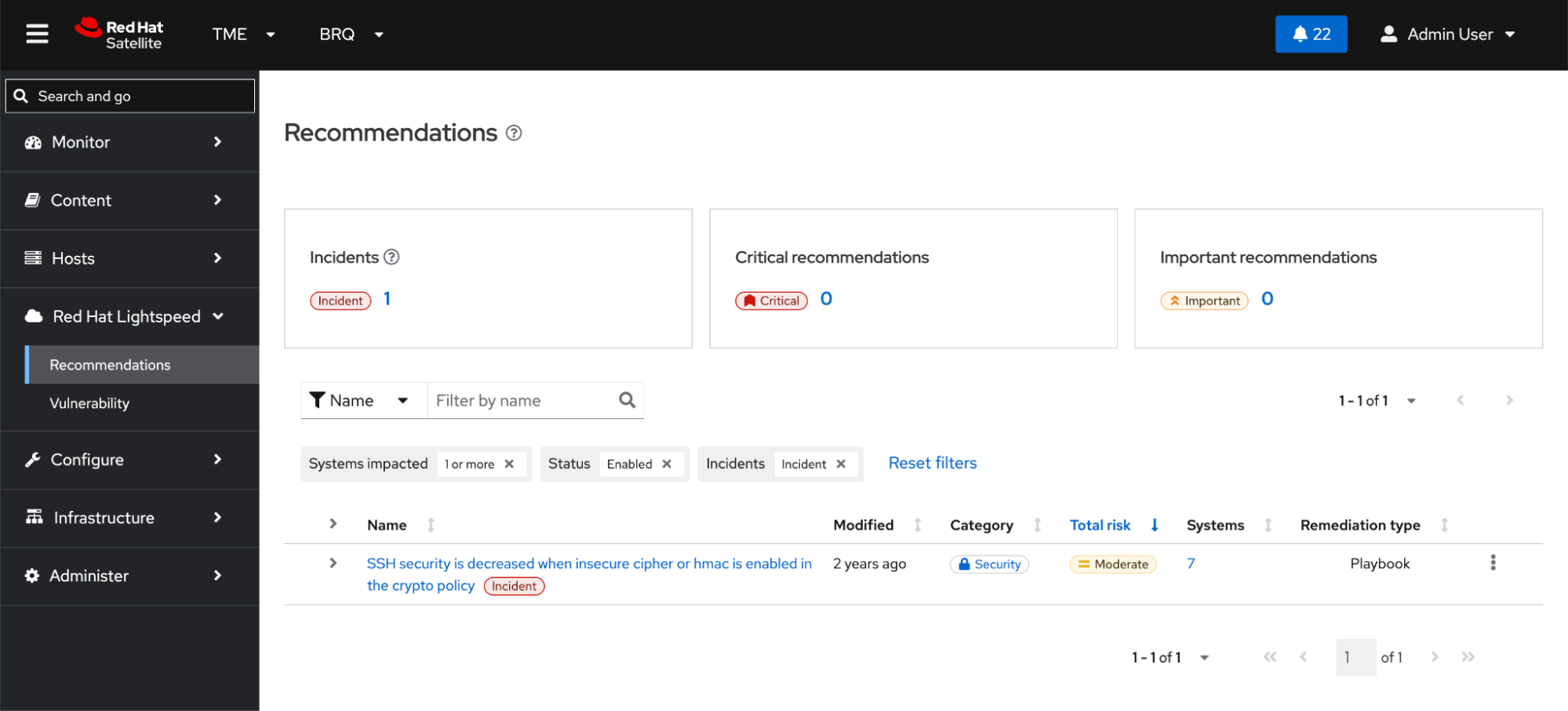
Figure 2. The recommendations panel showing systems affected
Using Red Hat Lightspeed tab as aggregator for leap preupgrade checks (to upgrade managed RHEL nodes)
With Red Hat Lightspeed, administrators can quickly resolve these blockers with Ansible Playbooks or manual recommendations, reducing infrastructure downtime.

Figure 3. Advisor detail screen
Vulnerability and CVE management
Red Hat Lightspeed helps simplify the vulnerability triage process, giving you greater awareness of and visibility into the security threats across your entire Red Hat Satellite-managed infrastructure.
Rather than manually managing spreadsheets of issues and related patches, you can see everything in a single dashboard, with vulnerabilities categorized by exploit availability and severity so your team can focus on the highest risk issues first.

Figure 4. Vulnerability screen showing all RHEL nodes affected by 1 or more CVEs
Custom CVE status labels
This feature helps keep your team aligned by updating the status of a CVE. The "justification note" provides an audit trail explaining why a specific patching decision was made, if patch is scheduled, postponed, or skipped for whatever reason.

Figure 5. Screen showing the modification of CVE status and justifications
Managing business risk
In addition to specifying the technical severity of a CVE, you can also specify the level of business risk involved, giving your teams additional context when prioritizing CVEs.

Figure 6. Screen showing defined level of business risk
Not "just another dashboard"
A common question we hear is, "Why should I add another dashboard to my daily routine?" Red Hat Lightspeed is designed to integrate into your existing workflow, not interrupt it. You don't have to live in the Red Hat Lightspeed UI to experience its value. With support for webhooks and certified integrations, you can push alerts, reports, and inventory data directly into the platforms your team already uses—such as ServiceNow, Splunk, or your preferred observability tool. By surfacing high-priority insights where your decision-makers are already working, Red Hat Lightspeed acts as an intelligent layer that enhances your existing toolset rather than piling more stuff on top of it.
A smarter approach to operations
Managing enterprise infrastructure doesn't have to be a reactive, chaotic process. By centralizing discovery, prioritization, and remediation, Red Hat Lightspeed capabilities transform the operational lifecycle from a series of tasks into a more streamlined workflow.
Whether you're proactively addressing potential upgrade blockers, or triaging critical CVEs with clear business context, Red Hat Lightspeed provides visibility and agility that help maintain a more security-focused and stable environment. By keeping your data local while gaining the intelligence of a modern operations tool, you can spend less time managing the "noise" of alerts and more time delivering value to your organization.
More integrations coming
In future versions of Red Hat Satellite, we'll be building deeper, more powerful integrations with on-premise Red Hat Lightspeed capabilities, such as Red Hat Ansible Automation Platform. If this is something you’re interested in, please reach out to the Red Hat Satellite product team.
For information and important deployment-specific details about setting up Red Hat Lightspeed in your on-premise environment, visit our documentation hub to learn more.
Product trial
Red Hat Enterprise Linux | Product Trial
About the authors
Štefan is a Technical Account Manager at Red Hat, where he started in 2015 in Technical Support for Satellite and systems management. He specializes in helping telecommunications providers modernize and automate large-scale infrastructure using Red Hat technologies, with a focus on RHEL, Satellite, automation, and AI-driven operations.
As a trusted technical advisor for major EMEA telecommunications customers, Štefan partners with engineering, operations, and leadership teams to solve complex technical challenges and drive successful technology adoption. His experience spans solution architecture, infrastructure modernization, operational automation, and customer success across some of Europe's largest telecom environments.
In recent years, he has focused on practical applications of AI — building agentic workflows that integrate large language models with enterprise infrastructure platforms via MCP servers to improve operational efficiency and decision-making.
A regular speaker at customer workshops, user groups, and technical events, Štefan is passionate about making emerging technologies accessible and delivering measurable business value through innovation.
Brian is a seasoned product professional with eight years of experience managing products and teams across a variety of company sizes, industries, and regions. As a member of the Red Hat Lightspeed team, he works to build solutions that enable our customers to derive more value from their Red Hat subscriptions and transform their IT operations.
More like this
What’s new in Red Hat OpenShift 5
Red Hat OpenShift 5: Bring stronger security to applications and AI
Random Acts Of Automation | Compiler
Can Compliance Be A Piece Of Cake? | Compiler
Keep exploring
- The automated enterprise
E-book - Try Red Hat Ansible Automation Platform with self-paced, hands-on labsInteractive lab
- Red Hat Ansible Automation Platform: A beginner’s guide
E-book
Browse by channel

Automation
The latest on IT automation for tech, teams, and environments

Artificial intelligence
Updates on the platforms that free customers to run AI workloads anywhere

Open hybrid cloud
Explore how we build a more flexible future with hybrid cloud

Security
The latest on how we reduce risks across environments and technologies

Edge computing
Updates on the platforms that simplify operations at the edge

Infrastructure
The latest on the world’s leading enterprise Linux platform

Applications
Inside our solutions to the toughest application challenges

Virtualization
The future of enterprise virtualization for your workloads on-premise or across clouds
