
Red Hat OpenShift migration advisor helps you assess your VMware inventory of virtual machines (VMs) and plan migrations to Red Hat OpenShift Virtualization. Over the past few months, we’ve focused on making assessments easier to read and share, and more useful when you’re working across multiple inventories, so more of the analysis stays in the product.
Here’s what’s new.
Get more in the assessment report—and share what matters

Assessment reports now show more of the information you need for migration conversations.
- Additional cluster and assessment details in the report
- Clearer operating system (OS) support information, organized by certification tiers
- Added application information for your whole VMware environment, as well as individual VMs, allowing you to review VMs in an application context
Plan from applications, complexity, and sizing—not just raw inventory

Beyond the initial assessment report, we’ve also strengthened the planning tools with:
- A refreshed cluster complexity estimation form
- (Available for partners only) Stronger standalone sizing and total cost of ownership (TCO)-oriented planning workflows
- Continued improvements to storage offload estimation and rightsizing recommendations
- Better support for labeling, grouping, and excluding items from reports to tailor the assessment to only include the VMs that matter
These updates help teams move from “what’s in the estate?” to “what should we migrate, how, and at what cost?”
Run new reports and compare results over time
OpenShift migration advisor now supports ongoing assessments rather than one-time discovery, helping you keep planning decisions aligned with evolving environments.
With "Run new report," you can refresh data directly from an appliance whenever your inventory changes. No new setup is required, helping your migration strategy stay accurate without extra administrative overhead.

We’ve also introduced a new comparison tool that allows you to look across historical assessment data to track changes between reports, such as inventory shifts, readiness improvements, or remaining blockers. This keeps your migration conversations grounded in the latest picture, not a stale snapshot.
In short:
- Run a new report when you need fresh data from the same discovery appliance
- Compare reports over time to understand what changed between assessments
- Keep planning decisions tied to current estate data, not a one-time export
Export data
Need to present the data? You can now select exactly which metrics you need and export them into formats ready for your next presentation or audit.
- Comma-separated values (CSV): Select which information you’d like to export out of all the available information
- Portable Document Format (PDF): Share with relevant stakeholders
- Portable Network Graphics (PNG): Export every report chart, or individual ones to quickly add them to your own documents or presentations
- HTML: View and share reports directly in a web browser
Clearer credentials, login, and disconnect flows
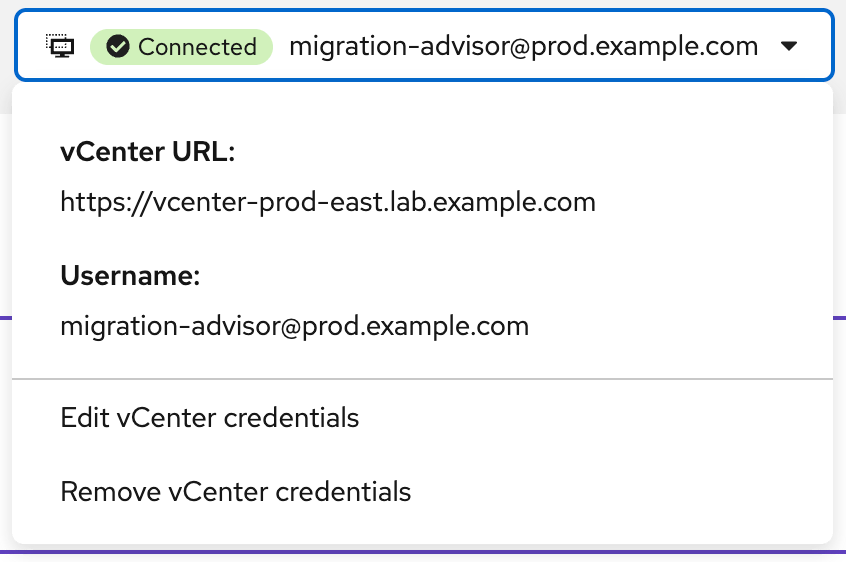
Managing connections should feel predictable. Recent updates improve how you manage connections by giving you:
- Better credential security: A clearer, more straightforward path for securely storing credentials
- Transparent disconnect flows: Explicit notifications showing what happens to assessment data when you disconnect
- Cleaner post-disconnect cleanup: Immediate clarity on what data is kept and what's removed
These updates lead to fewer surprises when you connect, reconnect, or disconnect an environment.
Easier to find—easier to understand
We’ve also improved findability and language across the experience, including clearer placement for the OpenShift migration advisor in the console navigation and terminology updates so key concepts are easier to understand.
What’s next
We’re continuing to invest in clarity, consistency between the different OpenShift migration advisor experiences, and deeper in-product analysis, so you can do more of your assessment work in OpenShift migration advisor without relying on separate, self-maintained analysis tools.
Try it out
If you already use OpenShift migration advisor, open a recent assessment and look for the updated report details, chart downloads, multi-inventory reporting, and export options.
If you’re new to OpenShift migration advisor, start with an assessment of your VMware inventory and use the report as the basis for your next migration planning conversation.
Learn more about the OpenShift migration advisor
- Access the advisor and generate a migration-readiness report
- Review the datasheet to learn more
- Watch a short demo on how to use the OpenShift migration advisor
- Read the documentation to learn more about technical requirements
Resource
15 reasons to adopt Red Hat OpenShift Virtualization
About the author
Margot is Senior Interaction Designer on the User Experience Design team, currently working in the OpenShift Virtualization space, with a focus on MTV
More like this
How Red Hat OpenShift console connects virtual machines to the networks they use
Node management in Red Hat OpenShift 5: Server-level visibility for bare metal
Virtualization Is (Still) King | Compiler
Browse by channel

Automation
The latest on IT automation for tech, teams, and environments

Artificial intelligence
Updates on the platforms that free customers to run AI workloads anywhere

Open hybrid cloud
Explore how we build a more flexible future with hybrid cloud

Security
The latest on how we reduce risks across environments and technologies

Edge computing
Updates on the platforms that simplify operations at the edge

Infrastructure
The latest on the world’s leading enterprise Linux platform

Applications
Inside our solutions to the toughest application challenges

Virtualization
The future of enterprise virtualization for your workloads on-premise or across clouds
