Introduction
Operators framework is the new way to manage complex applications on top of Kubernetes. They embed operational knowledge about applications and manage all the lifecycle from installation, upgrade, monitoring, and even autopilot according to a capability model.
OpenShift 4 is making use of operators, and it offers a way to install operators from a hub called OperatorHub in the web console:
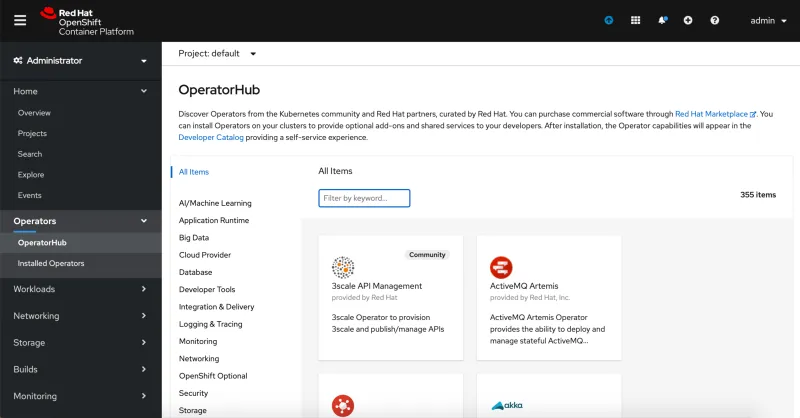
Today, we are going to build a customized operator registry to handle pre-existing operators, configure OpenShift to show these operators, and allow them to install them from the web console catalog.
Perquisites
To accomplish this lab, you will need: OpenShift 4.5+ cluster, operator-sdk, oc CLI, and a Docker v2_2 schema registry (in our case, we will be using quay.io).
Some commands evolve regarding the CLI versions; please keep in mind to use the following versions, or to update the commands:
|
$ operator-sdk version operator-sdk version: "v0.18.2", commit: "f059b5e17447b0bbcef50846859519340c17ffad", kubernetes version: "v1.18.2", go version: "go1.14.4 darwin/amd64" |
Procedure
Build opm CLI:
|
$ git clone https://github.com/operator-framework/operator-registry.git |
Create quay.io repos:
On quay.io, create one repository for the operator memcached-operator, the bundle memcached-bundle, and another for the operator registry operator-registry.
Get an existing operator, build it, and push it:
To build a custom operator, you can use operator-sdk and follow the official documentation. In our case, we will be using an existing one:
|
$ git clone https://github.com/operator-framework/operator-sdk-samples.git |
Replace image in operator deployment:
|
$ sed -i'.original' -e 's/REPLACE_IMAGE/quay\.io\/saberkan\/memcached-operator\:latest/g' deploy/operator.yaml |
Generate custom service version:
|
$ operator-sdk generate csv --csv-version 1.0.0 --interactive=true |
Build and publish the operator bundle:
|
$ operator-sdk bundle create --generate-only |
Check bundle is valid:
|
$ ./operator-registry/bin/opm alpha bundle validate --tag quay.io/saberkan/memcached-bundle:1.0.0 --image-builder docker |
Add the bundle into the registry image and publish it:
|
$ ./operator-registry/bin/opm index add --bundles quay.io/saberkan/memcached-bundle:1.0.0 --tag quay.io/saberkan/operator-registry:0.1-RC --build-tool docker |
Configure Catalog Source on OpenShift:
|
$ cat << EOF | oc create -f - |
Check catalog source is ready:
|
$ oc describe CatalogSource saberkan-catalog-source -n openshift-marketplace | grep 'Last Observed State' |
Create namespace where to install the operator:
|
$ oc new-project saberkan |
Install the operator from web console into the created namespace:
The installation can be also triggered with a subscription manifest. But we are doing it from the web console for a demo purpose:
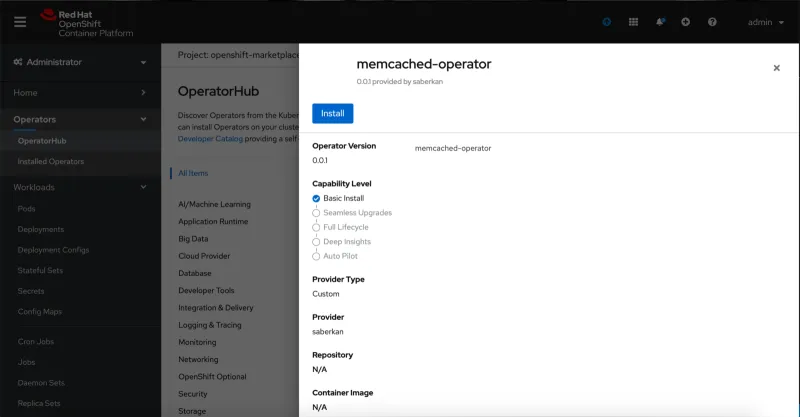
Check operator installed (after few moments):
|
$ oc get csv memcached-operator.v1.0.0 NAME DISPLAY VERSION REPLACES PHASE memcached-operator.v1.0.0 memcached-operator 1.0.0 Succeeded |

저자 소개

채널별 검색

오토메이션
기술, 팀, 인프라를 위한 IT 자동화 최신 동향

인공지능
고객이 어디서나 AI 워크로드를 실행할 수 있도록 지원하는 플랫폼 업데이트

오픈 하이브리드 클라우드
하이브리드 클라우드로 더욱 유연한 미래를 구축하는 방법을 알아보세요

보안
환경과 기술 전반에 걸쳐 리스크를 감소하는 방법에 대한 최신 정보

엣지 컴퓨팅
엣지에서의 운영을 단순화하는 플랫폼 업데이트

인프라
세계적으로 인정받은 기업용 Linux 플랫폼에 대한 최신 정보

애플리케이션
복잡한 애플리케이션에 대한 솔루션 더 보기

가상화
온프레미스와 클라우드 환경에서 워크로드를 유연하게 운영하기 위한 엔터프라이즈 가상화의 미래
