Introduction
The concept of platform-based cloud providers in Kubernetes are being migrated to a more agnostic approach. An important part of any provider is the container persistent storage that the cloud provides. Kubernetes Container Storage Interface, or CSI, provides an interface for exposing arbitrary block and file storage systems to containerized workloads in Kubernetes.
While the framework exists in upstream Kubernetes, the storage provider is in charge of their own drivers. This means timely updates can be included in the platform itself and not in Kubernetes. This article will explain the process of installing and configuring CSI for vSphere and will discuss some of the benefits of migrating to CSI vs. the in-tree vSphere Storage for Kubernetes.
This installation can be in tandem with the default vSphere storage class deployed and managed by OpenShift with the pre-existing or fully-automated installation experience. In the event that the new storage class is preferred, it can be made the default replacing the vSphere Storage for Kubernetes StorageClass.
Platform Requirements
The required platform for vSphere CSI is at least vSphere 6.7 U3. This particular update includes vSphere’s Cloud Native Storage, which provides ease of use in the vCenter console.
Additionally, cluster VMs will need “disk.enableUUID” and VM hardware version 15 or higher.
# govc find / -type m -runtime.powerState poweredOn -name 'ocp-*' | xargs -L 1 govc vm.power -off $1

# govc find / -type m -runtime.powerState poweredOff -name 'ocp-*' | xargs -L 1 govc vm.change -e="disk.enableUUID=1" -vm $1

# govc find / -type m -runtime.powerState poweredOff -name 'ocp-*' | xargs -L 1 govc vm.upgrade -version=15 -vm $1

# govc find / -type m -runtime.powerState poweredOff -name 'demo-*' | grep -v rhcos | xargs -L 1 govc vm.power -on $1
Installing the vSphere Cloud Provider Interface
The next step for installing CSI on OpenShift is to create a secret, which will be used for CSI’s configuration and access to the vCenter API.
It is important to note that the cluster-id in the below must be different per cluster, or volumes will end up being mounted into the wrong OCP cluster.
# vim csi-vsphere.conf

[Global]
cluster-id = "csi-vsphere-cluster"
[VirtualCenter "vcsa67.cloud.example.com"]
insecure-flag = "true"
user = "Administrator@vsphere.local"
password = "SuperPassword"
port = "443"
datacenters = "RDU"

# oc create secret generic vsphere-config-secret --from-file=csi-vsphere.conf --namespace=kube-system
# oc get secret vsphere-config-secret --namespace=kube-system
NAME                    TYPE     DATA    AGE
vsphere-config-secret   Opaque   1      43s
If you have some experiences with the in-tree vSphere Cloud Provider (VCP), the above format should be familiar to you. The following VMware article discusses more about this method of configuration and installation on a vanilla K8s platform.
Storage Tags for Storage Policy Names
One of the biggest limitations of the old vSphere cloud provider was the relationship between a storage class and a datastore. This one-to-one relationship made multiple storage classes a requirement and imposed inherent limitations on datastore clustering as well. When using the CSI driver, a storage policy name can be used to distribute across multiple datastores.

 The following tag-based placement rule was applied to the aos-vsphere datastore in question. Multiple datastores could have been added to this policy by assigning the same tag.
Now that the vSphere infrastructure has been prepared, the CSI drivers can be installed.
Installing the vSphere CSI Driver
Using the upstream CSI manifests is compatible by default with OCP, first ensure the vSphere CPI has provided each node with a ProviderID, without this the CSI will not work:
# oc describe nodes | grep "ProviderID"
NOTE: The version of manifest files is dependent on the version of vSphere. The example below uses vSphere 7U1. All of the versions are listed here:
https://github.com/kubernetes-sigs/vsphere-csi-driver/tree/master/manifests/v2.1.0
Install the vSphere CSI driver based on what version of OCP/K8s you have - For K8s 1.17+ or OCP 4.4 and above:
# oc apply -f https://raw.githubusercontent.com/kubernetes-sigs/vsphere-csi-driver/master/manifests/v2.1.0/vsphere-7.0u1/rbac/vsphere-csi-controller-rbac.yaml
# oc apply -f https://raw.githubusercontent.com/kubernetes-sigs/vsphere-csi-driver/master/manifests/v2.1.0/vsphere-7.0u1/deploy/vsphere-csi-node-ds.yaml
# oc apply -f https://raw.githubusercontent.com/kubernetes-sigs/vsphere-csi-driver/master/manifests/v2.1.0/vsphere-7.0u1/deploy/vsphere-csi-controller-deployment.yaml
For K8s <1.17 or OCP 4.3
# oc apply -f https://raw.githubusercontent.com/kubernetes-sigs/vsphere-csi-driver/master/manifests/v1.0.3/rbac/vsphere-csi-controller-rbac.yaml
# oc apply -f https://raw.githubusercontent.com/kubernetes-sigs/vsphere-csi-driver/master/manifests/v1.0.3/deploy/vsphere-csi-node-ds.yaml
# oc apply -f https://raw.githubusercontent.com/kubernetes-sigs/vsphere-csi-driver/master/manifests/v1.0.3/deploy/vsphere-csi-controller-ss.yaml
After the installation, verify success by querying one of the new custom resource definitions:
# oc get  CSINode
NAME              CREATED AT
control-plane-0   2020-03-02T18:21:44Z
Storage Class Creation and PVC Deployment
Now, the storage class should be deployed and tested. In the event that the vSphere cloud provider storage class was also present, the additional storage class can be created then used for migrations and workload use in tandem.
# oc get sc
NAME             PROVISIONER                    AGE
csi-sc           csi.vsphere.vmware.com         6m44s
thin (default)   kubernetes.io/vsphere-volume   3h29m

# vi csi-sc.yaml
kind: StorageClass
apiVersion: storage.k8s.io/v1
metadata:
  name: csi-sc
  annotations:
    storageclass.kubernetes.io/is-default-class: "false"
provisioner: csi.vsphere.vmware.com
parameters:
  StoragePolicyName: "GoldVM"

# oc create -f csi-sc.yaml

# Test the new storage class
# vi csi-pvc.yaml
kind: PersistentVolumeClaim
apiVersion: v1
metadata:
  name: csi-pvc2
  annotations:
    volume.beta.kubernetes.io/storage-class: csi-sc
spec:
  accessModes:
    - ReadWriteOnce
  resources:
    requests:
      storage: 30Gi

# oc create -f csi-pvc.yaml

# oc get pvc
NAME       STATUS   VOLUME                                     CAPACITY   ACCESS MODES   STORAGECLASS   AGE
csi-pvc2   Bound    pvc-8892e718-d89a-4267-9826-e2beb362e723   30Gi       RWO            csi-sc         9m27s

The following information should be in the events log on vCenter:
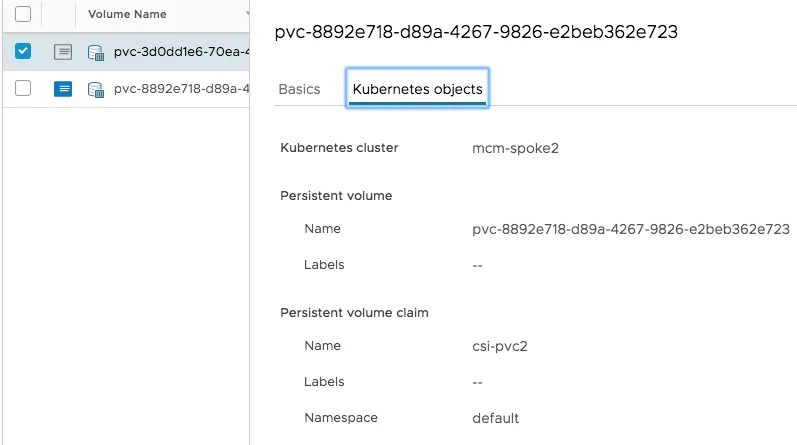
In the event that the new CSI storage class is the preferred one, patch both of the classes:
# oc patch storageclass thin -p '{"metadata": {"annotations": \
    {"storageclass.kubernetes.io/is-default-class": "false"}}}'
# oc patch storageclass csi-sc -p '{"metadata": {"annotations": \
    {"storageclass.kubernetes.io/is-default-class": "true"}}}'
Conclusion
In closing, this article has laid out directions for deploying and using CSI driver support on vSphere using OpenShift. CSI driver support and container native storage greatly simplify deployment and management of persistent volume container workloads.
Additionally, the disks are no longer indexed with virtual machines and are considered first-class disks.
For more information on CSI and OpenShift, check out this solution brief I worked on with VMware.
저자 소개

채널별 검색

오토메이션
기술, 팀, 인프라를 위한 IT 자동화 최신 동향

인공지능
고객이 어디서나 AI 워크로드를 실행할 수 있도록 지원하는 플랫폼 업데이트

오픈 하이브리드 클라우드
하이브리드 클라우드로 더욱 유연한 미래를 구축하는 방법을 알아보세요

보안
환경과 기술 전반에 걸쳐 리스크를 감소하는 방법에 대한 최신 정보

엣지 컴퓨팅
엣지에서의 운영을 단순화하는 플랫폼 업데이트

인프라
세계적으로 인정받은 기업용 Linux 플랫폼에 대한 최신 정보

애플리케이션
복잡한 애플리케이션에 대한 솔루션 더 보기

가상화
온프레미스와 클라우드 환경에서 워크로드를 유연하게 운영하기 위한 엔터프라이즈 가상화의 미래
