
Today's enterprise systems are changing so fast that, for many companies, the rate of change is beyond the capabilities of human control. This makes automated deployment a critical part of modern enterprise architecture.
Early implementations of automated deployment were focused on updating application software. But, as the notions of Infrastructure as Code (IaC) and ephemeral computing have taken hold, automation activities have gone beyond the boundaries of software updates. Businesses want to get the most bang for their buck. In an ephemeral IaC environment, assets are created and destroyed on demand, living only for as long as they're needed and thus, incurring cost only when those assets are operational. And, it's all controlled using automation.
In terms of enterprise architecture, the increasing growth of IaC and ephemeral computing means that modern enterprise architects will do well to include deployment automation planning into their designs. For instance, it's not enough to define the servers your architecture will need. You'll also need to describe how those servers will be created and how they'll be provisioned using automation.
Presently, there are two basic automated provisioning techniques: pull and push. In this article, I'll provide a conceptual understanding of the pull and push techniques and briefly describe products that support each.
Before getting started with the details of pull and push, it's important to understand automated continuous integration/continuous development (CI/CD) at a high level, particularly around the concepts of virtual machine (VM) creation and provisioning.
What are asset creation and provisioning?
There are two steps in the VM provisioning process. The first step is creating the VM. The second step is installing (or provisioning) the VM with the artifacts and applications particular to its purpose.
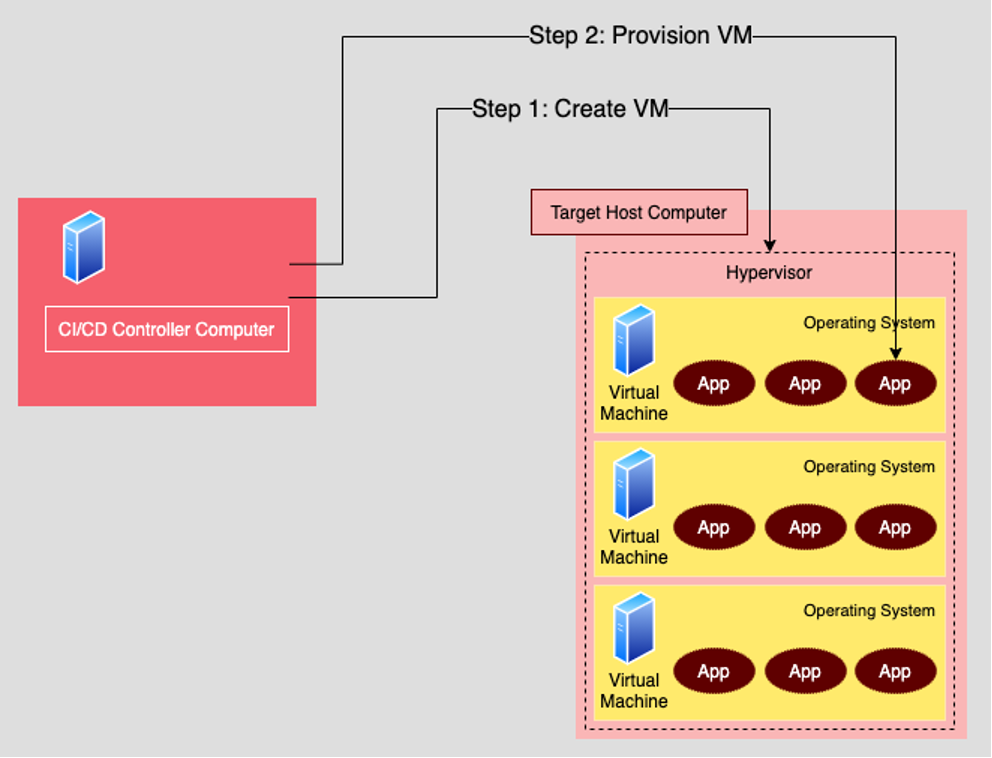
Typically, you initiate creating a VM from a computer dedicated to controlling the CI/CD process. Think of this computer as the CI/CD controller; it creates VMs on another host computer that has a hypervisor installed.
A hypervisor is a piece of software that acts as an intermediary between the host computer and the VMs. The hypervisor makes it possible to create a VM that runs any one of a variety of operating systems other than the one installed on the host computer. For example, you can have a host computer running Linux as the base operating system on the host and create VMs that use the Windows operating system. Again, the hypervisor is the intermediary that makes this all possible.
There are many hypervisors available. Some are free and open source; some you have to buy. For example, VirtualBox and KVM are free for download. The Red Hat Enterprise Linux hypervisor includes a built-in version of KVM with its license.
[ You can have it both ways. Read Containers vs. virtual machines: Why you don't always have to choose. ]
Once you have a hypervisor set up on a targeted host and that host is accessible on the network via an IP address, you're ready to create VMs and then provision them. Typically, you'll use a tool to create VMs automatically. This involves writing scripts that execute the VM-creation process. Then, once the VM is created, you'll provision it with the artifacts and applications that are particular to the purpose of the VM.
This is where pull vs. push techniques come into play.
What is the pull technique?
When you're provisioning a VM using the pull technique, an agent is installed within the VM being provisioned. The agent calls back to a provisioning server to get the artifacts and applications to install on the VM where it is running.
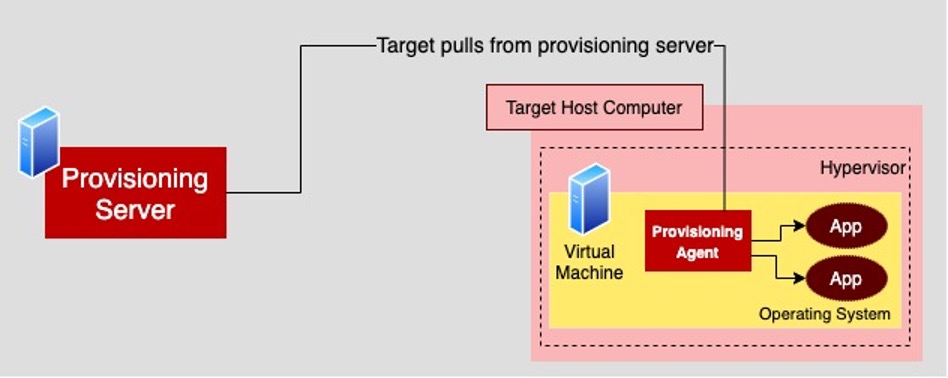
In order for the pull technique to work, the provisioning agent on the VM needs to know the location of the provisioning server on the network and have access permissions to the provisioning server.
Well-known provisioning products that use the pull technique are Puppet and Chef.
What is the push technique?
With the push technique, the provisioning server accesses the VM(s) of interest and, as the name implies, pushes the particular artifacts and applications directly onto the VM.
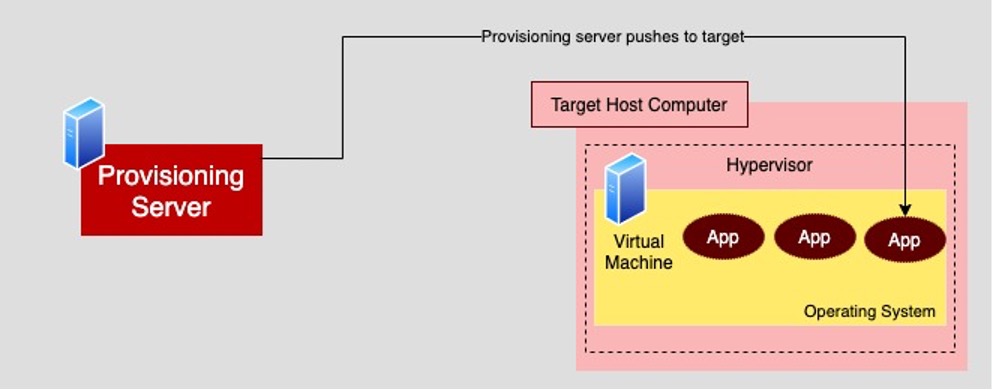
For the push to happen, the provisioning server needs to be able to access the VM in question via SSH. SSH access can happen against a bridged IP address or to a special SSH port using port forwarding. Also, the provisioning server will need to have a username/password pair or an SSH public key that enables access to the VM.
Once the network location and VM access are set up, you can use a push-based provisioning tool such as Ansible to configure the VM and install the artifacts and applications the VM requires.
[ Learn more about automation. Take a free online course on Ansible essentials. ]
Putting it all together
The push and pull techniques are two fundamentally different ways to provision VMs and physical computers. Under the push technique, provisioning software such as Ansible sends artifacts and applications directly to the devices of interest. The provisioning software will also configure the machines, for example, opening up ports for access by other machines.
The pull technique installs a provisioning agent on the VM or physical computer. Then, the provisioning agent interacts with the provisioning server to get artifacts and applications it wants to install. Also, the provisioning agent will configure the particular host machine according to a set of configuration rules.
Pull and push techniques are both controlled by automation scripts that execute the tasks necessary to provision the machines of interest. These scripts are typically run by CI/CD controller software such as Jenkins or Team City.
The push technique is growing in popularity because it allows you to create and provision VMs from a single point of execution. But there are still many working systems in force that use the pull technique.
When you're creating a system from scratch, you'll have the luxury of choosing the automated provisioning technique that makes the most sense for meeting the need at hand. If you're working with existing architecture, budgetary constraints might require you to work with the technique already in use. Thus, having a solid operational understanding of both provisioning techniques is useful for enterprise architects working or planning to work with ephemeral computing designs.
关于作者
Bob Reselman is a nationally known software developer, system architect, industry analyst, and technical writer/journalist. Over a career that spans 30 years, Bob has worked for companies such as Gateway, Cap Gemini, The Los Angeles Weekly, Edmunds.com and the Academy of Recording Arts and Sciences, to name a few. He has held roles with significant responsibility, including but not limited to, Platform Architect (Consumer) at Gateway, Principal Consultant with Cap Gemini and CTO at the international trade finance company, ItFex.


