Istio.io is an open platform that provides a uniform way to connect, manage, and secure microservices. This article describes installing and running on OpenShift (>=1.5 as of now) only. If you would like to know more theory I encourage you to read this post by @christianposta
Note that some of the permissions mentioned in this article may be more than what is needed. I plan to do further research and publish another article or comments on this post with accurate permissions in the future. For updates follow me on twitter @debianmaster
Run as Cluster Administrator on Master
oc login -u system:admin
Istio installation requires that you are the cluster-admin; you can use any cluster admin user for this purpose.
Choose a Namespace and Provide Permissions
oc project default

oc adm policy add-scc-to-user anyuid -z default

oc adm policy add-scc-to-user privileged -z default

oc patch scc/privileged --patch {\"allowedCapabilities\":[\"NET_ADMIN\"]}
NET_ADMIN privilege is needed for iptable NAT redirect chains updated by Istio.
Install Istio Service Mesh
git clone https://github.com/istio/istio

git checkout 0.1.5
Apply Necessary Permissions
oc adm policy add-cluster-role-to-user cluster-admin -z istio-manager-service-account

oc adm policy add-cluster-role-to-user cluster-admin -z istio-ingress-service-account

oc adm policy add-cluster-role-to-user cluster-admin -z default
oc adm policy add-scc-to-user anyuid -z istio-ingress-service-account
 oc adm policy add-scc-to-user privileged -z istio-ingress-service-account
oc adm policy add-scc-to-user anyuid -z istio-manager-service-account oc adm policy add-scc-to-user privileged -z istio-manager-service-account
Many permissions are needed currently, but this may change. Istio installation creates custom service accounts and they need privileges to be able to create ThirdPartyResources.
Deploying Istio
oc apply -f istio/install/kubernetes/istio.yaml
Install Addons
oc apply -f istio/install/kubernetes/addons/prometheus.yaml

oc apply -f istio/install/kubernetes/addons/grafana.yaml

oc apply -f istio/install/kubernetes/addons/servicegraph.yaml
Deploy Sample App
Install istioctl first
curl -L https://git.io/getIstio | sh -

export PATH="$PATH:/Users/YOUR_USERNAME/istio/istio-0.1.5/bin"
Note: Don't forget to replace with the appropriate value.
Deploy bookInfo App
oc apply -f <(istioctl kube-inject -f istio/samples/apps/bookinfo/bookinfo.yaml)
oc expose svc servicegrap
Test Service Mesh / Using Grafana Pod (or Another Pod)
$ export GRAFANA=$(oc get pods -l app=grafana -o jsonpath={.items[0].metadata.name})

$ oc exec $GRAFANA -- curl -o /dev/null -s -w "%{http_code}\n" http://istio-ingress/productpage

$ open http://$(oc get routes servicegraph -o jsonpath={.spec.host})/dotviz
Conclusion
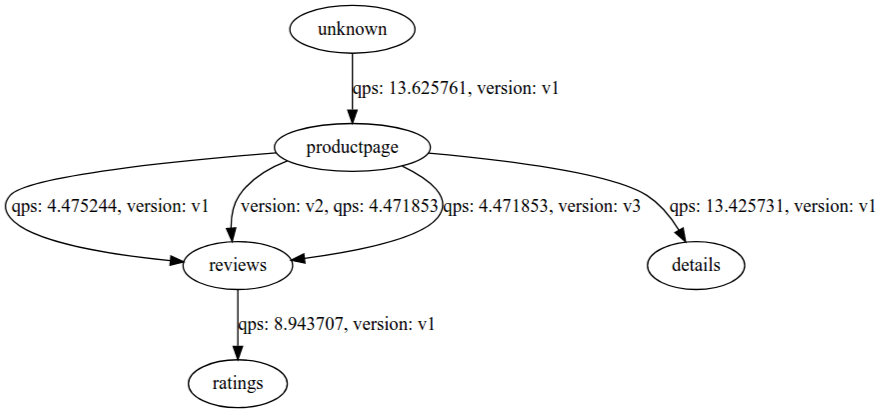
You should see something like this at the end showing the service graph.