Modules make writing Python applications easy and straightforward, but when you use someone else's code (which are what modules are), it's always best to check regularly for published vulnerabilities. This article shows you how to use the pip-audit tool to find CVE advisories issued for Python modules you're using in your project.
Most Python coders list all third-party dependencies in a requirements.txt file, which is useful for PyPi and other dependency management systems:
module1==x.y.z
module2==x.y.z
module1==x.y.z
This makes your development environment reproducible, but it also leaves you exposed to using older versions that may be vulnerable to exploits.
Think about your versions as a garden: They need watering, trimming, and attention. A good project keeps versions up to date when a vulnerability is found, and tools like pip-audit make this job easier.
Here's how to use pip-audit to scan your Python project and learn whether any of your third-party libraries have known vulnerabilities with CVE identifiers.
Install pip-audit
Install the latest version of pip-audit with pip:
python3 -m venv ~/virtualenv/pip-audit
$ . ~/virtualenv/pip-audit/bin/activate

$ pip install --upgrade pip pip-audit
The pip-audit command expects a requirements.txt file. If your project doesn't have one (for example, if it uses a single setup.py), generate one with:
. ~/virtualenv/myprojectvirtualenv/bin/activate
# Install your project as usual, like python setup.py develop
$ pip freeze > requirements.txt
Analyze a project
Now you should be ready to start analyzing your projects for potential vulnerabilities in your modules.
Example 1: A project with no vulnerabilities
Vision2 is a nice script that correlates the output of an Nmap scan XML file with the CVE NIST vulnerability database. Here is an example:
$ git clone https://github.com/CoolerVoid/Vision2.git
Cloning into 'Vision2'...
remote: Enumerating objects: 107, done.
remote: Counting objects: 100% (53/53), done.
remote: Compressing objects: 100% (42/42), done.
remote: Total 107 (delta 27), reused 23 (delta 9), pack-reused 54
Receiving objects: 100% (107/107), 30.92 KiB | 2.21 MiB/s, done.
Resolving deltas: 100% (52/52), done.

$ pip-audit  --requirement Vision2/re
requirements.txt  result_nmap.xml

$ pip-audit  --requirement Vision2/requirements.txt
\ Installing package in isolated environment                                  Processing /tmp/tmpyqd6k_6g/termcolor-1.1.0.tar.gz
  Preparing metadata (setup.py) ... done
Building wheels for collected packages: termcolor
  Building wheel for termcolor (setup.py) ... done
  Created wheel for termcolor: filename=termcolor-1.1.0-py3-none-any.whl size=4830 sha256=651435a861c5185b1cfb66655fb1da82488f5fa8b97d7ed859576d61af89f616
  Stored in directory: /home/josevnz/.cache/pip/wheels/74/35/a1/85d77e2de196f09e73917aa5b91c278b29efc72d4a800b2ae7
Successfully built termcolor
Installing collected packages: termcolor
Successfully installed termcolor-1.1.0
No known vulnerabilities found
Good, the project is not using any vulnerable libraries.
Example 2: An RSS reader with a vulnerability
EnableSysadminRSSReader contains a package where a recent vulnerability has been found (the project is secure, but I will downgrade one of the libraries on purpose for this example). Analyze it:
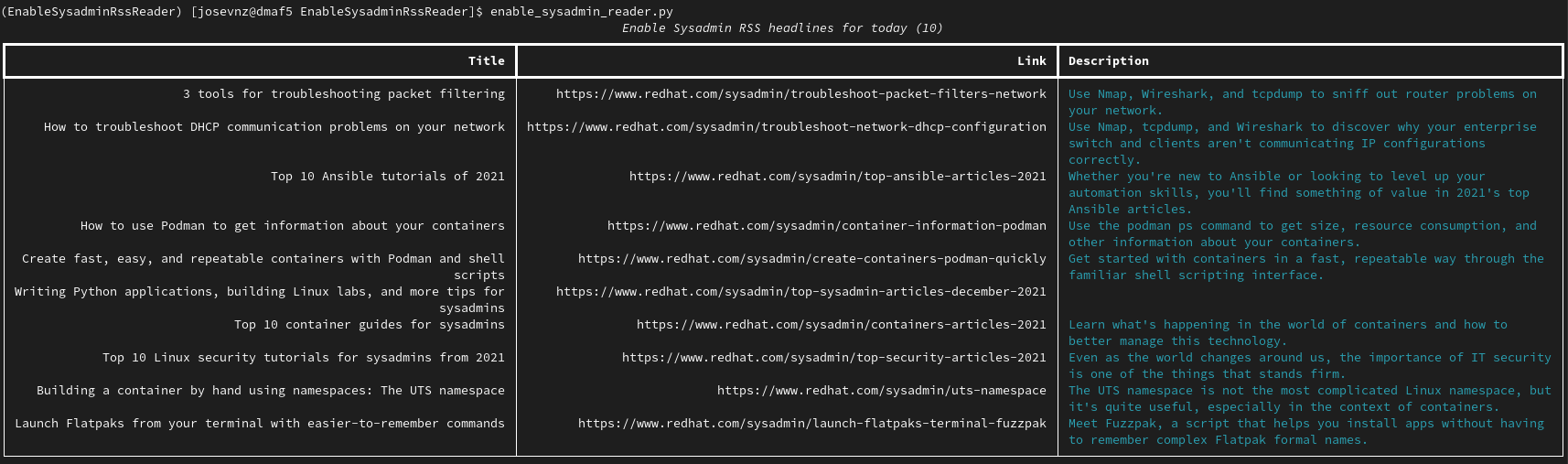
Install it (see my README for instructions):
$ git clone git@github.com:josevnz/EnableSysadminRssReader.git
$ cd EnableSysadminRssReader
$ sed -i 's#4.7.1#4.6.0#' requirements.txt
I downgraded the version of lxml from 4.7.1 to 4.6.0 (note the sed -i command). What happens when you scan it?
$ pip-audit  --requirement requirements.txt
Found 3 known vulnerabilities in 1 packages
Name Version ID             Fix Versions
---- ------- -------------- ------------
lxml 4.6.0   PYSEC-2021-19  4.6.3
lxml 4.6.0   PYSEC-2020-62  4.6.2
lxml 4.6.0   PYSEC-2021-852 4.6.5
There are warnings for lxml 4.6.0.
lxml is a good library to parse XML files easily. Software is complex, and this library had a bug that could be exploited. If you go to the NIST database and search for lxml, you will see more details on the advisory CVE-2021-43818. Take a look at the requirements.txt file:
requests==2.27.1
rich==11.0.0
lxml==4.6.0
The easiest fix is to upgrade to the recommended version of lxml (4.6.5), as it is a minor upgrade that contains the bug fix and makes minimal API changes. After checking the latest version at the time of this writing (4.7.1), I decided to go with a higher version, as my code doesn't need further modifications:
requests==2.27.1
rich==11.0.0
# lxml==4.6.0 <- Vulnerable to CVE-2021-43818
lxml==4.7.1
If you scan the project again, you get:
$ pip-audit  --requirement /home/josevnz/EnableSysadmin/EnableSysadminRssReader/requirements.txt
No known vulnerabilities found
After fixing this, I can say my favorite quote from Poltergeist, "This house is clean."
Can an IDE tell you if a library is stale?
Yes, it can. For example, PyCharm and VS Code tell you if there is a newer version of a third-party library. For this example, I used an outdated version of Rich:

You should not ignore these warnings.
Check your Python code
I'll summarize a few things you learned:
- You can scan your Python projects for third-party library vulnerabilities using pip-audit.
- As a plus, you can see how you can quickly wrap your Python code using the new
setuptoolspackaging rules (setup.cfgas opposed tosetup.py).
One more thing: Third-party vulnerabilities are not an issue exclusive to Python; other languages suffer from the same issue. In a follow-up article, I will show you how to check your Java code.
关于作者

Proud dad and husband, software developer and sysadmin. Recreational runner and geek.


