Do you ever heard about AMQ Streams? It is a Kafka Platform based on Apache Kafka and powered by Red Hat. A big advantage of AMQ Streams is that as all Red Hat tools, it is prepared to run on the OpenShift platform.
This article's about a common feature of Apache Kafka, called Kafka Connect. I'll explain how it works with OpenShift.
What is Kafka Connect?
Kafka Connect is an open-source component of Apache Kafka. It is a framework for connecting Kafka with external systems such as databases, key-value stores, search indexes, and file systems. The Telegram platform is one of these systems and in this article, I will demonstrate how to use Kafka Connect deployed on OpenShift to get data from Telegram.
Kafka Connect API Architecture
Basically, there are 2 types of Kafka Connectors:
Sources:
A source connector collects data from a system and sends it to a Kafka topic, for example, we can get messages from Telegram and put it in a Kafka topic.
Synk:
A sink connector delivers data from Kafka topic into other systems, which might be indexed such as Elasticsearch, batch systems such as Hadoop, or any kind of database.
There are two ways to execute Kafka Connect: Standalone and Distributed. However, the operator supports only Distributed mode in OpenShift. That's not a restriction, because none Kafka distribution in production environments is recommended set standalone mode.
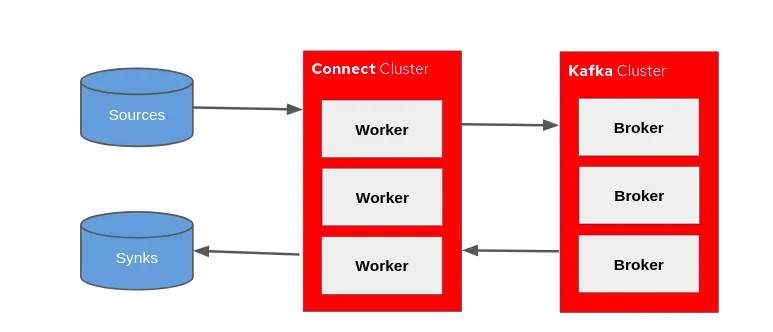
The Kafka Connector uses an environment independent of Kafka Broker, on OpenShift Kafka Connect API runs in a separated pod.
In this example, we will use a source connector.
Before start
Firstly, you must create a Telegram bot and generate an access token then generate a secret (in OpenShift platform) using this access token to Kafka Connect receive messages from Telegram. You can check here, how to create Telegram bot.
If you want to reproduce this demo, everybody can do this. Click here to start the download on GitHub.
Tip: All files have a sequence number to identify the correct order.
Let's start
The first step is to deploy AMQ Streams in OpenShift, for this use the Strimzi operator provided on Red Hat Web Site. The link of the file to download is "Red Hat AMQ Streams 1.4.1 OpenShift Installation and Example Files"
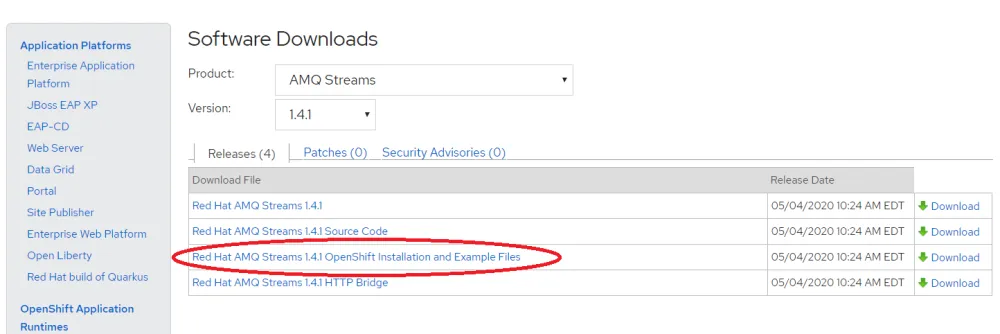
If you prefer I generated a package with the operator also available on GitHub
Use the commands below to install AMQ Stream (Kafka) on OpenShift .
$ oc new-project kafkaproject
$ oc apply -f ./operator/
$ oc apply -f ./kafka.yaml
What have we done? Firstly, we have created a project named 'kafkaproject' and deploy the Strimzi operator. When the operator was finished we deploy AMQ Streams through the kafka.yaml template.
Follow the result after running the commands above:

The next step is to generate the Openshift secret using Telegram access token. Create the property file, see the example below. I chose 'telegram-credentials.properties' filename, feel free to choose your filename.
token=1011765240:AAG-PdMojD1pZWUpNySa8rHDjxym3CVyqTxd
Create the file telegram-credentials.yaml and put the base64 representation of file telegram-credentials.properties.
apiVersion: v1
data:
  telegram-credentials.properties: ##BASE64 telegram-credentials.properties##
kind: Secret
metadata:
  name: telegram-credentials
  namespace: kafkaproject
type: Opaque
Use the below commands to create the secret and deploy the Kafka Connect. Making a reference with RHEL version, the kafka-connect.yaml is similar to execute connect-distributed.sh
 $ oc apply -f ./4-telegram-credentials.yaml
 $ oc apply -f ./5-kafka-connect.yaml
Notice that a new pod was created on OpenShift.

After deploying Kafka Connect we need to inform the parameters for Telegram's connection. For this, we use the file 6-telegram-connector.yaml. See below.
apiVersion: kafka.strimzi.io/v1alpha1
kind: KafkaConnector
metadata:
  name: telegram-connector
  labels:
    strimzi.io/cluster: my-connect-cluster
spec:
  class: org.apache.camel.kafkaconnector.CamelSourceConnector
  tasksMax: 1
  config:
    key.converter: org.apache.kafka.connect.storage.StringConverter
    value.converter: org.apache.kafka.connect.storage.StringConverter
    camel.source.kafka.topic: telegram-topic
    camel.source.url: telegram:bots
    camel.component.telegram.authorizationToken: ${file:/opt/kafka/external-configuration/telegram-credentials/telegram-credentials.properties:token}
Execute the command below:
oc apply -f 6-telegram-connector.yaml
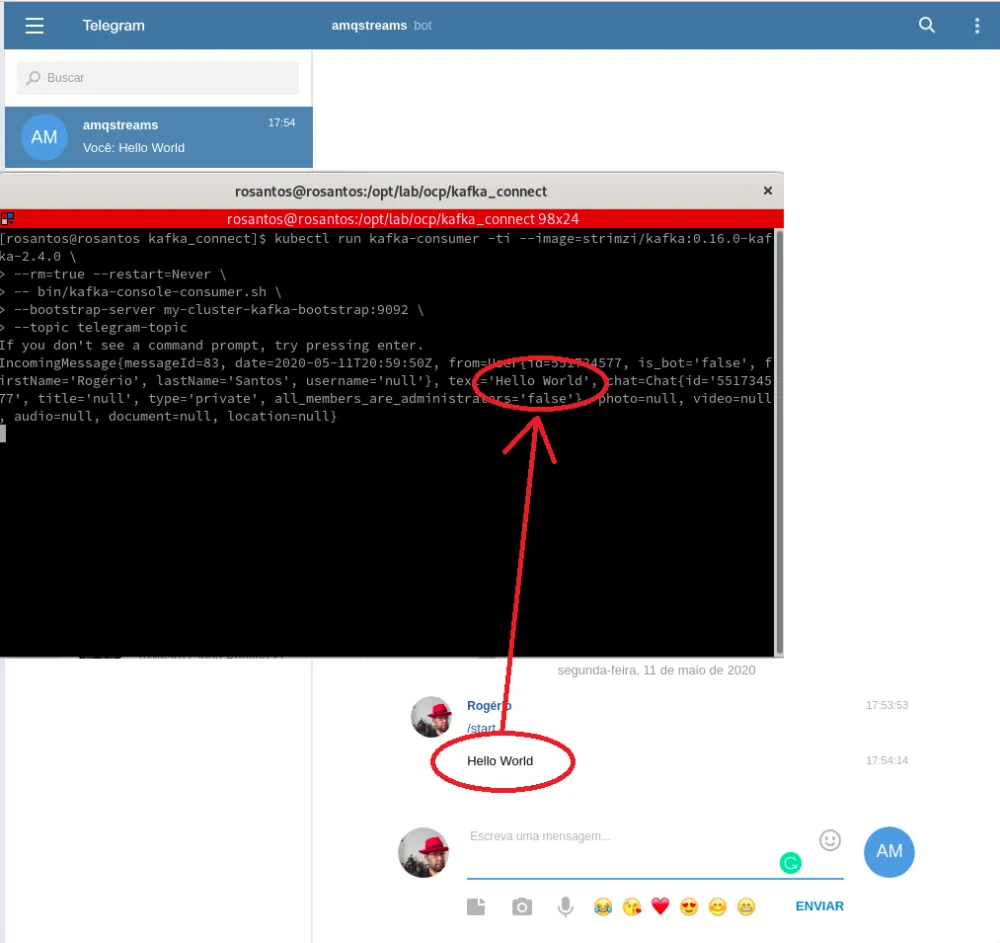
After complete, using correct credentials, any message sent to your bot will be received by Kafka Connect and saved in a topic called telegram-topic, which was defined in property camel.source.kafka.topic in the file 6-telegram-connector.yaml. Notice how the API token is mounted from a secret in the property camel.component.telegram.authorizationToken.
You can go to the Telegram app and talk with the bot, in this example I create a bot called @amqstreams. Run the receiver on a Kafka topic telegram-topic to see the messages sent to the bot.
To consume the messages on the topic, we can use the command below:
kubectl run kafka-consumer -ti --image=strimzi/kafka:0.16.0-kafka-2.4.0 \
--rm=true --restart=Never \
-- bin/kafka-console-consumer.sh \
--bootstrap-server my-cluster-kafka-bootstrap:9092 \
--topic telegram-topic \
--from-beginning
Final consideration
The Kafka Connect is a powerful member of the Kafka Ecosystem. In this article I showed a simple integration, however, Kafka Connect allows us to interact with a lot of systems or even other message brokers.
Guard this advice: "If there is data, we can connect and get it."



