Everybody loves a VPN these days. Whether you use it to connect to the office while working from home, or to connect to your own home server, or to encrypt your traffic on an otherwise unsafe network, a Virtual Private Network (VPN) is a vital component to dynamic and secure modern computing.
However, with the promise of added security comes at least one of two things:
- Added headaches for the sysadmin, who must set up a VPN gateway
- Potential man-in-the-middle attacks for users who choose arbitrary VPN services without auditing the service provider
As an answer to the second problem, open source VPN software has provided, for several years now, the ability to set up a personal VPN infrastructure that can be wholly trusted. As an answer to the first problem projects like WireGuard have been developed to ease configuration (it famously aims to be as easy to configure as SSH).
There’s an aswer to both problems, though. Tailscale is a secure network for WireGuard-encrypted traffic, requiring no configuration and no new firewall rules. It uses OAuth2 (SSO), OpenID, or SAML for authentication, and creates point-to-point, fully-encrypted connections between clients and servers.
[ Want more for your network? Download a free ebook on network automation with Ansible. ]
Traditional VPN models
Usually, a virtual private network involves one VPN gateway. Ideally, this gateway is under the purview of the network administrator, but in reality, many organizations hire out a gateway. Regardless of who owns the gateway, the model is that a single server acts as the VPN access point, with many clients on one side connecting to a few servers on the other side. The gateway node usually has a static IP address along with rules in the firewall to permit VPN traffic.
A common problem with this model is latency. But for the best of times, if you connect to a VPN in another state or country just to securely communicate with a computer located across the room, you’re taking the long way round.
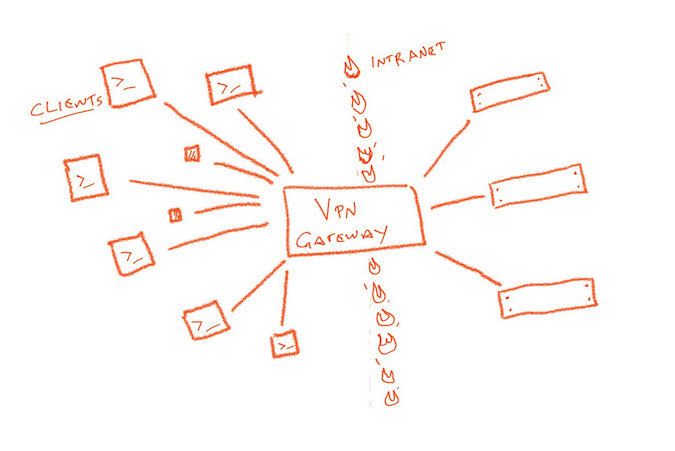
WireGuard, LibreSwan, and IPSec, in general, changed this centralized structure with point-to-point connections. However, the option to connect directly with another client requires a static IP address, some open firewall ports, and some key swapping.
Tailscale and the control plane
Tailscale replaces the requirements of a traditional VPN with a coordination node. That’s not a gateway, though, and it’s not a part of the tunnel. Instead, the coordination node is a control plane to manage keys and identities.
When connecting, each client generates a random public and private key pair for itself. It associates its public key with its identity. When a client contacts the coordination server, it leaves its public key along with data about where it can currently be found. The client downloads a list of public keys and addresses within its domain, all of which have been left on the coordination server by other clients. The client configures its own WireGuard instance with the appropriate set of public keys required to communicate with all other nodes within the same domain.
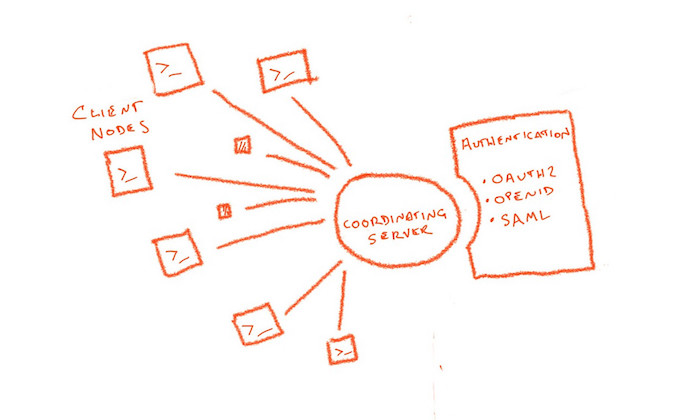
It’s significant to note that a private key never leaves the client. This achieves a zero-trust network, with each client alone having the ability to decrypt packets addressed to it and to encrypt packets emitting from itself.
Authentication
Traditional VPN technology used pre-shared keys (PSK) to authenticate its users. In Tailscale, authentication to the coordination server uses services that already exist, whether that’s your organization’s own OAuth2 service or an outsourced service like Google Apps or Office 365. This means you don’t have to manage identities specific to Tailscale.
Access control lists
As an added layer to an extraordinary/ordinary VPN experience, Tailscale also provides access control lists (ACL), so admins can arbitrarily limit connections between nodes. For instance, if you have a server within a Tailscale network that you want only your admin team to access, you can block off pathways to those servers using an ACL defined on your coordination server. This means you don’t have to go to each server and adjust their firewalls, nor do you have to place a firewall between them and your clients. Instead, you have a centralized location for security policies.
Try Tailscale
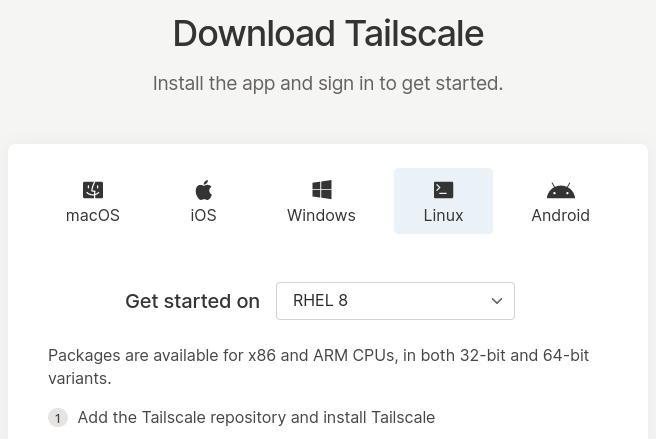
Tailscale is both an open source project and an open source product. You can try Tailscale by downloading an installer for your computer or mobile OS and use it to connect to any of your other devices. Tailscale offers installers everything you can think of: RHEL 8, Fedora, a variety of Linux distributions, Mac OS, Windows, iOS, Android, and more.
It’s easy to start using Tailscale, and it’ll likely be difficult to stop once you experience its power. Try it out, and consider it for your own organization.
[ Getting started with networking? Check out the Linux networking cheat sheet. ]
关于作者

Seth Kenlon is a Linux geek, open source enthusiast, free culture advocate, and tabletop gamer. Between gigs in the film industry and the tech industry (not necessarily exclusive of one another), he likes to design games and hack on code (also not necessarily exclusive of one another).


