In Migration Toolkit for Containers (MTC) 1.4.0, a new feature called Direct Migration is available that yields significant time savings for most customers migrating persistent volumes and/or internal images. Direct Migration enables the migration of persistent volumes and internal images directly from the source cluster to the destination cluster without using an intermediary replication repository. This introduces a significant performance enhancement while also providing better error and progress reporting information back to the end user.
With Direct Migration in MTC 1.4, we are able to take advantage of any environments that have network connectivity between the clusters involved in the migration by handling the migration of PV data and Image data in a new way. Assuming remote clusters have exposed routes to enable external access to the internal registry, MTC will push internal images directly into the internal registry on the destination cluster from the source cluster. Assuming the clusters can communicate over port 443 via OpenShift routes, MTC will directly migrate Persistent Volume data from a source cluster to a destination cluster using a set of Rsync + Stunnel pods, which will be described below. Other Kubernetes resources will continue to be migrated using the prior two-step backup-and-restore process using Velero.
Prerequisites
As mentioned above for direct image migrations, remote source and destination cluster internal image registries must be exposed for external network traffic. See here to expose the registry for OCP 4 clusters and here for OCP 3.
For direct volume migrations, the source and destination clusters must be able to communicate over port 443 via OpenShift routes. MTC will create a route in each namespace to be migrated on the destination cluster and will be migrating the data by establishing an Rsync connection to this route. This means that the OpenShift routes must be accessible by the source cluster.
Cluster Configuration

The above diagram shows a configuration of three clusters running MTC. The Host cluster does not need to be its own cluster and could be the source or the destination cluster.
Direct Image Migration Details
In direct image migration (DIM), the Migration Controller pod creates a DIM resource that contains a list of namespaces to migrate. The DIM controller then finds all of the imagestreams with internal image references in those namespaces and copies them directly into the destination registry. Ffor this to succeed, DIM also ensures the namespace exists on the destination cluster prior to the copy.
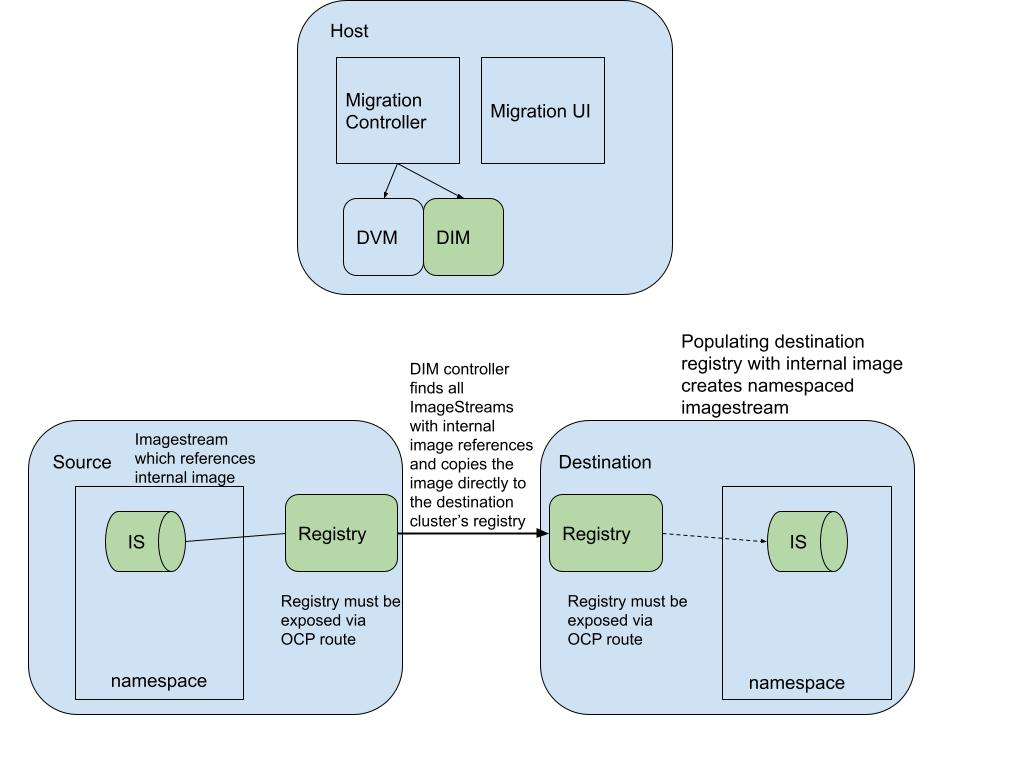
The above diagram shows how DIM orchestrates the migration of an imagestream backed by the internal registry directly from the source cluster to the destination cluster.
Direct Volume Migration Details
For Direct Volume Migration, or DVM, the DVM controller takes in a list of PVCs to migrate and performs a few steps prior to copying the data over. For DVM to work, it is necessary for the source and destination clusters to be able to communicate over port 443 via OCP routes which are created by DVM.
First, DVM sets up the needed configuration configmaps and secrets across all the namespaces to migrate and then creates transfer pods on the destination cluster in each namespace to be migrated. The transfer pods on the destination include both Rsyncd and Stunnel containers. Stunnel is used to open up a communication tunnel between the source and destination. The Rsyncd container has volume mounts to all PVCs in the namespace that are to be migrated. An Rsync client pod is created on the source (1 per PVC) to then Rsync the data via the stunnel route.
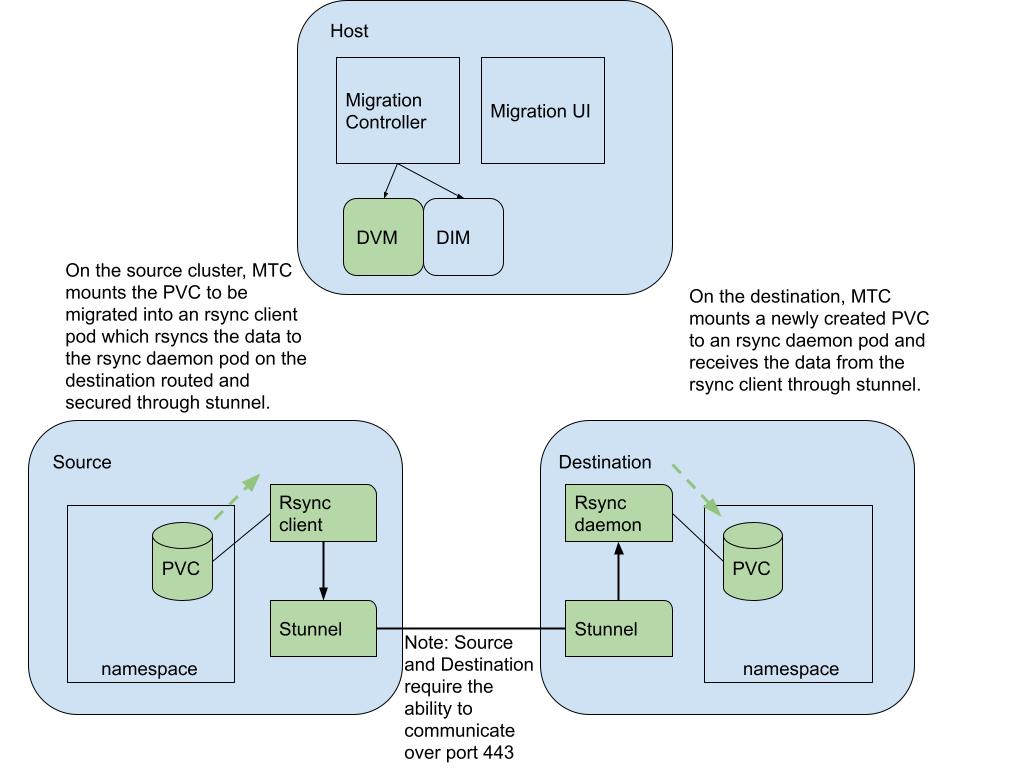
The above diagram shows how MTC orchestrates a direct volume migration by standing up a set of Rsync and Stunnel pods to directly migrate the PV data from the source to the destination cluster.
Conclusion
In MTC 1.4.0, users can expect significant performance enhancements with direct migration. The direct migration feature also grants the user more granular progress and error reporting back in the user interface to make it easier to debug if anything goes wrong with the migration.
Migrate to Kubernetes With the Konveyor Community
The upstream version of MTC, Crane, is part of the Konveyor community. This community is helping others modernize and migrate their applications to the hybrid cloud by building tools, identifying patterns, and providing advice on how to break down monoliths, adopt containers, and embrace Kubernetes.
Included within this community are open-source tools that migrate virtual machines to KubeVirt, Cloud Foundry or Docker containers to Kubernetes, or namespaces between Kubernetes clusters. These aree a few of the use cases we solve for.
For updates on these tools and invites to meetups where practitioners show how they moved to Kuberentes, join the community.



