
Managing Red Hat Enterprise Linux (RHEL) environments can involve troubleshooting when issues occur. While generative AI offers a promising way to accelerate troubleshooting, standard large language models (LLMs) can be disconnected from your actual infrastructure. To help with this, Red Hat introduced the MCP server for RHEL, currently available in developer preview. Built on the model context protocol (MCP), this acts as a bridge between your AI tools and your RHEL systems. Using MCP-compatible clients like goose or Claude Desktop with the MCP server for RHEL enables AI clients to directly query system information and inspect logs (and more) on your RHEL systems.
In its initial release, MCP server for RHEL provided a predefined set of read-only tools. This provides strong boundaries, but it can limit the ability of AI tools to perform dynamic, real-world troubleshooting to find the root cause of complex issues. Real-world troubleshooting frequently requires taking action. When an outage or issue occurs, administrators often need to execute exploratory steps, such as restarting a service or adjusting a configuration file, to help determine root cause.
To enable these more complex use cases, guarded command execution is a new optional capability in the MCP server for RHEL to enable an LLM to dynamically generate and run commands or scripts. By moving beyond a hard-coded toolset, this feature unlocks many new usage scenarios for the MCP server for RHEL.
The three pillars of guarded command execution
Utilizing an LLM to dynamically run commands and scripts in an environment can introduce risks. To help reduce these risks, the guarded command execution feature is built with several guardrails:
- Gatekeeper AI model: The gatekeeper model evaluates LLM-generated commands or scripts before they are executed on the system. By analyzing the proposed script alongside its description, the gatekeeper helps verify that the script does what is described. It includes a system policy, which is intended to limit software installations to pre-configured repositories and prevent internet content from being downloaded. If the request was marked as a read-only script, the gatekeeper also assesses whether the read-only designation appears correct. Additionally, it analyzes the script for clarity and potential security risks. The gatekeeper returns a structured JSON status (ranging from an approved
OKto flagged states likePOLICYorDANGEROUS) along with specific feedback to help guide the underlying LLM in correcting identified issues. - Human-in-the-loop approvals: When using an MCP Apps compatible MCP client, the MCP server can be configured to pause and require user confirmation before executing a command or script that modifies the system.
- systemd-run sandboxing: To help reduce the blast radius of a command or script, executions can be isolated using
systemd-run.
Getting started
Start by following the Using the MCP server for RHEL to enable AI assistants to run, discover, and troubleshoot complex issues documentation to install and configure the MCP server for RHEL within your preferred MCP client tool. Then follow the upstream documentation on Configuring Guarded Command Execution.
Dynamic investigation in action
Let's walk through a scenario where guarded command execution is used to help troubleshoot an issue on a RHEL system where users cannot create files in the /app1 filesystem, receiving an out of disk space message despite having plenty of available physical space.
To begin the investigation, I outline the symptoms to the LLM and ask it to determine the root cause:
A user is reporting that they can't create files in the /app1 directory, and are getting a message that it is out of space. However, I checked and there is lots of free disk space. Determine the root cause.The LLM starts by calling the read-only Get Disk Usage tool, which confirms there is 9.7G of free space in the filesystem (figure 1). Because this tool doesn't provide inode information, the LLM shifts to guarded command execution to run the df -i /app1 command to gather inode information. After the gatekeeper model validates the script, it is then executed.

The output of the df -i /app1 command reveals the root cause: The filesystem ran out of inodes, which the LLM reports to the user.
The root cause is inode exhaustion on the /app1 filesystem.
While there is plenty of physical disk space available (9.7G free), the filesystem has run out of inodes (the data structure used to store metadata about files and directories).

Evidence:
- `df -h /app1` showed ~51% disk utilization.
- `df -i /app1` showed 100% inode utilization (12,583,104 used out of 12,583,104).

Because every file and directory requires one inode, the system cannot create any new entries in /app1 regardless of the remaining disk capacity. This typically happens when a directory contains a very large number of small files.
To narrow down what's causing the issue, I asked the LLM to identify the top-level directories consuming the most inodes:
Look at the top level directories in /app1 and determine which one is using the most inodes.The LLM utilizes guarded command execution to run a script with a for loop to identify which top level directories have the most files and directories (figure 2).

This script identifies that the /app1/source directory is using approximately 12.5 million inodes (figure 3), which is the majority of the inode usage in the /app1 filesystem.

Next, I tell the LLM that I'm not sure whether I can delete those files, and ask it to increase the maximum percentage of space allocated for inodes as a temporary workaround. I ask it to use xfs_growfs to increase the percentage by 5%, and to refer to the manual page as needed.
I'm not sure if I can delete these files or not, I would first need to talk to the application owner, who isn't available currently. I'd like to temporarily increase the maximum percentage of space allocated for inodes as a temporary workaround. Use "xfs_growfs" to increase the percentage by 5%; refer to the manual page if needed.The LLM utilizes guarded command execution to reference the manual page for xfs_growfs to get details on how to increase the maximum percentage of space allocated for inodes.
I requested that this be increased by 5%, so the LLM uses guarded command execution to check the current value of the imaxpct setting, which is currently 30%.
Next, the LLM uses guarded command execution to increase this setting to 35% as requested. It is important to note that this time the Validate Script tool call has the readonly option set to false, because this command modifies the system (figure 4).

Because this is a command that modifies the system, the MCP Apps interface is shown and pauses to prompt for human-in-the-loop approval of the command prior to it being executed (figure 5).
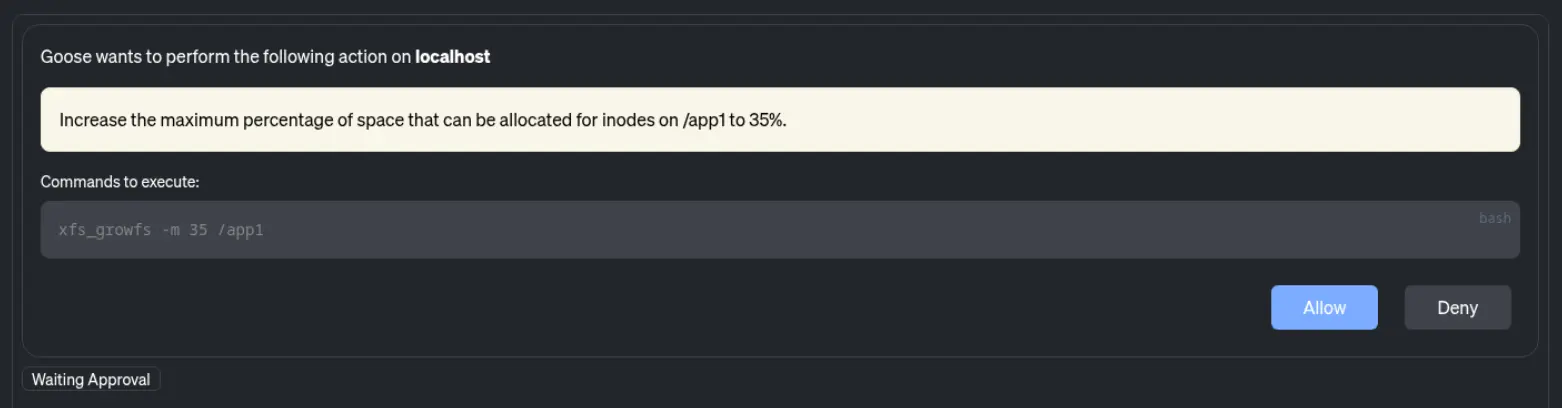
After I click the Allow button, the command is run.
Finally, the LLM utilizes guarded command execution to run df -i /app1 again to verify that there are now free inodes in the filesystem. The LLM then reports that the xfs_growfs command was successful and the issue is resolved (figure 6).

Bridging the gap between investigation and remediation
When adopting AI to help with system operations, it is crucial to draw a clear boundary between local incident investigation and enterprise-wide infrastructure remediation. The MCP server for RHEL is purposely built for the former. It equips your AI tools to dynamically investigate, troubleshoot, and validate localized fixes on individual systems during an incident.
In this article's example scenario, increasing the inode limit was a necessary, temporary workaround to quickly restore service. However, once you have successfully used the MCP server to identify the root cause and prove that the local fix works, the workflow shifts. The infrastructure team must collaborate with the application owner to design a permanent resolution, such as implementing log rotation, creating file cleanup tasks, or adjusting the application's architecture to stop generating excessive files.
Once that proper long-term remediation is defined, to prevent the issue from happening again across your environment, you can codify the fix within Red Hat Ansible Automation Platform, which provides enterprise-grade deterministic automation to consistently apply validated changes across your entire environment.
Next steps
The addition of guarded command execution to the MCP server for RHEL marks a significant step forward. By enabling AI tools to execute commands or scripts with the included guardrails, IT teams can use the MCP server for RHEL to help troubleshoot complex issues in their environment.
The MCP server for RHEL is now available as a developer preview. Try out guarded command execution today to experience the latest in AI-assisted RHEL management.
关于作者
Brian Smith is a product manager at Red Hat focused on RHEL automation and management. He has been at Red Hat since 2018, previously working with public sector customers as a technical account manager (TAM).


