Red Hat OpenShift Service on AWS (ROSA) is a fully managed turnkey application platform. It is jointly engineered and supported by Red Hat and AWS through Site Reliability Engineers so customers don’t have to worry about the complexity of infrastructure management. As an application platform running on AWS, a common use case is to connect an application to an AWS managed database.
Historically, to connect an application to a database, you would simply use static database credentials to authenticate with the database. The usage of a secrets manager can also be leveraged to store these credentials in a secure way. However, there is now a more modern approach by using IAM Roles for Service accounts ( IRSA) and something that ROSA makes incredibly easy to leverage. Following the AWS Well-Architected Framework, we can use IRSA to provide a more secure connection from a ROSA cluster to an AWS database.
ROSA clusters already have all the components needed to leverage IRSA. Red Hat OpenShift Service on AWS clusters use AWS Security Token Service (STS) and OpenID Connect (OIDC) to grant the in-cluster operators access to necessary AWS resources. This allows clients to provide a web identity token to gain access to multiple AWS services. When a client signs into a service using STS, the token is validated against the OIDC identity provider. By leveraging STS tokens and the OIDC identity provider, it eliminates the need for static AWS credentials and provides granular access control to resources within AWS.
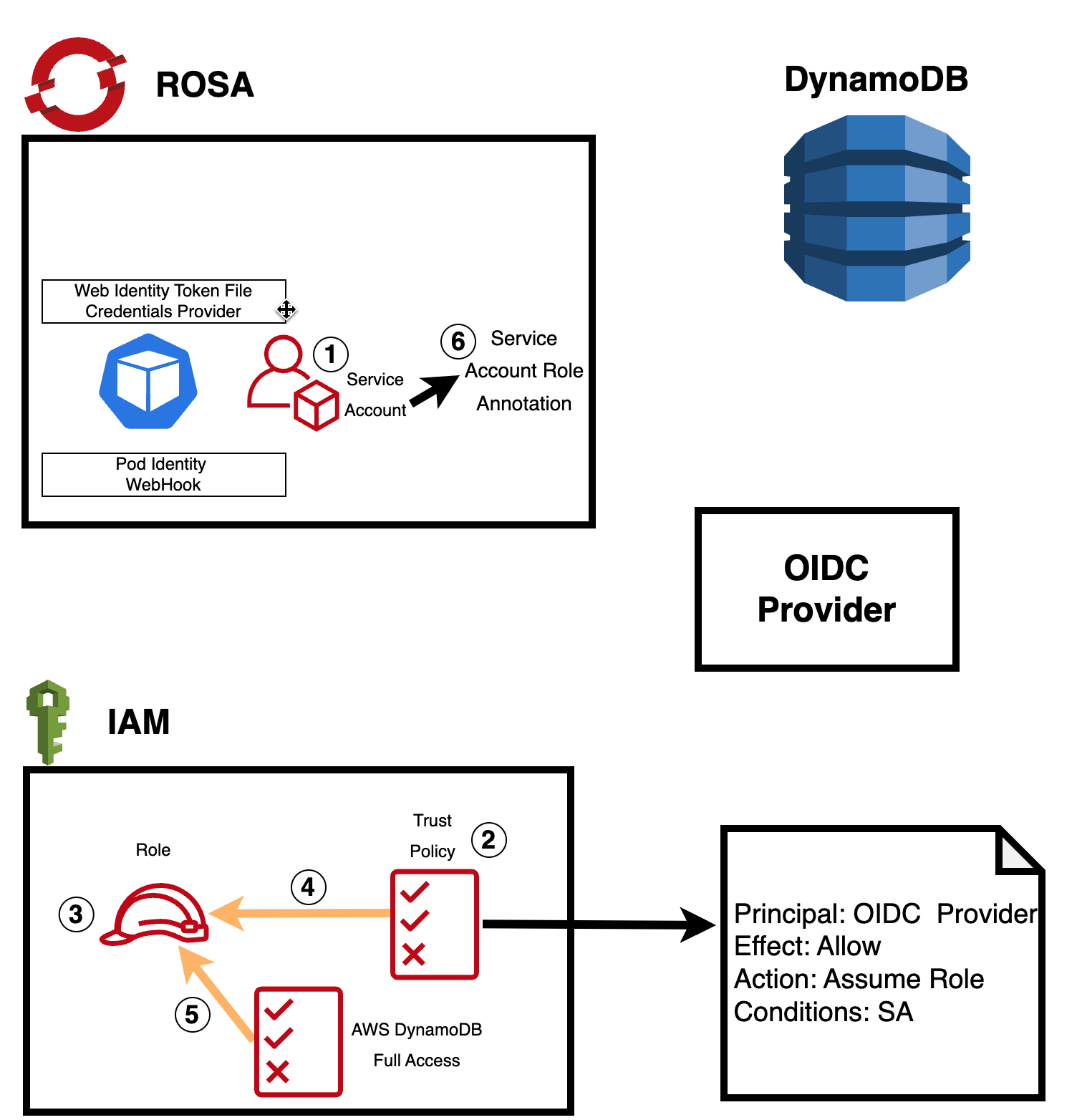
The steps for setting up this more secure connection:
1) Create a service account for your application in OpenShift. For an OpenShift application where the entity running the application needs special permissions, it’s recommended to run that application with a service account. Service accounts provide an identity to run your applications without having to share a regular user's credentials.
2) Set up a trust policy in AWS: In AWS, you need to create a trust policy that allows the service account from the OIDC provider (in this case, ROSA) to assume an IAM role. The trust policy should include the ROSA OIDC provider's information and allow the sts:AssumeRole action. For example:

3/4) Create an IAM role in AWS and attach the trust policy to it: In AWS IAM, create a new role that will define what permissions the service account will have when accessing the database. Attach the trust policy you created in step 2 to this role.
5) Attach the appropriate database access policy to the IAM role: When creating the IAM role, make sure to attach the necessary database access policy (e.g., AmazonDynamoDBFullAccess for Amazon DynamoDB) to define the level of permissions the service account will have when interacting with the database.
6) Annotate the service account in OpenShift, specifying the IAM role that the service account should assume when connecting to the database.
With these steps in place, the application running in the ROSA cluster can use the AWS SDK and Web IdentityToken File Credentials Provider to automatically handle the authentication process.
The Pod Identity Webhook will intercept the request, validate the token and role, and obtain STS credentials to grant access to the database. This entire process happens behind the scenes, ensuring a seamless and more secure connection between the application and the AWS database service.
Using IAM roles for service accounts and Pod Identity not only enhances security but also simplifies the management of access permissions, as you can update the IAM policies whenever needed without changing any application code.
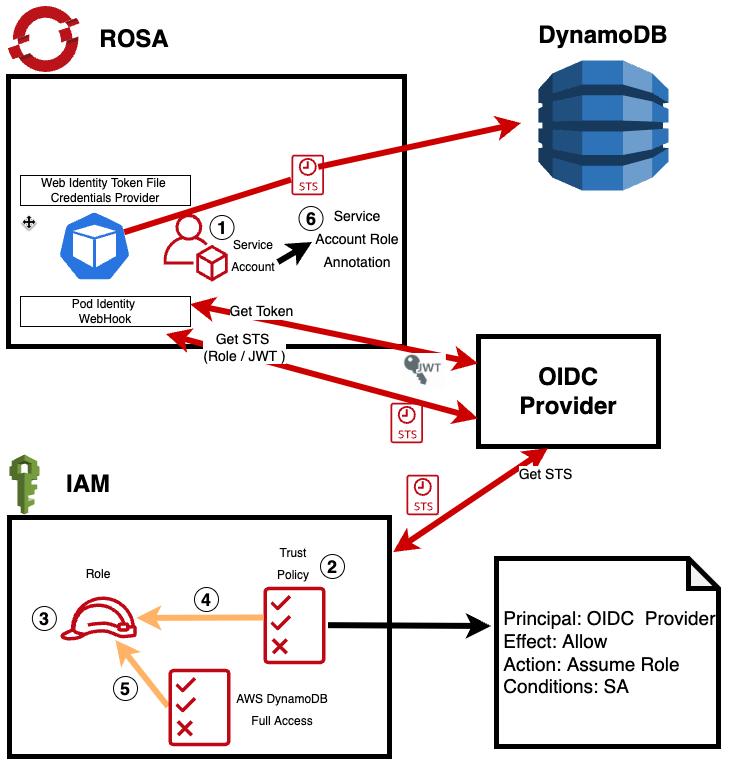
Here is a quick video that explains the process in detail:
See IRSA in action yourself by following this step-by-step tutorial.
Learn More about Red Hat OpenShift on AWS
- Visit Red Hat OpenShift on AWS to get started
- Tutorial - Deploy a RedHat OpenShift on AWS STS Cluster
- Learn how to Accelate Application Development with RedHat OpenShift on AWS



