
OpenShift 4 represents a significant update from previous versions. For example, the OpenShift services and functions have been moved from being deployed and managed by the administrator using Ansible to an Operator model, where Kubernetes Operators are responsible for the services.
As an administrator, deploying a cluster can be a daunting task. The documentation is thorough and robust, so sometimes it’s just not possible to read through hundreds of pages in order to find the relevant information for the lifecycle phase of the cluster that you are concentrating on. To make that easier, we have a series of blog posts that will focus on providing a simplified, reorganized index of the documentation based on what administrators care about.
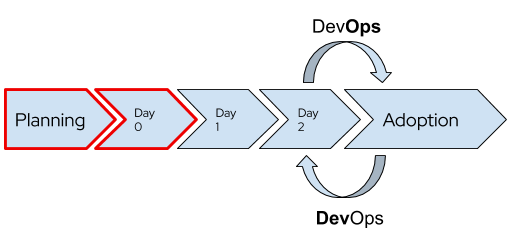
This blog post is the first in a series, focusing on the design and deployment phases. In future posts we will cover, among other things:
- Configuring core OpenShift services
- Cluster customization
- Preparing for users, applications, and beyond
Planning Your Deployment
The design and architecture planning that goes into any deployment is, arguably, the most important phase. The decisions made at this point can have long-lasting effects, but the good news is that OpenShift is extremely flexible! There are very few features and functionality that can’t be added, changed, or removed in the future. But, that doesn’t mean we don’t want to carefully and thoughtfully prepare at this stage for the future.
In no particular order, here are the sections of the documentation that are important to read and understand for pre-deployment planning and architecture:
- Choosing where to deploy your cluster is sometimes an easy job and sometimes very difficult. If you only have one option, then the decision is already made for you! If you have multiple options, then understanding the OpenShift architecture, the control plane’s features and functions, and why Red Hat Enterprise Linux CoreOS is different and particularly well suited for OpenShift are important topics to understand.
- Just as important as choosing where to deploy your cluster is choosing how to deploy: full-stack automation or pre-existing infrastructure. This can also affect which infrastructure provider you are able to use as well.
- Use this page to help determine the size and number of nodes in your cluster based on the expected application sizing. This will also play a critical role for the next item.
- Size master nodes appropriately, follow the documentation (AWS, Azure, Google) for the cloud providers or create VMs of the appropriate size if using Red Hat Virtualization, OpenStack, or vSphere. Regardless of where you deploy your OpenShift master nodes to, make sure that the storage used has adequate performance for etcd.
- Do you need FIPS?
- If you are using an SDN other than OpenShiftSDN, for example Calico, you will need to work with your provider pre-deployment.
- Will your containerized applications need persistent storage? For some cloud providers, it’s important to consider the size of the machine used to account for bandwidth and the number of disks which can be attached. Be sure to review the dynamic storage provisioning documentation for information about how to integrate with the hyperscalers, and review the documentation for your storage.
- Many enterprise storage vendors integrate using the Container Storage Interface (CSI) standard. Work with your storage vendor for information on how to deploy with OpenShift.
- If you will be using OpenShift Container Storage, you don’t need to do anything yet; just be aware of the planning suggestions.
- Now would also be a good time to be thinking about your backup and disaster recovery plans!
- And, you should be prepared for the pace of updates and upgrades for OpenShift 4. Be sure to review and understand the OpenShift lifecycle policy as it relates to how long releases are supported and the expected update/upgrade timeframe.
Last, but not least, it is important to conceptually understand the installation process for OpenShift 4. This will help with not only grokking what is happening, but also aids troubleshooting and when there is (or is not) a deployment issue vs. an infrastructure issue.
Deploying OpenShift
Deploying the cluster is purposefully meant to be uneventful and unexciting. We put a lot of work into making it a process that is as forgettable as possible because the real value happens when you start putting applications into the cluster!
When you are ready to deploy, you wi’ll find these parts of the documentation useful:
- Read the docs for your chosen deployment platform!
- On-premises: Red Hat Virtualization, Red Hat OpenStack, VMware vSphere, bare metal
- Cloud provider: Amazon, Azure, Google
- If you are deploying to something other than the above, for example Red Hat Virtualization without the full stack automation experience, using the bare metal method, please be sure to read and understand this article around support.
- If you are deploying a private cluster (such as one that is deployed to a cloud provider but does not have access from the public internet), be sure to review the changes and requirements here along with the relevant section of the deployment docs linked in the previous bullet point.
- Are you deploying to a restricted network, such as one without access to the internet either directly or via proxy? Make sure to review the requirements for creating a mirrored registry and follow the documented configuration (linked from the first bullet point in this section) during the deployment.
Once your cluster is deployed, you should make sure to subscribe / entitle your cluster at cloud.redhat.com, followed by choosing an update channel and applying available updates.
Making the Most of OpenShift
Congratulations! At this point you have a cluster deployed! Go poke around with it, test out some oc and kubectl commands, see what the default configuration looks like, and look at the next posts in this series to help you decide what things you want to deploy, configure, and customize in your new cluster. If this is your first time using OpenShift and you are not familiar with the convenience commands the oc CLI provides beyond kubectl, be sure to read this page for more information.


