
Introduction
By default, the OpenShift Container Platform registry is not exposed outside of the cluster at the time of installation. Red Hat Advanced Cluster Security can be used to scan images held within OpenShift image streams (the OpenShift registry). This can be helpful within continuous integration processes, to enable organizations to scan images for policy violations and vulnerabilities prior to pushing the image to an external container registry. In this way, the quality of container images that get to the external registry improves, and triggered activities that result from a new image appearing in the registry only happen for a good reason.
Configuration of OpenShift
The OpenShift Platform requires a default route to the image registry, which is configured using the command described here and shown below:
oc patch configs.imageregistry.operator.openshift.io/cluster --patch \
'{"spec":{"defaultRoute":true}}' --type=merge
Next, get the route using the command:
oc get route default-route -n openshift-image-registry \
--template='{{ .spec.host }}'
This will display the route URL.
User ID
For a user who has access to the image registry, get the login token. This can be a service account where the token is stored in a secret or a general account where the token is generated using the command:
oc whoami -t
Configuration of Advanced Cluster Security
To allow the roxctl command line interface to scan the images within the OpenShift registry, add an integration of type “Generic Docker Registry'', from the Platform Configuration - Integrations menu.
Fill in the fields as shown in figure 1, giving the integration a unique name that should include the cluster name for practicality. Paste in the username and token and select Disable TLS certificate validation if you need insecure https communication to a test cluster, for example.
Press the test button to validate the connection and press “save” when the test is successful.
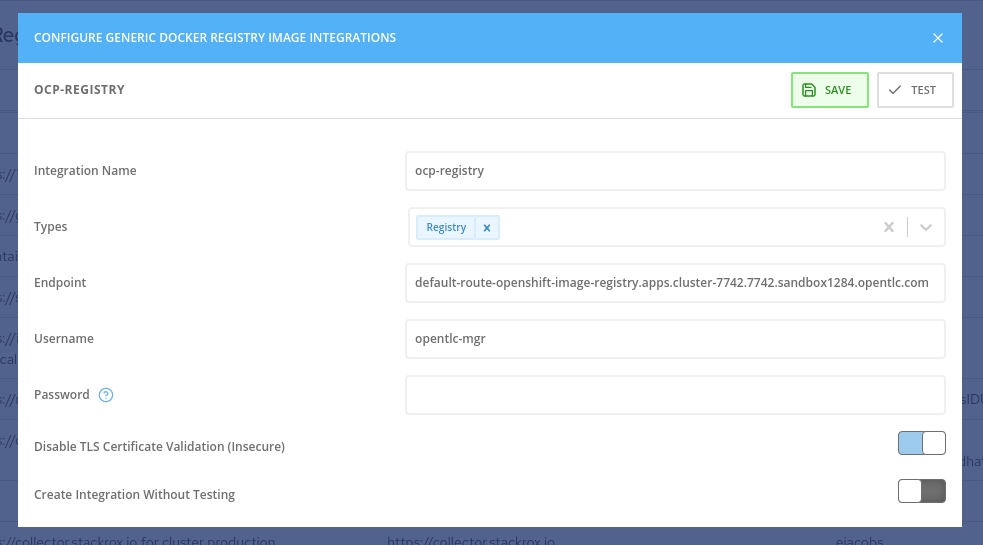
Figure 1 - Registry with Integration for Advanced Cluster Security
Testing the Image Scan Process
To test the roxctl command line image scanning process using an image held within an OpenShift image stream, perform the following steps:
Setup
- Create a CI/CD integration within Advanced Cluster Security such that the roxctl command line can connect to the central server. This is done using the Platform Configuration - Integrations menu and selecting an integration of type API Token. Give the integration a name and select “continuous integration” for the role. Generate the API token and copy it to the copy/paste buffer.
- Create an environment variable on the test system called ROX_API_TOKEN with the value of the generated token from step 1.
- Create a second environment variable called ROX_CENTRAL_ENDPOINT with the URL of the central server. This does not include http:// or https:// and has the port number on the end. For example: my-central.server.company.com:443
- Download the latest version of roxctl to the test machine.
Test
Execute the roxctl command with the following options:
roxctl image check --image <ocp-registry-route>/<project>/<image-stream> --insecure-skip-tls-verify -e $ROX_CENTRAL_ENDPOINT
For example:
roxctl image check --image default-route-openshift-image-registry.apps.cluster-7742.7742.sandbox1284.opentlc.com/liberty-rest/liberty-rest-app --insecure-skip-tls-verify -e $ROX_CENTRAL_ENDPOINT
The result will be similar to that shown below, depending on the specific faults in the image:
✗ Image default-route-openshift-image-registry.apps.cluster-7742.7742.sandbox1284.opentlc.com/liberty-rest/liberty-rest-app failed policy 'Red Hat Package Manager in Image'
- Description:
    ↳ Alert on deployments with components of the Red Hat/Fedora/CentOS package
      management system.
- Rationale:
    ↳ Package managers make it easier for attackers to use compromised containers,
      since they can easily add software.
- Remediation:
    ↳ Run `rpm -e $(rpm -qa *rpm*) $(rpm -qa *dnf*) $(rpm -qa *libsolv*) $(rpm -qa
      *hawkey*) $(rpm -qa yum*)` in the image build for production containers.
- Violations:
    - Image includes component 'dnf' (version 4.4.2-11.el8.noarch)
    - Image includes component 'rpm' (version 4.14.3-14.el8_4.x86_64)
    - Image includes component 'yum' (version 4.4.2-11.el8.noarch)
✗ Image default-route-openshift-image-registry.apps.cluster-7742.7742.sandbox1284.opentlc.com/liberty-rest/liberty-rest-app failed policy 'Latest tag'
- Description:
    ↳ Alert on deployments with images using tag 'latest'
- Rationale:
    ↳ Using latest tag can result in running heterogeneous versions of code. Many
      Docker hosts cache the Docker images, which means newer versions of the latest
      tag will not be picked up. See
      https://docs.docker.com/develop/dev-best-practices for more best practices.
- Remediation:
    ↳ Consider moving to semantic versioning based on code releases (semver.org) or
      using the first 12 characters of the source control SHA. This will allow you to
      tie the Docker image to the code.
- Violations:
    - Image has tag 'latest'
The output can be represented in JSON format for simpler analysis by scripted operations using the option --json.


