Sustainability in Cloud Technology
Out of the world's population of seven billion people, around 4.66 billion individuals are active Internet users. However, it's important to recognize that everything we do online, from sending emails and playing games to storing data, requires energy and contributes to energy consumption (Matta, 2021). Shockingly, technology accounts for a staggering 1.6 billion tons of greenhouse gas emissions (Griffiths, 2020).
Consider this: In just one year, the energy consumed by a single email inbox is enough to power 40 light bulbs for an hour (thanks in advance). Furthermore, the collective usage of emails worldwide is equivalent to the carbon dioxide emissions of 7 million cars (Matta, 2021). As the demand for technology increases, data centers have seen their energy usage rise by 10-30% annually, contributing to approximately 1.5% of global energy consumption (IEA, 2021).
To say that technology plays a crucial role in driving more sustainable initiatives is an understatement.
What is the kube-green operator?
The kube-green operator is an operator that helps reduce the CO2 footprint of your Kubernetes clusters. It is a Kubernetes add-on that automatically shuts down and starts up some of your resources at designated times when you don't need them. It suspends resources during off-hours to help reduce CO2 emissions. The resources currently supported are Deployments and CronJobs.
What is an Operator?
An operator is a Kubernetes-native application that extends the capabilities of the Kubernetes controller concept. It consists of three components: a controller, a custom resource, and application knowledge. Operators are responsible for managing the application lifecycle and can be configured to oversee all aspects of it. While all operators are controllers, not all controllers are operators. To be considered an operator, a controller should incorporate some element of these three components.
Unlike Kubernetes' built-in resources and controllers, operators are ideal for handling stateful applications that require ongoing maintenance. You must define a custom resource to create an operator, and the custom controller will monitor it within its control loop. The control loop reconciles the custom resource's current state to match the desired state defined in the custom resource definition YAML. The custom resource definition contains application-specific knowledge, and the controller handles the entire process to ensure consistency throughout the application's lifecycle.
What are the benefits and use cases for the kube-green operator?
During regular business hours, clusters and resources operate normally. However, outside of those hours, the kube-green operator shuts down the resources and reduces the workload. kube-green currently supports Deployments and CronJobs, making it ideal for suspending these resources when they are not needed during off hours. The key benefit of using kube-green is its ability to save resources, energy, and money for organizations.
Several adopters of the kube-green operator have reported significant savings in their monthly cloud costs, with reductions of 30-40%. Additionally, kube-green eliminates the need for developers to spend time maintaining idle clusters during weekends and evenings when they are not being utilized.
By optimizing resource usage and reducing unnecessary energy consumption, kube-green offers tangible benefits to both the environment and organizations.
Installing kube-green operator on OpenShift
Note: This demo assumes you have an OpenShift cluster available and ready. You must also have the Joget DX Operator installed and running. If you haven't already, follow this blog to install the Joget DX operator to follow along with this demonstration. The kube-green operator is not dependent on the Joget DX operator to function as intended—the Joget DX operator is utilized as an example only.
Step 1: Install the kube-green operator on OpenShift
- Search for kube-green in Operators > OperatorHub in the OpenShift Container Platform Console.
- Install the kube-green operator. (Note: kube-green is only available as an all-namespaces operator in the openshift-operators namespace and cannot be installed in specific namespaces.)

Step 2: Configure a new instance of SleepInfo
- Configure an instance of SleepInfo with the correct namespace, suspended resource type, timezone, wake and sleep times, and designated days (see the Appendix below).

kind: SleepInfo
apiVersion: kube-green.com/v1alpha1
metadata:
  labels:
    app: kube-green
  name: sleepinfo-joget
  namespace: joget
spec:
  sleepAt: '18:30'
  suspendDeployments: true
  timeZone: America/Chicago
  wakeUpAt: '08:00'
  weekdays: 1-5
- Once everything is as it should be, create your SleepInfo instance and watch as it manages and shuts down or spins up your Deployments at the designated time intervals.
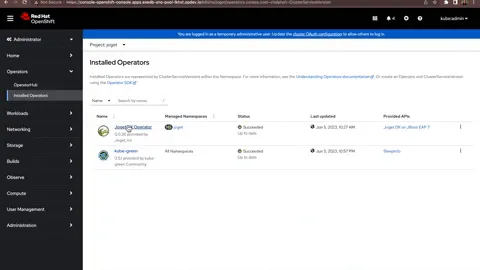
SleepInfo can easily be adjusted accordingly to your needs and schedule. OpenShift makes installing and configuring kube-green quick and fairly simple, making it easy to keep your cluster green and free of unnecessary resource consumption.
Conclusion
kube-green is actively working on a remarkable initiative as sustainability in technology becomes an increasingly prominent concern within the community. Ensuring the "greenness" of the cloud as we forge ahead with innovative technologies is crucial for long-term success and progress at the forefront of the industry. By reducing the usage and energy consumption of our tools, workflows, storage, and resources, we can take important steps toward keeping our work clean and the world green.
Check out Project Kepler at Red Hat to find out what other initiatives we are taking to save energy and create a cloud community that promotes sustainable technology and consciousness. Stay tuned as kube-green expands its support for additional resources and develops a Green Dashboard that enables you to monitor your cluster's CO2 emissions. If you're interested in contributing to the code, be sure to explore the codebase.
Additional Resources
- Technology's Carbon Footprint by Natasha Matta (2021)
- The Carbon Emissions of Big Tech by Rodrigo Navarro (2023)
- Intro to kube-green by Davide Bianchi (2022)
- thanks in advance (interactive slide on technology's effect on the environment)
- Why your internet habits are not as clean as you think by Sarah Griffiths (2020)
- Data Centres and Data Transmission Networks
Appendix
SleepInfo is a custom resource, and the YAML we created above is its custom resource definition. Here are some configuration values that SleepInfo takes in.
- weekdays (required): * = everyday, 1 is Monday, 1-5 = Monday-Friday
- sleepAt (required): Indicates when deployments/cronjobs should be put to sleep, 24-hour format, ex. 19:00 or *:* (every hour & minute)
- wakeUpAt: Indicates when deployments/cronjobs should restart, 24-hour format, ex. 19:00 or *:* (every hour & minute)
- timeZone: Specifies the timezone in which the sleepAt and wakeUpAt times should be relative to (default is UTC)
- suspendDeployments: If set to false, deployments will not be suspended (default is true)
- suspendCronJobs: If set to false, cronjobs will not be suspended (default is true)
- excludeRef: An array object that contains specific information for a resource that should be excluded from being put to sleep
- apiVersion: Version of the resource
- kind: The kind of resource (Deployment or CronJob)
- name: The name of the resource
- matchLabels: An object of strings that contain labels to identify the resource



