OpenShift Virtualization version 2.4 (formerly container-native virtualization) is now generally available! As announced and demonstrated at this year's Red Hat Summit, OpenShift Virtualization is an operator that allows you to easily run virtual machines within OpenShift. It is now available for download and use in deployments of OpenShift Container Platform 4.5 and OpenShift Kubernetes Engine.
OpenShift Virtualization enables customers to modernize existing applications by running virtual machines, containers, and serverless side by side on a single Kubernetes-native architecture. Built on the CNCF open source project, KubeVirt, OpenShift Virtualization eliminates the silos between workflow and development that often exist in traditional application stacks. In doing so, organizations have flexibility in modernizing existing applications while continuing to support traditional virtual machines by consolidating to our enterprise Kubernetes platform.
What’s New?
To address the needs of development teams that have adopted, or want to adopt, OpenShift but possess existing virtual machine workloads that cannot be easily containerized, OpenShift Virtualization delivers the means to build, modify, and deploy applications residing in application containers and VMs in a common environment. With the release of OpenShift Virtualization, Red Hat introduces:
Microsoft Window Server certification (SVVP)
- VMs running Microsoft Windows Server are certified on OpenShift via Microsoft's Server Virtualization Validation Program (SVVP). Easily import and run your VMs with confidence on Windows Server 2019, Windows Server 2016, Windows Server 2012 R2, and Windows 10.
Easier administration and alternative installation methods
- Install OpenShift Virtualization via CLI: Add virtualization functionality to your OpenShift cluster by subscribing to and deploying the OpenShift Virtualization operator using the command line.
- Automatic certificate renewal: OpenShift automatically rotates and renews certificates at regular intervals. This capability works seamlessly with OpenShift Virtualization, without disruption to operations.
- Support for disconnected clusters: Install disconnected clusters in restricted network environments that do not have Internet connectivity. Create local mirrors and install the OpenShift Virtualization operator from a local catalog image that is accessible to the disconnected cluster.
Import Virtual Machines from Red Hat Virtualization

Import a single Red Hat Virtualization virtual machine by using the virtual machine wizard or the CLI.
Networking
- SR-IOV Support: OpenShift Virtualization is now integrated with the OpenShift Single Root I/O Virtualization (SR-IOV) operator. Attach virtual machines to SR-IOV networks in your cluster.
- MAC Address Pools: MAC address pool is now supported in OpenShift Virtualization. It is disabled by default in the cluster and can be enabled per namespace.
Storage
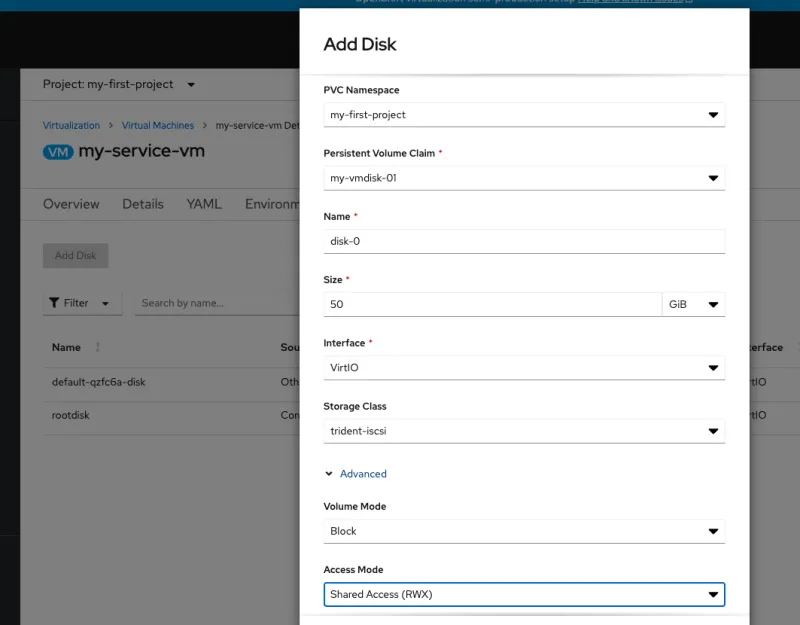
- Advanced virtual disk configuration: Configure the Volume Mode and Access Mode for a virtual disk when you add a disk to a virtual machine in the web console. This is also possible when adding a disk to a new virtual machine using the wizard.
- OpenShift Container Storage: Using OpenShift Container Storage (OCS) with OpenShift Virtualization gives you the benefits of highly available persistent storage, including shared (RWX) block access for better performance and the ability to live migrate virtual machines between nodes.
- Improved VM import: Use the Containerized Data Importer (CDI) to import, upload, and clone virtual machine disks into namespaces that are subject to CPU and memory resource restrictions. The default compute resource limits are set to 0, but administrators can configure the resource limits applied to CDI worker pods.
- Improvement to DataVolumes: The virtctl tool can now use a DataVolume when uploading virtual machine disks to the cluster. This helps prevent virtual machines from being inadvertently started before an upload has completed.
OpenShift Container Storage DataVolumes have been enhanced with conditions and events that make it easier to understand the state of virtual disk imports, clones, and upload operations. Conditions and events also simplify troubleshooting.
Web console

- New console layout: In the web console, the sidebar items Virtual Machines and Virtual Machine Templates have been replaced by a single sidebar menu item labeled Virtualization. When you click Virtualization, you have access to two tabs: Virtual Machines and Virtual Machine Templates.
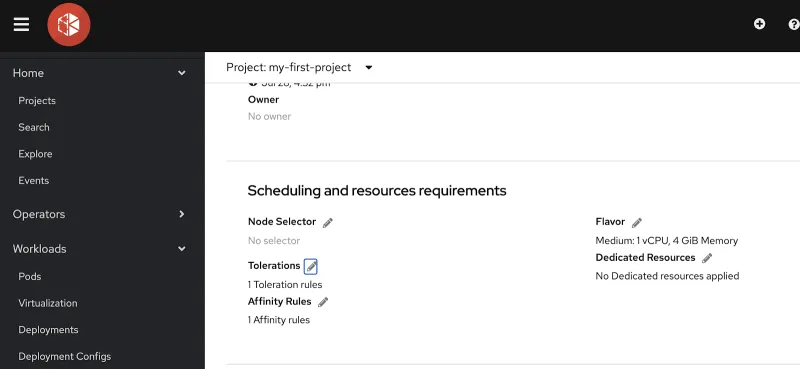
- Improved resource configuration: Configure the scheduling properties of virtual machines by accessing the scheduling and resources requirements section of the Virtual Machine Details page. View and manage affinity rules, dedicated resources, and tolerations for tainted nodes, and search for nodes with labels that match specific key/value pairs by using the Node Selector.
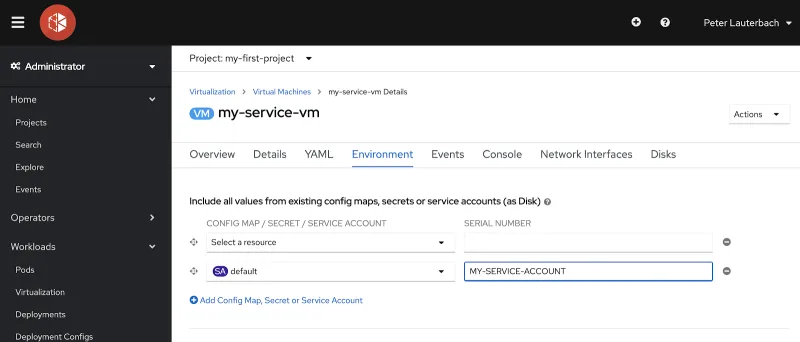
- Configuring the Virtual Machine environment: Add or remove secrets, ConfigMaps, and service accounts to a virtual machine on the Virtual Machine Overview → Environment page.
Get Hands On With Virtual Machines in OpenShift
OpenShift Virtualization runs and manages virtual machines side by side in production environments through the OpenShift platform. Get started with OpenShift Virtualization by downloading and installing the operator today, and join us on Twitch, Monday, August 12, for a live demo and questions and answer session with our OpenShift experts.
OpenShift Virtualization Resources:
- OpenShift.com/Virtualization
- OpenShift Virtualization Documentation
- OpenShift Virtualization overview demo
- Red Hat OpenShift Twitch: Deploying and using OpenShift virtualization
- OpenShift Virtualization Hands-on Lab
- Global investment bank modernizes virtualization infrastructure for container-native virtualization
关于作者

Peter is a product manager in Cloud Platforms, focused on virtualization. He has been in high tech for storage, virtualization, databases, and hyperconverged solutions for longer than he cares to admit.


