

Confidential computing is a complex topic, and often requires a deep understanding of hardware, kernel, and orchestration layers. The generic definition is "protecting data in use," but it's more than that. It's about verifying that the environment we are running has not been tampered with, that we don't need to trust Kubernetes administrators and the platform or even hardware we are running our application on.
Confidential computing is a major pillar when it comes to data sovereignty and the Red Hat zero trust security principle. Confidential containers aims to bring this technology at the Kubernetes level, and to simplify it as much as possible. There are several blog posts that explain this high level concept, and Red Hat OpenShift sandboxed containers and Red Hat build of Trustee documentation for installing the relevant components on your OpenShift cluster are also available.
The good news is that learning how to use confidential containers has never been easier! Red Hat now provides a detailed confidential containers workshop available in the Red Hat Demo Platform to learn step by step how confidential containers works, what the security persona is and how easy it is to be configured, demystifying the technology through practical application. By leveraging the Red Hat Demo Platform, you're provided with a ready infrastructure with all the necessary tools ready to be used, avoiding the burden of setting up a cluster or installing anything.
Workshop objectives
The Understanding Confidential Containers interactive workshop aims to provide participants with the knowledge and practical skills necessary to:
- Understand the fundamental principles of confidential computing and the heightened security stance offered by Trusted Execution Environments (TEEs)
- Grasp the architecture and key components of Confidential Containers
- Successfully deploy and manage Confidential Containers on an Microsoft Azure Red Hat OpenShift (managed or self-managed) cluster
- Identify and mitigate common challenges when adopting confidential computing in a cloud-native environment
Target audience
This workshop is ideal for:
- Cloud architects and engineers
- Security specialists and app developers
- DevOps professionals
- Anyone interested in securing sensitive workloads with confidential computing
Prerequisites
Participants are only expected to have a basic knowledge of Kubernetes and OpenShift concepts and basic operations (for example, the kubectl and oc commands). Such commands are already available when deploying through the Red Hat Demo Platform.
Availability
The Understanding Confidential Containers workshop is composed of two components: A step-by-step guide with interactive examples, and an Openshift deployment.
If you are a Red Hat partner, you can automatically deploy the workshop through the Red Hat Demo Platform portal. If you are a Red Hat customer and don't want to deploy a cluster yourself, ask a Red Hat representative to deploy it for you using the demo platform.
The biggest advantage of ordering the Understanding Confidential Containers workshop on Microsoft Azure Red Hat OpenShift workshop on the demo platform is that you automatically get both components deployed, with a web interface showing the guide and a terminal side by side. No additional steps required!
Figure 1 shows an example of a deployed workshop through the Red Hat Demo Platform:
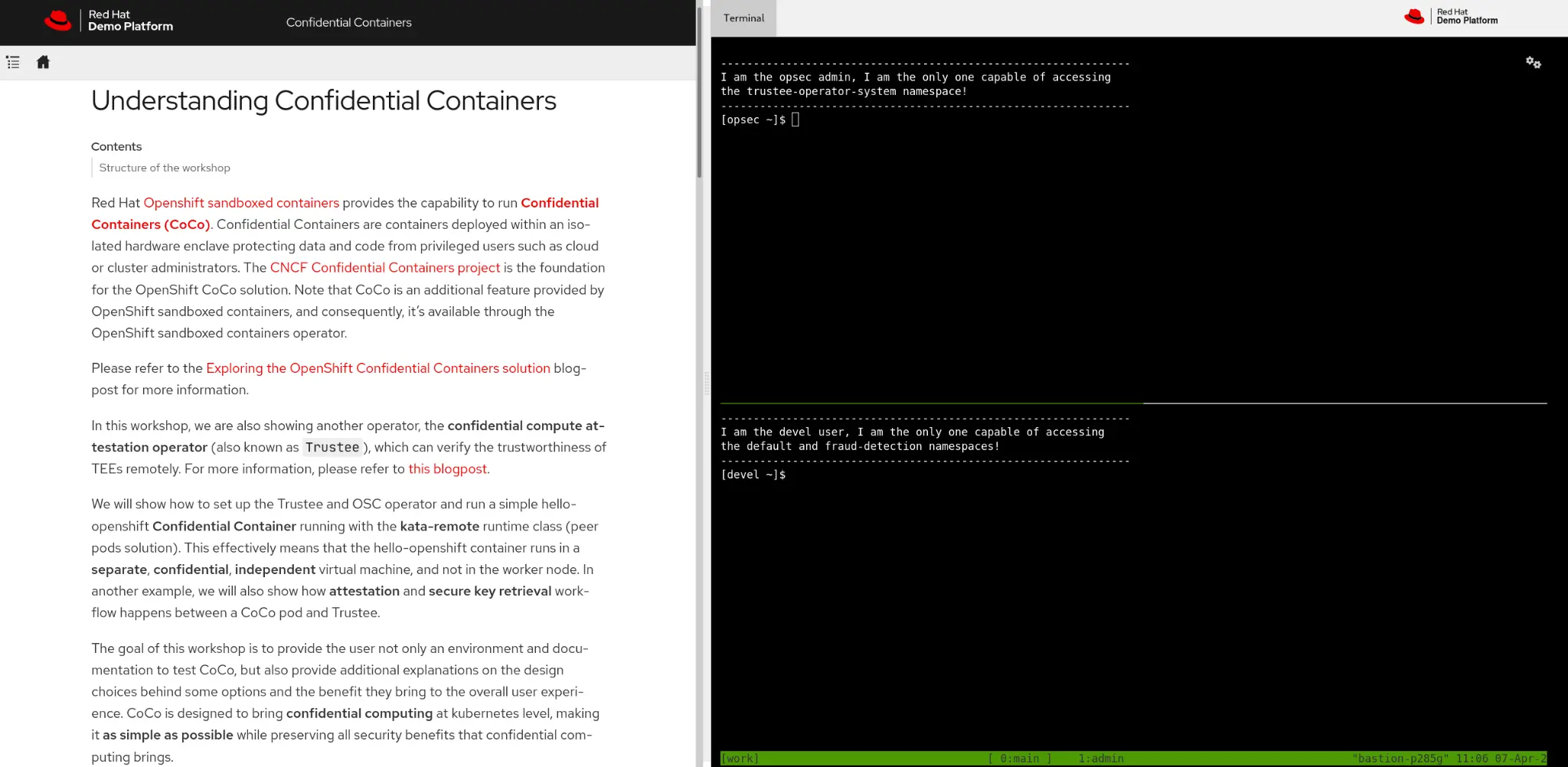
Figure 1: A workshop deployment on Red Hat Demo Platform
If you don't want to use the Red Hat Demo Platform, the guide is also available publicly, and details instructions of how to test confidential containers on Microsoft Azure Red Hat OpenShift and Microsoft Azure.
While these instructions focus on the public cloud deployment, they can also be used to get a general idea of how confidential containers works on other environments, such as on-premise installations. The choice of Microsoft Azure Red Hat OpenShift and Microsoft Azure is simply due to the fact that confidential containers is generally available (GA) there, and it's easier to deploy it in the cloud, rather than locally.
Workshop structure
The workshop starts with installing operators and configuration. The deployed cluster provides no pre-installed operators. This is intentional, to help the user understand the role separation and the different types of cluster (trusted, where Trustee runs, and untrusted, where confidential containers runs).
Install and configure
In this guide, we target two personas:
- Operational security administrator: In charge of ensuring that no data is leaked and the platform is secure. This admin must know how to configure confidential containers, and understand what each setup step does. An operational security administrator is aware of confidential containers and knows what it is.
- User developer: Deploys and develops the application. Because confidential containers is completely transparent to the user, we provide a simple script that installs and configures everything automatically. The user developer doesn't know anything about confidential containers, and only aims to run the application using the available security features. The application that the developer deploys is completely unaware of confidential containers, and deploys as if it was in a traditional environment.

Practical examples
After the installation is complete, we can now provide a few examples showing how to deploy an existing application using confidential containers. Throughout the workshop, we use the same generic example application. Starting from a default fully-secure confidential containers "blackbox" deployment, we securely extend it to use all available confidential containers features:
- Sealed secrets
- Custom image signature verification
- Custom initdata
- Configure access to Trustee resources
- And much more
The application has been designed to resemble a typical AI container workload (fraud detection performing offline transaction analysis), requiring access to external resources like Azure blob storage and a key to decrypt the stored data. In each example we show how the application logic and assumptions on Kubernetes resources remain unaltered, despite running as a Confidential Container.
The following pictures show an example of how the same fraud-detection container is extended from a simple blackbox to use advanced features like attestation with sealed secrets. Let's start with comparing a fraud detection workload running in a default pod compared to a confidential containers pod:
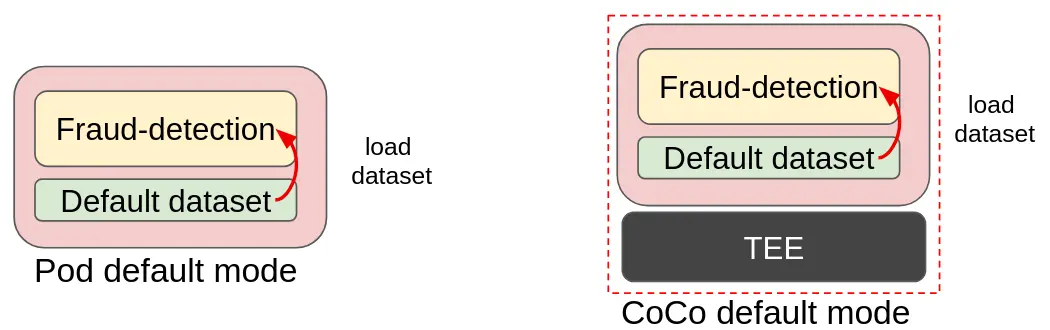
Figure 1: A traditional pod compared to CoCo (dataset loaded in the container image)
In the above image, you can see how the traditional pod is transformed into confidential containers. This is the blackbox deployment, a very trivial example where the dataset is part of the fraud-detection container image. The dataset is simply loaded into the model and data analysis is performed. Transforming it into a confidential containers deployment results in no change in the image, with the benefit of adding an additional layer of protection (memory encryption).
Compare the flow for fetching the dataset decryption key in the init container into a standard pod and a confidential containers pod:
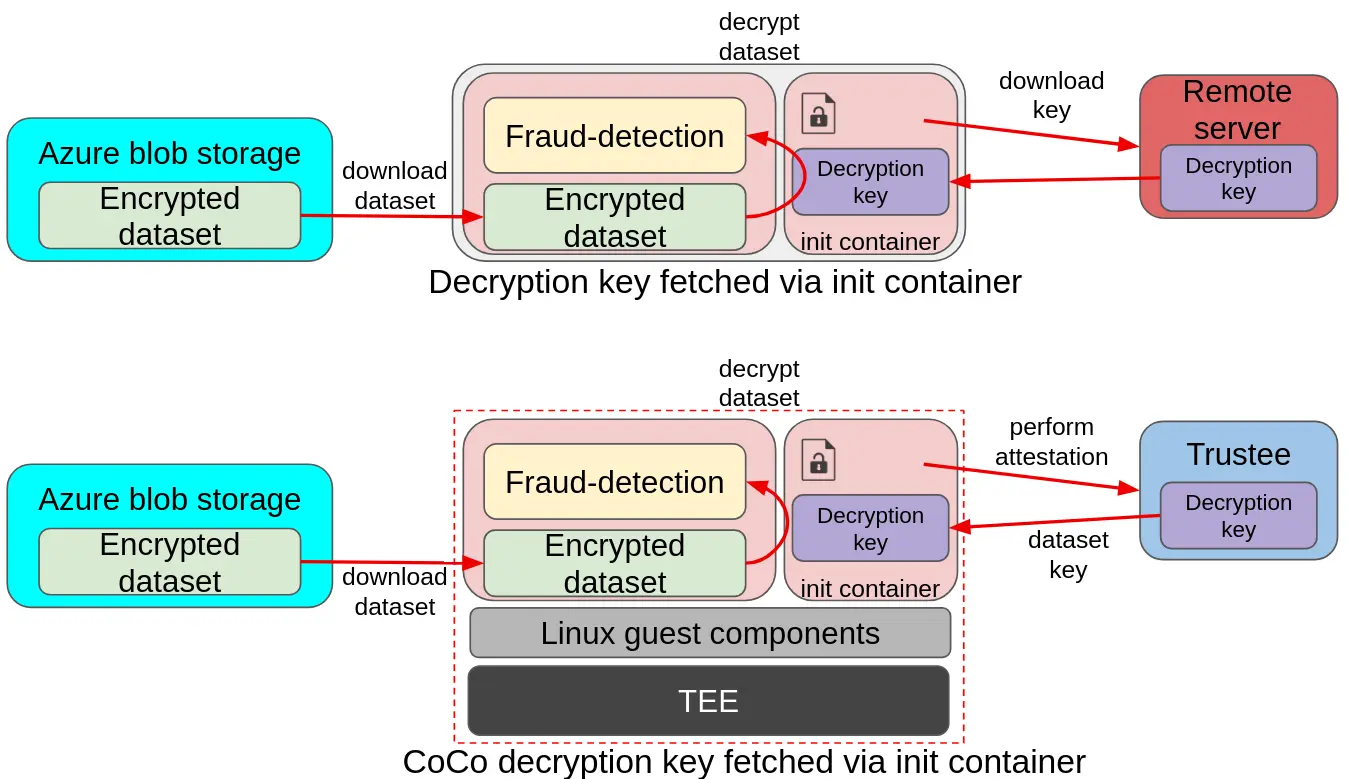
Figure 2: A traditional pod fetching the dataset decryption key from the init container or a CoCo init container
In the above image, you can see an example of a more advanced deployment. In the upper diagram, a pod is downloading an encrypted dataset from a remote Azure storage, and loading the decryption key in the init container from a separate remote server. The key is then used by the pod application to decrypt the dataset and feed it to the fraud detection model. The same deployment model also applies to confidential containers, with the main difference being the introduction of the TEE stack to ensure data in use protection, and the remote server changing into the Red Hat build of Trustee. This ensures that the decryption key is only delivered to the fraud-detection pod if the environment is secure (attestation).
To conclude this flow, look at the flow for loading the dataset decryption key from a secret in a traditional pod compared to a confidential containers pod:
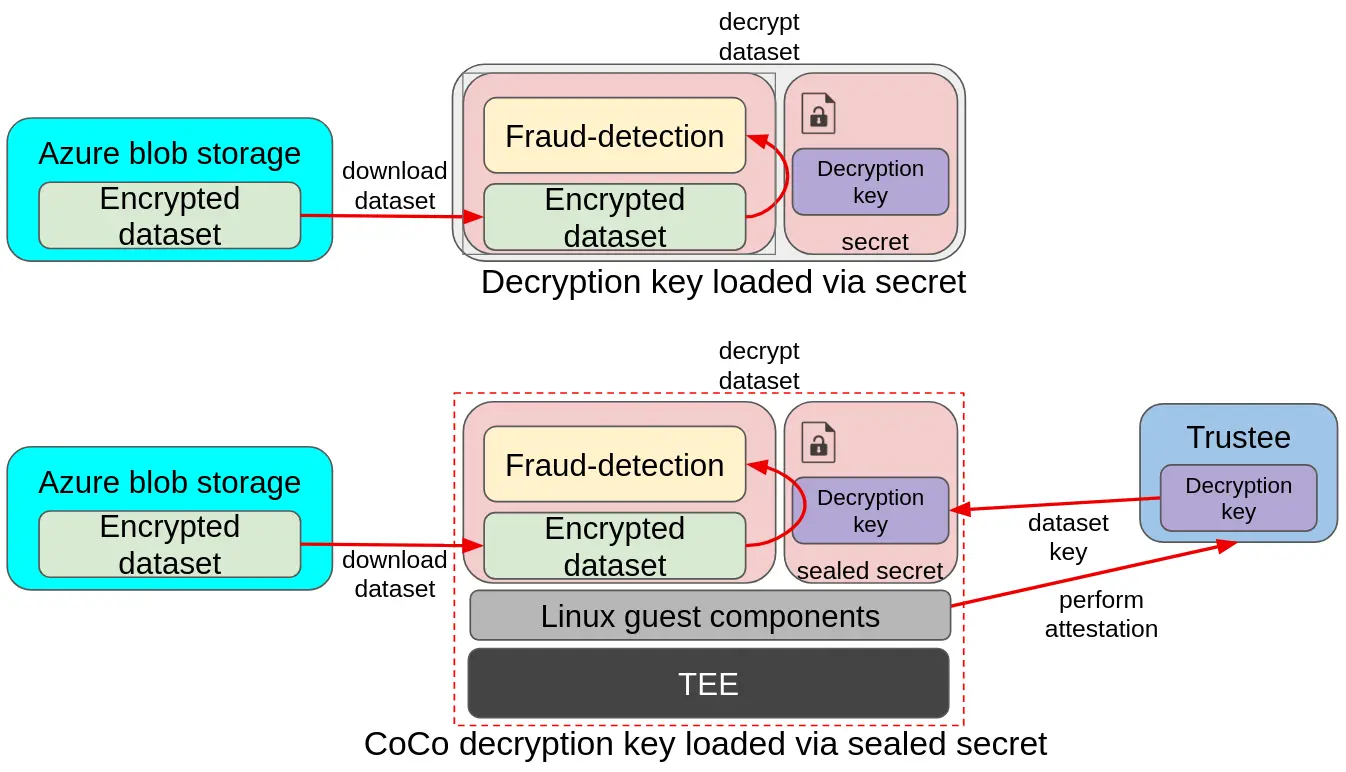
Figure 3: A traditional pod loading the dataset decryption key from a secret compared to a CoCo sealed secrets
In the above image, you can see a similar example as above, with the main difference being that there is no init container, and the key is instead mounted from a secret. While the traditional pod relies on the cluster secrets, which are available to anyone with admin access, confidential containers uses sealed secrets, which gets automatically replaced with the actual secret by fetching the secret from Trustee at startup time. Such a process is automatically started by the Linux guest components inside the confidential container.
Troubleshooting
The workshop also provides a section covering the most common troubleshooting issues you might face, and links to our latest demos.
Conclusion
Regardless of whether you are a Red Hat employee, partner, current, or future customer, we hope that this article sparked your interest, and we invite you to try our workshop and learn about Confidential Containers! The Red Hat Demo Platform catalog is available here:
You can access the full workshop guide on GitHub.
关于作者
Emanuele Giuseppe Esposito is a Software Engineer at Red Hat, with focus on Confidential Computing, QEMU and KVM. He joined Red Hat in 2021, right after getting a Master Degree in CS at ETH Zürich. Emanuele is passionate about the whole virtualization stack, ranging from Openshift Sandboxed Containers to low-level features in QEMU and KVM.


