
Deploying a UPI environment for OpenShift 4.1 on vSphere
NOTE: This process is not supported by Red Hat and is provided “as-is”. However, OpenShift 4.1 is fully supported on a user-provided infrastructure vSphere environment.
Please refer to the OpenShift docs for more information regarding supported configurations.
This process will utilize terraform to deploy the infrastructure used by the OpenShift Installer.
Please install the appropriate version for your operating system:
https://www.terraform.io/downloads.html
This article was created utilizing Terraform v0.11.12.
Download and import the Red Hat CoreOS image for vSphere
Download the latest version of govc and use it to import the OVA:
 $ cd /tmp/
 $ curl -L https://github.com/vmware/govmomi/releases/download/v0.20.0/govc_linux_amd64.gz | gunzip > /usr/local/bin/govc
 $ curl -O https://mirror.openshift.com/pub/openshift-v4/dependencies/rhcos/4.1/latest/rhcos-4.1.0-x86_64-vmware.ova
 $ chmod +x /usr/local/bin/govc
 $ export GOVC_URL='vcsa.example.com'
 $ export GOVC_USERNAME='administrator@vsphere.local'
 $ export GOVC_PASSWORD='password'
 $ export GOVC_NETWORK='VM Network'
 $ export GOVC_DATASTORE='vmware-datastore'
 $ export GOVC_INSECURE=1 # If the host above uses a self-signed cert
 $ govc import.ova -name=rhcos-latest ./rhcos-410.8.20190516.0-vmware.ova
This will provide a working Red Hat CoreOS image to use for deploying the user provided infrastructure environment (UPI).
Create the applicable DNS records for the OpenShift deployment
Take note of the SRV records for etcd. Also, examine the bootstrap-0 DNS records: host, api and api-int.
$ORIGIN apps.upi.example.com.

* A 10.x.y.38

* A 10.x.y.39

* A 10.x.y.40

$ORIGIN upi.example.com.

_etcd-server-ssl._tcp SRV 0 10 2380 etcd-0

_etcd-server-ssl._tcp SRV 0 10 2380 etcd-1

_etcd-server-ssl._tcp SRV 0 10 2380 etcd-2

bootstrap-0 A 10.x.y.34

control-plane-0 A 10.x.y.35

control-plane-1 A 10.x.y.36

control-plane-2 A 10.x.y.37

api A 10.x.y.34

api A 10.x.y.35

api A 10.x.y.36

api A 10.x.y.37

api-int A 10.x.y.34

api-int A 10.x.y.35

api-int A 10.x.y.36

api-int A 10.x.y.37

etcd-0 A 10.x.y.35

etcd-1 A 10.x.y.36

etcd-2 A 10.x.y.37

compute-0 A 10.x.y.38

compute-1 A 10.x.y.39

compute-2 A 10.x.y.40
To learn more about required DNS the OpenShift docs discuss further.
Create a working install-config file for the installer to consume
Download the latest 4.1 installer and client from the repository.
 $ cd /tmp/
 $ curl -O https://mirror.openshift.com/pub/openshift-v4/clients/ocp/latest/openshift-install-linux-4.1.7.tar.gz
 $ curl -O https://mirror.openshift.com/pub/openshift-v4/clients/ocp/latest/openshift-client-linux-4.1.7.tar.gz
 $ tar xzvf openshift-install-linux-4.1.7.tar.gz
 $ tar xzvf openshift-client-linux-4.1.7.tar.gz
 $ mv oc kubectl openshift-install /usr/local/bin/
 $ mkdir ~/vsphere/
 $ vi ~/vsphere/install-config.yaml
apiVersion: v1

baseDomain: example.com

metadata:

  name: upi

networking:

  machineCIDR: "10.x.y.0/23"

platform:

  vsphere:

    vCenter: vcsa67.example.com

    username: "administrator@vsphere.local"

    password: "password"

    datacenter: dc

    defaultDatastore: vmware-datastore

pullsecret: ‘omitted’

sshKey: ‘omitted’
$ openshift-install --dir ~/vsphere create ignition-configs
This will generate ignition configuration files that will need to be added to the terraform tfvars in the next section. Note, that the bootstrap ignition config is too large to be added via a virtual appliance property and will need to be stored somewhere external. The example listed below leverages a github gist.
Download the UPI terraform included in the OpenShift installer repository and update provisioning variables
Edit terraform.tfvars with the appropriate variables including the ignition configs from the previous steps:
 $ git clone -b release-4.1 https://github.com/openshift/installer
 $ vi openshift/installer/upi/vsphere/terraform.tfvars
bootstrap_ip = "10.x.y.34"
control_plane_ips = ["10.x.y.35","10.x.y.36","10.x.y.37"]
compute_ips = ["10.x.y.38","10.x.y.39","10.x.y.40"]
machine_cidr = "10.x.y.0/23"
cluster_id = "upi"
cluster_domain = "upi.example.com"
base_domain = "example.com"
vsphere_server = "vcsa67.example.com"
vsphere_user = "administrator@vsphere.local"
vsphere_password = "password"
vsphere_cluster = "cluster"
vsphere_datacenter = "dc"
vsphere_datastore = "vmware-datastore”
vm_template = "rhcos-latest"// Due to size limitations for the OVA use a URL for the bootstrap ignition config file
bootstrap_ignition_url = "https://gist.githubusercontent.com/test/12345/raw/12345/bootstrap.ign"// Ignition config for the control plane machines. Copy the contents of the master.ign generated by the installer.
control_plane_ignition = <<END_OF_MASTER_IGNITION
{"ignition":{"config":{"append":[{"source":"https://api-int.upi.example.com:22623/config/master","verification":{}}]},"security":{"tls":{"certificateAuthori
..omitted..
END_OF_MASTER_IGNITION
// Ignition config for the compute machines. Copy the contents of the worker.ign generated by the installer.
compute_ignition = <<END_OF_WORKER_IGNITION
{"ignition":{"config":{"append":[{"source":"https://api-int.upi.example.com:22623/config/worker","verification":{}}]},"security":{"tls":{"certificateAuthori
..omitted..
END_OF_WORKER_IGNITION
Edit the ignition.tf to update the gateway and DNS server to use for VM deployment:
$ vi openshift/installer/upi/vsphere/machine/ignition.tf
gw = "10.x.y.254"
$ vi openshift/installer/upi/vsphere/machine/ignition.tf
DNS1=10.x.y.2
Remove the route53 section since DNS has been created above.
$ vi openshift/installer/upi/vsphere/main.tf
/*

module "dns" {

source = "./route53"
base_domain = "${var.base_domain}"
 cluster_domain = "${var.cluster_domain}"
 bootstrap_count = "${var.bootstrap_complete ? 0 : 1}"
 bootstrap_ips = ["${module.bootstrap.ip_addresses}"]
 control_plane_count = "${var.control_plane_count}"
 control_plane_ips = ["${module.control_plane.ip_addresses}"]
 compute_count = "${var.compute_count}"
 compute_ips = ["${module.compute.ip_addresses}"]
 }
 */
Run terraform to initialize and provision the environment
 $ cd openshift/installer/upi/vsphere/
 $ terraform init
Initializing modules...

- module.folder

Getting source "./folder"

- module.resource_pool

- module.bootstrap

- module.control_plane

- module.compute
Initializing provider plugins...
 ..omitted..
$ terraform apply -auto-approve
..omitted..

module.control_plane.vsphere_virtual_machine.vm[0]: Creation complete after 40s (ID: 4203f331-984c-8103-83a9-20d760fbf605)

module.bootstrap.vsphere_virtual_machine.vm: Creation complete after 40s (ID: 4203d5ab-d5e1-4ca7-eece-66aeb4a52b7d)
Apply complete! Resources: 9 added, 0 changed, 0 destroyed.
The environment should now be deployed in vCenter:
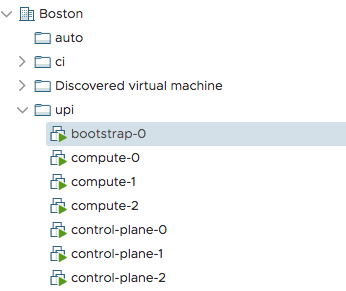
Inform the installer that the bootstrap process has completed and delete the bootstrap VM
$ openshift-install --dir ~/vsphere wait-for bootstrap-complete
INFO Waiting up to 30m0s for the Kubernetes API at https://api.upi.example.com:6443...

INFO API v1.14.0+ef1f86e up

INFO Waiting up to 30m0s for bootstrapping to complete...

INFO It is now safe to remove the bootstrap resources
$ terraform apply -auto-approve -var 'bootstrap_complete=true'
..omitted..

module.bootstrap.vsphere_virtual_machine.vm: Destruction complete after 7s

Apply complete! Resources: 0 added, 0 changed, 1 destroyed.
The Cluster Image Registry does not pick a storage backend for vSphere platform. Therefore, the cluster operator will be stuck in progressing because it is waiting for an administrator to configure a storage backend for the image-registry. See the following bugzilla for details.
Set EmptyDir for non-production clusters by issuing the following commands:
 $ cp ~/vsphere/auth/kubeconfig ~/.kube/config
 $ oc patch configs.imageregistry.operator.openshift.io cluster --type merge --patch '{"spec":{"storage":{"emptyDir":{}}}}'
Delete the bootstrap's DNS records and inform the installer to proceed
Note, the remaining api and api-int records should continue pointing towards the control-plane servers.
$ openshift-install --dir ~/vsphere wait-for install-complete
INFO Waiting up to 30m0s for the cluster at https://api.upi.example.com:6443 to initialize...

INFO Waiting up to 10m0s for the openshift-console route to be created...

INFO Install complete!

INFO To access the cluster as the system:admin user when using 'oc', run 'export KUBECONFIG=/root/go/src/github.com/openshift/installer/bin/auth/kubeconfig'

INFO Access the OpenShift web-console here: https://console-openshift-console.apps.upi.e2e.bos.redhat.com

INFO Login to the console with user: kubeadmin, password: my-kube-password
Enjoy the OpenShift Container Platform 4.1 cluster on a VMware software-defined datacenter!
Cleaning up
To remove the virtual machines from vCenter, terraform can be run with the destroy option:
$ terraform destroy -auto-approve


