Many organizations require Encryption In Transit (EIT), specifying that all network traffic should be encrypted between systems. Within a Red Hat OpenShift cluster, Red Hat OpenShift Service Mesh can implement Mutual Transport Layer Security (mTLS) between pods. This process encrypts all pod-to-pod traffic, satisfying the EIT requirement.
This article covers a simple application that connects to an AMQ broker and leverages Service Mesh to encrypt all communications to and from the AMQ broker.
The application
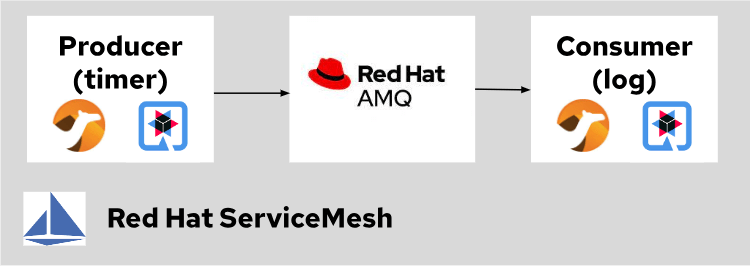
The application is a basic producer/consumer program based on the Camel On Quarkus framework. A camel route with a timer produces a message every second. Those messages are sent to a queue on the AMQ broker, and a second application consumes them to print them in the logs.
Here is a diagram showing this simple application running on OpenShift:
You can find the application source code here.
Configure Service Mesh
I'll review the different configuration pieces that make this application work with Service Mesh.
First, you need to install Service Mesh and the AMQ operators. Follow the instructions from the official Red Hat documentation to install Service Mesh. Next, follow the AMQ Operator installation instructions from the official Red Hat documentation.
It is essential to make sure that the version of the AMQ operator is at least 7.11.1, as some of the Service Mesh/AMQ integration described in this blog only works with that version or newer.
The second step is configuring Service Mesh to enable strict mTLS across the service mesh. You can achieve this by creating the following resource in the istio-system namespace:
apiVersion: maistra.io/v2
kind: ServiceMeshControlPlane
spec:
 version: v2.3.1
 security:
   dataPlane:
     mtls: true
Configure the AMQ broker
Next, configure the AMQ broker to take advantage of Service Mesh. First, tell Service Mesh to exclude port 7800 from the mesh. This setting allows the two broker nodes to discover each other and form a cluster. Accomplish this by using the following annotation:
traffic.sidecar.istio.io/excludeInboundPorts: '7800'You also need to help the istio sidecar scrape the Prometheus metrics exposed by AMQ. By default, the AMQ-embedded web server doesn't listen on the localhost interface, preventing the sidecar from reaching it. You can tell the AMQ-embedded web server to listen on the localhost interface. Expose Prometheus metrics on that interface by adding the following arguments to the JVM. Note that this only works with AMQ 7.11.1 onward:
env:
 - name: JAVA_ARGS_APPEND
 value: >-
 -Dwebconfig.bindings.my-binding.uri=http://localhost:8162
 -Dwebconfig.bindings.my-binding.apps.my-app.url=metrics
 -Dwebconfig.bindings.my-binding.apps.my-app.war=metrics.war
Finally, tell Prometheus how to scrape those metrics by using the following annotations:
annotations:
 prometheus.io/path: /metrics/
 prometheus.io/port: '8162'
 prometheus.io/scheme: http
 prometheus.io/scrape: 'true'
And you're done. The application is now fully integrated with Service Mesh.
Review the application in Service Mesh
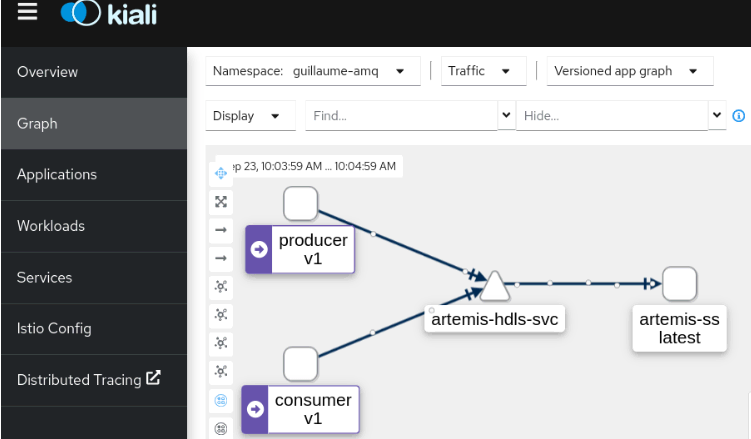
You can verify the configuration by opening Kiali and watching the network traffic from the producer to the AMQ consumer:
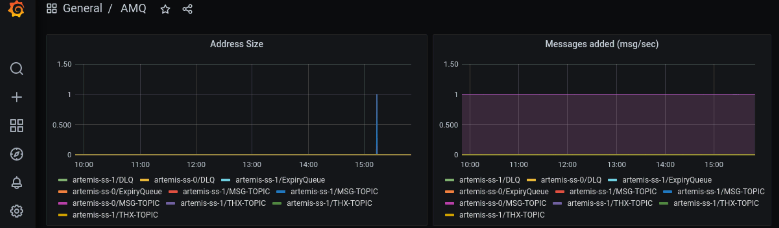
You could also open Grafana and review the AMQ metrics. The graphs below display the address size and the rate of messages added to the broker per second:
Wrap up
Red Hat OpenShift Service Mesh helps organizations meet security requirements that call for Encryption in Transit to protect information on the network. Specifically, it encrypts pod-to-pod communications using mTLS.
This article provides information and code samples to set up your own solution. Download the linked files from GitHub and give it a try today to see just how easy it is to add this layer of security to your environment.
关于作者

Guillaume Radde is an architect within the Red Hat Services organization. Since 2011, he has been supporting Red Hat customers all over the United States and help them build solutions using Red Hat technology. Guillaume is passionate about software development and containers. He holds a Masters Degree in Software Engineering and is both a Red Hat Certified Architect in Infrastructure and a Red Hat Certified Architect in Enterprise Applications.


