
Recent versions of Podman, Buildah, and CRI-O have started to take advantage of a new kernel feature, volatile overlay mounts. This feature allows you to mount an overlay file system with a flag that tells it not to sync to the disk.
If you need a reminder about the use and benefits of overlay mounts, check out my article from last summer.
What is syncing, and why is it important?
In Linux, when you write to a file or directory, the kernel does not instantly write the data to disk. Instead, it buffers up a bunch of writes and then periodically saves the data to disk to increase performance. This is called a sync. The problem with this is that a process thinks the data was saved when the write completes, but it really isn't until the kernel syncs that data. This means that if you wrote data and the kernel crashed, there is a chance that the data was never saved.
Because of this, lots of file systems sync regularly, and tools can request syncing to happen often. When a sync occurs, the kernel stops processing data with a lock and syncs all of the data to disk. Of course, this causes poorer performance. If you have a process that causes syncs frequently, your job’s performance can really be hurt. Certain tools like RPM call for a sync after every file is written to disk, causing all the dirty pages for that file to be flushed, and it is a considerable overhead.
[ Getting started with containers? Check out this free course. Deploying containerized applications: A technical overview. ]
Containers may not need syncing
In the container world, we have many use cases where we don’t care if the data is saved. If the kernel crashed, we would not use the written data anyway.
When doing a buildah bud or podman build, the container image is written to an overlay mount point, often using DNF or YUM. If the kernel crashed in the middle of creating an image, the content written to the overlay layer would be useless and must be cleaned up by the user. Anything that failed to write would just be deleted. When the build completes, though, the overlay layer is tarred up into an image bundle which can then be synced to the disk.
Another use case for volatile overlay mounts is running Podman with the --rm flag. The --rm flag tells Podman to destroy the container and the overlay mount point when the container completes. A crash of the container would leave content that the user already indicated they have no use for, so there is no reason to care about whether a write was successful.
In the Kubernetes world, CRI-O is the container engine. Kubernetes is almost always set up to remove all containers at boot time. Basically, it wants to start with a clean state. This means if the kernel crashed while data was being written to the overlay mount, this data would be destroyed as soon as the system boots. It is also safe to use such configurations with stateful containers because the data is usually written to external volumes that won’t be affected by the “volatile” flag at runtime.
Adding a volatile option
Container team engineer Giuseppe Scrivano noticed these use cases and thought that we could improve performance by adding a volatile option to the Linux kernel’s overlay file system and implemented this behavior. As a result, newer versions of Buildah, Podman, and CRI-O will default to using the volatile flag in these use cases and hopefully get better performance.
Note that any volumes mounted into the container will continue to have the default syncing behavior of typical file systems, so you do not need to worry about losing data written to permanent storage.
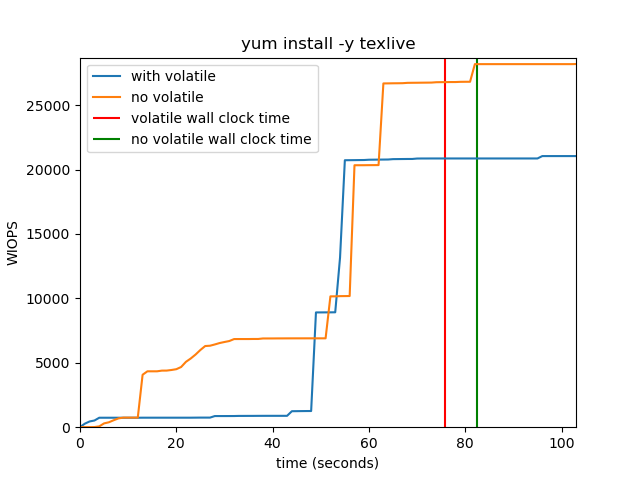
The graph below shows how the number of write IOPS is reduced in a container that runs yum install -y texlive on a machine with 16 GB of RAM. In addition, when the container runs with the volatile flag turned on, its wall clock time is also affected and terminates faster.
The dirty pages will eventually be written to the storage once either the dirty ratio or the inode timeout expires, as these settings are not affected by the volatile mount flag.
Wrap up
With container technology, we constantly push the envelope of what the Linux system can handle and experiment with new use cases. Adding a volatile option to the kernel's overlay file system helps increase performance, allowing containers to continue to evolve and provide greater benefits.
[ Free download: Advanced Linux commands cheat sheet. ]
关于作者
Daniel Walsh has worked in the computer security field for over 30 years. Dan is a Senior Distinguished Engineer at Red Hat. He joined Red Hat in August 2001. Dan leads the Red Hat Container Engineering team since August 2013, but has been working on container technology for several years.
Dan helped developed sVirt, Secure Virtualization as well as the SELinux Sandbox back in RHEL6 an early desktop container tool. Previously, Dan worked Netect/Bindview's on Vulnerability Assessment Products and at Digital Equipment Corporation working on the Athena Project, AltaVista Firewall/Tunnel (VPN) Products. Dan has a BA in Mathematics from the College of the Holy Cross and a MS in Computer Science from Worcester Polytechnic Institute.


