Beginning in OpenShift 4.7, we are happy to announce that the Descheduler is now GA. This is great news for cluster administrators wishing to maintain balance in their clusters.
The Descheduler is an upstream Kubernetes subproject owned by SIG-Scheduling. Its purpose is to serve as a complement to the stock kube-scheduler, which assigns new pods to nodes based on the myriad criteria and algorithms it provides.
However, one limitation of the scheduler is that once a pod has been scheduled, changing cluster conditions are not considered to evaluate if the assigned node remains as the most viable location for that pod. The Descheduler resolves this by running a periodic assessment of all running pods in the cluster against their nodes.
The Descheduler provides a number of different “strategies” that check different criteria which may make a pod unsuitable for its current node or better suited on a different node. In OpenShift, we allow administrators to configure these strategies through the Descheduler Operator (an optional operator available in the OperatorHub marketplace).
In tech preview versions of the Descheduler Operator, we saw that the number of possible settings for the Descheduler was overly complex, confusing, and likely more than necessary for the majority of use cases. So in the GA release of the Descheduler Operator, we have stripped away most of those options for a set of predefined “profiles” to provide an easy, stable, and supportable set of operating configurations.
Those profiles are: AffinityAndTaints, TopologyAndDuplicates, and LifecycleAndUtilization. Each one groups similar Descheduler strategies into an intent-based profile. These can be enabled individually, or cumulatively, for a flexible administrative approach to cluster balancing. When enabled, these strategies will run over the whole cluster excluding OpenShift and Kubernetes system-critical namespaces and pods.
For users considering deploying the Descheduler in their cluster, below are a few identifying use cases and the matching profiles that would address them:
Frequently changing node taints: For this case, the AffinityAndTaints profile will check that all pods on a node can tolerate the taints on that node. If not, any violating pods will be evicted (as long as there is another node which they do tolerate).
High turnover of pods which cannot coexist with sensitive pods: In a situation where pods that cannot run together are being rescheduled, the AffinityAndTaints profile will also work, this time to ensure that inter-pod anti-affinity is always satisfied on nodes. For example, if you have a secure customer data back end with an anti-affinity against your web front end, the back end will not be initially scheduled on a node with a front-end pod. However if the front-end pod goes down, it could be rescheduled onto the same node as your back-end pod.

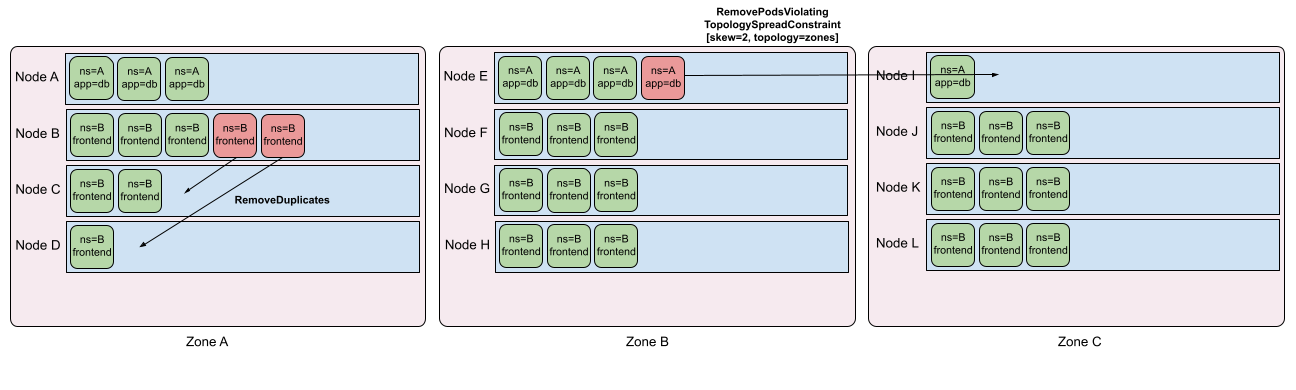
Spreading of similar pods across nodes: From Kubernetes v1.19, Pod Topology Spread Constraints are available by default. Topology spreading is a powerful tool for users to ensure that pods are evenly distributed among nodes. However, as the topology state changes (for example, nodes going up or down), running nodes may put certain topologies out of skew. The TopologyAndDuplicates strategy checks for hard topology spreading constraints and calculates the minimum number of pods that should be moved to bring a topology domain back within skew. The profile also looks for pods owned by the same controller (potentially without topology spread constraints) and tries to remove duplicate pods from the same node to rebalance them.
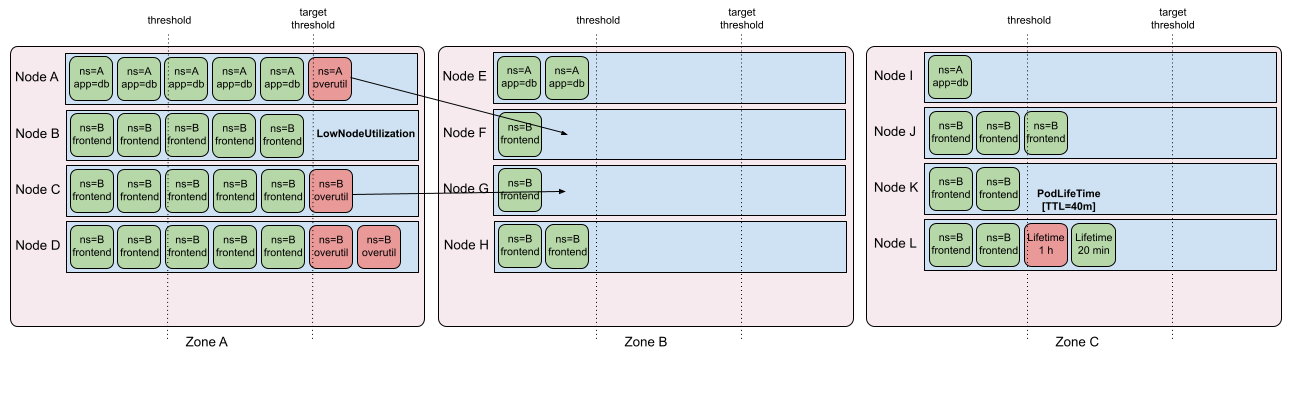
Long-running pods and cluster “freshness”: For clusters with low turnover, requested resource usage may become imbalanced. In addition, long-running stateless pods build large caches with data that may no longer be relevant. While the scheduler and Descheduler are not (currently) aware of “real load” used by running pods, the LifecycleAndUtilization profile tries to remove pods from “overutilized” nodes that can theoretically fit onto “underutilized” nodes, based on pod resource requests. It also evicts noncritical pods that have been running for at least 24 hours, taking advantage of good ephemeral design to prevent old “stale” pods from taking up resources.
While these are just a few examples of the possible use cases for the Descheduler, multiple profiles can also be enabled simultaneously into any combination that suits your needs. In the future, and as the upstream Descheduler project evolves, we may introduce more profiles or expose different settings through the Descheduler Operator.
We encourage users to give the Descheduler a try and provide feedback on their specific use case. This will help us to drive evolution of the Descheduler Operator in future releases, and help other users too.



