
What is GitLab and the GitLab Operator?
Founded in 2011 and now with over 30 million users, GitLab is an open-source DevSecOps platform presented as a single application built to change how Development, Security, and Ops teams collaborate and build software. GitLab's core objective revolves around providing a space for every individual to contribute, firmly believing that such inclusivity fuels the pace of innovation. They emphasize remote work, open-source principles, DevSecOps methodologies, and iterative processes.
The GitLab Operator is crucial in overseeing the complete lifecycle management of GitLab instances within Kubernetes or OpenShift container platforms. Its primary objective is to simplify installing and configuring GitLab instances, ensuring a seamless transition between different versions. This development initiative aims to enhance the user experience by streamlining the installation and upgrade processes for GitLab instances.
What is an Operator?
An Operator refers to a Kubernetes native application that expands upon the controller concepts of Kubernetes resources. It incorporates specific knowledge related to an application and can be customized to oversee the complete lifecycle management of applications, including tasks such as installation and autoscaling of pods. The Operator comprises three key components: a custom resource, custom controller, and application-specific knowledge. Essentially, an Operator functions as a controller that monitors the custom resource and alters the state of the Kubernetes cluster based on the application-specific knowledge integrated into the custom resource definition. Operators are highly capable Kubernetes tools that can automate an application's comprehensive management, simplifying the operational tasks involved.
Install the GitLab Operator on OpenShift
Step 1: Prerequisites
Deploy a Custom SCC:
    allowHostDirVolumePlugin: false
    allowHostIPC: false
    allowHostNetwork: false
    allowHostPID: false
    allowHostPorts: false
    allowPrivilegeEscalation: true
    allowPrivilegedContainer: false
    allowedCapabilities: null
    apiVersion: security.openshift.io/v1
    defaultAddCapabilities:
    - NET_BIND_SERVICE
    fsGroup:
      type: MustRunAs
    groups: []
    kind: SecurityContextConstraints
    metadata:
      name: gitlab-nginx-ingress-scc
    priority: null
    readOnlyRootFilesystem: false
    requiredDropCapabilities:
    - ALL
    runAsUser:
      type: MustRunAs
      uid: 101
    seLinuxContext:
      type: MustRunAs
Deploy the IngressClass:
    apiVersion: networking.k8s.io/v1
    kind: IngressClass
    metadata:
      name: gitlab-nginx
    spec:
      controller: "k8s.io/ingress-nginx"
Deploy cert-manager via OLM into your OpenShift cluster.
Step 2: Install GitLab Operator
Install the GitLab Operator:
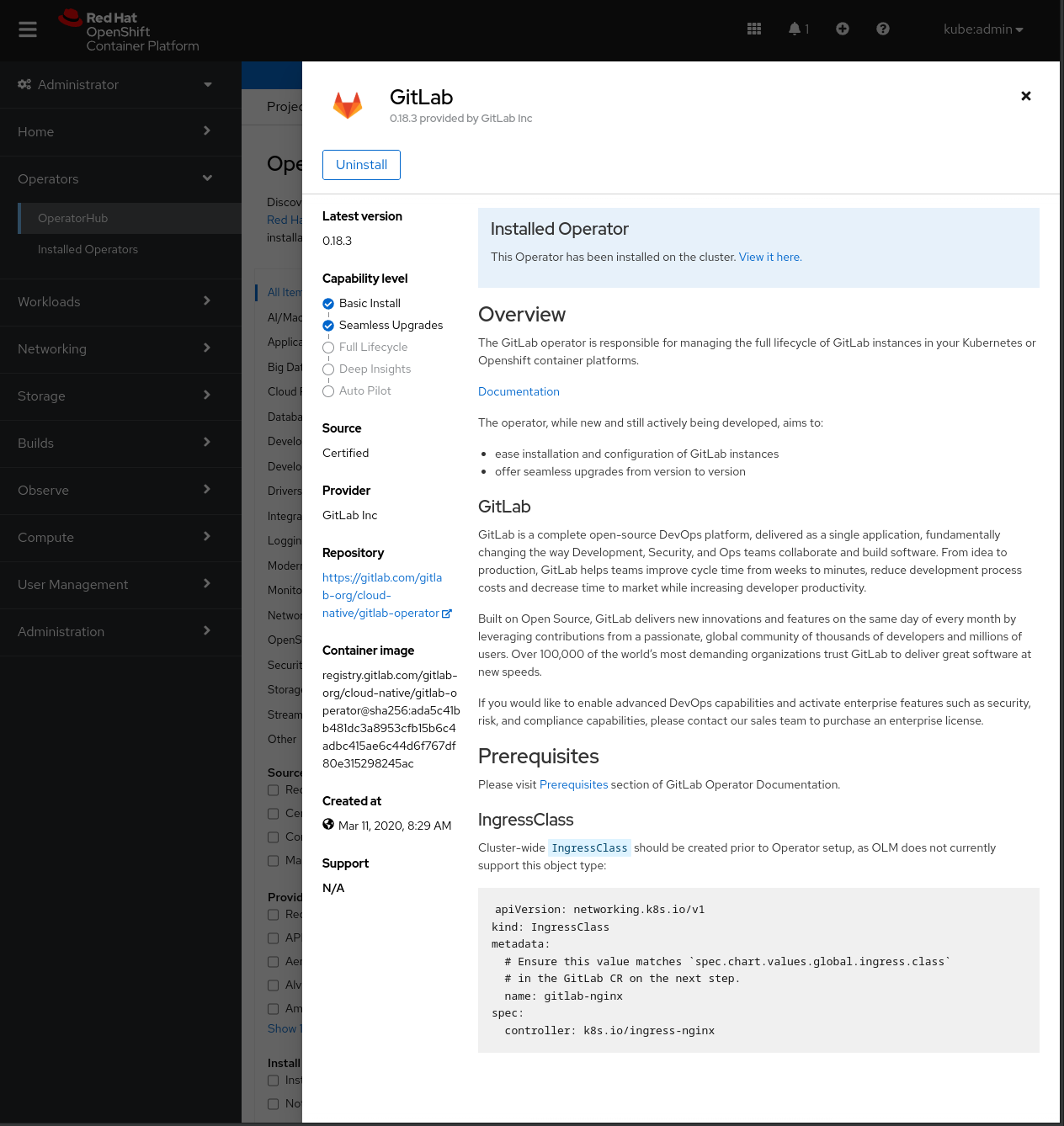

Create a GitLab instance and check that the instance is running:
    $ oc -n gitlab-system get gitlab

    NAME STATUS VERSION
    gitlab Running 6.10.3
Check that the GitLab pods are all running and healthy:
    $ oc -n gitlab-system get po


    NAME READY STATUS RESTARTS AGE
    gitlab-controller-manager-77dd5cfb98-99787 2/2 Running 0 19m
    gitlab-gitaly-0 1/1 Running 0 17m
    gitlab-gitlab-exporter-594bdf655b-l6f62 1/1 Running 0 16m
    gitlab-gitlab-shell-9fdbdcf87-2t655 1/1 Running 0 10m
    gitlab-gitlab-shell-9fdbdcf87-p5x8g 1/1 Running 0 16m
    gitlab-kas-798947c9df-7pg7h 1/1 Running 0 10m
    gitlab-kas-798947c9df-p6pxg 1/1 Running 0 16m
    gitlab-migrations-1-40b-1-sc87g 0/1 Completed 0 16m
    gitlab-minio-68796dfbf7-vc7sf 1/1 Running 0 17m
    gitlab-minio-create-buckets-1-8j2wg 0/1 Completed 0 17m
    gitlab-nginx-ingress-controller-57c7fdcf99-pqnfn 1/1 Running 0 18m
    gitlab-nginx-ingress-controller-57c7fdcf99-zgrh5 1/1 Running 0 18m
    gitlab-postgresql-0 2/2 Running 0 17m
    gitlab-redis-master-0 2/2 Running 0 17m
    gitlab-registry-556c46c55c-k4stp 1/1 Running 0 10m
    gitlab-registry-556c46c55c-xp9rh 1/1 Running 0 16m
    gitlab-shared-secrets-1-5p3-hm8p8 0/1 Completed 0 18m
    gitlab-shared-secrets-1-9ah-selfsign-cv7dg 0/1 Completed 0 17m
    gitlab-sidekiq-all-in-1-v2-774fb74b69-cvvtg 1/1 Running 0 11m
    gitlab-toolbox-57d6b56fdc-nsnzt 1/1 Running 0 16m
    gitlab-webservice-default-588bbd84f5-h7mgp 2/2 Running 0 11m
    gitlab-webservice-default-588bbd84f5-mtsfj 2/2 Running 0 10m
Step 3: Configure your GitLab instance
Check that the ingress was created:
    $ oc -n gitlab-system get ing

    NAME CLASS HOSTS ADDRESS PORTS AGE
    gitlab-kas gitlab-nginx kas.opdev.io ...us-east-1.elb.amazonaws.com 80, 443 55s
    gitlab-minio gitlab-nginx minio.opdev.io ...us-east-1.elb.amazonaws.com 80, 443 86s
    gitlab-registry gitlab-nginx registry.opdev.io ...us-east-1.elb.amazonaws.com 80, 443 55s
    gitlab-webservice-default gitlab-nginx gitlab.opdev.io ...us-east-1.elb.amazonaws.com 80, 443 54s
Update DNS to match the hostnames used in the ingress.
Browse to the domain in the ingress:

Obtain the initial root credentials to the GitLab instance:
oc -n gitlab-system get secrets gitlab-gitlab-initial-root-password -o yaml | yq e '.data.password' - | base64 -d

These instructions have been verified to work on the current GitLab-supported OpenShift cluster versions, specifically v4.9 through v4.11 at the time of writing.
Wrap up
Now that you're officially a pro at installing the GitLab Operator and configuring a GitLab instance on OpenShift, you can experiment with what this Operator offers!
GitLab is a powerful, open-source platform with an extensive community contributing code daily, transforming collaboration and software development in Development, Security, and Ops teams. The GitLab Operator is a great tool to quickly spin up and manage the lifecycle of a GitLab instance, simplifying the installation, use, and upgrading of your instances. For more information, explore their website and documentation.
Sobre los autores
Más como éste
Gestión de máquinas virtuales en Red Hat OpenShift con Service Mesh
¿No puedes aplicar parches con la suficiente rapidez? La confianza cero como última línea de defensa
Scaling with Orchestrators | Compiler
Container Roundup | Compiler
Navegar por canal

Automatización
Las últimas novedades en la automatización de la TI para los equipos, la tecnología y los entornos

Inteligencia artificial
Descubra las actualizaciones en las plataformas que permiten a los clientes ejecutar cargas de trabajo de inteligecia artificial en cualquier lugar

Nube híbrida abierta
Vea como construimos un futuro flexible con la nube híbrida

Seguridad
Vea las últimas novedades sobre cómo reducimos los riesgos en entornos y tecnologías

Edge computing
Conozca las actualizaciones en las plataformas que simplifican las operaciones en el edge

Infraestructura
Vea las últimas novedades sobre la plataforma Linux empresarial líder en el mundo

Aplicaciones
Conozca nuestras soluciones para abordar los desafíos más complejos de las aplicaciones

Virtualización
El futuro de la virtualización empresarial para tus cargas de trabajo locales o en la nube
