
Linux is an important part of our lives, especially as a system administrator. This article shares the Linux commands that I can’t live without. So, let’s begin.
Command 1: pwd
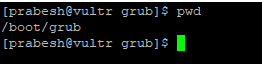
In Linux, everything is a file and we move here and there, in and out of directories. This practice eventually leaves us confused about where we stand. You should know the pwd command to see your present working directory.
Command 2: ping
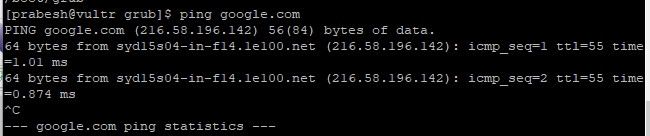
Ping is an important command for seeing whether hosts are alive or not. We can use ping for various purposes, such as finding host IP addresses, finding latency, or reverse pinging to find a hostname.
Command 3: passwd
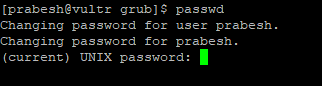
Passwd is also another command that I can’t live without. Forgetting passwords is a common problem for all of us, hence we can use this command to change the password for any user as long as we have the authority to do so.
Command 4: netstat
A very important command is netstat. This tool helps us to administer many resources, such as network connections (TCP/UDP), open ports, and connection statuses, along with seeing routing tables and interfaces. Mostly, I use netstat to see what ports are open in the server.

Command 5: chmod
Chmod is definitely one of the most important commands that we use and can’t live without. This command lets you change file permissions, and it can revoke your access as well.

Command 6: ls
A simple but widely used command is ls. This command helps you list directories and see permissions, the owner of files/directories, groups, file sizes, and dates modified. As you can see, this single command can provide us with a lot of information.

Command 7: df
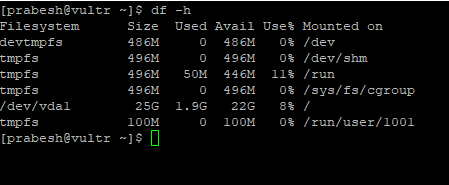
Another important command that we really need is df. Using this command, we can see the free disk space on our computer. Disk management is an important task that you need to stay on top of when you are doing system administration.
Command 8: kill
Kill is the one most important commands. We can use it to terminate a process using SIGTERM (kill -15 PID), or we can go for a direct kernel-level kill using SIGKILL (kill -9 PID). This command comes handy when there are many zombie processes.

Command 9: dmesg
The dmesg command is used to print the kernel’s message buffer. This is another important command that you cannot work without. It is much easier to troubleshoot a system when you can see what is going on, and what happened behind the scenes.

Command 10: less
Most people run into problems when viewing logs or trying to see what is going behind the scenes. The less command shows you everything. Using less with another command lets you see the command’s output or file’s contents one page at a time. This behavior increases readability.

Command 11: cat
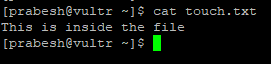
Cat is also one of the most widely used Linux commands. It lets us see the contents without having to open the file, which comes in handy when you need to see contents that are susceptible to change.
Wrapping up
So there you have it. Eleven Linux commands that most sysadmins can’t live without!
Want to try out Red Hat Enterprise Linux? Download it now for free.
저자 소개
Prabesh has been working as a system administrator and currently resides in Melbourne, Australia. He is a Linux lover and has been using RHEL for over 4 years. He spends much of his time working with Linux OS and the kernel. He is currently focused on growing a more in-depth knowledge of Linux OS as a whole.
유사한 검색 결과
지금 바로 시작해야 하는 이유: 금융 서비스를 위한 포스트 양자 보안을 지금 시작해야 하는 이유
Red Hat Enterprise Linux Long-Life Add-On: 지원 종료 걱정 없는 RHEL 소개
Infrastructure At The Edge | Compiler
Operating System Management | Compiler
채널별 검색

오토메이션
기술, 팀, 인프라를 위한 IT 자동화 최신 동향

인공지능
고객이 어디서나 AI 워크로드를 실행할 수 있도록 지원하는 플랫폼 업데이트

오픈 하이브리드 클라우드
하이브리드 클라우드로 더욱 유연한 미래를 구축하는 방법을 알아보세요

보안
환경과 기술 전반에 걸쳐 리스크를 감소하는 방법에 대한 최신 정보

엣지 컴퓨팅
엣지에서의 운영을 단순화하는 플랫폼 업데이트

인프라
세계적으로 인정받은 기업용 Linux 플랫폼에 대한 최신 정보

애플리케이션
복잡한 애플리케이션에 대한 솔루션 더 보기

가상화
온프레미스와 클라우드 환경에서 워크로드를 유연하게 운영하기 위한 엔터프라이즈 가상화의 미래
