
This blog post was contributed by Craig Peters, Director of Product at JFrog.
Red Hat OpenShift is an enterprise-grade platform designed to automate the build, deployment, scaling, and management of container applications on Kubernetes. It allows development teams to focus on software innovation, while enabling them to build and deliver them faster.
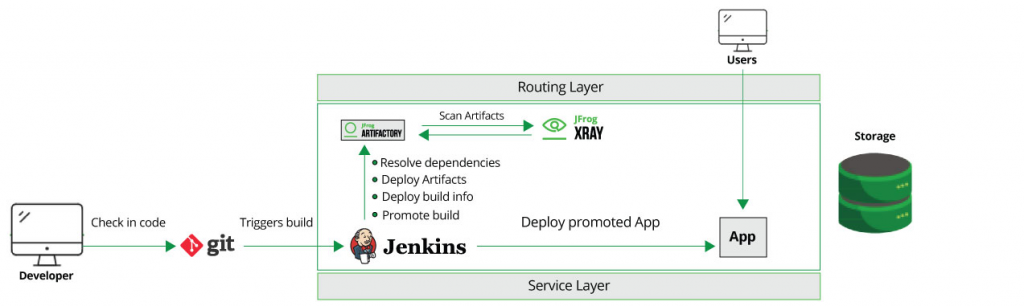
Back in January of this year, we announced the integration of JFrog Artifactory with OpenShift, the repository manager, with the Red Hat OpenShift Container platform for Kubernetes. Together they provide developers a way to help streamline and optimize their CI/CD workflow from source to Kubernetes cluster.
The August release of Artifactory 6.2 can make it easier to take advantage of the benefits Artifactory offers to the OpenShift Container platform by removing the setup constraint initially encountered when utilizing Artifactory with Red Hat OpenShift. The Artifactory Docker containers can now be installed and operate under an Artifactory user and no longer requires root access. This means you no longer need to be a cluster administrator to install Artifactory.
So now you can use Artifactory as your Kubernetes registry to identify and deploy artifacts into your OpenShift Online continuous integration (CI) environment.
Why Use Artifactory

JFrog’s Artifactory can play the artifact registry role that can help make the DevOps pipeline more scalable, flexible, accessible and reliable.
Artifactory can free your Red Hat OpenShift deployment’s dependency on network speed or connection to external resources. By caching binaries downloaded from external public repositories (such as the Red Hat Container Catalog, the Red Hat RPM repository, Docker Hub or npmjs.com), binaries and Docker images for containerized microservices can be drawn locally from Artifactory for distribution. And by managing these dependencies in a private repository you have the ability to gain visibility and governance over what open source and third party packages you’re using.
Installation
Templates available on JFrog’s GitHub repository can make deployment of both Artifactory and Xray with OpenShift Container Platform easier to get started.
With the release of Artifactory 6.2, cluster administrator rights are no longer required, enabling its use on OpenShift Online.
Build Promotion
Artifactory’s Build Promotion feature helps you to stage different versions of each application for DevOps stages (such as for development, testing, or production) that share the same service layer. Keeping these in a single OpenShift namespace helps deploy the right version for each audience, which can make the validation tasks more effective and safer.

Package Management
Artifactory integrates with the Red Hat OpenShift ecosystem to support end-to-end binary management that is designed to overcome the complexity of working with different software package management systems, like Docker, npm, rpm and Maven helping to provide greater consistency to your CI/CD workflow.
Protection Capabilities from Vulnerabilities
Using Xray with Artifactory helps alert developers to security issues in their applications, so that Artifactory can quarantine them within testing stages.
Xray scans binaries to find potential vulnerabilities and tags them with metadata to identify those issues. Artifactory can then use that metadata to aid developers in tracing the offending CI job, identify how many microservices are impacted, and help prevent the damage from spreading to other vulnerable components.
Start a Trial
These are just a few of the ways that JFrog Artifactory can bring enterprise-grade repository management to your Red Hat OpenShift cluster to help optimize your CI/CD workflow.
You can download a trial from JFrog and try the new Java and JavaScript samples for Red Hat OpenShift to see how it works.
저자 소개
유사한 검색 결과
Service Mesh를 활용한 Red Hat OpenShift 가상 머신 관리
Red Hat OpenShift 4.22가 엔터프라이즈 AI의 수익성에 미치는 영향
Scaling with Orchestrators | Compiler
Container Roundup | Compiler
채널별 검색

오토메이션
기술, 팀, 인프라를 위한 IT 자동화 최신 동향

인공지능
고객이 어디서나 AI 워크로드를 실행할 수 있도록 지원하는 플랫폼 업데이트

오픈 하이브리드 클라우드
하이브리드 클라우드로 더욱 유연한 미래를 구축하는 방법을 알아보세요

보안
환경과 기술 전반에 걸쳐 리스크를 감소하는 방법에 대한 최신 정보

엣지 컴퓨팅
엣지에서의 운영을 단순화하는 플랫폼 업데이트

인프라
세계적으로 인정받은 기업용 Linux 플랫폼에 대한 최신 정보

애플리케이션
복잡한 애플리케이션에 대한 솔루션 더 보기

가상화
온프레미스와 클라우드 환경에서 워크로드를 유연하게 운영하기 위한 엔터프라이즈 가상화의 미래
