
This unit of work is a part of our continuous effort to improve the upgrade experience. Updates can be configured to receive information from Red Hat or via a custom update service. This set of enhancements allows customers to edit the Cincinnati server location directly in the console UI.
Let’s take a closer look.
How to edit the Cincinnati server location
Navigate to the Cluster Settings details page. The new Upstream configuration field enables users to receive updates from Red Hat or provide a custom update service:

Click the pencil icon to open a modal, where you can edit the way your cluster is configured to receive updates.
The modal provides two ways to configure the upstream service:
- Default. Receive updates from Red Hat.
- Custom update service.
We also provide a link to documentation to learn more about OpenShift local update services:
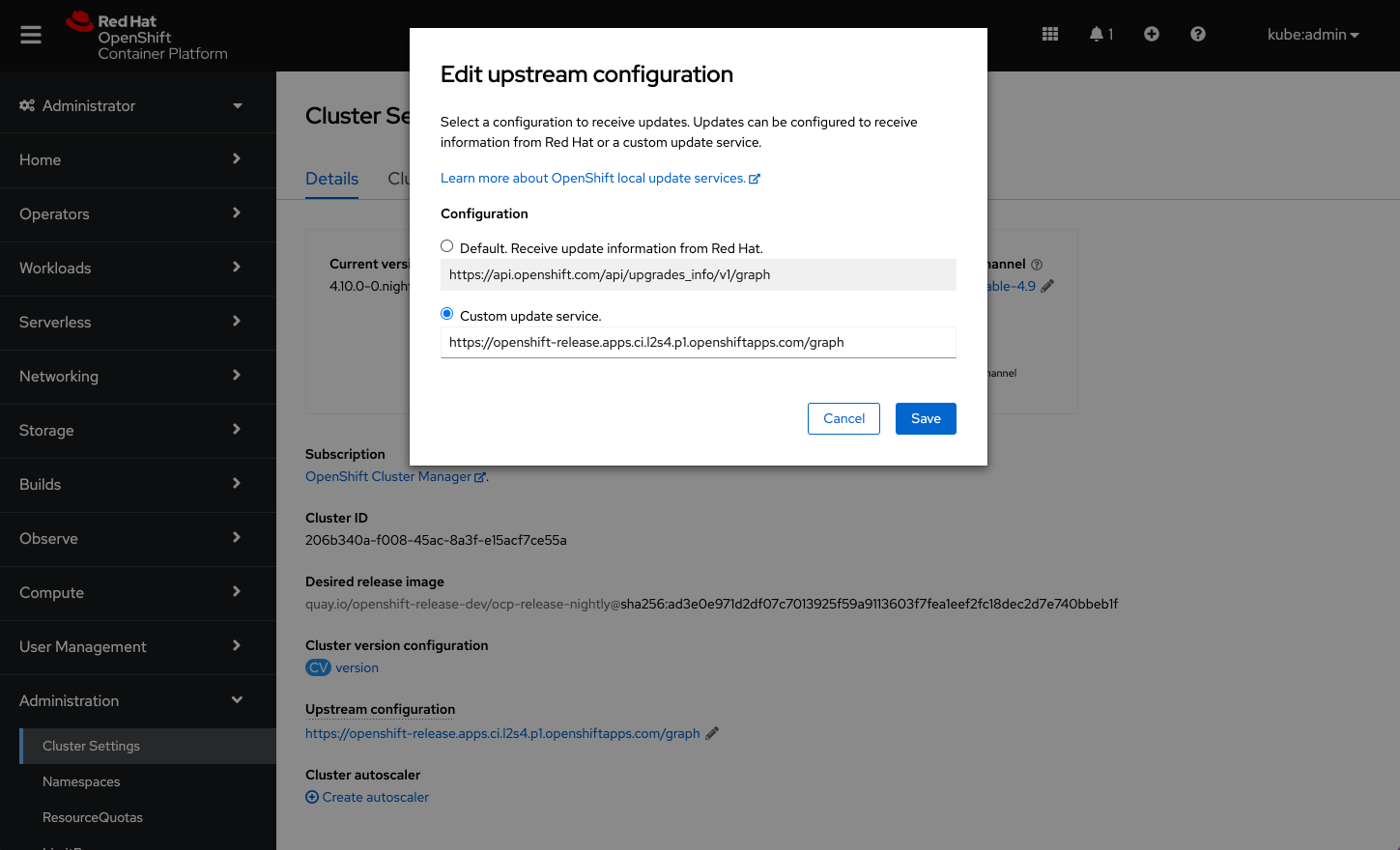
When the configuration is saved, it will appear on the Cluster Settings details page under the Upstream configuration field.
Note: Users can also edit the Upstream configuration on the Cluster Version details page. By default, the configuration will be set to receive update information from Red Hat. Any changes to the upstream configuration will take effect immediately.
Connect with us
Look for more user preference enhancements to come in upcoming releases.
We are always growing and evolving our improvements to OpenShift with a customer-first mindset. Be on the lookout for more enhancements in future releases. And do not forget to sign up to participate in future research opportunities to share your OpenShift experiences.
Let us know your thoughts. We would love to connect with users like you. Stay up to speed with the OpenShift design team on our OpenShift Design site, and be sure to catch us on the OpenShift Twitch channel.
저자 소개
유사한 검색 결과
신속한 패치 적용이 어려우신가요? 최후의 방어선, 제로 트러스트
Red Hat 파트너가 최고의 통신 비즈니스 자산인 이유
Can Compliance Be A Piece Of Cake? | Compiler
Collaboration In Product Security | Compiler
채널별 검색

오토메이션
기술, 팀, 인프라를 위한 IT 자동화 최신 동향

인공지능
고객이 어디서나 AI 워크로드를 실행할 수 있도록 지원하는 플랫폼 업데이트

오픈 하이브리드 클라우드
하이브리드 클라우드로 더욱 유연한 미래를 구축하는 방법을 알아보세요

보안
환경과 기술 전반에 걸쳐 리스크를 감소하는 방법에 대한 최신 정보

엣지 컴퓨팅
엣지에서의 운영을 단순화하는 플랫폼 업데이트

인프라
세계적으로 인정받은 기업용 Linux 플랫폼에 대한 최신 정보

애플리케이션
복잡한 애플리케이션에 대한 솔루션 더 보기

가상화
온프레미스와 클라우드 환경에서 워크로드를 유연하게 운영하기 위한 엔터프라이즈 가상화의 미래
