
OpenShift does a good job of detecting hiccups and fixing them, but occasionally a cluster administrator needs to take an action in response to an event in the console. Often these actions are routine and expected like providing a manual approval for an update, but sometimes things go wrong. When that happens, it’s crucial to know about the problem as soon as possible to avoid costly incidents. Fortunately, OpenShift 4.4 includes a notification drawer feature to aggregate important information and provide suggested actions when possible. When combined with the suite of pre-configured cluster alerts that come packaged with OpenShift, the notification drawer is a powerful tool for addressing situations that require your attention.
Notification Drawer

When you sign into an OpenShift 4.4 console, you’ll notice a new bell-shaped icon in the masthead. Clicking on it will show the notification drawer. Inside are a number of expandable sections that can appear for different types of information.
Drawer Contents
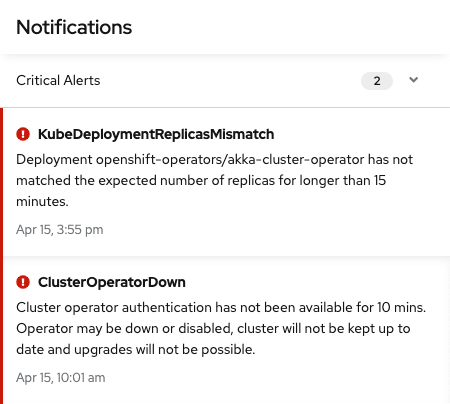
The first section you’ll see when you open the notification drawer is for critical alerts. These are reserved for incidents that are likely having an impact on your customers or may work against your service level agreements. Critical alerts should be addressed as quickly as possible using tools such as the new metrics dashboards to find the source of the problem.

The most common type of notification that you are likely to see are non-critical alerts found under the other alerts section. These are mostly warnings about unusual cluster states that require action in order to resolve. One unique example is the “AlertmanagerReceiversNotConfigured” alert. This alert serves as a reminder to configure your alertmanager. In this case, the notification includes a link directly to the configuration page, saving time.
From time to time, you may see other messages appear in the notification drawer. An available cluster update, for example, will show up in a separate section of the drawer with options to view more information or to start the update.
Targeted Information
The new notification drawer is part of our effort to increase access to useful data and improve the troubleshooting experience in OpenShift. As we add more functionality to the console, expect to see more kinds of actions appear in the notification drawer that make maintaining your cluster a simpler and more pleasant experience. To try out these new features, visit the newly revamped Try OpenShift site to get instant access to a cluster.
If you have features that you’d like to see in the notification drawer let us know here or take this brief 3-minute survey.
저자 소개
유사한 검색 결과
Red Hat 파트너가 최고의 통신 비즈니스 자산인 이유
에이전틱 패러독스와 하이브리드 AI의 필요성
Crack the Cloud_Open | Command Line Heroes
Edge computing covered and diced | Technically Speaking
채널별 검색

오토메이션
기술, 팀, 인프라를 위한 IT 자동화 최신 동향

인공지능
고객이 어디서나 AI 워크로드를 실행할 수 있도록 지원하는 플랫폼 업데이트

오픈 하이브리드 클라우드
하이브리드 클라우드로 더욱 유연한 미래를 구축하는 방법을 알아보세요

보안
환경과 기술 전반에 걸쳐 리스크를 감소하는 방법에 대한 최신 정보

엣지 컴퓨팅
엣지에서의 운영을 단순화하는 플랫폼 업데이트

인프라
세계적으로 인정받은 기업용 Linux 플랫폼에 대한 최신 정보

애플리케이션
복잡한 애플리케이션에 대한 솔루션 더 보기

가상화
온프레미스와 클라우드 환경에서 워크로드를 유연하게 운영하기 위한 엔터프라이즈 가상화의 미래
