
The Ansible 2.5 release includes an additional 13 Azure modules for automators to use in their hybrid cloud journey. We have a goal of making automation as accessible as possible. As part of this goal, we are working with technology partners to bring additional automation know-how to the Ansible blog.
Special thanks to Kylie Liang from the Microsoft Azure DevEx team for giving us a closer look at one of the new Azure module features.
---
Launch an Azure Container Instance
For this blog entry, we wanted to share a step by step guide to using the Azure Container Instance module that has been included in Ansible 2.5.
The Container Instance service is a PaaS offering on Azure that is designed to let users run containers without managing any of the underlying infrastructure. The Ansible Azure Container Instance module allows users to create, update and delete an Azure Container Instance.
Getting Started
For the purposes of this blog, we’ll assume that you are new to Azure and Ansible and want to automate the Container Instance service. This tutorial will guide you through automating the following steps:
- Install Ansible and Docker
- Set up credentials for your Azure modules
- Create an Azure Container Instance with the image from the Azure Container Registry
*Note: This tutorial was created running CentOS 7.4
Install Ansible:
## Install prerequisite packagessudo yum check-update; sudo yum install -y gcc libffi-devel python-devel openssl-devel epel-release
sudo yum install -y python-pip python-wheel
## Install Ansible and Azure SDKs via pipsudo pip install ansible[azure]
Install Docker:
#install docker and start itcurl -fsSL https://get.docker.com/ | shsudo systemctl start docker
#manage Docker as a non-root usersudo usermod -aG docker $USER
Log out and log back in so that your group membership is re-evaluated.
Visit Docker Docs for more information.
#install docker python SDKsudo pip install docker-py
*Note: You don’t need to set up Docker in your environment if you just need to create, update or delete an Azure resource (e.g. Azure Container Instance). Here we setting up Docker for sample, below, which will push a Docker image to Azure Container Registry.
Set up Credential for Azure Modules
Create a service principal on your host computer or cloud shell. az ad sp create-for-rbac --query '{"client_id": appId, "secret": password, "tenant": tenant}'
An example of the output from the preceding commands is as follows:{
"client_id": "eec5624a-90f8-4386-8a87-02730b5410d5",
"secret": "531dcffa-3aff-4488-99bb-4816c395ea3f",
"tenant": "72f988bf-86f1-41af-91ab-2d7cd011db47"
}
To authenticate to Azure, you also need to obtain your Azure subscription ID. az account show --query "{ subscription_id: id }"
Now create a create a credentials file for Ansible on your host computer as follows:mkdir ~/.azurevi ~/.azure/credentials
Enter your own values as follows: [default]
subscription_id=xxxxxxx-xxxx-xxxx-xxxx-xxxxxxxxxxxx
client_id=eec5624a-90f8-4386-8a87-02730b5410d5
secret=531dcffa-3aff-4488-99bb-4816c395ea3f
tenant=72f988bf-86f1-41af-91ab-2d7cd011db47
Visit Microsoft Azure Docs for more information.
Create your Container Instance on Azure
Checkout the sample code, below, and you are ready to go.
git clone: https://github.com/Azure-Samples/ansible-playbooks.gitcd ansible-playbooks
ansible-playbook ACIcreatewithACR.yml
Output from example Ansible Playbook - ACIcreatewithACR.yml:

Note: You may need to run “sudo pip install azure-mgmt-containerinstance==0.3.1” to downgrade container instance API version if you meet error when creating Azure Container Instance.
Azure Portal displays the running container instance:
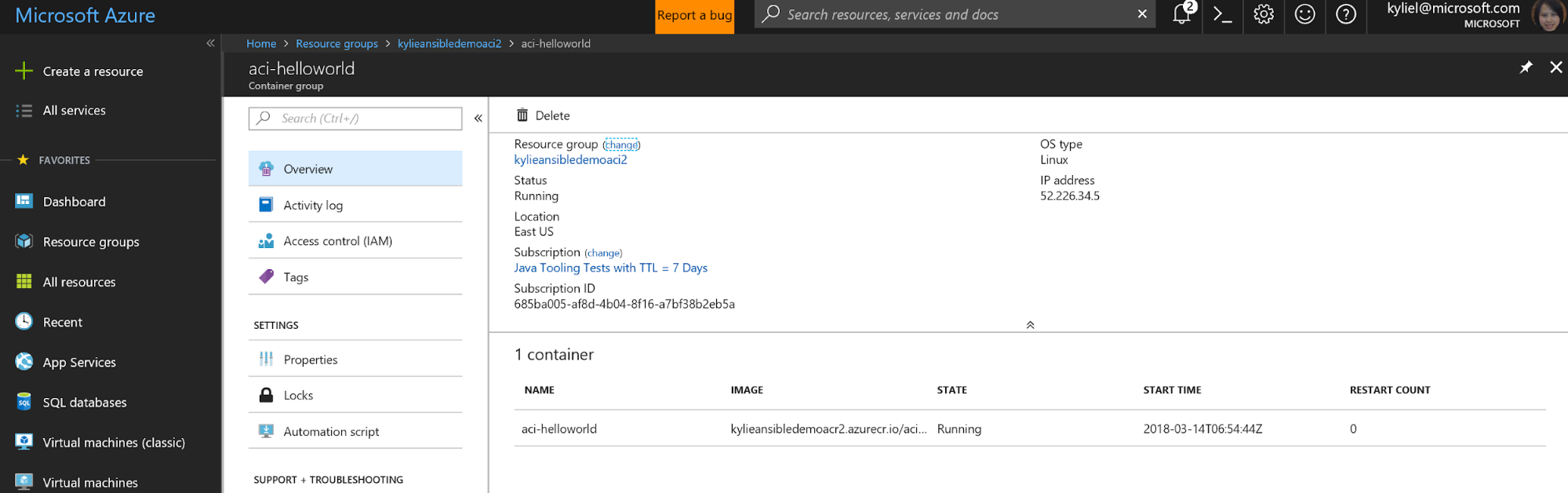
Navigate to the endpoint of the container instance. Confirm the container is running:

Congratulations! You have successfully automated the creation of a container instance in Azure. You can now modify the sample playbook, or write your own playbook leveraging the Container Instance module.
Additional Resources
For general information about using Ansible modules in Azure, visit Ansible Docs.
For additional information around installing Ansible in Azure, visit Azure Docs.
If you want to see more Ansible resources in Azure, consider filing a request or contributing to Ansible GitHub.
The Azure Team is proud to be the largest contributor of Ansible Azure content in the 2.5 release. We want to hear from you. Please try the new 2.5 modules and give us feedback and contact us at: AnsibleonAzure@service.microsoft.com
저자 소개
유사한 검색 결과
신속한 패치 적용이 어려우신가요? 최후의 방어선, 제로 트러스트
Red Hat Enterprise Linux의 이미지 모드를 지금 바로 사용해야 하는 4가지 이유
Scaling with Orchestrators | Compiler
Container Roundup | Compiler
채널별 검색

오토메이션
기술, 팀, 인프라를 위한 IT 자동화 최신 동향

인공지능
고객이 어디서나 AI 워크로드를 실행할 수 있도록 지원하는 플랫폼 업데이트

오픈 하이브리드 클라우드
하이브리드 클라우드로 더욱 유연한 미래를 구축하는 방법을 알아보세요

보안
환경과 기술 전반에 걸쳐 리스크를 감소하는 방법에 대한 최신 정보

엣지 컴퓨팅
엣지에서의 운영을 단순화하는 플랫폼 업데이트

인프라
세계적으로 인정받은 기업용 Linux 플랫폼에 대한 최신 정보

애플리케이션
복잡한 애플리케이션에 대한 솔루션 더 보기

가상화
온프레미스와 클라우드 환경에서 워크로드를 유연하게 운영하기 위한 엔터프라이즈 가상화의 미래
