
Smart Inventory is a feature that was added to Red Hat Ansible Tower 3.2. The feature allows you to generate a new Inventory that is made of up hosts existing in other Inventory in Ansible Tower. This inventory is always-up-to-date and is populated using what we call a host filter. The host filter is a domain specific query language that is a mix of Django Rest Framework GET query language with a JSON query syntax added in. Effectively, this allows you create an Inventory of Hosts and their relational fields as well as related JSON structures.
The ansible_facts field is a related field on a Host that is populated by Job Template runs (Jobs) that have fact caching enabled. Ansible Tower bolts on an Ansible fact cache plugin with Job Template that have fact caching enabled. Job Templates of this kind that run playbooks that invoke Ansible gather_facts will result in those facts being saved to the Ansible Tower database when the Job finishes.
A limitation of the Smart Inventory filter is that it only allows equality matching on ansible_fact JSON data. In this blog post I will show you how to overcome this limitation and add hosts to a Smart Inventory using, for example, a range query on if a host is part of a subnet.
Ansible Tower Objects
Enough talking about it, let's see an example. We are going to have to create objects in Ansible Tower. Specifically, the objects in the table below.
| Resource | Value |
| Organization | Transformers |
| Inventory | Autobots |
| Project | Facts |
| Hosts | optimus, bumblebee, jazz |
| Job Templates | gather, clear, subnet, set_fact_cacheable |
Enable fact cache for all the job templates
1. Fact Cache
Now, let's make something happen. Run the gather job template. Then look at the resulting facts that got gathered in the UI for the Inventory Autobots.

Above is an example of how you view the results from the fact gathering process in the UI. Now let's see how we can create a Smart Inventory from the facts gathered.
2. Our First Smart Inventory
We will create a smart inventory that contains only Red Hat hosts. In my example, optimus and bumblebee are both Red Hat hosts while jazz is an Ubuntu host.
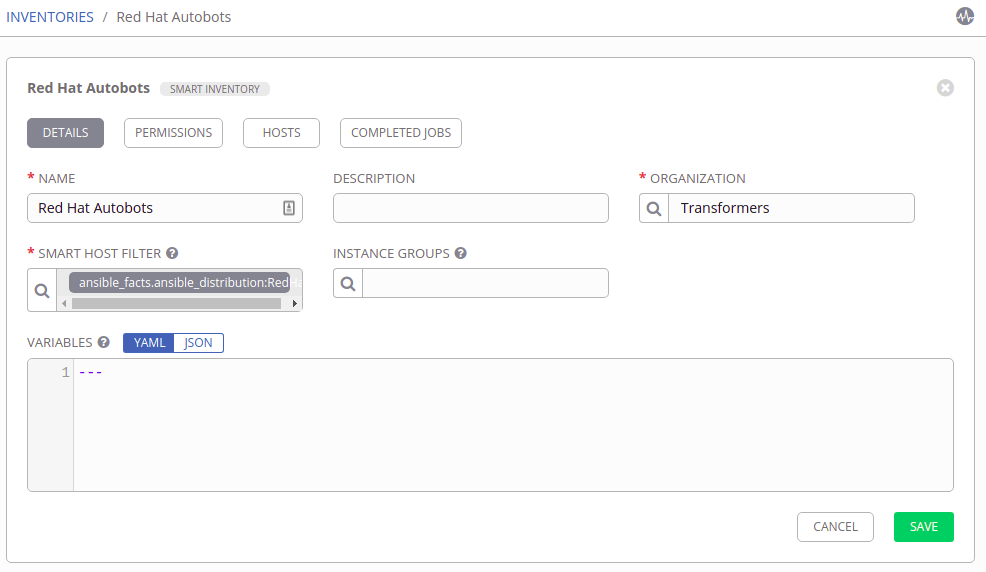
Create a smart inventory with host filter: ansible_facts.ansible_distribution:RedHat
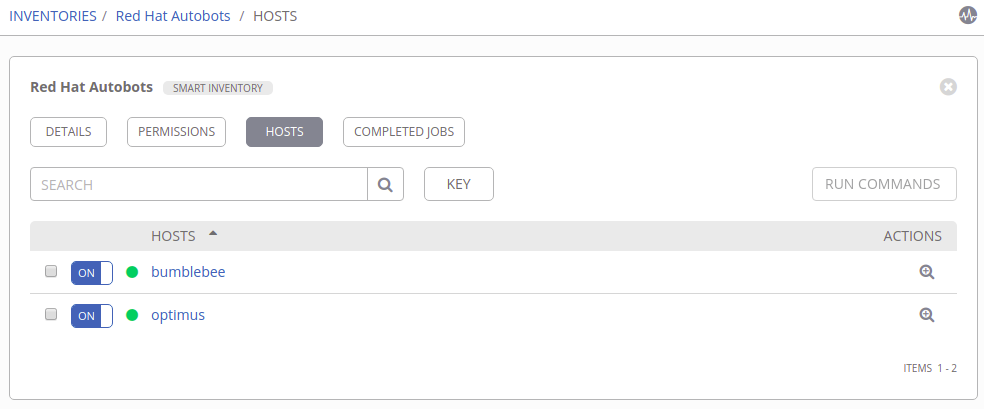
My new smart inventory, Red Hat Autobots, contains 2 hosts (see below image).
3. Inject playbook facts
We are now going to leave the Smart Inventory feature and go back to fact caching. Specifically, I am going to show you how to set_fact in a playbook and have that fact stored in Ansible Tower.
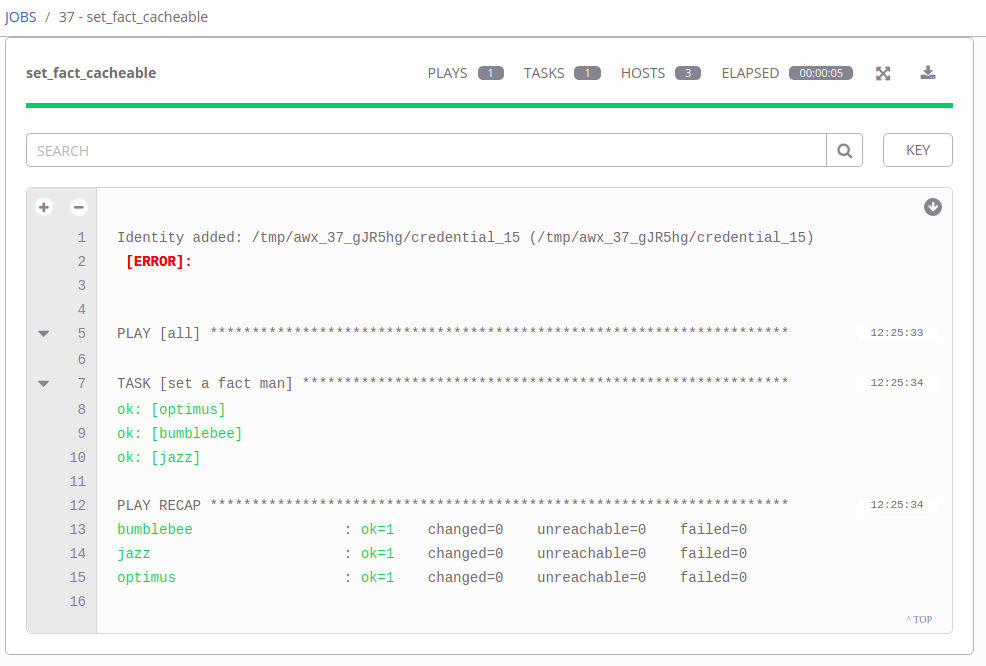
Run the job template set_fact_cacheable. Below is the result of that run.
Now, let's look at the facts for any of the 3 hosts that this playbook ran against. Notice how bumblebee now has a new set of facts (see below image).
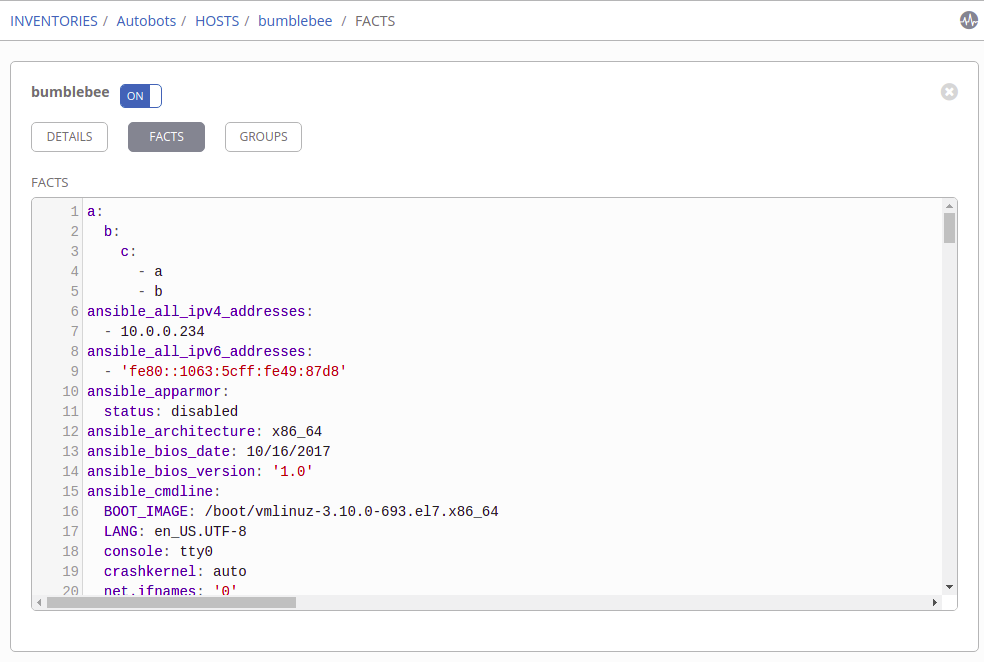
Specifically:
a:
       b:
          c:
            - a
            - b
These facts were set by this playbook which uses the set_fact Ansible module with cacheable: true set.
Create a Smart Inventory
I've showed you all the pieces you are going to need to create a Smart Inventory based on host facts that aren't simple equality matching. The pieces are:
- Fact Cache
- Smart Inventory
- Inject playbook facts
Now I'll show you an example using all these pieces to construct a Smart Inventory of hosts within a subnet. This is a good example because selecting hosts based on subnet is a range query, it is not a simple equality query. Therefore, we are going to need to leverage 3. Inject playbook facts to accomplish creating a Smart Inventory to group these hosts.
The overall goal is to set is_subnet on a host to True if the host is in the desired subnet, or False if the host is not in the subnet. Then, we can construct a Smart Inventory host filter like ansible_facts.is_subnet:true to get hosts in the subnet. The below playbook accomplishes this.
- hosts: all
      vars:
        subnet: '172.18.0.0/16'
      tasks:
        - name: "Presume host to not belong to subnet"
          set_fact:
            is_subnet: False
            cacheable: True
        - name: "Figure out if host belongs to subnet"
          set_fact:
            is_subnet: True
            cacheable: True
          when: ansible_all_ipv4_addresses | ipaddr(subnet)
Future
Currently, all traditional relational database fields on Ansible Tower objects can be used in a Smart Inventory host filter query (i.e. Host name, Inventory name, Organization description, etc); the only JSON searchable field related to Hosts is the ansible_facts field. We hope to expand the searchable JSON fields in the future as well as the operators supported (right now we only support equality). However, much consideration must be given to the performance characteristics as well as the storage requirements in doing so.
저자 소개
유사한 검색 결과
GPU 작업 시간의 가치 최대화: Red Hat OpenShift AI의 진행 상황 추적 기능
글로벌 선도 기업들이 AI에 대한 비전을 비즈니스 가치로 실현하는 방법
How Red Hat cleared IT debt for scalable AI
Virtualization Is (Still) King | Compiler
자세히 알아보기
E-book: 기업 자동화영어 (English) 버전으로 제공됩니다 (한국어 미지원) - 체험: 자기 주도식 핸즈온 랩으로 구성된 Red Hat Ansible Automation Platform
- Red Hat Ansible Automation Platform: 초보자 가이드
채널별 검색

오토메이션
기술, 팀, 인프라를 위한 IT 자동화 최신 동향

인공지능
고객이 어디서나 AI 워크로드를 실행할 수 있도록 지원하는 플랫폼 업데이트

오픈 하이브리드 클라우드
하이브리드 클라우드로 더욱 유연한 미래를 구축하는 방법을 알아보세요

보안
환경과 기술 전반에 걸쳐 리스크를 감소하는 방법에 대한 최신 정보

엣지 컴퓨팅
엣지에서의 운영을 단순화하는 플랫폼 업데이트

인프라
세계적으로 인정받은 기업용 Linux 플랫폼에 대한 최신 정보

애플리케이션
복잡한 애플리케이션에 대한 솔루션 더 보기

가상화
온프레미스와 클라우드 환경에서 워크로드를 유연하게 운영하기 위한 엔터프라이즈 가상화의 미래
