
What does it mean to manage your apps with Red Hat Advanced Cluster Management?
In today's blog post, we are going to show you how Red Hat Advanced Cluster Management can be used for managing your applications across multiple environments, no matter where they are; cloud? on-prem? We've got you covered!
Red Hat Advanced Cluster Management features complete Application Lifecycle capabilities and today we are going to explore some of the GitOps capabilities built in to the product. In order to do so, we will be using the following environment:
NOTE: Pay special attention to the different labels, as they will be used during the blog posts examples.
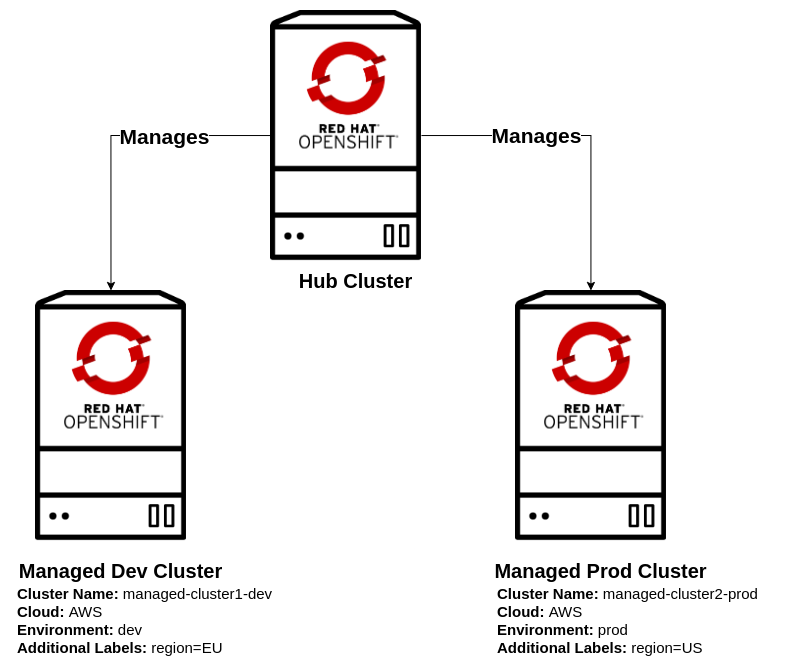
In the diagram, you can see that we will be using 3 OpenShift clusters. Red Hat Advanced Cluster Management uses a hub cluster/managed cluster model for managing the different connected clusters, the hub cluster is where Red Hat Advanced Cluster Management is running, managed clusters are the clusters that are managed by Red Hat Advanced Cluster Management. For the hub cluster, see the following supported products:
| Component | Version |
|---|---|
| Red Hat OpenShift Container Platform | 4.5.7 |
| Red Hat Advanced Cluster Management | 2.0 Fix Pack 2.0.2 |
You can see that our Managed clusters have some labels, whic will be used later for placing our applications across the different environments.
Our managed development cluster is named managed-cluster1-dev and it is deployed in the EU region at AWS. We also have a managed production cluster named managed-cluster2-prod deployed in the US region at AWS.
Application Lifecycle
The possibilities offered by Red Hat Advanced Cluster Management with regards to application lifecycle are plentiful. In this series of blog posts we are going to focus on GitOps capabilities for the following use cases:
- Deploying an application to multiple environments
- Blue-green deployment
- Application migration
- Disaster recovery
First, let's explore some concepts that we will be using during the blog posts:
Channels
Channels point to a physical place where resources are stored for deployment. For this write-up we are going to use Channels of type Git, there are different channel types for Helm, Namespaces, etc.
PlacementRules
You can create and manage placement rules to define where subscriptions to Kubernetes resources and Helm releases are deployed. Use placement rules to help you facilitate multi-cluster deployments of your Kubernetes resources.
Subscriptions
Subscriptions serve as sets of definitions for identifying Kubernetes resources within channels by using annotations, labels, and versions. Subscription resources are defined on the hub and propagated to the managed cluster(s). The subscription controller watches the source location (channel) for new or updated resources. When a new or updated Kubernetes resource is detected, the subscription controller can download the resource directly from the source location (channel) to managed clusters without checking the Hub cluster first (because the subscription was initially propagated).
The subscription can filter the Helm releases to select a specific chart version. For this case, the subscription controller checks the version parameter to identify the Helm release (chart) version to select.
Applications
An Application object provides a way for you to aggregate subscriptions as a group. It provides tooling and a console with a resource that allows for the aggregation and display of all the components in the Application.
Git Repository
GitOps patterns will be followed to deploy our applications, the different manifests required to deploy our applications in the different environments will be stored in a Git repository, the Git structure is defined in the following table:
| Branch | Description |
|---|---|
config |
Stores the base files for our APPs, which apply to every environment |
prod |
Stores the overlay files for our APPs, which apply to production environments |
stage |
Stores the overlay files for our APPs, which apply to staging environments |
NOTE: There are multiple ways to organize the Git repository, Red Hat Advanced Cluster Management won't force you to go one way or another, you can organize the Git repository as it fits you best.
Deploying an application to multiple environments
We are going to explore how Red Hat Advanced Cluster Management can help us to deploy our applications to multiple environments, for this example we have our application, a simple web-service that reverses words. This web-service has two releases, the stage release which is the version our development team is testing at the moment and the production release, which is the version our customers are using.
Red Hat Advanced Cluster Management has Kustomize support, which makes it really easy to configure our applications based on the destination environments.
As previously mentioned, we will use the same application for both environments, but the release will be different depending on which environment the application is being deployed to.
For deploying the applications, we will use the oc tool and a set of yaml manifests with the required configurations for Red Hat Advanced Cluster Management that define a Channel, Subscription, and PlacementRule. Everything we do from the command line can be done from the web console, as well.
In our oc tool, we will have three contexts configured, one for each environment:
| Context | Description |
|---|---|
hub |
CLI Profile connected to the HUB Cluster (where ACM is deployed) |
dev |
CLI Profile connected to the managed development cluster (managed-cluster1-dev) |
pro |
CLI Profile connected to the managed production cluster (managed-cluster2-prod) |
You can learn more about CLI profiles here.
Let's review some of the resources we will be using during this example:
Channel
apiVersion: apps.open-cluster-management.io/v1
kind: Channel
metadata:
  name: acm-app-lifecycle-blog
  namespace: open-cluster-management
spec:
  type: Git
  pathname: https://github.com/RHsyseng/acm-app-lifecycle-blog.git
The Channel we are defining is a Git type Channel that will be used by our subscriptions in order to get the Kubernetes resources that deploy our application.
In this case, it is configured to get the Kubernetes resources from the Git repository at github.com/RHsyseng/acm-app-lifecycle-blog.git.
Namespace
apiVersion: v1
kind: Namespace
metadata:
  name: reverse-words-stage
When using Subscriptions, the namespace holding the Subscription will be propagated to the destination cluster. Here, we are creating a namespace named reverse-words-stage that will be propagated to our development clusters by the Subscription:
PlacementRule
apiVersion: apps.open-cluster-management.io/v1
kind: PlacementRule
metadata:
  name: development-clusters
  namespace: reverse-words-stage
spec:
  clusterConditions:
    - type: "ManagedClusterConditionAvailable"
      status: "True"
  clusterSelector:
    matchExpressions: []
    matchLabels:
      environment: "dev"
The Subscriptions are propagated to a list of clusters returned by a PlacementRule, that means that we need a way to select some clusters from our different environments and make that list available to the different Subscriptions, PlacementRules are used for that.
In this case the PlacementRule named development-clusters will return all clusters which are marked as Available and that match the label environment: dev, in our scenario this PlacementRule will return the managed development cluster named managed-cluster1-dev.
Subscription
apiVersion: apps.open-cluster-management.io/v1
kind: Subscription
metadata:
  name: reversewords-dev-app-subscription
  namespace: reverse-words-stage
  labels:
    app: reversewords-dev-app
  annotations:
    apps.open-cluster-management.io/git-path: apps/reversewords/
    apps.open-cluster-management.io/git-branch: stage
spec:
  channel: open-cluster-management/acm-app-lifecycle-blog
  placement:
    placementRef:
      kind: PlacementRule
      name: development-clusters
In the previous sample, Subscription will take care of deploying a list of Kubernetes resources (obtained from a given Channel) into a list of clusters (obtained from a given PlacementRule). On top of that, we can define where the Kubernetes resources are located within the Git repository (Channel).
This subscription uses the Channel we defined earlier, and will get the Kubernetes resources from the branch stage. Within that branch, it will look for Kubernetes resources in the apps/reversewords/ path.
Application
apiVersion: app.k8s.io/v1beta1
kind: Application
metadata:
  name: reversewords-dev-app
  namespace: reverse-words-stage
spec:
  componentKinds:
  - group: apps.open-cluster-management.io
    kind: Subscription
  descriptor: {}
  selector:
    matchExpressions:
    - key: app
      operator: In
      values:
      - reversewords-dev-app
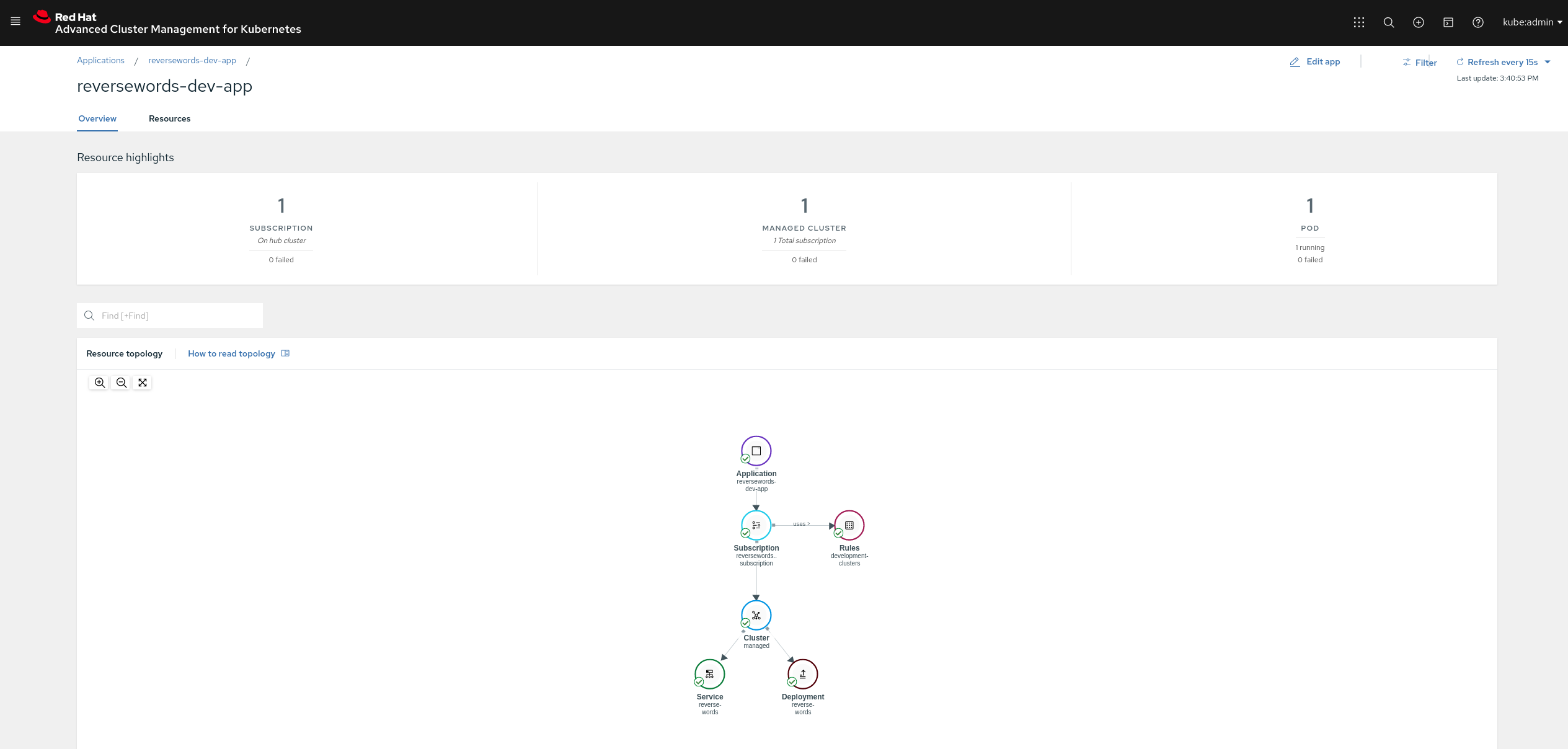
The Application will help us to create a topology view of our applications across the clusters that are managed by Advanced Cluster Management. To do so, the Application matches one or more Subscriptions, which ultimately will create resources in the different clusters so we can trace what was created by whom and where it was created.
NOTE: We have just reviewed the resources we will be using for deploying the application to the
developmentenvironment, feel free to review the rest of resources directly on the GitHub repository as they're pretty similar and self-explanatory.
Deploying the application to the development environment
-
First, we are going to create the
Channeldefinition.oc --context hub create -f https://raw.githubusercontent.com/RHsyseng/acm-app-lifecycle-blog/master/acm-manifests/base/00_channel.yaml -
Next, create a
Namespacefor storing our application manifests.oc --context hub create -f https://raw.githubusercontent.com/RHsyseng/acm-app-lifecycle-blog/master/acm-manifests/reversewords-stage/00_namespace.yaml -
Now create a
PlacementRulethat matches our managed development clusters.oc --context hub create -f https://raw.githubusercontent.com/RHsyseng/acm-app-lifecycle-blog/master/acm-manifests/reversewords-stage/01_placement_rule.yamlSee the following
PlacementRulestatus, note that it matched the managed development cluster namedmanaged-cluster1-dev:oc --context hub -n reverse-words-stage get placementrule development-clusters -o yaml<OMITTED_OUTPUT>
status:
decisions:
- clusterName: managed-cluster1-dev
clusterNamespace: managed-cluster1-dev -
The
Subscriptionand theApplicationcan be created now targeting the development clusters via thePlacementRule.oc --context hub create -f https://raw.githubusercontent.com/RHsyseng/acm-app-lifecycle-blog/master/acm-manifests/reversewords-stage/02_subscription-dev.yaml
oc --context hub create -f https://raw.githubusercontent.com/RHsyseng/acm-app-lifecycle-blog/master/acm-manifests/reversewords-stage/03_application-dev.yamlSee the following
Subscriptionstatus. Note that it sayspropagated, which means the Subscription has been sent to the destination cluster:oc --context hub -n reverse-words-stage get subscription reversewords-dev-app-subscription -o yaml<OMITTED_OUTPUT>
status:
message: Active
phase: Propagated -
Finally, if we look at the development cluster, we will see our application up and running.
oc --context dev -n reverse-words-stage get deployments,services,podsNAME READY UP-TO-DATE AVAILABLE AGE
deployment.extensions/reverse-words 1/1 1 1 73s
NAME TYPE CLUSTER-IP EXTERNAL-IP PORT(S) AGE
service/reverse-words LoadBalancer 172.30.217.208 a84668cb23acf4d109a78b119dfddbef-750551.eu-central-1.elb.amazonaws.com 8080:30053/TCP 73s
NAME READY STATUS RESTARTS AGE
pod/reverse-words-68b9b894dd-jfgpf 1/1 Running 0 73sIf we run the same query against production cluster we will see that there is no application running there
oc --context pro -n reverse-words-stage get deployments,services,podsNo resources found in reverse-words-stage namespace. -
We can now query our application and see that we deployed the staging release:
curl http://$(oc --context dev -n reverse-words-stage get service reverse-words -o jsonpath='{.status.loadBalancer.ingress[0].hostname}'):8080Reverse Words Release: Stage Release v0.0.3. App version: v0.0.3
Deploying the application to the production environment
-
We don't need to create a new
Channel, since we will be using the same source Git repository, but a different branch. -
Create a
Namespacefor storing our application manifests.oc --context hub create -f https://raw.githubusercontent.com/RHsyseng/acm-app-lifecycle-blog/master/acm-manifests/reversewords-prod/00_namespace.yaml -
Now create a
PlacementRulethat matches our production clusters:oc --context hub create -f https://raw.githubusercontent.com/RHsyseng/acm-app-lifecycle-blog/master/acm-manifests/reversewords-prod/01_placement_rule.yamlSee the following
PlacementRulestatus. Note that it matched the managed production cluster named,managed-cluster2-prod.oc --context hub -n reverse-words-prod get placementrule production-clusters -o yaml<OMITTED_OUTPUT>
status:
decisions:
- clusterName: managed-cluster2-prod
clusterNamespace: managed-cluster2-prod -
The
Subscriptionand theApplicationcan be created now targeting the production clusters via thePlacementRule.oc --context hub create -f https://raw.githubusercontent.com/RHsyseng/acm-app-lifecycle-blog/master/acm-manifests/reversewords-prod/02_subscription-pro.yaml
oc --context hub create -f https://raw.githubusercontent.com/RHsyseng/acm-app-lifecycle-blog/master/acm-manifests/reversewords-prod/03_application-pro.yamlSee the following
Subscriptionstatus. Note that it sayspropagated, which means theSubscriptionhas been sent to the destination cluster:oc --context hub -n reverse-words-prod get subscription reversewords-pro-app-subscription -o yaml<OMITTED_OUTPUT>
status:
message: Active
phase: Propagated -
Finally, if we look at the production cluster, we will see our application up and running.
oc --context pro -n reverse-words-prod get deployments,services,podsNAME READY UP-TO-DATE AVAILABLE AGE
deployment.extensions/reverse-words 1/1 1 1 93s
NAME TYPE CLUSTER-IP EXTERNAL-IP PORT(S) AGE
service/reverse-words LoadBalancer 172.30.100.0 a6067d9a2cd904003a1b53b65f9e1cb3-450574743.us-west-2.elb.amazonaws.com 8080:30293/TCP 96s
NAME READY STATUS RESTARTS AGE
pod/reverse-words-7dd94446c-vkzr8 1/1 Running 0 94s -
We can now query our application and see that we deployed the production release.
curl http://$(oc --context pro -n reverse-words-prod get service reverse-words -o jsonpath='{.status.loadBalancer.ingress[0].hostname}'):8080Reverse Words Release: Production release v0.0.2. App version: v0.0.2 -
Now we have different versions of our application, depending on the environment we are deploying to:
# Query development environment
curl http://$(oc --context dev -n reverse-words-stage get service reverse-words -o jsonpath='{.status.loadBalancer.ingress[0].hostname}'):8080
# Query production environment
curl http://$(oc --context pro -n reverse-words-prod get service reverse-words -o jsonpath='{.status.loadBalancer.ingress[0].hostname}'):8080
# Dev Query
Reverse Words Release: Stage Release v0.0.3. App version: v0.0.3
# Pro Query
Reverse Words Release: Production release v0.0.2. App version: v0.0.2
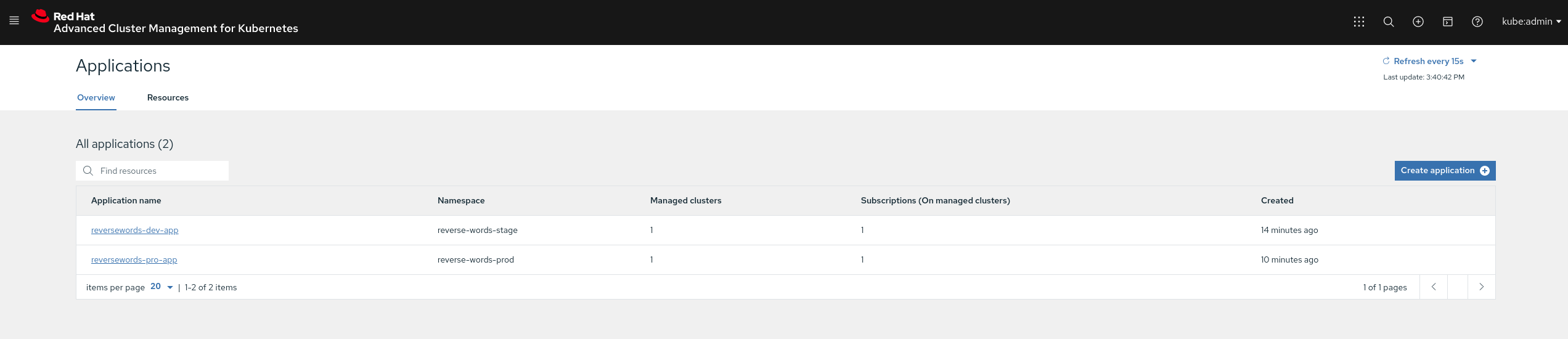
Finally, let's take a look in the web console:
ACM Applications General View
ACM Development Application View
What's next
In the next blog post of this series, we will be demonstrating how blue-green deployments can be performed using Red Hat Advanced Cluster Management and GitOps.
저자 소개
유사한 검색 결과
Red Hat 파트너가 최고의 통신 비즈니스 자산인 이유
에이전틱 패러독스와 하이브리드 AI의 필요성
Crack the Cloud_Open | Command Line Heroes
Edge computing covered and diced | Technically Speaking
채널별 검색

오토메이션
기술, 팀, 인프라를 위한 IT 자동화 최신 동향

인공지능
고객이 어디서나 AI 워크로드를 실행할 수 있도록 지원하는 플랫폼 업데이트

오픈 하이브리드 클라우드
하이브리드 클라우드로 더욱 유연한 미래를 구축하는 방법을 알아보세요

보안
환경과 기술 전반에 걸쳐 리스크를 감소하는 방법에 대한 최신 정보

엣지 컴퓨팅
엣지에서의 운영을 단순화하는 플랫폼 업데이트

인프라
세계적으로 인정받은 기업용 Linux 플랫폼에 대한 최신 정보

애플리케이션
복잡한 애플리케이션에 대한 솔루션 더 보기

가상화
온프레미스와 클라우드 환경에서 워크로드를 유연하게 운영하기 위한 엔터프라이즈 가상화의 미래
