
Sometimes you need to generate multi-line documents with complex nested structures, like YAML or HTML, from inside Bash scripts. You can accomplish this by using some special Bash features, like here documents. A "here doc" is a code or text block that can be redirected to a script or interactive program. Essentially, a Bash script becomes a here doc when it redirects to another command, script, or interactive program.
This article explains how to:
- Use arrays, dictionaries, and counters
- Work with different types of comments
- Generate YAML and HTML documents
- Send emails with text and attachments
[ Download now: A sysadmin's guide to Bash scripting. ]
Documenting a script
It's important to comment your scripts, and you can create single-line comments with a #, or you can have multi-line comments by using the combination of : and <<ANYTAG.
For example:
# This is a simple comment
: <<COMMENT

This is a multi-line comment
Very useful for some complex comments

COMMENT
This help function for your script is another useful example:
#!/bin/bash
SCRIPT=$(/usr/bin/basename $0)|| exit 100
export SCRIPT
function help_me {
    /usr/bin/cat<<EOF

$SCRIPT -- A cool script that names and oh wait...
------------------------------------------------------
$SCRIPT --arg1 \$VALUE --arg2 \$VALUE2

EOF

help_me
}

# To use the help function just call help
help_me
The multi-line format is pretty useful by itself, especially when documenting complex scripts. However, there is a nice twist to using here documents that you may have seen before:
$ /usr/bin/cat<<EOF>$HOME/test_doc.txt
Here is a multi-line document that I want to save.
Note how I can use variables inside like HOME=$HOME.

EOF
Here's what is written in the file:
$ /usr/bin/cat $HOME/test_doc.txt
Here is a multi-line document that I want to save.
Note how I can use variables inside like HOME=/home/josevnz.
Now I'll move to something else so that you can apply this knowledge.
[ For more Bash tips, download this Bash Shell Scripting Cheat Sheet ]
Using arrays and dictionaries to generate an Ansible inventory YAML file
Say you have the following CSV file with a list of hosts on each line containing servers or desktops:
# List of hosts, tagged by group
macmini2:servers
raspberrypi:servers
dmaf5:desktops
mac-pro-1-1:desktops
You want to convert the list to the following Ansible YAML inventory file:
---
all:
  children:
    servers:
      hosts:
        macmini2:
        raspberrypi:
      vars:
        description: Linux servers for the Nunez family
    desktops:
      hosts:
        dmaf5:
        mac-pro-1-1:
      vars:
        description: Desktops for the Nunez family
Extra constraints:
- Each system type (desktops or servers) will have a different variable called
description. Using arrays and associative arrays and counters allows you to satisfy this requirement. - The script should fail if the user doesn't provide all the correct tags. An incomplete inventory is not acceptable. For this requirement, a simple counter will help.
This script accomplishes the goal:
#!/bin/bash
:<<DOC
Convert a file in the following format to Ansible YAML:
# List of hosts, tagged by group
macmini2:servers
raspberrypi:servers
dmaf5:desktops
mac-pro-1-1:desktops
DOC
SCRIPT="$(/usr/bin/basename "$0")"|| exit 100
function help {
    /usr/bin/cat<<EOF
Example:
$SCRIPT $HOME/inventory_file.csv servers desktops
EOF
}

# We could use a complicated if-then-else or a case ... esac
# to handle the tag description logic
# with an Associate Array is very simple
declare -A var_by_tag
var_by_tag["desktops"]="Desktops for the Nunez family"
var_by_tag["servers"]="Linux servers for the Nunez family"

function extract_hosts {
    tag=$1
    host_file=$2
    /usr/bin/grep -P ":$tag$" "$host_file"| /usr/bin/cut -f1 -d':'
    test $? -eq 0 && return 0|| return 1
}
# Consume the host file
hosts_file=$1
shift 1
if [ -z "$hosts_file" ]; then
    echo "ERROR: Missing host file!"
    help
    exit 100
fi

if [ ! -f "$hosts_file" ]; then
    echo "ERROR: Cannot use provided host file: $hosts_file"
    help
    exit 100
fi
# Consume the tags
if [ -z "$*" ]; then
    echo "ERROR: You need to provide one or more tags for the script to work!"
    help
    exit 100
fi
: <<DOC
Generate the YAML
The most annoying part is to make sure the indentation is correct. YAML depends entirely on proper indentation.
The idea is to iterate through the tags and perform the proper actions based on each.
DOC
for tag in "$@"; do # Quick check for tag description handling. Show the user available tags if that happens
    if [ -z "${var_by_tag[$tag]}" ]; then
        echo "ERROR: I don't know how to handle tag=$tag (known tags=${!var_by_tag[*]}). Fix the script!"
        exit 100
    fi
done
/usr/bin/cat<<YAML
---
all:
  children:
YAML
# I do want to split by spaces to initialize my array, this is OK:
# shellcheck disable=SC2207
for tag in "$@"; do
    /usr/bin/cat<<YAML
    $tag:
      hosts:
YAML
    declare -a hosts=($(extract_hosts "$tag" "$hosts_file"))|| exit 100
    host_cnt=0 # Declare your counter
    for host in "${hosts[@]}"; do
        /usr/bin/cat<<YAML
        $host:
YAML
        ((host_cnt+=1)) # This is how you increment a counter
    done
    if [ "$host_cnt" -lt 1 ]; then
        echo "ERROR: Could not find a single host with tag=$tag"
        exit 100
    fi
    /usr/bin/cat<<YAML
      vars:
        description: ${var_by_tag[$tag]}
YAML
done
Here's what the output looks like:
all:
  children:
    servers:
      hosts:
        macmini2:
        raspberrypi:
      vars:
        description: Linux servers for the Nunez family
    desktops:
      hosts:
        dmaf5:
        mac-pro-1-1:
      vars:
        description: Desktops for the Nunez family
A better way could be to create a dynamic inventory and let the Ansible playbook use it. To keep the example simple, I did not do that here.
Sending HTML emails with YAML attachments
The last example will show you how to pipe a here document to Mozilla Thunderbird (you can do something similar with /usr/bin/mailx) to create a message with an HTML document and attachments:
#!/bin/bash
:<<HELP
Please take a look a the following document so you understand the Thunderbird command line below:
http://kb.mozillazine.org/Command_line_arguments_-_Thunderbird
HELP
declare EMAIL
EMAIL=$1
test -n "$EMAIL"|| exit 100
declare ATTACHMENT
test -n "$2"|| exit 100
test -f "$2"|| exit 100
ATTACHMENT="$(/usr/bin/realpath "$2")"|| exit 100
declare DATE
declare TIME
declare USER
declare KERNEL_VERSION
DATE=$(/usr/bin/date '+%Y%m%d')|| exit 100
TIME=$(/usr/bin/date '+%H:%M:%s')|| exit 100
USER=$(/usr/bin/id --real --user --name)|| exit 100
KERNEL_VERSION=$(/usr/bin/uname -a)|| exit 100

/usr/bin/cat<<EMAIL| /usr/bin/thunderbird -compose "to='$EMAIL',subject='Example of here documents with Bash',message='/dev/stdin',attachment='$ATTACHMENT'"

<!DOCTYPE html>
<html>
<head>
<style>
table {
  font-family: arial, sans-serif;
  border-collapse: collapse;
  width: 100%;
}

td, th {
  border: 1px solid #dddddd;
  text-align: left;
  padding: 8px;
}

tr:nth-child(even) {
  background-color: #dddddd;
}
</style>
</head>
<body>
<h2>Hello,</p> <b>This is a public announcement from $USER:</h2>
<table>
  <tr>
    <th>Date</th>
    <th>Time</th>
    <th>Kernel version</th>
  </tr>
  <tr>
    <td>$DATE</td>
    <td>$TIME Rovelli</td>
    <td>$KERNEL_VERSION</td>
  </tr>
</table>
</body>
</html>
EMAIL
Then you can call the mailer script:
$ ./html_mail.sh cooldevops@kodegeek.com hosts.yaml
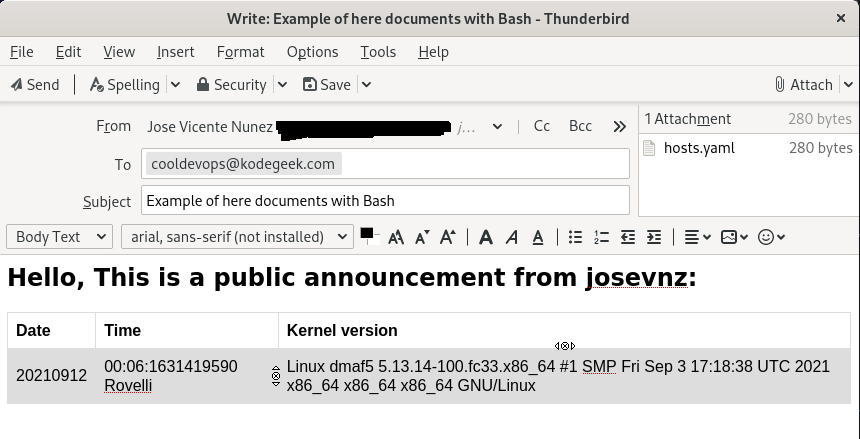
If things go as expected, Thunderbird will create an email like this:
Wrapping up
To recap, you've learned how to:
- Use more sophisticated data structures like arrays and associative arrays to generate documents
- Use counters to keep track of events
- Use here documents to create YAML documents, help instructions, HTML, etc.
- Send emails with HTML and YAML
Bash is OK for generating small, uncomplicated documents. If you're dealing with large or complex documents, you may be better off using another scripting language like Python or Perl to get the same results with less effort. Also, never underestimate the importance of a real debugger when dealing with complex document creation.
저자 소개
Proud dad and husband, software developer and sysadmin. Recreational runner and geek.
유사한 검색 결과
Red Hat OpenShift에서 데이터베이스 워크로드 현대화
지금 바로 시작해야 하는 이유: 금융 서비스를 위한 포스트 양자 보안을 지금 시작해야 하는 이유
Infrastructure At The Edge | Compiler
Operating System Management | Compiler
채널별 검색

오토메이션
기술, 팀, 인프라를 위한 IT 자동화 최신 동향

인공지능
고객이 어디서나 AI 워크로드를 실행할 수 있도록 지원하는 플랫폼 업데이트

오픈 하이브리드 클라우드
하이브리드 클라우드로 더욱 유연한 미래를 구축하는 방법을 알아보세요

보안
환경과 기술 전반에 걸쳐 리스크를 감소하는 방법에 대한 최신 정보

엣지 컴퓨팅
엣지에서의 운영을 단순화하는 플랫폼 업데이트

인프라
세계적으로 인정받은 기업용 Linux 플랫폼에 대한 최신 정보

애플리케이션
복잡한 애플리케이션에 대한 솔루션 더 보기

가상화
온프레미스와 클라우드 환경에서 워크로드를 유연하게 운영하기 위한 엔터프라이즈 가상화의 미래
