
When deploying OpenShift, everyone has to pick whether they want to use OpenShift's integrated registry or bring their own. Let's break down the differences with each option.
Automated Updates
scheduledImageImportMinimumIntervalSeconds setting in the
master config and defaults to 15 mins. For general maintenance, such as security updates, this interval is probably good enough. But for active development, waiting up to 15 mins for a build or deployment to be kicked off will get annoying quickly.
Authentication/Authorization
<span>oc policy add-role-to-group system:image-puller system:serviceaccounts:stage -n qe</span>
And you would probably want to tag the appropriate Image Stream to pull:
<span>oc tag qe/myapp:promote <image_stream_id></span>
Create an image pull secret. Note: Other mechanisms to specify the secret are available.
oc secrets new <pull_secret_name> .dockercfg=<path/to/.dockercfg>
Then link that secret to the default service account. Note: There is a separate link action required for builds.
oc secrets link default <pull_secret_name> --for=pull
Manually import the tag and image metadata. Note: It's also possible to query external registries at a scheduled interval.
oc import-image <image_stream_name>[:<tag>] --from=<registry:port> --confirm
Image Pruning
Another big advantage of using OpenShift's integrated registry is image pruning. OpenShift has the ability to prune images based on lack of references (including individual image layers), age, and size. This feature might not be super critical if you are only using containers as a production deployment mechanism because you might not mind keeping every version ever published. But for most pre-production use cases, especially development scenarios, automated pruning is probably a requirement.
User Interface
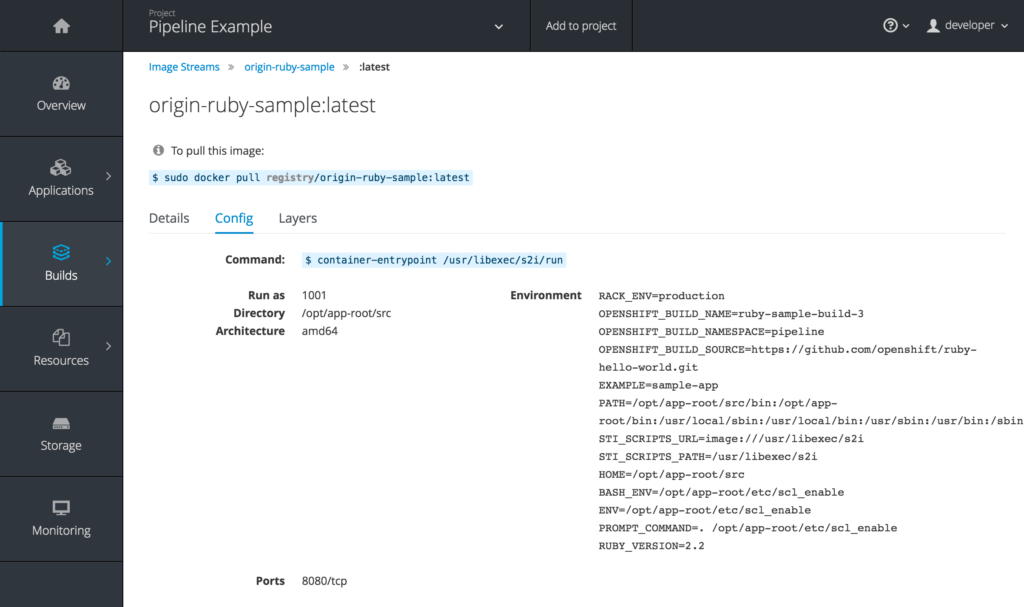
Obviously every registry interface is going to have its own advantages. But UI was probably the biggest weakness for the OpenShift registry before OCP 3.3. OpenShift previously took the approach of providing a registry but not really highlighting it. That's all changing with 3.3 as the image details, including helpful hints about how to interact with images directly, are being exposed.
What to Choose?
If you haven't already picked a registry, there are a lot of reasons to use the one provided by OpenShift. Even if you already have another registry for production use cases, it might still make sense to use the OpenShift registry for all your pre-production, or at least pre-stage, scenarios. Any environment with a large number of users or projects under active development will certainly benefit greatly from the tight integration.
저자 소개
유사한 검색 결과
Red Hat OpenShift 4.22가 엔터프라이즈 AI의 수익성에 미치는 영향
Red Hat 파트너가 최고의 통신 비즈니스 자산인 이유
Crack the Cloud_Open | Command Line Heroes
Edge computing covered and diced | Technically Speaking
채널별 검색

오토메이션
기술, 팀, 인프라를 위한 IT 자동화 최신 동향

인공지능
고객이 어디서나 AI 워크로드를 실행할 수 있도록 지원하는 플랫폼 업데이트

오픈 하이브리드 클라우드
하이브리드 클라우드로 더욱 유연한 미래를 구축하는 방법을 알아보세요

보안
환경과 기술 전반에 걸쳐 리스크를 감소하는 방법에 대한 최신 정보

엣지 컴퓨팅
엣지에서의 운영을 단순화하는 플랫폼 업데이트

인프라
세계적으로 인정받은 기업용 Linux 플랫폼에 대한 최신 정보

애플리케이션
복잡한 애플리케이션에 대한 솔루션 더 보기

가상화
온프레미스와 클라우드 환경에서 워크로드를 유연하게 운영하기 위한 엔터프라이즈 가상화의 미래
