
There are multiple articles about GitOps describing how to use ArgoCD with Kustomize to configure multiple clusters or environments. They show a nice way to apply some kustomizations, but when you try you implement it in your organization, you’ll probably face the following “How can I” challenges:
- Dynamically add new clusters?
- Use templating (replace vars) in an easy way?
- Add any custom configuration to any of the clusters?
- Specify the configuration I want to add to each cluster?
Maybe you also read a cool post about creating a kustomize plugin. But organizations don’t want to rely on a custom plugin which is not supported. And the answer to all these questions is a really nice combination: ApplicationSets + Helm + Kustomize.
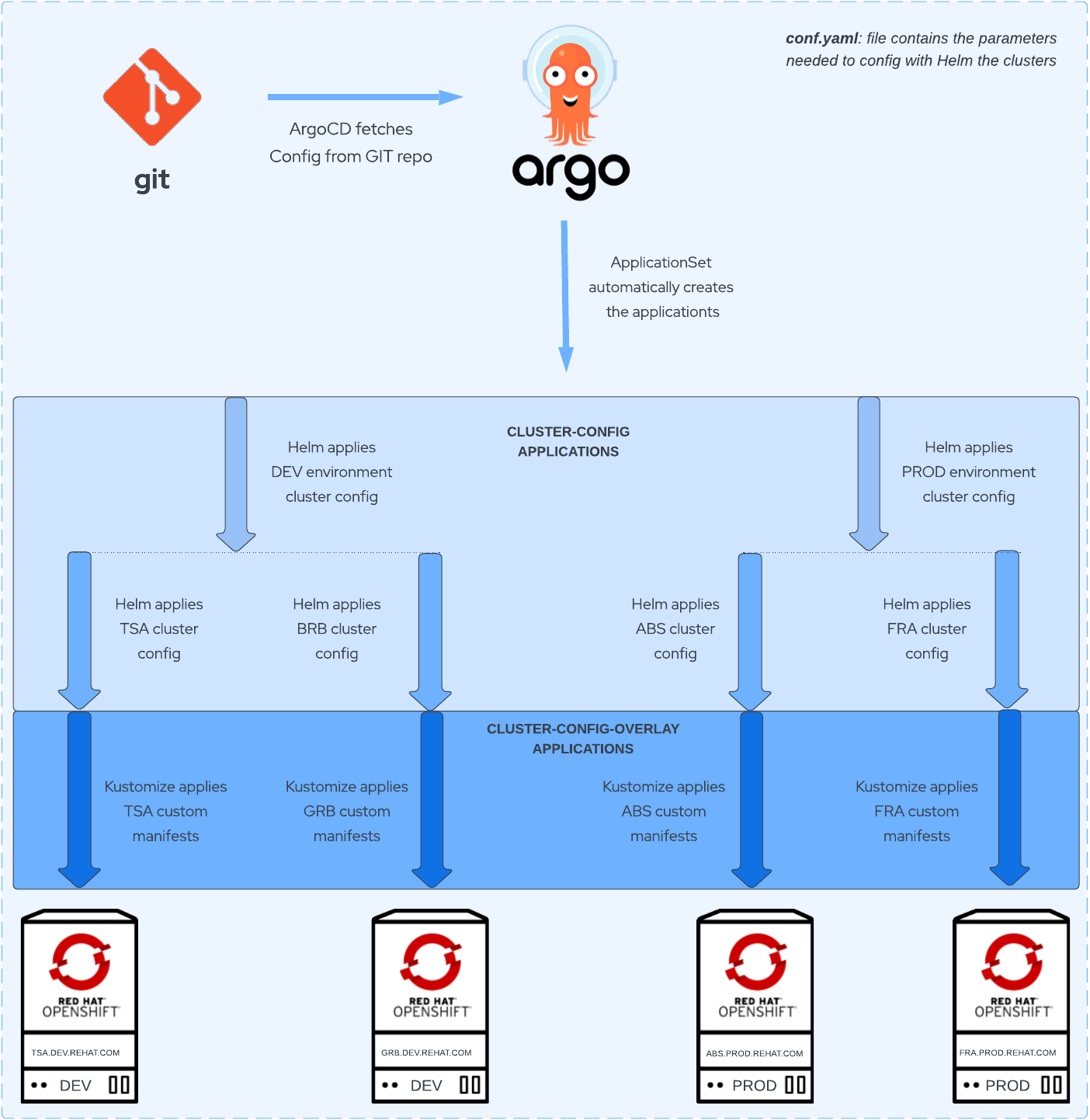
The big picture of this solution is:
- Create an ApplicationSet which auto generates Helm Applications to configure the clusters
- Leverage Helm templating to define all the configuration templates
- Define conditional blocks in each template to control what templates can be included in which cluster
- Create an ApplicationSet which auto generate kustomize Applications to add any overlay
- Patch, add other configurations using kustomize
Note: Creating only an ApplicationSet with a plugin of kustomize+Helm can be an alternative solution, however that would duplicate the same kustomization overlay to all the Cluster applications. So it’s better to have an ApplicationSet for all the configurations based on templates, and an ApplicationSet for the kustomization for each cluster.
Cluster-config ApplicationSet
With an ApplicationSet, we can automate the generation of Argo CD Applications, which will be the placeholders for each of our cluster configurations.
This is the ApplicationSet we’ll use in this solution to configure the clusters using Helm templates:
apiVersion: argoproj.io/v1alpha1
kind: ApplicationSet
metadata:
 name: cluster-config
 namespace: openshift-gitops
spec:
 generators:
   - matrix:
       generators:
         - git:
             repoURL: https://github.com/albertogd/gitops-for-organizations.git
             revision: main
             files:
               - path: "clusters/**/conf.yaml"
         - list:
             elements:
               - template: openshift-machine-config
               - template: openshift-ingress
               - template: openshift-marketplace
 template:
   metadata:
     name: "config-{{cluster.environment}}-{{cluster.name}}-{{template}}"
     labels:
       environment: "{{cluster.environment}}"
       cluster: "{{cluster.fqdn}}"
       region: "{{cluster.region}}"
       cloud: "{{cluster.cloud}}"
   spec:
     project: default
     source:
       repoURL: https://github.com/albertogd/gitops-for-organizations.git
       targetRevision: main
       path: base/config/{{template}}
       helm:
         valueFiles:
           - /conf/{{cluster.environment}}/conf.yaml
           - /clusters/{{cluster.environment}}/{{cluster.fqdn}}/conf.yaml
     destination:
       server: "{{cluster.address}}"
     syncPolicy: {}
Generator
There are several generators, but we’ll use a combination of 2 generators to show the power and flexibility of applicationset generators: git and list.
- With the git generator, we get all the conf.yaml objects. Each of them defines a cluster.
- With the list generator, we define all the argo Applications we have for each cluster. Each configuration type will become an Application.
With the matrix generator, we create all the list elements for each cluster. For example, for the cluster salamanca.pre.redhat.com, we’ll have 3 Argo Applications:
- openshift-machine-config application for the cluster
- openshift-ingress application for the cluster
- openshift-marketplace application for the cluster
Template
In the template section, we define the Applications that will be created by the ApplicationSet:
- metadata:
- name: ArgoCD Application name
config-{{cluster.environment}}-{{cluster.name}} -{{template}}
- name: ArgoCD Application name
- spec:
- source:
- path: Helm chart path
base/config/{{template}} - helm: type of the application
- valueFiles: configuration files with the parameters of the cluster
/conf/{{cluster.environment}}/conf.yaml/clusters/{{cluster.environment}}/{{cluster.fqdn}}/conf.yaml
- valueFiles: configuration files with the parameters of the cluster
- repoURL: URL of the git repository
- path: Helm chart path
- destination:
- server: the API address of the cluster
{{cluster.address}}
- server: the API address of the cluster
- source:
Cluster-config-overlay ApplicationSet
This is the ApplicationSet we’ll use in this solution to apply the overlay configuration (all the configuration not based on templates) using kustomize:
apiVersion: argoproj.io/v1alpha1
kind: ApplicationSet
metadata:
 name: cluster-config-overlays
 namespace: openshift-gitops
spec:
 generators:
 - git:
     repoURL: https://github.com/albertogd/gitops-for-organizations.git
     revision: main
     files:
       - path: "clusters/**/conf.yaml"
 template:
   metadata:
     name: "config-{{cluster.environment}}-{{cluster.name}}-overlay"
     labels:
       environment: "{{cluster.environment}}"
       cluster: "{{cluster.fqdn}}"
       region: "{{cluster.region}}"
       cloud: "{{cluster.cloud}}"
   spec:
     project: default
     source:
       repoURL: https://github.com/albertogd/gitops-for-organizations.git
       targetRevision: main
       path: clusters/{{cluster.environment}}/{{cluster.fqdn}}/overlay
     destination:
       server: "{{cluster.address}}"
     syncPolicy: {}
Generator
With the git generator, we get all the conf.yaml objects. Each of them defines an Application for each cluster.
Template
In the template we define the Applications that will be created by the ApplicationSet:
- metadata:
- name: ArgoCD Application name
config-{{cluster.environment}}-{{cluster.name}}-overlay
- name: ArgoCD Application name
- spec:
- source:
- path: cluster overlay path
clusters/{{cluster.environment}}/{{cluster.fqdn}}/overlay - repoURL: URL of the git repository
- path: cluster overlay path
- destination:
- server: the API address of the cluster
{{cluster.address}}
- server: the API address of the cluster
- source:
Git repository structure
There are 3 main directories:
- base: all the Helm templates are stored in this directory. It has two subfolders:
- config: we create a directory for each Chart (ArgoCD Application). In the example, we have the machine-config, oauth and
- provision: we have one openshift-provisioning application. This application is the one defined in the first part of provisioning Openshift clusters.
- clusters: the orchestrator, defined in the first part, will write the objects conf.yaml and provision.yaml in the subdirectory . For the acm-hub, we’ll keep the configuration of the own ACM cluster:
- applications: app-argocd, the initial argo, to synchronize all the cluster configuration
- applicationsets: 3 applicationsets
cluster-config-overlays.yaml: cluster-config ApplicationSet for kustomize applicationscluster-config.yaml: cluster-config ApplicationSet for Helm applicationscluster-provisioning.yaml: cluster-provisioning ApplicationSet for ACM cluster provisioning
- argocd: ArgoCD instance
- gitops-cluster: objects to register ManagedClusters in ArgoCD
GitOpsCluster.yaml: GitOpsCluster object to register the ManagedClusters to ArgoCDManagedClusterSetBinding.yaml: Binding for the ClusterSetPlacement.yaml: Placement to select ManagedClusters
- policies: policies used to configure the ManagedClusters
- conf: here we’ll keep the default values (
conf.yamlandprovision.yaml) for each environment (dev, pre and pro).
├── base
│   ├── config
│   |   ├── openshift-ingress
│   |   |   ├── Chart.yaml
│   |   |   └── templates
│   |   |       ├── ingress.yaml
│   |   |       └── service.yaml
│   |   ├── openshift-machine-config
│   |   |   ├── Chart.yaml
│   |   |   └── templates
│   |   |       ├── 05-worker-kernelarg-selinuxpermissive.yaml
│   |   |       └── master-kubeletconfig.yaml
│   |   └── openshift-marketplace
│   |       ├── Chart.yaml
│   |       └── templates
│   |           ├── local-certified-operators.yaml
│   |           └── local-community-operators.yaml
│   └── provision
│       └── openshift-provisioning
│           ├── Chart.yaml
│           └── templates
│               ├── clusterdeployment.yaml
│               ├── klusteraddonconfig.yaml
│               ├── machinepool.yaml
│               ├── managedcluster.yaml
│               ├── managedclusterinfo.yaml
│               └── namespace.yaml
├── clusters
│   ├── acm-hub
│   │   ├── applications
│   |   |   ├── app-argocd.yaml
│   |   |   └── kustomization.yaml
│   │   ├── applicationsets
│   |   |   ├── cluster-config-overlays.yaml
│   |   |   ├── cluster-config.yaml
│   |   |   ├── cluster-provisioning.yaml
│   |   |   └── kustomization.yaml
│   │   ├── argocd
│   |   |   ├── argocd.yaml
│   |   |   └── kustomization.yaml
│   │   ├── gitops-cluster
│   |   |   ├── GitOpsCluster.yaml
│   |   |   ├── ManagedClusterSetBinding.yaml
│   |   |   ├── Placement.yaml
│   |   |   └── kustomization.yaml
│   │   └── policies
│   |       └── 4.11
│   │           ├── odf-operator
│   │           |   ├── binding-odf-operator-411.yaml
│   │           |   ├── kustomization.yaml
│   │           |   ├── placement-odf-operator-411.yaml
│   │           |   └── policy-odf-operator-411.yaml
│   │           └── upgrade-ocp
│   │               ├── binding-upgrade-cluster-411.yaml
│   │               ├── kustomization.yaml
│   │               ├── placement-upgrade-cluster-411.yaml
│   │               └── policy-upgrade-cluster-411.yaml
│   ├── dev
│   │   └── zamora.dev.redhat.com
│   |       ├──  provision.yaml
│   |       ├──  conf.yaml
│   |       └──  overlay
│   |            ├── kustomization.yaml
│   |            └── project.yaml
│   └── pre
│       └── salamanca.pre.redhat.com
│           ├──  provision.yaml
│           ├──  conf.yaml
│           └──  overlay
│
└── conf
    ├── dev
    │   ├── conf.yaml
    │   └── provision.yaml
    └── pre
        ├── conf.yaml
        └── provision.yaml
Initial ArgoCD application
There are multiple ways of bootstrapping all the configuration: using a policy, creating an Argo Application… If we have another cluster with ArgoCD, we can synchronize all the configurations from there using OpenShift GitOps. However, we’re considering in this solution that we’re starting from 0, and we have only the ACM hub cluster. In this case, we need to create the initial application manually. After this, this initial application will be synchronized with ArgoCD
$ oc apply -f clusters/acm-hub/applications/app-argocd.yaml
Why 2 ApplicationSets instead of using a custom plugin of Helm + Kustomize
Before explaining about Helm + Kustomize, let’s start with the feature we want:
- Base manifest templates:
- Common manifest to apply to all the clusters (i.e. machine-config template)
- Be able to include/exclude any base manifest (i.e. exclude oauth template)
- Custom manifests per cluster:
- Be able to add any custom manifest to a specific cluster (i.e. add an Ingress)
- Default values per environment:
- Have a default configuration file per environment (i.e. development configuration)
- Custom values per cluster
- Have a custom configuration file per cluster
- Avoid any custom/unsupported plugin
With Kustomize, it’s really easy to add kustom manifests, but it’s a tool for templating. Yes, you can add a Kustomize plugin to do the templating. But let’s not forget, this is about “GitOps for organizations”, and we want something OOB supported. And kustomize is not a templating tool OOB. But Helm is a templating engine. With helm we have a really powerful templating engine, but we don’t have the flexibility to add custom manifests as with Kustomize.
So, why don’t we use the templating feature of Helm with one ApplicationSet, and the flexibility to add customizations with Kustomize with other ApplicationSet?
Helm Templates
Helm is a really powerful tool for templating. We’ll define templates for all the objects we need to create, using the vars defined in the default environment config (config//conf.yaml) and in the own cluster (clusters//conf.yaml). The cluster variables will override environment variables.
Kustomize
We can add any kustomization we want for each cluster using kustomize. We’ll use the folder overlay to add any custom objects we want.
Cluster Lifecycle with ACM policies
For the cluster lifecycle, we’ll use ACM policies, which are stored in the policies folder in the git repository under clusters/acm-hub.
└── clusters
    └── acm-hub
        └── policies
            └── 4.11
                ├── odf-operator
                |   ├── binding-odf-operator-411.yaml
                |   ├── kustomization.yaml
                |   ├── placement-odf-operator-411.yaml
                |   └── policy-odf-operator-411.yaml
                └── upgrade-ocp
                    ├── binding-upgrade-cluster-411.yaml
                    ├── kustomization.yaml
                    ├── placement-upgrade-cluster-411.yaml
                    └── policy-upgrade-cluster-411.yaml
Policies are stored in the git repository, synchronized with ArgoCD and applied by ACM.
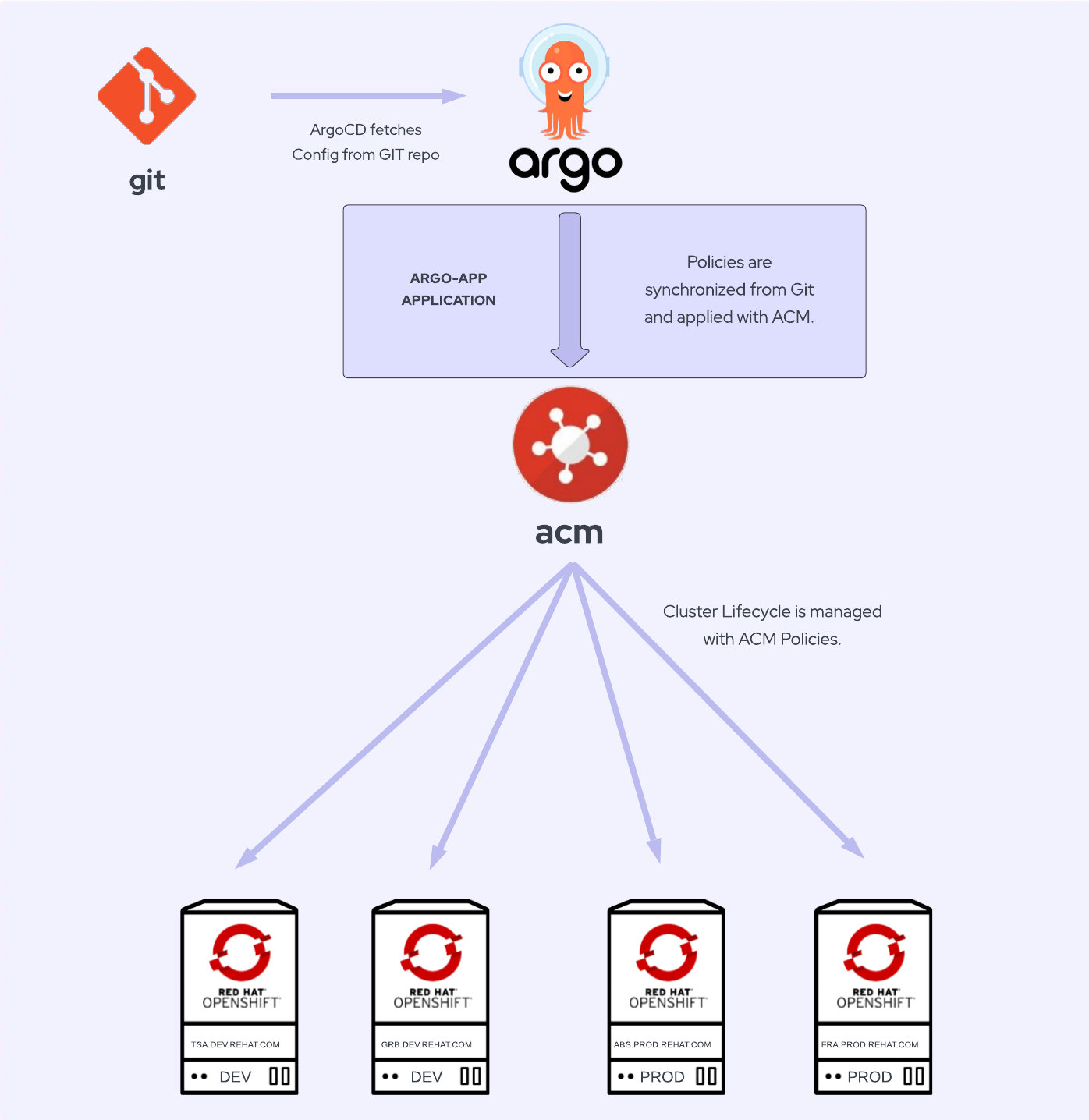
In this repository there are many policy examples for Access Control, Audit and Accountability, Security Assessment and Authorization, Configuration Management…
Operators
Installing operators using ArgoCD can be tricky, as they need to resolve dependencies and it’s not. There are some workarounds like using a Job. But in this solution we’re using a much better approach: ACM policies. With an ACM policy we can enforce any cluster to have the operators we want.
Operators can be installed using a policy like this one which is used to install the Compliance Operator.
Cluster upgrades
As we are doing with operators, we can use this policy to set the version we want for any cluster.
Return to the first part: Provisioning Openshift clusters using GitOps with ACM
Return to the Introduction: GitOps for organizations: provisioning and configuring Openshift clusters automatically
저자 소개
Alberto Gonzalez de Dios is a Senior Cloud consultant: Automation and OpenShift specialist. He joined Red Hat in 2018, and he is certified in Azure, AWS and Red Hat (Red Hat Certified Architect Level II).
유사한 검색 결과
Red Hat 파트너가 최고의 통신 비즈니스 자산인 이유
에이전틱 패러독스와 하이브리드 AI의 필요성
The Agile_Revolution | Command Line Heroes
DevOps_Tear Down That Wall | Command Line Heroes
채널별 검색

오토메이션
기술, 팀, 인프라를 위한 IT 자동화 최신 동향

인공지능
고객이 어디서나 AI 워크로드를 실행할 수 있도록 지원하는 플랫폼 업데이트

오픈 하이브리드 클라우드
하이브리드 클라우드로 더욱 유연한 미래를 구축하는 방법을 알아보세요

보안
환경과 기술 전반에 걸쳐 리스크를 감소하는 방법에 대한 최신 정보

엣지 컴퓨팅
엣지에서의 운영을 단순화하는 플랫폼 업데이트

인프라
세계적으로 인정받은 기업용 Linux 플랫폼에 대한 최신 정보

애플리케이션
복잡한 애플리케이션에 대한 솔루션 더 보기

가상화
온프레미스와 클라우드 환경에서 워크로드를 유연하게 운영하기 위한 엔터프라이즈 가상화의 미래
