
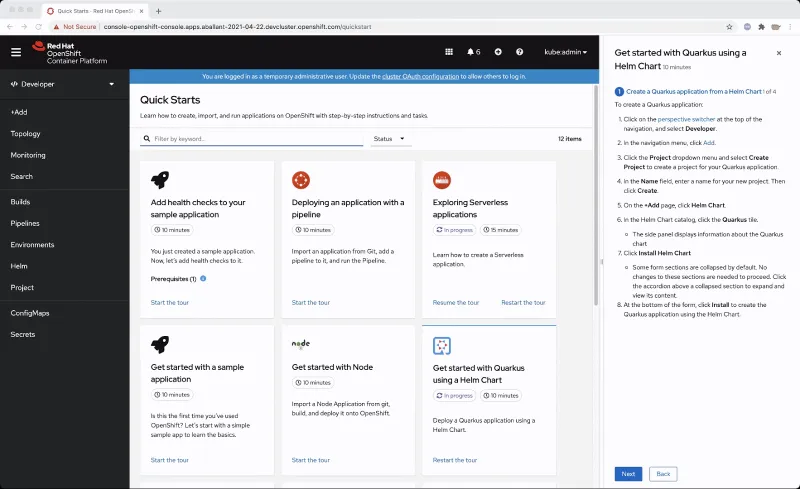
Navigation hints are tips that are featured in some quick starts to point to parts of the navigation.
After quick starts were initially added to OpenShift in 4.7, we saw the need to make the quick starts more integrated and interactive with the UI. We wanted to make it easier to figure out what areas of the UI a quick start might point you towards to complete a quick start.
That’s where the idea to add navigation hints came from. With navigation hints, users who have less OpenShift experience are able to get more familiarized with OpenShift’s navigation and layout.
If a quick start features a navigation hint, it will appear as a link in the quick start. You can click on the link to reveal the navigation hint which will appear as a blue rectangle around the navigation touch point. The navigation hint will go through a subtle animation cycle to point out where the navigation point is. Navigation hints are static and are always accessible from the quick start.
If you are writing a custom quick start, adding navigation hints is a great way to customize it.
Adding navigation hints to your quick starts:
- Introduces users to new parts of the UI that they might not have known about before.
- Points out navigation elements in an interactive way.
- Provides more context and support to the user while they complete a quick start.
If you’re interested in adding navigation hints to your quick start, consult this list of navigation elements that are currently supported as navigation hints:
- Perspective switcher
- Navigations elements in the administrator perspective such as:
- Home
- Operators
- Workloads
- Serverless
- Networking
- Storage
- Service catalog
- Compute
- User management
- Administration
- Navigations elements in the developer perspective such as:
- Add
- Topology
- Search
- Project
- Helm
- Navigation elements in both perspectives such as:
- Builds
- Pipelines
- Monitoring
- Masthead elements such as:
- CloudShell
- Utility menu
- User menu
- Applications
- Import
- Help
- Notifications
Try It Out
If you’d like to try this new feature, or if you’re just getting started with OpenShift, visit Try OpenShift to get instant access to a cluster.
And, as always, we want to connect with users like you. Learn more about what the OpenShift design team is up to on our OpenShift Design site, and be sure to catch us on the OpenShift Twitch channel.
저자 소개
유사한 검색 결과
에이전틱 패러독스와 하이브리드 AI의 필요성
과거의 운영 방식에서 벗어나 IT의 미래 구축
Edge computing covered and diced | Technically Speaking
Crack the Cloud_Open | Command Line Heroes
채널별 검색

오토메이션
기술, 팀, 인프라를 위한 IT 자동화 최신 동향

인공지능
고객이 어디서나 AI 워크로드를 실행할 수 있도록 지원하는 플랫폼 업데이트

오픈 하이브리드 클라우드
하이브리드 클라우드로 더욱 유연한 미래를 구축하는 방법을 알아보세요

보안
환경과 기술 전반에 걸쳐 리스크를 감소하는 방법에 대한 최신 정보

엣지 컴퓨팅
엣지에서의 운영을 단순화하는 플랫폼 업데이트

인프라
세계적으로 인정받은 기업용 Linux 플랫폼에 대한 최신 정보

애플리케이션
복잡한 애플리케이션에 대한 솔루션 더 보기

가상화
온프레미스와 클라우드 환경에서 워크로드를 유연하게 운영하기 위한 엔터프라이즈 가상화의 미래
