
When managing infrastructure, there are times when a dynamic inventory is essential. Kubernetes is a perfect example of this where you may create multiple applications within a namespace but you will not be able to create a static inventory due to Kubernetes appending a systems-generated string to uniquely identify objects.
Recently, I decided to play with using a Kubernetes dynamic inventory to manage pods, but finding the details on how to use and apply it was a bit scarce. As such, I wanted to write a quick start guide on how you can create an Ansible Playbook to retrieve your pods within a namespace and generate a Kubernetes dynamic inventory.
This is much easier to do when you take advantage of the kubernetes.core.k8s_info module.
In my example, I’m going to take advantage of using my existing ansible-automation-platform namespace that has a list of pods to create my dynamic inventory. In your scenario, you’d apply this to any namespace you wish to capture a pod inventory from.
When creating your inventory, the first step is to register the pods found within a particular namespace. Here’s an example of a task creating an inventory within the ansible-automation-platform namespace:

While this task would capture every pod within that namespace, you could further target specific pods using the label_selectors as such:

This would target only the automation controller pods from within my ansible-automation-platform namespace.
Once the pods are registered, take your list and use the add_host module to dynamically add those pods to your inventory. One key piece from this add_host module is that I’ve included the ansible_kubectl_namespace var within the task. When adding pods to your host list, you need to provide their namespace, because without adding this variable it assumes the namespace is the default namespace.
NOTE: If you want to use kubernetes connection plugin parameters, you need to prefix ansible_ to them. In this example, I used the kubectl_namespace and prefixed ansible to get ansible_kubectl_namespace.

And there you have it! Now your pods have been added to your inventory dynamically in a group labeled “pods”.
Now with your dynamically built inventory, you can run tasks against this pod inventory. Since this inventory is built at run-time, you’d want to have a playbook with multi plays similar to this example:
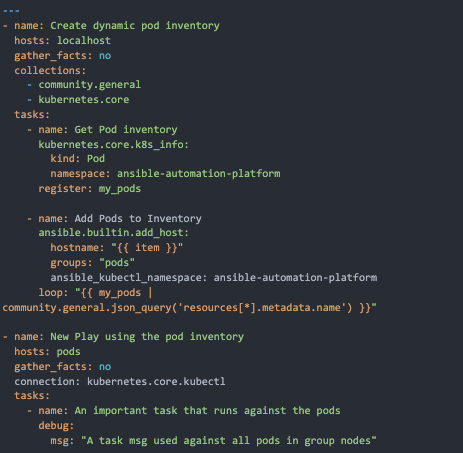
NOTE: In the second play labeled "New Play using the pod inventory" there is a connection: kubernetes.core.kubectl. This allows for the run of command on the pods and for that you need this connection plugin.
And there it is! One method of creating an inventory of your pods that you can then run tasks against.
What can I do next?
Whether you are beginning your automation journey or are a seasoned veteran, there are a variety of resources to enhance your automation knowledge:
- AnsibleFest 2022 - Come hang out with myself, and more importantly the automation mesh guru Craig Brandt, my friend and colleague who knows everything there is to know about automation mesh in Chicago October 18-19, 2022.
- Self-paced exercises - Check out our interactive, in-browser exercises to learn and dive into Ansible Automation Platform
- Subscribe to the Red Hat Ansible Automation Platform YouTube channel. Be sure to check out our web series, Automated Live hosted by Colin McNaughton.
- Follow Red Hat Ansible Automation Platform on Twitter and myself @Lopez - Do you have questions or an automation project you want to show off? Tweet at us!
저자 소개
유사한 검색 결과
AI 에이전트 프레임워크만으로는 충분하지 않은 이유: 프로덕션 환경에서 누락된 7가지 플랫폼 기능
Red Hat Ansible 올스타: 네트워크 및 인프라 자동화의 미래를 주도합니다
Random Acts Of Automation | Compiler
How Red Hat cleared IT debt for scalable AI
채널별 검색

오토메이션
기술, 팀, 인프라를 위한 IT 자동화 최신 동향

인공지능
고객이 어디서나 AI 워크로드를 실행할 수 있도록 지원하는 플랫폼 업데이트

오픈 하이브리드 클라우드
하이브리드 클라우드로 더욱 유연한 미래를 구축하는 방법을 알아보세요

보안
환경과 기술 전반에 걸쳐 리스크를 감소하는 방법에 대한 최신 정보

엣지 컴퓨팅
엣지에서의 운영을 단순화하는 플랫폼 업데이트

인프라
세계적으로 인정받은 기업용 Linux 플랫폼에 대한 최신 정보

애플리케이션
복잡한 애플리케이션에 대한 솔루션 더 보기

가상화
온프레미스와 클라우드 환경에서 워크로드를 유연하게 운영하기 위한 엔터프라이즈 가상화의 미래
