
GnuPG, also known as GPG, can be used to encrypt files for confidentiality or sign files for integrity and authenticity. This article explores the minimum commands needed to encrypt a file or check a signature.
What is GnuPG and where is it used?
GnuPG, is a tool that is compliant with the OpenPGP Internet standard described in RFC4880 and which is used for secure communication and data storage. It has a robust key management system and integrates easily with other applications. In addition to encrypting and signing data, it provides support for S/MIME and Secure Shell (ssh).
Package repositories are mirrored around the world. Digital signatures are used to ensure that you get an exact copy from the original packager and not a malicious version from a compromised site. OpenPGP programs such as GPG are used to sign and verify those packages.
Local disk encryption protects data at rest for your powered-off laptop. However, to make sure that only the intended recipient can open a file you send by email or drop into a shared folder, you need to encrypt that individual file. The TLS certificates used with email or web-based drop boxes only protect the transfer on the wire. OpenPGP products can encrypt a file with a shared symmetric key or with asymmetric key pairs.
How do I install GnuPG?
Most Linux distributions already have GnuPG installed, and the current version will likely use GnuPG 2.0 by default.
$ yum list gnupg*
Installed Packages
gnupg2.x86_64              2.2.18-2.fc31    @updates
gnupg2-smime.x86_64        2.2.18-2.fc31    @updates
Available Packages
gnupg-pkcs11-scd.x86_64    0.9.2-1.fc31     updates
gnupg1.x86_64              1.4.23-9.fc31    fedora
The installed binary is likely named gpg, but because of the recent version changes, you may want to check that as well.
$ ls -l $(which gpg gpg2 gpg1)
/usr/bin/which: no gpg1 in ...
-rwxr-xr-x. 1 root root 1085608 Dec  6 04:02 /usr/bin/gpg
lrwxrwxrwx. 1 root root       3 Dec  6 04:02 /usr/bin/gpg2 -> gpg
Early adopters of version 2.0 needed to use a gpg2 binary. Now that version 1.0 is considered obsolete, users of that older version may need to use a binary called gpg1. On my current Fedora and RHEL 8 systems, gpg2 is a symbolic link to gpg, which is the main binary.
The first time you run any gpg command, a configuration directory and keyring will be created in your home directory. For example, if you run gpg --list-keys to display keys you may see the following message:
$ gpg --list-keys
gpg: directory '/home/bestuser/.gnupg' created
gpg: keybox '/home/bestuser/.gnupg/pubring.kbx' created
gpg: /home/bestuser/.gnupg/trustdb.gpg: trustdb created
Encrypt and decrypt a file with a shared secret
Simply having GnuPG installed is enough to encrypt or decrypt a file with a shared secret. To specify symmetric encryption, use the -c or --symmetric option and pass the file you wish to encrypt. You are prompted to enter and reenter a passphrase for the encrypted file.
$ gpg -c sample1.txtThe default is to create the encrypted file with a gpg extension added to the original filename.
$ file foo*
sample1.txt:     ASCII text
sample1.txt.gpg: GPG symmetrically encrypted data (AES cipher)
You can use the -o or --output option to specify a specific output filename.
To decrypt the file, use the -d or --decrypt option.
$ gpg -d sample1.txt.gpg
gpg: AES encrypted data
gpg: encrypted with 1 passphrase
Demo for GnuPG bestuser
The default is to display the contents to standard out and leave the decrypted file in place. Use the -o or --output option to specify an output file, especially when the contents are a data file. Additionally, GnuPG tries to use its cached passwords to decrypt before prompting for the shared secret. The cache is based on a message-specific salt value, but you can use the --no-symkey-cache option to have gpg skip the cache.
This encrypted file can now be sent to a remote location. Determining how to share the passphrase to decrypt it is a separate issue.
Working with public keys
Because sharing secrets can be insecure and simply does not scale well, files for a specific recipient are often encrypted with the recipient's public key. Only the holder of the private key can then decrypt the file. To send a file encrypted with a recipient's public key, you must first import that public key. Public keys are also used to verify signatures.
Import a public key
If the recipient has provided the key in an email or on their website, you can download the file and use the --import option. For example, if you are reporting a security vulnerability or working on a CVE with a company, their security team probably has a key posted on their contact page.
$ gpg --import dce3823597f5eac4.txt
gpg: key DCE3823597F5EAC4: public key "Red Hat, Inc. (Product Security) <secalert@redhat.com>" imported
gpg: Total number processed: 1
gpg:               imported: 1
I can list the fingerprint of the key and compare it to the web site to see if I already have the correct key.
$ gpg --fingerprint
/home/bestuser/.gnupg/pubring.kbx
---------------------------------
pub   rsa4096 2017-10-31 [SC]
      77E7 9ABE 9367 3533 ED09  EBE2 DCE3 8235 97F5 EAC4
uid           [ unknown] Red Hat, Inc. (Product Security) <secalert@redhat.com>
sub   rsa4096 2017-11-01 [E]
Encrypt a file with a recipient's public key
Use the -e or --encrypt option to encrypt a file. If you do not specify the recipient on the command line with the -r or --recipient option, you are prompted to specify the user ID. The email address is often the easiest way to specify the user ID.
$ gpg -e -r secalert@redhat.com sample2.txtYou are shown the key ID and fingerprint, and you may be asked to confirm the usage of the key if the gpg utility cannot verify any signatures on the key.
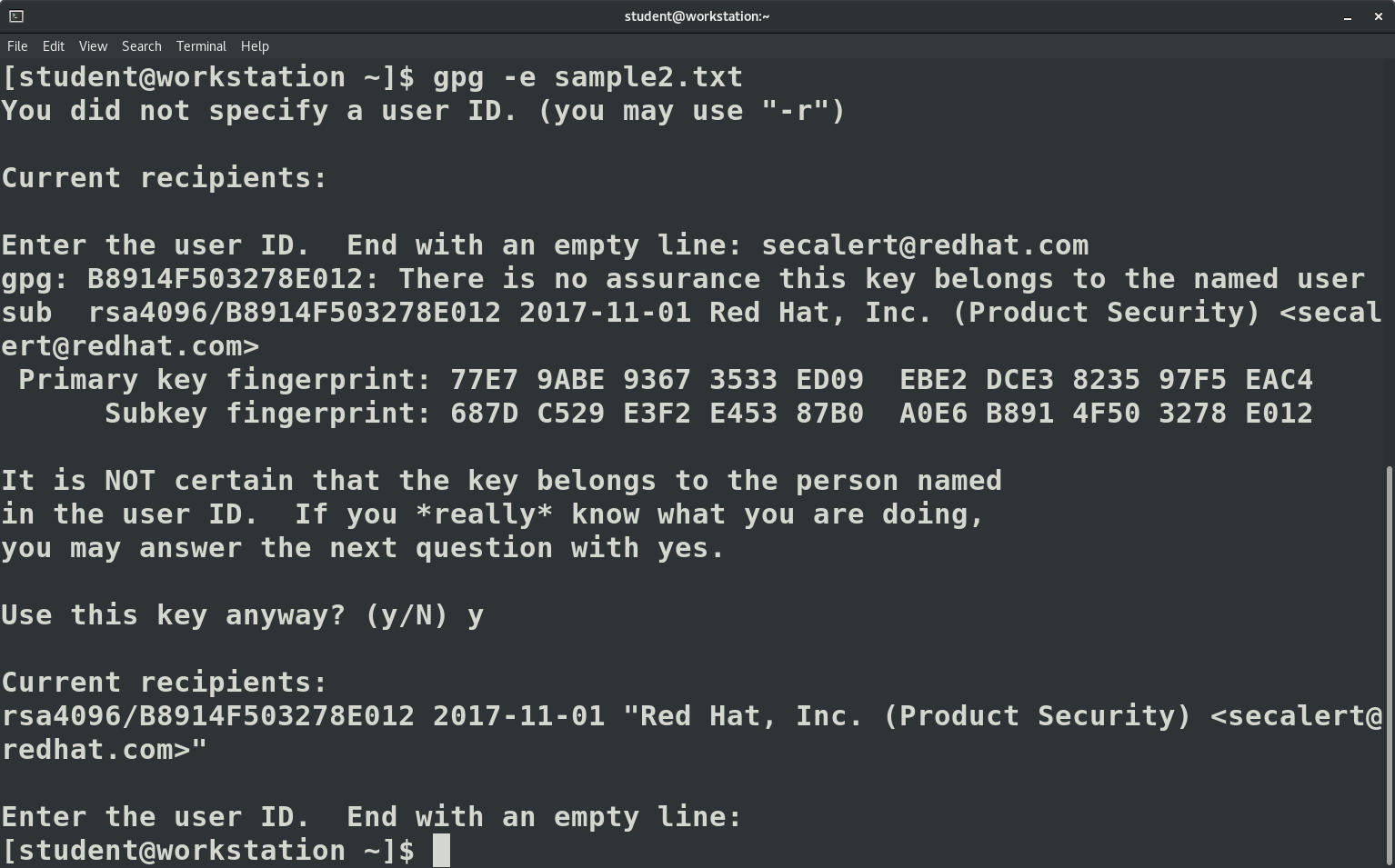
Like with symmetric encryption, the output file has a gpg extension.
$ file bar*
sample2.txt:     ASCII text
sample2.txt.gpg: PGP RSA encrypted session key - keyid: 504F91B8 12E07832 RSA (Encrypt or Sign) 4096b .
Check a signature
Sometimes it is not the confidentiality of the message or file that is an issue, but rather the authenticity. An email or a package file can be digitally signed with a private key and later verified with the public key. Fedora provides CHECKSUM files to verify downloads and signs those files with the Fedora GPG key, as documented on their security page.
After importing the GPG key, I can check the signature of the CHECKSUM file using the -v or --verify option.
$ gpg -v Fedora-Workstation-31-1.9-x86_64-CHECKSUM
gpg: Signature made Fri 25 Oct 2019 09:09:48 AM EDT
gpg:                using RSA key 50CB390B3C3359C4
gpg: Good signature from "Fedora (31) <fedora-31-primary@fedoraproject.org>" [unknown]
gpg: WARNING: This key is not certified with a trusted signature!
gpg:          There is no indication that the signature belongs to the owner.
Primary key fingerprint: 7D22 D586 7F2A 4236 474B  F7B8 50CB 390B 3C33 59C4
The message indicates a "Good signature" but warns that gpg cannot validate the key used for the signature. If I trust the fingerprint provided and the source of the key, then I can trust the file contents are what Fedora released, even if I obtained the CHECKSUM file from an unknown mirror site.
Wrap up
In this article, we started using GnuPG to encrypt or verify a file. In a future article, I will walk through creating a key that others can use to send you confidential files.
[ Check out the IT security and compliance checklist. ]
저자 소개
Susan Lauber is a Consultant and Technical Trainer with her own company, Lauber System Solutions, Inc. She has over 25 years of experience working with Information Systems and specializes in Open Source technologies, specifically platform and data center installation, interoperability, automation, and security.
Susan is always an open source advocate and ambassador of projects she follows. She contributes to projects mostly by way of documentation and QA processes. She has contributed to Fedora Magazine and Opensource.com and is the author of "Linux Command Line Complete Video Course" (2016, Prentice Hall).
Susan is an independent instructor for several companies and holds an alphabet of certifications in those products. She is also a Certified Information Systems Security Professional (CISSP) and a Certified Technical Trainer (CTT). She has been a Red Hat Certified Instructor since 1999 and a co-author and contributor to several Red Hat Training student guides.
Follow her on twitter @laubersm to see what she is reading. Posts include a variety of technology topics as well as some travel, animals, sports, and other randomness.
유사한 검색 결과
기업 속도의 새로운 가치 기준
오픈소스 방어 계층 강화: Red Hat, NVIDIA와 함께 Open Secure AI Alliance 합류
Can Compliance Be A Piece Of Cake? | Compiler
Collaboration In Product Security | Compiler
채널별 검색

오토메이션
기술, 팀, 인프라를 위한 IT 자동화 최신 동향

인공지능
고객이 어디서나 AI 워크로드를 실행할 수 있도록 지원하는 플랫폼 업데이트

오픈 하이브리드 클라우드
하이브리드 클라우드로 더욱 유연한 미래를 구축하는 방법을 알아보세요

보안
환경과 기술 전반에 걸쳐 리스크를 감소하는 방법에 대한 최신 정보

엣지 컴퓨팅
엣지에서의 운영을 단순화하는 플랫폼 업데이트

인프라
세계적으로 인정받은 기업용 Linux 플랫폼에 대한 최신 정보

애플리케이션
복잡한 애플리케이션에 대한 솔루션 더 보기

가상화
온프레미스와 클라우드 환경에서 워크로드를 유연하게 운영하기 위한 엔터프라이즈 가상화의 미래
