

In a previous article, we walked you through crafting a user-friendly chatbot, harnessing the power of Azure OpenAI's advanced GPT models and the robust infrastructure of Microsoft Azure Red Hat OpenShift. Building on your previous exploration of deploying AI chatbots with Microsoft Azure and Red Hat OpenShift, you're now ready for GitOps.
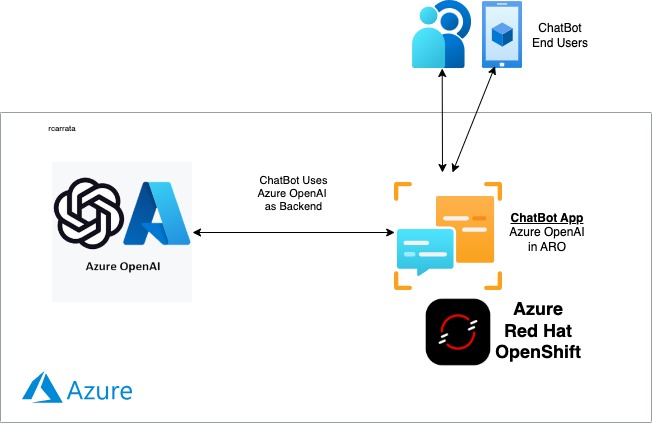
This time around, we show you how to enhance your project by integrating GitOps into your workflow. GitOps offers a streamlined approach to project management using Git, simplifying updates, fostering collaboration, and helping to smooth operations. It's all about bringing more structure, security, and ease of management to your chatbot project:
Streamlined updates and rollbacks: With GitOps, every change to your chatbot's configuration and deployment process is tracked in a Git repository. You can update the chatbot or roll it back to a previous version with the simplicity of a Git commit. It's like having a time machine for your project, making updates and fixes faster and safer.
Enhanced collaboration: GitOps uses tools and practices that developers are already familiar with, such as pull requests. This encourages team members to review and discuss changes before they're applied, contributing to higher quality code and more innovative solutions.
Consistent environments: By defining your infrastructure and deployment processes as code stored in Git, you can have consistency across every environment, from development to production. This eliminates the "it works on my machine" problem, making deployments predictable and reducing surprises.
Improved security and compliance: With everything tracked in Git, you have a complete audit trail of changes, updates, and deployments. This not only enhances security because you can quickly identify and revert unauthorized changes, it also simplifies steps to compliance with regulatory requirements.
Automated workflows: GitOps automates the deployment process. Once a change is merged into the main branch, it's automatically deployed to your environment in Azure Red Hat OpenShift. This reduces the risk of human error and frees up your developers to focus on improving the chatbot instead of managing deployments.
Scalability and reliability: GitOps practices, combined with the power of Azure OpenAI and Azure Red Hat OpenShift, makes it easy to scale your chatbot to handle more users. The infrastructure can automatically adjust to demand, ensuring that your chatbot remains responsive and reliable even during peak times.
By integrating GitOps into your AI chatbot project, you're not just building a more capable chatbot — You're creating a more efficient, collaborative, and secure development life cycle. This approach means that your chatbot can evolve rapidly to meet users' needs while maintaining high standards of quality and reliability.
Prerequisites
To more seamlessly integrate your AI chatbot within the Azure Red Hat OpenShift environment using the power of GitOps, it's important that all prerequisites are in place and deployment steps are followed meticulously.
Before diving into the deployment process, your setup should meet the following conditions:
- Azure Subscription: An active subscription to access Azure resources and services
- Azure OpenAI Service: Access to Azure OpenAI services, including the necessary API keys for integration with the ChatBot
- Azure CLI: Installed and configured to communicate with your Azure resources
- Azure Red Hat OpenShift: Cluster deployed
Bootstrap Red Hat OpenShift GitOps / ArgoCD
GitOps relies on a declarative approach to infrastructure and application management, using Git as the single source of truth. To initialize OpenShift GitOps (powered by ArgoCD) in your environment, follow these steps:
Clone the Git repository containing the necessary GitOps configuration files for the ChatBot demo:
Apply the bootstrap configuration to your cluster. This initializes the OpenShift GitOps operator and sets up ArgoCD, preparing your cluster for the ChatBot deployment:
$ until kubectl apply -k bootstrap/base/; do sleep 2; done |
Deploy the AI chatbot in Azure Red Hat OpenShift with GitOps
With the prerequisites out of the way, you're now ready to deploy the chatbot application. The GitOps methodology automates the application deployment by referencing configurations stored in a Git repository. This approach leads to greater consistency, reproducibility, and traceability for your deployments.
- Deploy the chatbot application: Use the following command to apply the Kubernetes manifests from the gitops/ directory. These manifests describe the necessary resources and configurations for running the chatbot app on your Azure Red Hat OpenShift cluster through OpenShift GitOps and ArgoCD.
$ kubectl apply -k gitops/ |
This command triggers the OpenShift GitOps tooling to process the manifests, setting up the underlying infrastructure and the chatbot application itself.
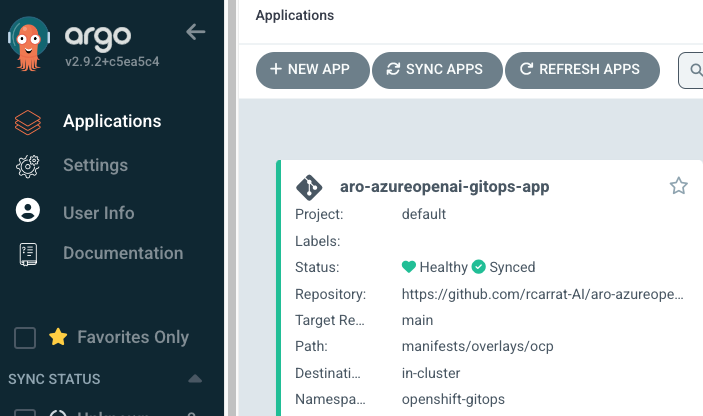
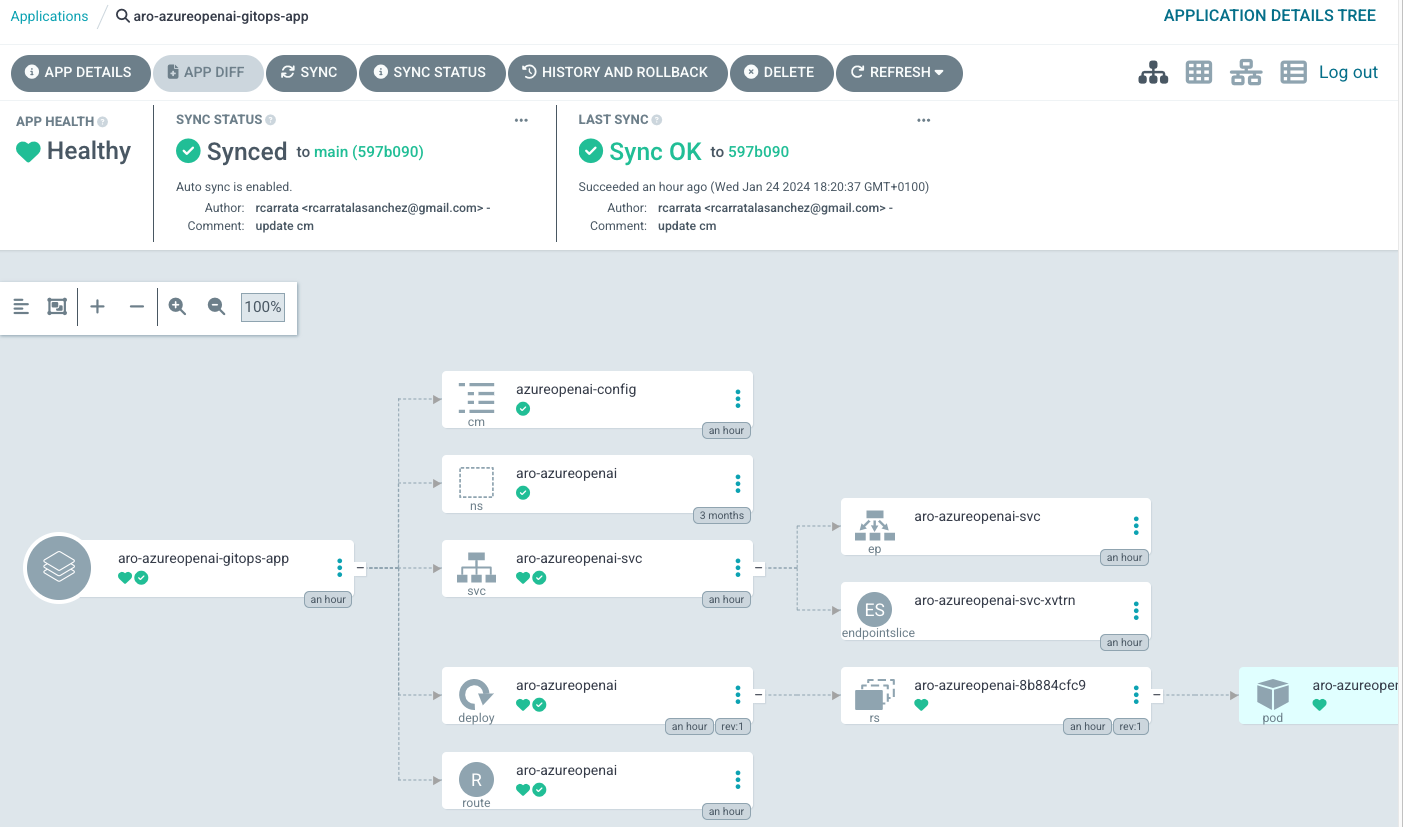
- Verify deployment: After applying the command, monitor the deployment process within the ArgoCD dashboard. There, you see resources being created and the application status transitioning to Healthy once everything is successfully deployed.
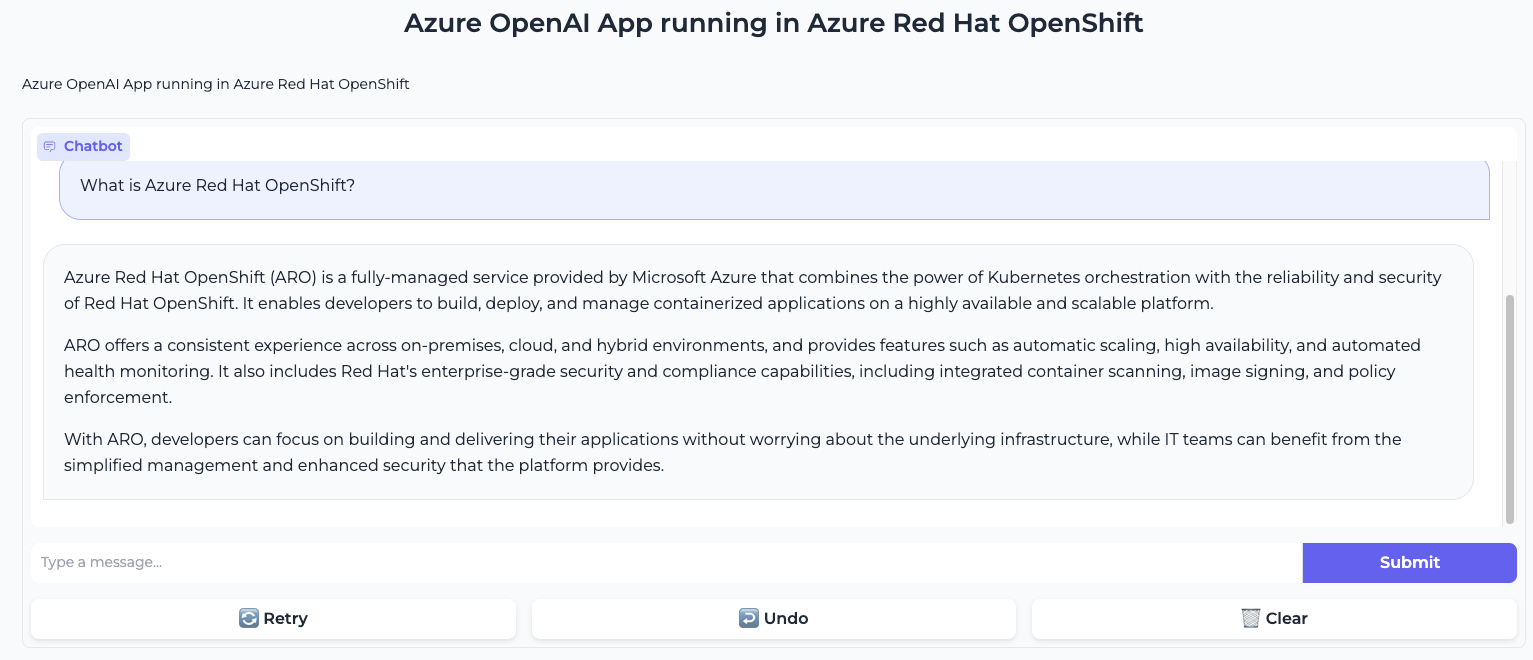
- Access the chatbot application: Once deployed, the chatbot is accessible through a URL exposed by an Azure Red Hat OpenShift route. You can find this URL in the OpenShift console under the Routes section of your project.
Conclusion
By following these steps, you’ve successfully deployed an AI chatbot application in Azure Red Hat OpenShift using a GitOps workflow. This approach not only simplifies the deployment process, but also enhances the manageability and scalability of your application, enabling your chatbot to evolve and grow within the dynamic Azure and OpenShift ecosystem.
저자 소개
Roberto is a Principal AI Architect working in the AI Business Unit specializing in Container Orchestration Platforms (OpenShift & Kubernetes), AI/ML, DevSecOps, and CI/CD. With over 10 years of experience in system administration, cloud infrastructure, and AI/ML, he holds two MSc degrees in Telco Engineering and AI/ML.
Courtney started at Red Hat in 2021 on the OpenShift team. With degrees in Marketing and Economics and certificates through AWS and Microsoft she is passionate about cloud computing and product marketing.
유사한 검색 결과
AI 에이전트 프레임워크만으로는 충분하지 않은 이유: 프로덕션 환경에서 누락된 7가지 플랫폼 기능
asago 소개: 오픈소스 AI 안전 및 거버넌스 오케스트레이션
Can agentic AI patch the internet?
How Red Hat cleared IT debt for scalable AI
채널별 검색

오토메이션
기술, 팀, 인프라를 위한 IT 자동화 최신 동향

인공지능
고객이 어디서나 AI 워크로드를 실행할 수 있도록 지원하는 플랫폼 업데이트

오픈 하이브리드 클라우드
하이브리드 클라우드로 더욱 유연한 미래를 구축하는 방법을 알아보세요

보안
환경과 기술 전반에 걸쳐 리스크를 감소하는 방법에 대한 최신 정보

엣지 컴퓨팅
엣지에서의 운영을 단순화하는 플랫폼 업데이트

인프라
세계적으로 인정받은 기업용 Linux 플랫폼에 대한 최신 정보

애플리케이션
복잡한 애플리케이션에 대한 솔루션 더 보기

가상화
온프레미스와 클라우드 환경에서 워크로드를 유연하게 운영하기 위한 엔터프라이즈 가상화의 미래
