
References:
GitOps is the way to do Kubernetes or OpenShift cluster management through declarative management of API manifests (yaml files) rather than configuration drifting.
There are many posts on OpenShift blog talking about Vault Integration:
- Managing Secrets on OpenShift - Vault Integration
- Vault Integration Using Kubernetes Authentication Method
- Integrating Vault with Legacy Applications
- Integrating Hashicorp Vault in OpenShift 4
But there are other options and possibilities out there in the community, so in this post, we will explore a couple of options for secret management the GitOps way:
The code and scripts referred in this blog can be found at:
https://github.com/rahmed-rh/oc4-learn/tree/master/secret-managment
Using bitnami-labs Sealed Secrets
The idea is to Encrypt your Secret into a Sealed Secret, which is safe to store even in public repos as it is encrypted.
So your normal GitOps workflow is not impacted, you will store Sealed Secret yaml files rather than the standard secret yaml files. Sealed Secrets Controller is responsible for doing the conversion for you.
Understand Sealed Secrets
Sealed Secrets is composed of two parts:
- A cluster-side controller / operator
- A client-side utility: kubeseal
Installation
I’m using a bash script to download the controller file from bitnami repo. Then using kustomize, I modify some security context attributes to run on ocp. Then it downloads kubeseal utility:
sealed-secrets/base/kustomization.yaml
|
apiVersion: kustomize.config.k8s.io/v1beta1 |
To deploy the controller, run the deploy script:
$ ./00_build.sh
What is kubeseal
The kubeseal utility uses asymmetric crypto to encrypt Secrets that only the controller can decrypt. The key certificate (public key portion) is used for sealing Secrets, and needs to be available wherever kubeseal is going to be used.
Kubeseal will fetch the certificate from the controller at runtime, but public key certificate can also be download for offline usage by:
kubeseal --fetch-cert >mycert.pem
Use it offline with:
kubeseal --cert mycert.pem
Create an Encrypted Sealed Secret
Encrypted Sealed Secret cannot allow users to read a Sealed Secret meant for a namespace they wouldn’t have access to and does not just push a copy of it in a namespace where they can read secrets.
Sealed Secrets thus behaves as if each namespace had its own independent encryption key and thus once you seal a Secret for a namespace, it cannot be moved into another namespace and decrypted there. For more information about scopes, please check documentation.
By default, kubeseal will use current context configured in ~/.kube/config.
This will include server connection and active project you can display it by running:
$ oc config current-context
To create the Sealed Secret named “test-secret”:
|
$ oc create secret generic test-secret --from-literal=dummykey1=supersecret --from-literal=dummykey2=topsecret --dry-run -o yaml >test-secret.yaml $ cat test-secret.yaml |kubeseal --controller-namespace sealed-secrets -o yaml --scope strict > sealedtest-secret.yaml |
Then apply the Sealed Secret:,
$ oc apply -f sealedtest-secret.yaml
Note that the actual Secret is created automatically:
|
$ oc describe secret/test-secret |
Update an Encrypted Sealed Secret
To update the Sealed Secret “test-secret,” reate the Secret data with the new values, then use “--merge-into” to update the existing Sealed Secret:
|
$ oc create secret generic test-secret --from-literal=dummykey1=supersecret --from-literal=dummykey2=topsecret --from-literal=dummykey3=new-secret --dry-run -o yaml >test-secret.yaml $ cat test-secret.yaml |kubeseal --controller-namespace sealed-secrets -o yaml --scope strict --merge-into sealedtest-secret.yaml |
Then apply the Sealed Secret:
|
$ oc apply -f sealedtest-secret.yaml |
Using GoDaddy Kubernetes External Secrets
The idea is to use external Secret management systems, like AWS Secrets Manager or HashiCorp Vault, to securely add Secrets in Kubernetes. The controller is responsible to fetch Secret data from external providers and add it to namespace
Understand External Secrets
An External Secret is composed of a cluster controller, which is responsible to fetch Secret data from external providers and adds it to namespace so the Pods can use it.
You define your external provider configuration through External Secrets custom resource:
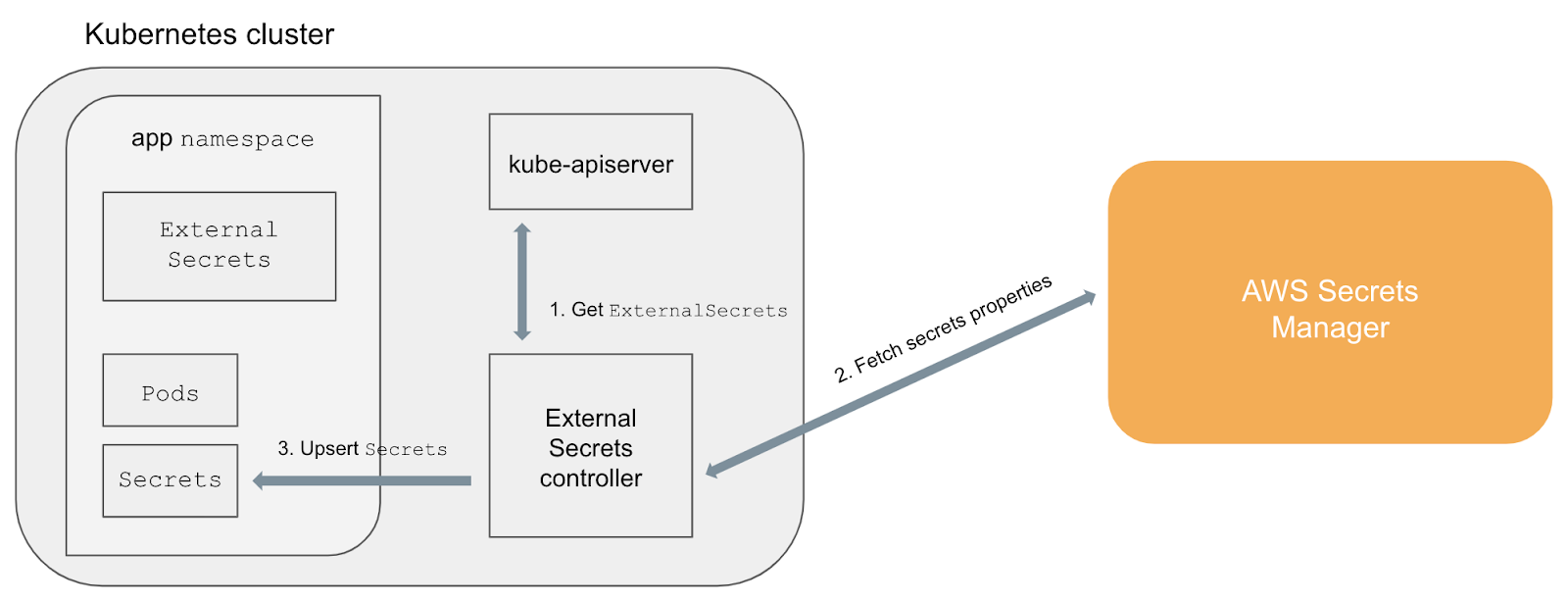
source https://github.com/godaddy/kubernetes-external-secrets/raw/master/architecture.png
Installation
I’m using a bash script to clone the whole repo as the installer using helm charts, and I converted it to template files and used kustomize to modify some resource files to remove helm-related stuff.
You will need helm client to be installed on the machine, follow this link to Install Helm.
In case you changed the bash variable "InstanaceName," you will need to modify the resource name in all patch yaml files (helm generate the name based on instance name):
export InstanaceName=dev (1)
(1) The helm instance name
For example, go to patch file and change the name:
external-secrets/base/clusterrole-patch.yaml
|
apiVersion: rbac.authorization.k8s.io/v1beta1 |
(1) Name should match helm instance name:
external-secrets/base/kustomization.yaml
|
apiVersion: kustomize.config.k8s.io/v1beta1 |
The bash script configures the environment variable needed for each back-end external service, through kustomization overlays.
For example, for Ali Baba, it modifies the needed environment variable through the overlay patch file:
external-secrets/overlays/alibaba/deployment-patch.yaml
|
apiVersion: apps/v1 |
And in the deploy bash script, it uses this specific overlay:
oc apply -k overlays/alibaba/ (1)
(1) Will deploy the controller with the needed Deployment environment variables for Ali Baba cloud
To deploy the controller, run the deploy script:
$ ./00_build.sh
What Are External Secrets?
An External Secret is the Custom Resource definition that will be created after the installation. It defines the back-end external service that will be used to retrieve the Secret data:
|
apiVersion: kubernetes-client.io/v1 |
Create an External Secret
- Create secret by using the aliyun-cli command:
|
aliyun kms CreateSecret --SecretName db_cred --SecretData "{\"username\": \"test\", \"password\": \"123456\"}" --VersionId v001 |
- Create the CR yaml file:
external-secrets/demo-external-secret.yaml
|
apiVersion: kubernetes-client.io/v1 |
(1) (optional) Specify role to assume using provided access key ID and access key secret when retrieving the data.
(2) Match the same Secret name you created using aliyun-cli.
(3) version of the secret, ACSCurrent means the latest
- Apply the CR file:
oc apply -f demo-external-secret.yaml
That's all folks, please let me know your feedback!
저자 소개
유사한 검색 결과
안정적인 코드를 재작성하지 마세요: Lightwell로 귀사의 수익과 개발자의 속도를 보호하는 방법
기업 속도의 새로운 가치 기준
Can Compliance Be A Piece Of Cake? | Compiler
Collaboration In Product Security | Compiler
채널별 검색

오토메이션
기술, 팀, 인프라를 위한 IT 자동화 최신 동향

인공지능
고객이 어디서나 AI 워크로드를 실행할 수 있도록 지원하는 플랫폼 업데이트

오픈 하이브리드 클라우드
하이브리드 클라우드로 더욱 유연한 미래를 구축하는 방법을 알아보세요

보안
환경과 기술 전반에 걸쳐 리스크를 감소하는 방법에 대한 최신 정보

엣지 컴퓨팅
엣지에서의 운영을 단순화하는 플랫폼 업데이트

인프라
세계적으로 인정받은 기업용 Linux 플랫폼에 대한 최신 정보

애플리케이션
복잡한 애플리케이션에 대한 솔루션 더 보기

가상화
온프레미스와 클라우드 환경에서 워크로드를 유연하게 운영하기 위한 엔터프라이즈 가상화의 미래

