Today, the current Vertical Pod Autoscaler (VPA) recommends CPU/Memory requests based on one default recommender, which recommends future requests based on the statistics of historical usage observed in a rolling time window. As no universal recommendation policy can apply to different workloads for different customers, customers have a need to define their own customized recommendation policies.
For example, the default VPA recommendation policy would fail to capture the usage changes for periodic and trendy behaviors, as shown in Figure 1 and Figure 2, which are common resource usage behaviors observed in monitoring and caching workloads.

Figure 1 Default VPA recommendation policies on periodic CPU usage.
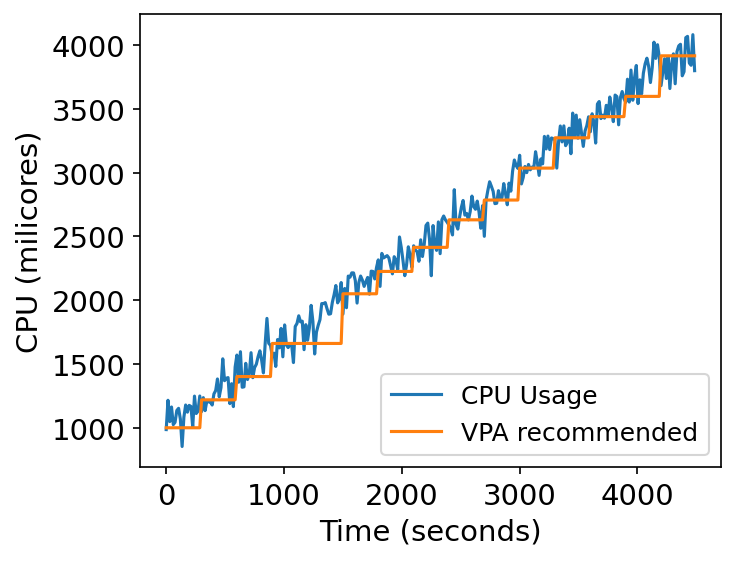
Figure 2 Default VPA recommendation policies on trendy CPU usage.
So, there is a need for the default VPA to support customized recommenders developed by customers for different types of workloads.
OpenShift is Red Hat’s enterprise Kubernetes distribution. This means OpenShift has the same VPA as the upstream VPA, which has the same default recommendation policy. We in Red hat always listen to our customers and partners that there is a need to bring in their own VPA recommendation policies, which can best run for their workloads.
We recently contributed to the upstream VPA to allow the support of configuring an alternative recommender for different workloads. As shown in Figure 3, the new feature allows customers to specify a different customized recommender for a particular VPA object instead of using the default one. Thus, users and developers can specify different recommenders for different VPA objects, which govern different workloads exhibiting distinct resource usage behaviors.
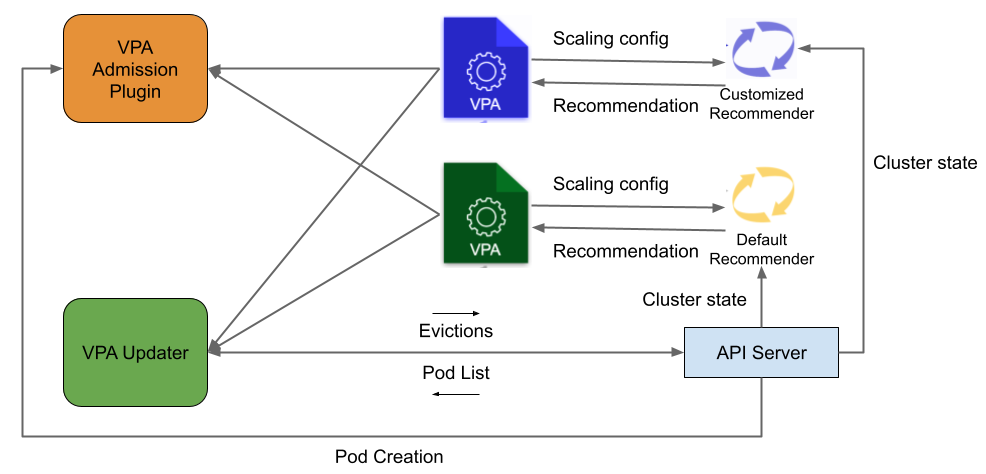
Figure 3 Alternative Recommender Support in VPA
The way to specify an alternative recommender is intuitive. Users just need to give the name of the customized recommender For example, when customers define a VPA object, it can specify the customized recommender name under spec.recommenders.name as specified in ${customized_recommender_name}.
apiVersion: "autoscaling.k8s.io/v1"
kind: VerticalPodAutoscaler
metadata:
  name: hamster-vpa
spec:
  recommenders:
    - name: ${customized_recommender_name}
  targetRef:
    apiVersion: "apps/v1"
    kind: Deployment
    name: ${deployment_name}
  resourcePolicy:
    containerPolicies:
      - containerName: '*'
        minAllowed:
          cpu: 100m
          memory: 50Mi
        maxAllowed:
          cpu: 1
          memory: 500Mi
        controlledResources: ["cpu", "memory"]
This customized VPA recommender support is also available in OpenShift 4.11.
Example
In the following, we will walk you through how easy it is to install an example predictive VPA recommender via the default VPA operator.
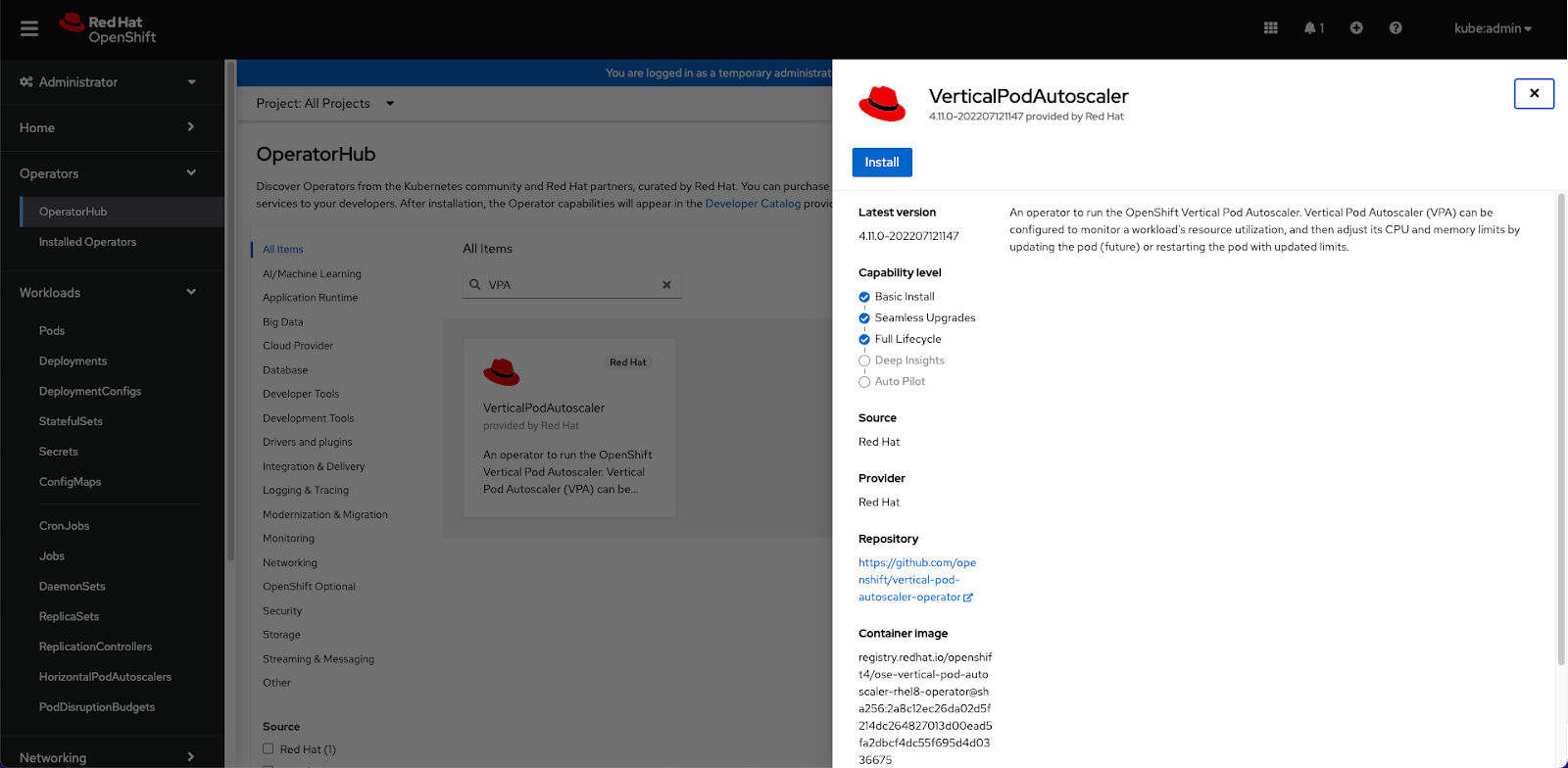
STEP 1: Install the VPA operator via OpenShift Operator Hub.
Click install to install the default VPA operator.
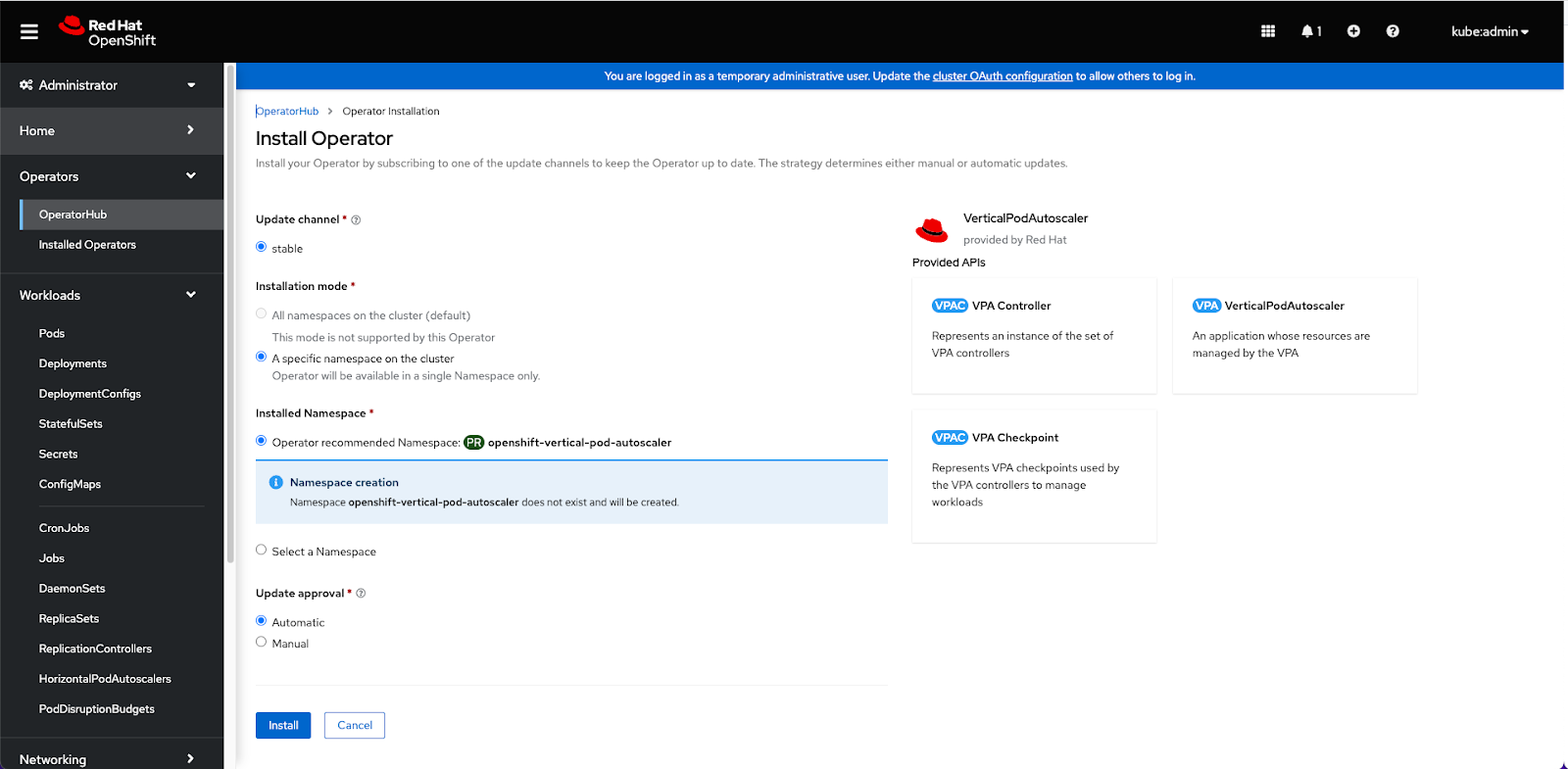
Please choose the default configurations to install the VPA operator.
STEP 2: Deploy a customized VPA recommender.
In this step, we use the predictive-vpa-recommenders to deploy it as a customized recommender to run with the default VPA controllers.
- We first built one predictive VPA recommender named “pando”.
- Update necessary configurations for pando-recommender-deployment.yaml.
- Deploy the updated pando-recommender-deployment.yaml.
> docker login quay.io/${user_id}

> git clone https://github.com/openshift/predictive-vpa-recommenders.git

> cd predictive-vpa-recommenders

> docker build -t quay.io/${user_id}/predictive-vpa-recommender:latest .

> docker push -t quay.io/${user_id}/predictive-vpa-recommender:latest
- First, please replace the ${user_id} to your container image repo user ID.
- Then, follow the tutorial on Enabling monitoring for user-defined projects to allow the pando-recommender to fetch data from Prometheus.
- Update the ${PROM_HOST} and ${PROM_TOKEN} by the following variables.
- You can also change the RECOMMENDER_NAME via the recommender-config configmap. We here choose RECOMMENDER_NAME: “pando” for recommender selection purpose in Step 3.
>  export SECRET=`oc get secret -n openshift-user-workload-monitoring | grep  prometheus-user-workload-token | head -n 1 | awk '{print $1 }'`

>  export PROM_TOKEN=`echo $(oc get secret $SECRET -n openshift-user-workload-monitoring -o json | jq -r '.data.token') | base64 -d`

>  export PROM_HOST=`oc get route thanos-querier -n openshift-monitoring -o json | jq -r '.spec.host'`

> oc create -f manifests/openshift/pando-recommender-deployment.yaml
Then, we can check running pods under openshift-vertical-pod-autoscaler namespace to see if pando recommender is running.
> oc get pods -n openshift-vertical-pod-autoscaler

NAME                                                READY   STATUS    RESTARTS   AGE
pando-7c8fbd6d47-75x4k                              1/1     Running   0          21s
vertical-pod-autoscaler-operator-547c78cd5b-k8p5h   1/1     Running   0          24m
vpa-admission-plugin-default-8448d994c9-8qd62       1/1     Running   0          24m
vpa-recommender-default-85c6c4d57d-tlch8            1/1     Running   0          24m
vpa-updater-default-7c85ddffb8-slvlh                1/1     Running   0          24m
STEP 3: Deploy the workload deployment and the VPA object managing the workload
In this step, we first create a testing workload.
> cat testing-periodic-deployment.yaml

apiVersion: apps/v1
kind: Deployment
metadata:
  name: test-periodic
spec:
  selector:
    matchLabels:
      app: test-periodic
  replicas: 2
  template:
    metadata:
      labels:
        app: test-periodic
    spec:
      securityContext:
        runAsNonRoot: true
        runAsUser: 65534 # nobody
      containers:
        - name: test-periodic
          image: quay.io/chenw615/periodic-load:latest
          imagePullPolicy: Always
          resources:
            requests:
              cpu: 100m
              memory: 50Mi
          command: ["/bin/sh"]
          args:
            - "/periodic.sh"
            - "1200"
            - "60"
> oc create -f testing-periodic-deployment.yaml
Then, we define and create a VPA object to control this workload using pando recommender. The recommender name is specified under spec.recommenders.
> cat testing-periodic-vpa.yaml

apiVersion: "autoscaling.k8s.io/v1"
kind: VerticalPodAutoscaler
metadata:
  name: test-periodic-vpa
spec:
  recommenders:
    - name: pando
  targetRef:
    apiVersion: "apps/v1"
    kind: Deployment
    name: test-periodic
  resourcePolicy:
    containerPolicies:
      - containerName: '*'
        minAllowed:
          cpu: 100m
          memory: 50Mi
        maxAllowed:
          cpu: 2
          memory: 1Gi
        controlledResources: ["cpu", "memory"]
Then, we can see from the customized pando recommender’s logs that the test-periodic-vpa is selected and the deployment of 'test-periodic' is analyzed.
> oc logs pando-7c8fbd6d47-75x4k -n openshift-vertical-pod-autoscaler

{'recommenders': [{'name': 'pando'}], 'resourcePolicy': {'containerPolicies': [{'containerName': '*', 'controlledResources': ['cpu', 'memory'], 'maxAllowed': {'cpu': 2, 'memory': '1Gi'}, 'minAllowed': {'cpu': '100m', 'memory': '50Mi'}}]}, 'targetRef': {'apiVersion': 'apps/v1', 'kind': 'Deployment', 'name': 'test-periodic'}, 'updatePolicy': {'updateMode': 'Auto'}}
{'apiVersion': 'apps/v1', 'kind': 'Deployment', 'name': 'test-periodic'}
rate(container_cpu_usage_seconds_total{namespace='default',container='test-periodic'}[1m])
container_memory_usage_bytes{namespace='default',container='test-periodic'}
Forecast cpu resource for Container test-periodic at 03:40:00
Trace Behavior Label: 12
Trace Forecaster Selected: theta
Forecasts: [0.1467253  0.14668293 0.93619717 0.93589763 0.99966014 0.99931881
 0.0789116  0.07888437 0.00251754 0.00251665 0.00256805 0.00256697
 0.00331901 0.00331838 0.00250759 0.00250705 0.00275479 0.00275385
 0.00261838 0.00261735]
Provision: 0.9993358793009247
Forecast memory resource for Container test-periodic at 03:40:00
Trace Behavior Label: 7
Trace Forecaster Selected: naive
Forecasts: [2478080. 2478080. 2453504. 2453504. 2707456. 2707456. 2936832. 2936832.
 2445312. 2445312. 2437120. 2437120. 2650112. 2650112. 2457600. 2457600.
 2547712. 2547712. 2457600. 2457600.]
Provision: 2936832.0
Successfully patched VPA object with the recommendation: [{'containerName': 'test-periodic', 'lowerBound': {'cpu': '942m', 'memory': '50Mi'}, 'target': {'cpu': '999m', 'memory': '50Mi'}, 'uncappedTarget': {'cpu': '999m', 'memory': '2Mi'}, 'upperBound': {'cpu': '999m', 'memory': '50Mi'}}]
…..
And at the same time, if we look at the logs of the default recommender, we can see there is 0 VPA objects fetched and selected.
> oc logs -f vpa-recommender-default-85c6c4d57d-tlch8 -n openshift-vertical-pod-autoscaler

….

I0729 17:45:38.089839       1 recommender.go:188] Recommender Run
I0729 17:45:38.089923       1 cluster_feeder.go:349] Start selecting the vpaCRDs.
I0729 17:45:38.089953       1 cluster_feeder.go:374] Fetched 0 VPAs.
저자 소개

유사한 검색 결과
과거의 운영 방식에서 벗어나 IT의 미래 구축
AI의 다음 변곡점: 에이전트를 엔터프라이즈 슈퍼유저로 전환
Crack the Cloud_Open | Command Line Heroes
Edge computing covered and diced | Technically Speaking
채널별 검색

오토메이션
기술, 팀, 인프라를 위한 IT 자동화 최신 동향

인공지능
고객이 어디서나 AI 워크로드를 실행할 수 있도록 지원하는 플랫폼 업데이트

오픈 하이브리드 클라우드
하이브리드 클라우드로 더욱 유연한 미래를 구축하는 방법을 알아보세요

보안
환경과 기술 전반에 걸쳐 리스크를 감소하는 방법에 대한 최신 정보

엣지 컴퓨팅
엣지에서의 운영을 단순화하는 플랫폼 업데이트

인프라
세계적으로 인정받은 기업용 Linux 플랫폼에 대한 최신 정보

애플리케이션
복잡한 애플리케이션에 대한 솔루션 더 보기

가상화
온프레미스와 클라우드 환경에서 워크로드를 유연하게 운영하기 위한 엔터프라이즈 가상화의 미래
