If you are offering a service running on OpenShift on AWS for other AWS customers, and for security reasons you want them to access the service directly over the AWS network and not over the internet, then AWS PrivateLink enables creating a highly secure network between your service running on OpenShift and the other client AWS VPCs (in the same AWS region), fully protected from unauthorized external access.
AWS PrivateLink provides private connectivity between VPCs and services hosted by OpenShift on AWS or on-premises, securely on the Amazon network. By providing a private endpoint to access your services, AWS PrivateLink ensures your traffic is not exposed to the public internet. AWS PrivateLink makes it easy to connect services across different AWS accounts and VPCs to significantly simplify your network architecture.
Secure Your Traffic
Network traffic that uses AWS PrivateLink doesn't traverse the public internet, reducing the exposure to threat vectors such as brute force and distributed denial-of-service attacks. You can use private IP connectivity and security groups so that your services function as though they were hosted directly on your private network. You can also attach an endpoint policy, which allows you to control precisely who has access to a specified service.
Simplify Network Management
You can connect services across different accounts and Amazon VPCs, with no need for firewall rules, path definitions, or route tables. There is no need to configure an Internet gateway, VPC peering connection, or manage VPC Classless Inter-Domain Routing (CIDRs) as AWS PrivateLink simplifies your network architecture, it is easier for you to manage your global network.
How it works

AWS PrivateLink enables you to securely connect your VPCs to services/apps running on OpenShift on AWS. Since traffic between the client VPC and the service running on OpenShift does not leave the Amazon network, an Internet gateway, NAT device, public IP address, or VPN connection is no longer needed to communicate with the service.
In this post we will look at AWS PrivateLink, creating an Endpoint Service for our simple “Hello World” service running on OpenShift in our VPC. Next, another VPC(client) creates an Elastic Network Interface (ENI) in their subnet with a private IP address that serves as an entry point for traffic destined to the service. Service endpoints available over AWS PrivateLink will appear as ENIs with private IPs in the client VPC.
Test PrivateLink with OpenShift on AWS
Step 1: Install OpenShift on AWS
For our test we used IPI (Installer Provisioned Infrastructure) to install OpenShift. For IPI, you delegate the infrastructure bootstrapping and provisioning to the installation program instead of doing it yourself. The installation program not only creates all of the networking, machines, and operating systems that are required to support the cluster, but also install OpenShift on the machines.
Step 2: CLB to NLB
With IPI the default ingress controller uses the Classic Load Balancer (ELB), so replace it with a Network Load Balancer (NLB) as PrivateLink has support for NLB and not ELB classic at this stage. Use the following Knowledge Base for the procedure.
Step 3: Create an application/service
We created a simple “Hello World” application using this image.
Step 4: Create “Endpoint Service”
You can use AWS PrivateLink to make services in your VPC available to other AWS accounts and VPCs. AWS PrivateLink is a highly available, scalable technology that enables private access to services across VPC boundaries. Other accounts and VPCs can create VPC endpoints to access your endpoint service.
Endpoint services can be created on Network Load Balancers. Services created on Network Load Balancers can be accessed using interface endpoints, while services created on Gateway Load Balancers are accessed using Gateway Load Balancer endpoints.

Associate the NLB with the Service Endpoint, and for control over who can access the service check “Required acceptance for endpoint” as shown below in the screenshot.This means that any request from client to our service would now be possible only after we accept the request.
Next, click on the “Enable private DNS name” checkbox and enter the name of the private DNS server to use. This allows the clients accessing the service via the endpoint to use the specified private DNS server for accessing the service.
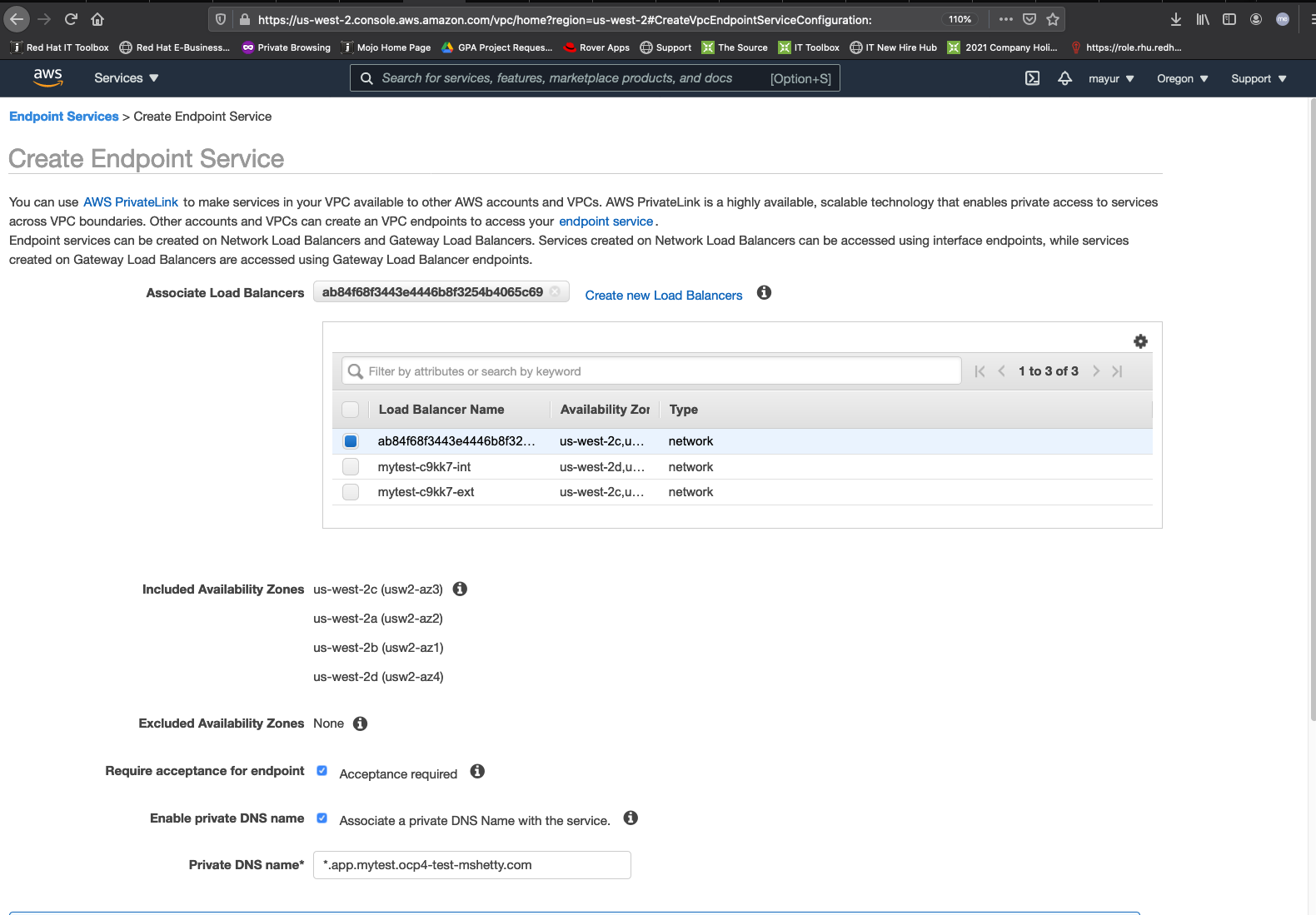
Before you proceed, you’ll need to initiate domain ownership verification as per the instructions in the documentation.

The Domain verification status will be Pending verification until you add a TXT record to your domain's DNS server using the specified Domain verification name and Domain verification value. The domain ownership verification is complete when the existence of the TXT record in the domain's DNS settings is detected.

Step 5: Create client “Endpoints”
On the client side, after creating the Endpoint to our service -com.amazonaws.vpce.us-west-2.vpce-svc-0da6b8fc3df92bd89 - the connection needs to be approved on the Endpoint Service side.
Once the endpoint connection request has been accepted, the client Endpoint status changes to available, and you will see a list of DNS names that we can use to connect to the service.
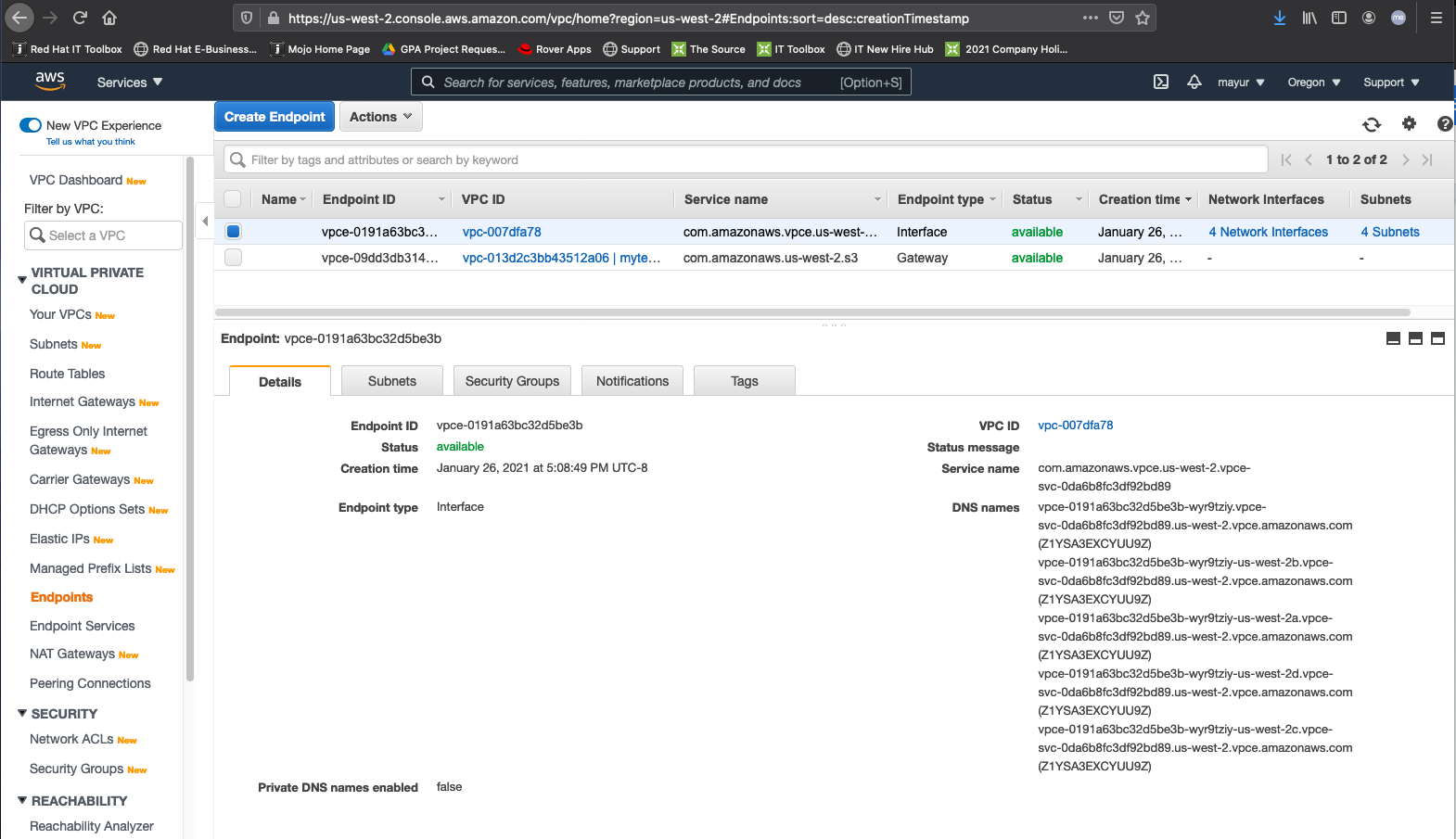
As you can see in the screenshot below, each subnet in the different Availability Zones has an ENI with a private IPv4 address.
To route domain traffic to an interface endpoint, use Amazon Route 53 to create CNAME records for the subdomain as shown below.

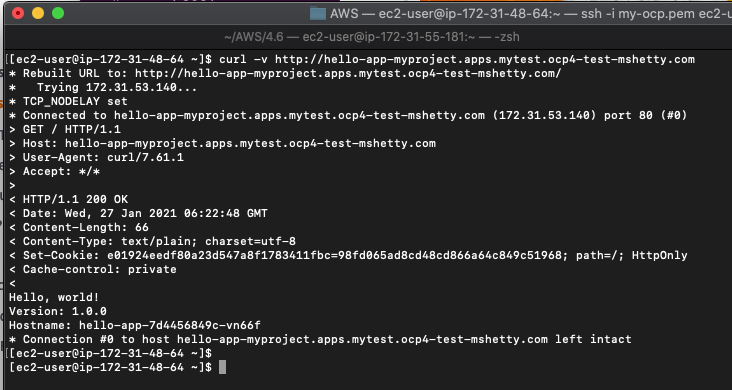
To test if the client is indeed accessing the service using PrivateLink we created an EC2 instance in the client VPC (172.31.0.0/16).
The screenshot below shows that the curl from the EC2 is accessing our service using the IP address of the ENI ie. 172.31.53.140
Conclusion
In this post we have seen how to privately share our service between VPCs running on OpenShift deployed on AWS using PrivateLink. Using AWS Direct Connect along with PrivateLink this solution can be extended to create a hybrid cloud environment, where we can share the service running on OpenShift on AWS with our clients running in an on-premises data center.
Please click on the link to register for Red Hat Summit 2021 where we will have a session on this topic.
저자 소개

Mayur Shetty is a Principal Solution Architect with Red Hat’s Global Partners and Alliances (GPA) organization, working closely with cloud and system partners. He has been with Red Hat for more than five years and was part of the OpenStack Tiger Team.
유사한 검색 결과
과거의 운영 방식에서 벗어나 IT의 미래 구축
Red Hat Device Edge, 이제 NVIDIA Jetson Orin에서 사용 가능
Collaboration In Product Security | Compiler
Keeping Track Of Vulnerabilities With CVEs | Compiler
채널별 검색

오토메이션
기술, 팀, 인프라를 위한 IT 자동화 최신 동향

인공지능
고객이 어디서나 AI 워크로드를 실행할 수 있도록 지원하는 플랫폼 업데이트

오픈 하이브리드 클라우드
하이브리드 클라우드로 더욱 유연한 미래를 구축하는 방법을 알아보세요

보안
환경과 기술 전반에 걸쳐 리스크를 감소하는 방법에 대한 최신 정보

엣지 컴퓨팅
엣지에서의 운영을 단순화하는 플랫폼 업데이트

인프라
세계적으로 인정받은 기업용 Linux 플랫폼에 대한 최신 정보

애플리케이션
복잡한 애플리케이션에 대한 솔루션 더 보기

가상화
온프레미스와 클라우드 환경에서 워크로드를 유연하게 운영하기 위한 엔터프라이즈 가상화의 미래
