
When a new programming language is introduced to great fanfare, some developers take a quick look and then return to the comfort of their preferred programming language. But Rust has not been dismissed as easily as most other languages.
Created in 2015 by Mozilla developer Graydon Hoare, Rust has been praised for outperforming and overcoming challenges other languages face. For the past five years, it has been voted the most loved programming language on the Stack Overflow Developer Survey. In 2020, it made the TIOBE Index's top 20 list of the most popular programming languages. While it's fallen a few steps on TIOBE's list since then, Rust is still making its mark on the coding community.
Rust is fast, readable, and memory-efficient. Unlike other high-level programming languages, Rust lacks a garbage collector and focuses on memory safety. For this reason, Rust is great for programs involving memory usage, computer processors, or targeting bare metal.
Rust is not without its flaws, however. Some note that the debugging process is not as advanced as C++ and may frustrate those trying to learn the language. In addition, Rust has prolonged compile times compared to C or Java, and it lacks the copious number of libraries that a more established language like Python has. That said, the community is expanding, and more public packages are being developed.
This article explains how to install Rust and create a Rust project. For more information on Rust syntax and development, visit the Rust Programming Language Handbook.
Note: To follow along with the article's steps, you need a Linux system. For my next article, on deploying Rust on OpenShift, you'll need an OpenShift subscription.
[ Keep Rust syntax and tips on hand with this free Rust cheat sheet. ]
Install Rust
Installing Rust is a straightforward process. Download the installation script with the curl command and run it in the terminal:
$ curl --proto '=https' --tlsv1.2 -sSf https://sh.rustup.rs
Look over the script to understand what it does, and then run it:
$ sh ./sh.rustup.rs
When prompted, enter 1 to continue the installation.
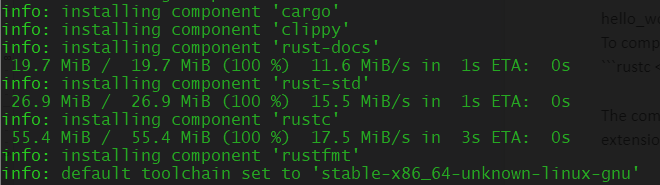
After the installation completes, a prompt states, "Rust is installed now. Great!" The rustup, rustc, and cargo commands are now available in the terminal.

Update Rust with this command:
$ rustup update
Check the update with:
$ rustc --version
Uninstall Rust with:
$ rustup self uninstall
Run Rust code
Rust source files end with the .rs extension and follow the "snake-case" naming convention (for example, hello_world.rs). In a Rust application, main.rs is always the entry point. Before running a Rust program, you must compile it using rustc:
$ rustc filename.rs
The compiler produces an executable file, which by default is the source file's name without the .rs extension. It's machine code, so systems can run the executable file even if Rust is not installed on them. To run the executable, type the absolute path of the file:
$ ./executable_name
Create a new Rust project
When developing larger applications, consider initializing a Rust project using Cargo. Cargo is Rust's package manager. To start a new project, type in the command cargo new {project_name}. The following example creates a project called hello_cargo:
$ cargo new hello_cargo
A new directory appears called hello_cargo. Inside the directory, Cargo creates a Cargo.toml file to store configuration information and an src directory with the main.rs file. It also initializes a new Git repository with a .gitignore file.
Build and run a Rust project locally
To build the project locally, go to the root directory and run cargo build. This build runs rustc for you, using attributes from the Cargo.toml file.
After the project is built, run the Rust project using the command cargo run.
Test the Rust project
Rust provides the cargo check command to examine the project code for errors without creating an executable file. It runs faster than cargo build and is especially useful during development.
[ Download now: A system administrator's guide to IT automation. ]
Wrap up
Rust is a fast, readable, and memory-efficient programming language. This article helps you install Rust and understand a project's components. In a follow-up article, I'll explain how to deploy Rust on OpenShift.
저자 소개
Nicole Lama is a first-generation Panamanian-American with a bachelor's in biomedical sciences and a master's in bioinformatics and computational biology. Since 2015, she has worked with academics, tech startups, and Fortune 500 companies to help meet their data extraction, transformation, mobilization, storage, analytics, and visualization needs. She specializes in Python, machine learning, and open source technology.
유사한 검색 결과
귀사의 애플리케이션 플랫폼은 미래에 대비되어 있나요?
전문성을 검증하는 새로운 기준: Red Hat 자격증 주요 업데이트
Mainframes | Command Line Heroes
The Ground Floor | Compiler: Tales From The Database
채널별 검색

오토메이션
기술, 팀, 인프라를 위한 IT 자동화 최신 동향

인공지능
고객이 어디서나 AI 워크로드를 실행할 수 있도록 지원하는 플랫폼 업데이트

오픈 하이브리드 클라우드
하이브리드 클라우드로 더욱 유연한 미래를 구축하는 방법을 알아보세요

보안
환경과 기술 전반에 걸쳐 리스크를 감소하는 방법에 대한 최신 정보

엣지 컴퓨팅
엣지에서의 운영을 단순화하는 플랫폼 업데이트

인프라
세계적으로 인정받은 기업용 Linux 플랫폼에 대한 최신 정보

애플리케이션
복잡한 애플리케이션에 대한 솔루션 더 보기

가상화
온프레미스와 클라우드 환경에서 워크로드를 유연하게 운영하기 위한 엔터프라이즈 가상화의 미래
