
OpenStack's Identity service, Keystone, verifies the user's identity and provides information about which resources the user has access to.
The Keystone project provides authentication, authorization, and other services such as delivering the service catalog, as this diagram shows:

It is important to note that the Identity service also provides the authorization for a user between services. For example, does the user have the authority to access a particular image in Glance for Nova and create a virtual machine (VM) from it?
Due to its critical role in authentication, authorization, and managing the catalog of services and their endpoints, the Identity service is the first service installed during an OpenStack deployment.
How the Identity service authenticates
Whether you're using OpenStack's Horizon dashboard or the command-line interface (CLI), requests to the Identity service are made via an API call. In the following diagram, it seems like a fairly easy process with a single call being made and with a single answer received:

The Identity service's role in launching a VM
Now let's dive deeper into the steps for a user to launch a VM.
[ Learn more OpenStack usage tips by building a lab in five minutes with three simple commands. ]
The following diagram shows that the initial API call authenticates the user's credentials, creates a temporary token for the user, and creates a generic catalog.
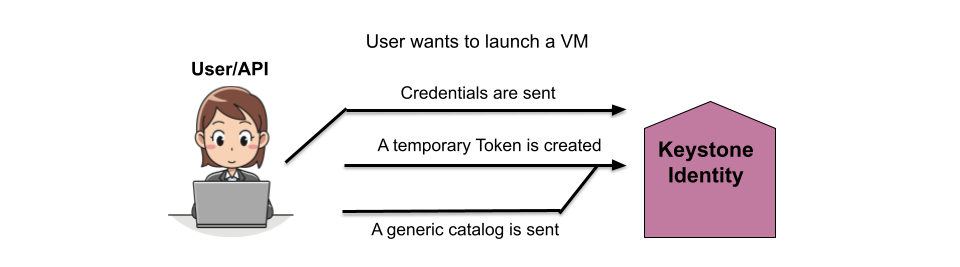
In the next step, the Identity service replies with the temporary token and the list of tenants the user has access to.

The user then selects the tenant from the provided list and receives a list of services they are authorized to access in that tenant and a token for that tenant. The user then connects to the correct endpoint based on the selected service and sends the token.
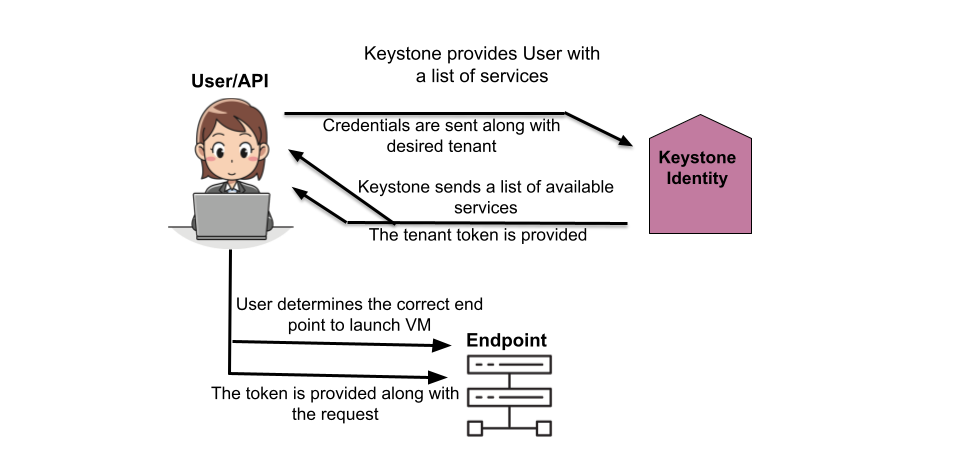
The Identity service then verifies that the token is correct and also that the user has permission to access the requested service (compute, in this case), as well as any other services the compute services might need to access to complete the request.

The Identity service then authorizes the user for the tenant, verifies the token is correct for the request, and confirms the user. The service also verifies the user has the correct permissions for the request based on its own policies.
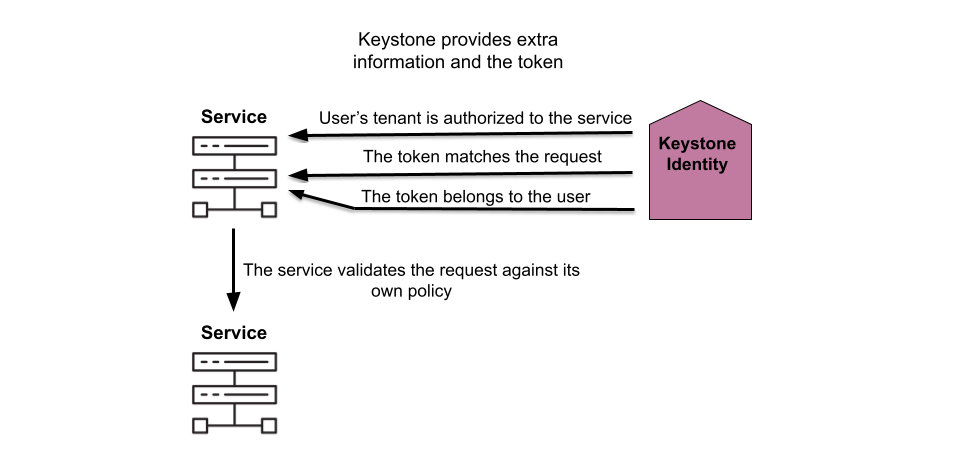
With the user authorized and their permissions verified, the other services involved create the new VM.

Finally, the compute service informs the user the VM is created and how to connect to it.

Wrap up
Walking through the process of creating a VM demonstrates where the Identity service fits in with the other services. The authentication and authorization processes Keystone provides make it clear why this service is installed before any of the others when deploying OpenStack.
[ Download now: A system administrator's guide to IT automation.]
저자 소개
Amy Marrich is a Principal Technical Marketing Manager at Red Hat. She previously worked at a small open source e-assessment company in Luxembourg, where she was the Open Source Community and Global Training Manager. Previously, she was the OpenStack Instructor at Linux Academy and a Linux System Engineer on the Platform Engineering Cloud Operations team at Rackspace. She currently serves on the OpenStack Board, is an active member of the Openstack Ansible project, and was previously the chair of the OpenStack User Committee. Amy spends her free time competing in performance events (agility, FASt Cat, and dock diving) with her Dalmatians and competing in dressage with her Connemara pony.
유사한 검색 결과
안정적인 코드를 재작성하지 마세요: Lightwell로 귀사의 수익과 개발자의 속도를 보호하는 방법
기업 속도의 새로운 가치 기준
Can Compliance Be A Piece Of Cake? | Compiler
Collaboration In Product Security | Compiler
채널별 검색

오토메이션
기술, 팀, 인프라를 위한 IT 자동화 최신 동향

인공지능
고객이 어디서나 AI 워크로드를 실행할 수 있도록 지원하는 플랫폼 업데이트

오픈 하이브리드 클라우드
하이브리드 클라우드로 더욱 유연한 미래를 구축하는 방법을 알아보세요

보안
환경과 기술 전반에 걸쳐 리스크를 감소하는 방법에 대한 최신 정보

엣지 컴퓨팅
엣지에서의 운영을 단순화하는 플랫폼 업데이트

인프라
세계적으로 인정받은 기업용 Linux 플랫폼에 대한 최신 정보

애플리케이션
복잡한 애플리케이션에 대한 솔루션 더 보기

가상화
온프레미스와 클라우드 환경에서 워크로드를 유연하게 운영하기 위한 엔터프라이즈 가상화의 미래
