
One of the things I like most about Kubernetes is how well designed it is, using just the right level of abstraction for objects and APIs. In this post, we will discuss an often underappreciated concept: Replicas.
For folks new to the whole cloud native world, it’s sometimes hard to figure what’s going on here, why replicas are so essential and how to get the most out of them.
But let's step back a bit and start with the basics: As you know, pods are the smallest unit of deployment in Kubernetes. You launch a pod like so:
$ kubectl create -f https://raw.githubusercontent.com/mhausenblas/kbe/master/specs/pods/pod.yaml

$ kubectl get pods

NAME                      READY     STATUS    RESTARTS   AGE

twocontainers             2/2       Running   0          7s
Nice! With just a single line we launched a pod with two containers into the Kubernetes cluster. Now, what happens when one of the containers gets sick? Let's assume that due to a bug one of the containers in our pod crashes. Well, the kubelet on the node the pod is running on will certainly try to revive it, but at some point in time will have to give up and declare the pod dead. You can view this by looking at the STATUS column of the kubectl get pods command, as it then turns to Failed or Error. The following figure, taken—with kudos to the authors—from Issue 3312 summarizes the lifecycle:
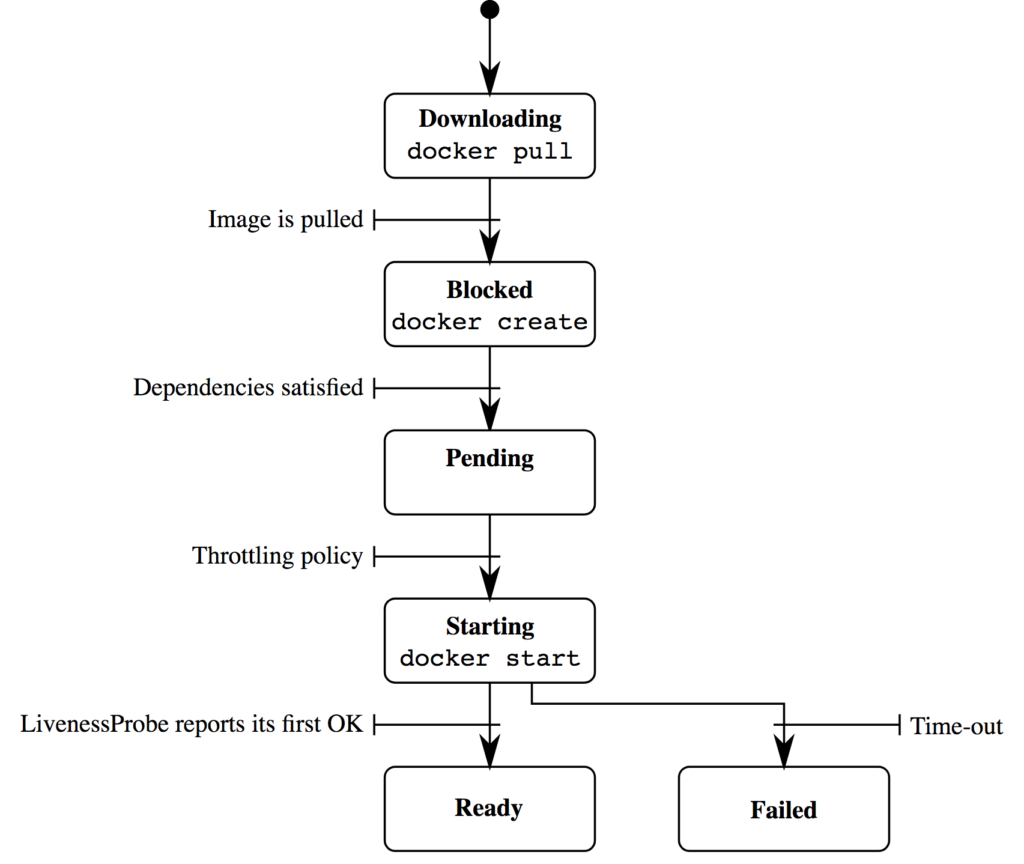
Sure, you can influence this behavior via the restartPolicy field in the pod spec (YAML file) as well as by providing a liveness probe but this is kind of micro-management and not necessarily the first thing you should be thinking of. Don't get me wrong, you should always implement liveness and readiness probes, but for a different reason: If you don't, then things become less predictable.
What you're really after in this situation is a kind of supervisor. Something that looks after your pod and restarts it, potentially on a different node, when one or more of the containers in the pod causes troubles. You've guessed it, this is where controllers come into the picture.
In the beginning, with Kubernetes 1.0, we only had Replication Controllers. Those Replication Controllers (RC) act as supervisors for pods containing long-running processes such as an app server. With Kubernetes 1.2, a new abstraction was introduced: Deployments. This is a higher-level abstraction than the good old RCs because it covers the entire lifecycle of a pod, from the initial rollout to updating to a new version as well as rolling back to an older version. Along with the Deployments came the Replica Sets (RS), a kind of more powerful RC (supporting set-based labels). Nowadays you should only be using Deployments and not touch RSs, RCs, or—Yoda forbid—pods.
Alrighty Michael, thanks for the history lesson, but what has that to do with replicas?
Glad you asked. No, seriously. This background was necessary to appreciate replicas.
The basic idea behind a replica (or instance or clone) is that if you have multiple, identical copies of
your pod running, potentially on different nodes in the cluster, a couple of things suddenly become possible:
- Because there are a number of clones of your pod running, Kubernetes can distribute the load between them. This is what the
Serviceobject is partly about. - The above-mentioned controllers (or supervisors), namely
Deployments(along with RS) and RCs (if you're old school or have been living under a rock), can (re-)launch pods as they see fit, reacting to the health of the containers running in the pod. - If the load increases, you can use the controllers to launch even more lovely clones of your pod (known formally as increasing the replica count).
- If you have more than one node in your cluster, which I hope you do, then even node failures are no issue, because the controllers will find a new home for your clones. The same is true when you need to do maintenance on one of the nodes, though consider draining it first.
There's one area where the whole replica thing gets a tad more complicated, though. So far, we've only looked at stateless processes. All of the above applies to stateful processes as well; however, you'll need to take into account the, well, state.
In a nutshell: If your app writes to disk and/or happens to use a non-cloud-native datastore (for example, MySQL or PostgreSQL), then you either need to use a pod volume that is backed by a networked filesystem or something like what StorageOS is offering. This will take care of replicating the data on disk to the worker node(s) other than the originating one, enabling controllers to relaunch a pod somewhere else in the cluster and pretending that nothing (bad) happened.
To sum up: Replicas are the basis for self-healing apps in a Kubernetes cluster, you should be using Deployments to supervise these replicas, and, last but not least, you need to pay extra attention concerning stateful processes as they typically require some more effort to clone properly.
저자 소개
유사한 검색 결과
Red Hat OpenShift 4.22가 엔터프라이즈 AI의 수익성에 미치는 영향
Red Hat 파트너가 최고의 통신 비즈니스 자산인 이유
Crack the Cloud_Open | Command Line Heroes
Edge computing covered and diced | Technically Speaking
채널별 검색

오토메이션
기술, 팀, 인프라를 위한 IT 자동화 최신 동향

인공지능
고객이 어디서나 AI 워크로드를 실행할 수 있도록 지원하는 플랫폼 업데이트

오픈 하이브리드 클라우드
하이브리드 클라우드로 더욱 유연한 미래를 구축하는 방법을 알아보세요

보안
환경과 기술 전반에 걸쳐 리스크를 감소하는 방법에 대한 최신 정보

엣지 컴퓨팅
엣지에서의 운영을 단순화하는 플랫폼 업데이트

인프라
세계적으로 인정받은 기업용 Linux 플랫폼에 대한 최신 정보

애플리케이션
복잡한 애플리케이션에 대한 솔루션 더 보기

가상화
온프레미스와 클라우드 환경에서 워크로드를 유연하게 운영하기 위한 엔터프라이즈 가상화의 미래
