This post was originally published by Marcos Entenza (Mak) on Mak's blog.
This is an update from my previous blog post on the same topic. Let’s Encrypt wildcards certificates support is now GA.
Wildcards can be requested using the ACME v2 compatible clients. For this post, I have used an ACME v2 compatible shell script, acme.sh.
There is still a limitation right now (this is a limitation on acme.sh script side) on the ability to request wildcards certificated directly using "*.domain.com". It must contain both domain.com and *.domain.com at least. Hopefully, this will be solved soon, or you can just use another ACME v2 supported client.
Use the following steps to request a wildcard certificate:
1. Clone acme.sh repository master branch.
$ git clone https://github.com/Neilpang/acme.sh.git

$ cd acme.sh
2. Add DNS API keys to the corresponding provider on ./dnsapi directory (using CloudFlare on this example). acme.sh currently supports the following list of DNS providers.
$ egrep 'CF_Key|CF_Email' dnsapi/dns_cf.sh | head -2

  CF_Key="xxxxxxxxxxxxxxxxxxxxxxxxx"

  CF_Email="xxxxxxxxxxxxxxx"
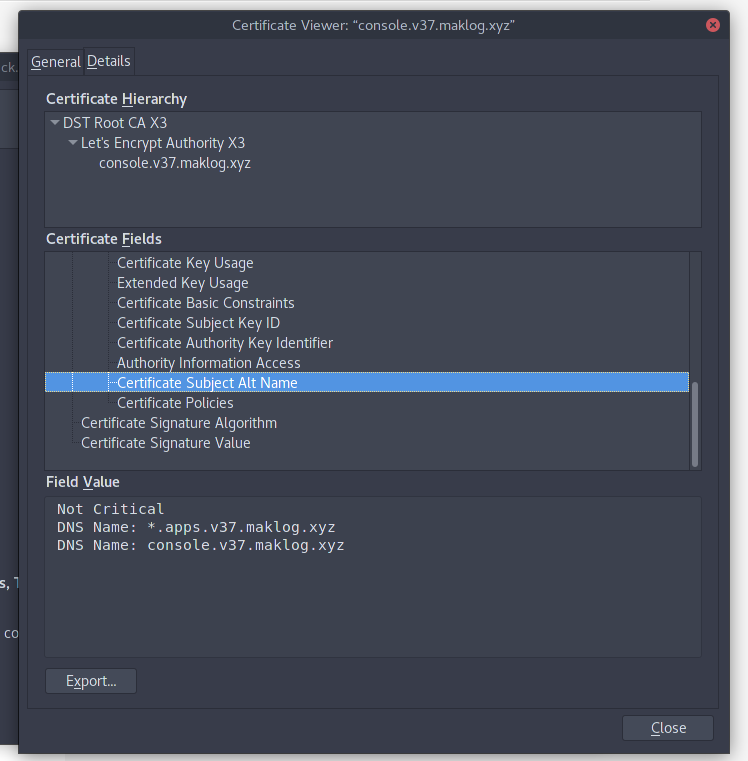
3. Request the wildcard certificate with the required Subject Alternative Names (on the example I’m requesting 2 DNS Names, one for the OpenShift API and another one for the SSL application endpoints running on my OpenShift Cluster).
$ ./acme.sh --issue -d console.v37.maklog.xyz -d *.apps.v37.maklog.xyz --dns dns_cf
$ $ ./acme.sh --issue -d console.v37.maklog.xyz -d *.apps.v37.maklog.xyz --dns dns_cf

[Thu 15 Mar 15:18:19 EET 2018] Creating domain key

[Thu 15 Mar 15:18:19 EET 2018] The domain key is here: /home/mak/.acme.sh/console.v37.maklog.xyz/console.v37.maklog.xyz.key

[Thu 15 Mar 15:18:19 EET 2018] Multi domain='DNS:console.v37.maklog.xyz,DNS:*.apps.v37.maklog.xyz'

[Thu 15 Mar 15:18:19 EET 2018] Getting domain auth token for each domain

[Thu 15 Mar 15:18:24 EET 2018] Getting webroot for domain='console.v37.maklog.xyz'

[Thu 15 Mar 15:18:25 EET 2018] Getting webroot for domain='*.apps.v37.maklog.xyz'

[Thu 15 Mar 15:18:25 EET 2018] console.v37.maklog.xyz is already verified, skip dns-01.

[Thu 15 Mar 15:18:25 EET 2018] *.apps.v37.maklog.xyz is already verified, skip dns-01.

[Thu 15 Mar 15:18:25 EET 2018] Verify finished, start to sign.

[Thu 15 Mar 15:18:28 EET 2018] Cert success.

-----BEGIN CERTIFICATE-----

xxxxxxxxxxxxxxxxxxxxxxxxxxxxxxxxxxxxxxxxxxxxxxxxxxxxxxxxxxxxxxxx

xxxxxxxxxxxxxxxxxxxxxxxxxxxxxxxxxxxxxxxxxxxxxxxxxxxxxxxxxxxxxxxx

xxxxxxxxxxxxxxxxxxxxxxxxxxxxxxxxxxxxxxxxxxxxxxxxxxxxxxxxxxxxxxxx

xxxxxxxxxxxxxxxxxxxxxxxxxxxxxxxxxxxxxxxxxxxxxxxxxxxxxxxxxxxxxxxx

xxxxxxxxxxxxxxxxxxxxxxxxxxxxxxxxxxxxxxxxxxxxxxxxxxxxxxxxxxxxxxxx

xxxxxxxxxxxxxxxxxxxxxxxxxxxxxxxxxxxxxxxxxxxxxxxxxxxxxxxxxxxxxxxx

xxxxxxxxxxxxxxxxxxxxxxxxxxxxxxxxxxxxxxxxxxxxxxxxxxxxxxxxxxxxxxxx

xxxxxxxxxxxxxxxxxxxxxxxxxxxxxxxxxxxxxxxxxxxxxxxxxxxxxxxxxxxxxxxx

xxxxxxxxxxxxxxxxxxxxxxxxxxxxxxxxxxxxxxxxxxxxxxxxxxxxxxxxxxxxxxxx

xxxxxxxxxxxxxxxxxxxxxxxxxxxxxxxxxxxxxxxxxxxxxxxxxxxxxxxxxxxxxxxx

...

...

...

xxxxxxxxxxxxxxxxxxxxxxxxxxxxxxxxxxxxxxxxxxxxxxxxxxxxxxxxxxxxxxxx

xxxxxxxxxxxxxxxxxxxxxxxxxxxxxxxxxxxxxxxxxxxxxxxxxxxxxxxxxxxxxxxx

-----END CERTIFICATE-----

[Thu 15 Mar 15:18:28 EET 2018] Your cert is in  /home/mak/.acme.sh/console.v37.maklog.xyz/console.v37.maklog.xyz.cer

[Thu 15 Mar 15:18:28 EET 2018] Your cert key is in  /home/mak/.acme.sh/console.v37.maklog.xyz/console.v37.maklog.xyz.key

[Thu 15 Mar 15:18:28 EET 2018] The intermediate CA cert is in  /home/mak/.acme.sh/console.v37.maklog.xyz/ca.cer

[Thu 15 Mar 15:18:28 EET 2018] And the full chain certs is there:  /home/mak/.acme.sh/console.v37.maklog.xyz/fullchain.cer
4. Copy generated certs to your preferred location. Certificates will be created under ~/.acme.sh/yourdomain directory
Your wildcard is now ready to be used. Follow the documentation to deploy or redeploy custom named certificates for your OpenShift public API, and custom wildcard certificates for your router.
As an example, in order to deploy your OpenShift Container Platform with your custom certificates, use the following steps assuming you are using the Advance Installation:
- Copy required certificates to your Ansible inventory directory
$ cp ~/.acme.sh/yourdomain/yourdomain.cer /<ansible_inventory_directory>

$ cp ~/.acme.sh/yourdomain/yourdomain.key /<ansible_inventory_directory>

$ cp ~/.acme.sh/yourdomain/ca.cer /<ansible_inventory_directory>
- Add the following entries to your
OSEv3group vars:
openshift_master_overwrite_named_certificates=true

openshift_master_named_certificates=[{"certfile": "{{ inventory_dir }}/yourdomain.cer", "keyfile": "{{ inventory_dir }}/yourdomain.key", "names": ["your_master_api_dns_name"], "cafile": "{{ inventory_dir }}/ca.cer"}]
- Deploy OpenShift Container Platform as usual
-
Once you have your OpenShift Container Platform deployed, we need to replace the Edge certificates from the Router. To do this we need to use the generated certificates to generate a new file including all the info, and replace the existing secret with this new certificate:
$ cat ~/.acme.sh/yourdomain/yourdomain.cer ~/.acme.sh/yourdomain/yourdomain.key ~/.acme.sh/yourdomain/ca.cer > /tmp/cloudapps.router.pem

$ oc secrets new router-certs tls.crt=/tmp/cloudapps.router.pem tls.key=~/.acme.sh/yourdomain/yourdomain.key -o json --type='kubernetes.io/tls' --confirm | oc replace -f -
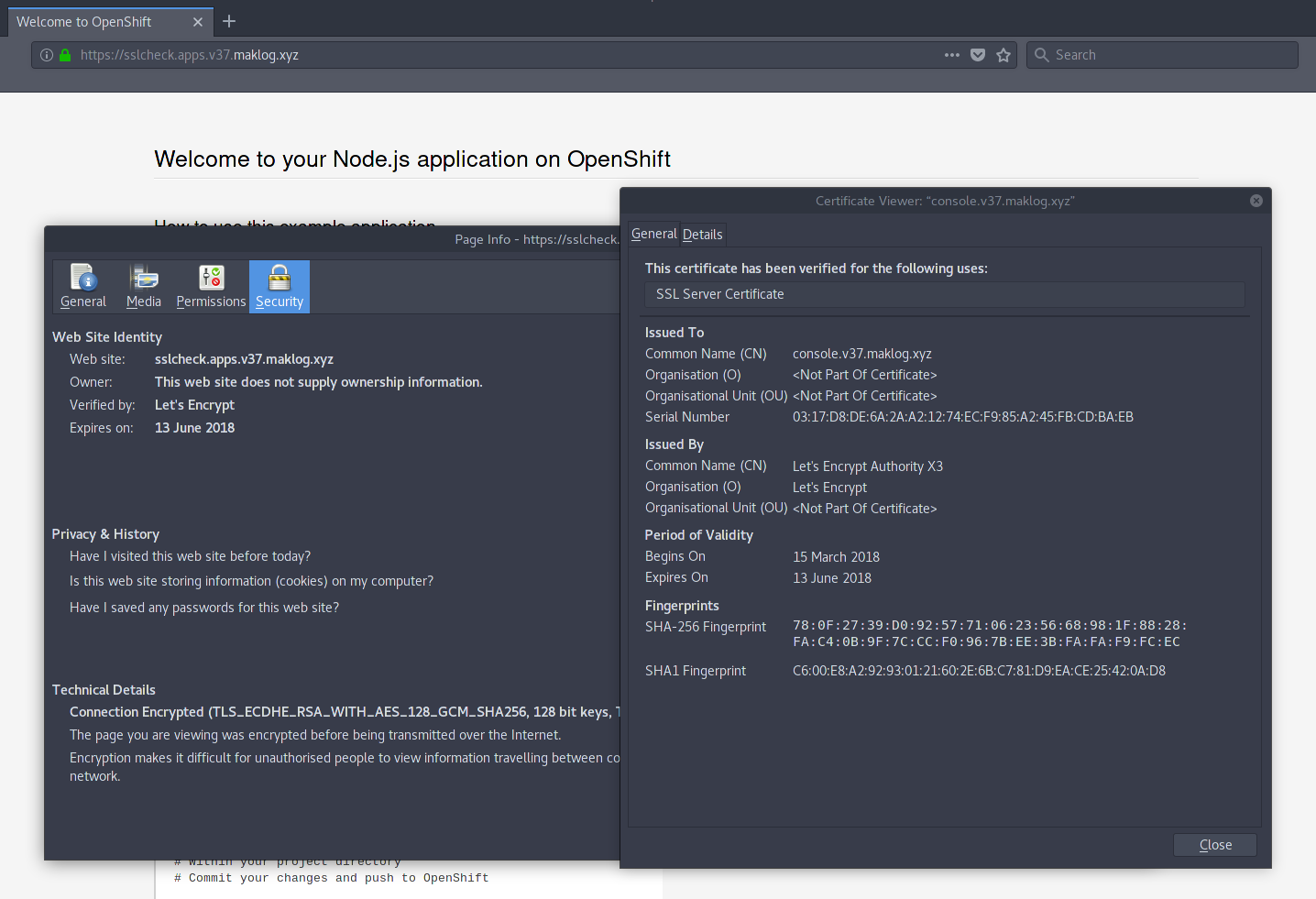
- Once you have deployed the certificates on your OpenShift Cluster, you will see valid certificates for both the public OpenShift API and any application deployed using the router Edge termination.
About the Author
At Red Hat's Open Innovation Labs, Marcos Entenza (aka Mak), helps build our Push Button Infrastructure that we use to accelerate customer residencies. He is part of the Consulting Team, where he has been played Consultant and Architect roles for Customer's engagements, helping Enterprise DevOps teams with PaaS and CI/CD adoption and transformation
저자 소개
유사한 검색 결과
Ansible Automation Platform 2.7: 시각적 실행 환경 빌더 및 콘텐츠 검색 가이드
안정적인 코드를 재작성하지 마세요: Lightwell로 귀사의 수익과 개발자의 속도를 보호하는 방법
Can agentic AI patch the internet?
Random Acts Of Automation | Compiler
채널별 검색

오토메이션
기술, 팀, 인프라를 위한 IT 자동화 최신 동향

인공지능
고객이 어디서나 AI 워크로드를 실행할 수 있도록 지원하는 플랫폼 업데이트

오픈 하이브리드 클라우드
하이브리드 클라우드로 더욱 유연한 미래를 구축하는 방법을 알아보세요

보안
환경과 기술 전반에 걸쳐 리스크를 감소하는 방법에 대한 최신 정보

엣지 컴퓨팅
엣지에서의 운영을 단순화하는 플랫폼 업데이트

인프라
세계적으로 인정받은 기업용 Linux 플랫폼에 대한 최신 정보

애플리케이션
복잡한 애플리케이션에 대한 솔루션 더 보기

가상화
온프레미스와 클라우드 환경에서 워크로드를 유연하게 운영하기 위한 엔터프라이즈 가상화의 미래
