
This is the second post in a series taking a deeper look at how Envoy Proxy and Istio.io enable a more elegant way to connect and manage microservices. Follow me @christianposta to learn when the next posts are available. In this series I'll cover:
- What is Envoy Proxy and how does it work?
- How to implement some of the basic patterns with Envoy Proxy
- How Istio Mesh fits into this picture
- How Istio Mesh works and how it enables higher-order functionality across clusters with Envoy
- How Istio Mesh auth works
Part II - Timeouts and Retries with Envoy Proxy
The first blog post introduced Envoy Proxy’s implementation of circuit-breaking functionality. In this second part, we’ll take a closer look at how to enable additional resilience features like timeouts and retries. These demos are intentionally simple so that I can illustrate the patterns and usage individually. Please download the source code for this demo and follow along.
This demo is comprised of a client and a service. The client is a Java HTTP application that simulates making HTTP calls to the “upstream” service (note, we’re using Envoy's terminology here, and throughout this repo). The client is packaged in a Docker image named docker.io/ceposta/http-envoy-client:latest. Alongside the http-client Java application is an instance of Envoy Proxy. In this deployment model, Envoy is deployed as a sidecar alongside the service (the HTTP client in this case). When the http-client makes outbound calls (to the “upstream” service), all of the calls go through the Envoy Proxy sidecar.
The “upstream” service for these examples is httpbin.org. httpbin.org allows us to easily simulate HTTP service behavior. It’s awesome, so check it out if you’ve not seen it.
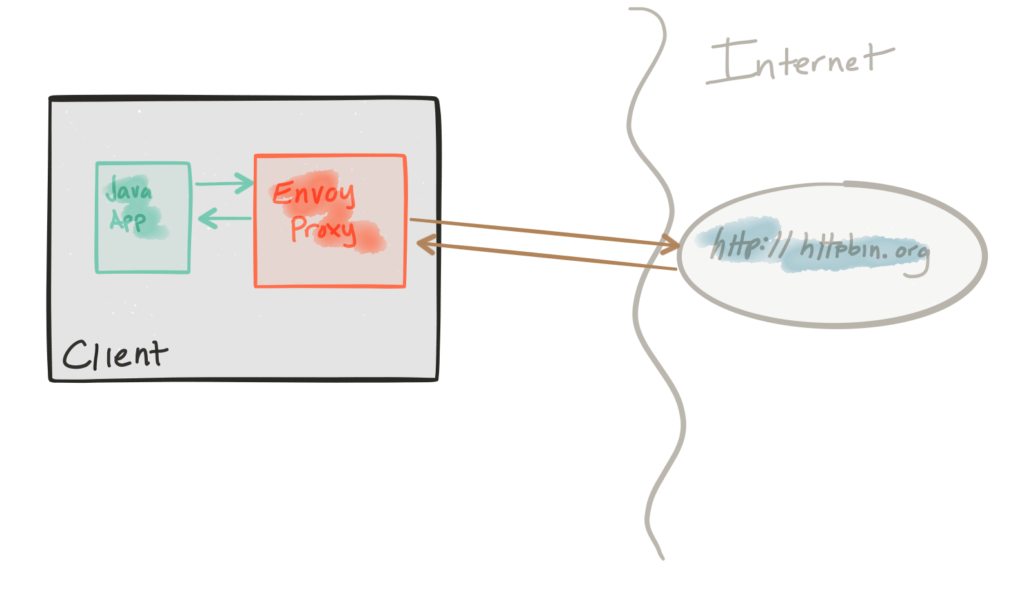
Both the retries and timeouts demos have their own envoy.jsonconfiguration file. I recommend taking a look at the reference documentation for each section of the configuration file to help understand the full configuration. The good folks at datawire.io also put together a helpful intro to Envoy and its configuration which you should check out too.
Running the retries Demo
For the retries demo, we’ll be configuring our routing in Envoy like this:
      "routes": [

        {

          "timeout_ms": 0,

          "prefix": "/",

          "auto_host_rewrite": true,

          "cluster": "httpbin_service",

          "retry_policy": {

            "retry_on": "5xx",

            "num_retries": 3

          }
}
Here we’re saying to retry up to 3 times on HTTP status of 5xx. If you’ve run previous demos, please make sure to get a clean start for this (or any) demo. We have different Envoy configurations for each demo and want to make sure to start from a clean slate each time. First, stop any existing demos:
./docker-stop.sh
Now let’s get our retries demo up:
./docker-run.sh -d retries
Now let’s exercise the client with a single call which will hit an HTTP endpoint that should return an HTTP 500 error. We’ll use the curl.sh script, which is set up to call curl inside our demo container.
./curl.sh -vvvv localhost:15001/status/500
We should see something like this:
    * Hostname was NOT found in DNS cache

    *   Trying ::1...

    * connect to ::1 port 15001 failed: Connection refused

    *   Trying 127.0.0.1...

    * Connected to localhost (127.0.0.1) port 15001 (#0)

    > GET /status/500 HTTP/1.1

    > User-Agent: curl/7.35.0

    > Host: localhost:15001

    > Accept: */*

    >

    < HTTP/1.1 500 Internal Server Error

    * Server envoy is not blacklisted

    < server: envoy

    < date: Thu, 25 May 2017 05:55:37 GMT

    < content-type: text/html; charset=utf-8

    < access-control-allow-origin: *

    < access-control-allow-credentials: true

    < x-powered-by: Flask

    < x-processed-time: 0.000718116760254

    < content-length: 0

    < via: 1.1 vegur

    < x-envoy-upstream-service-time: 684

    <

    * Connection #0 to host localhost left intact
Great! Now, let’s check what Envoy has done for us:
./get-envoy-stats.sh | grep retry
    cluster.httpbin_service.retry.upstream_rq_500: 3

    cluster.httpbin_service.retry.upstream_rq_5xx: 3

    cluster.httpbin_service.upstream_rq_retry: 3

    cluster.httpbin_service.upstream_rq_retry_overflow: 0

    cluster.httpbin_service.upstream_rq_retry_success: 0
Yay! We see here that envoy has retried 3 times because of HTTP 500 errors. Retries can have harmful effects on your services architectures if treated naively. They can help propagate failures or cause DDoS type attacks on internal services that may be struggling.
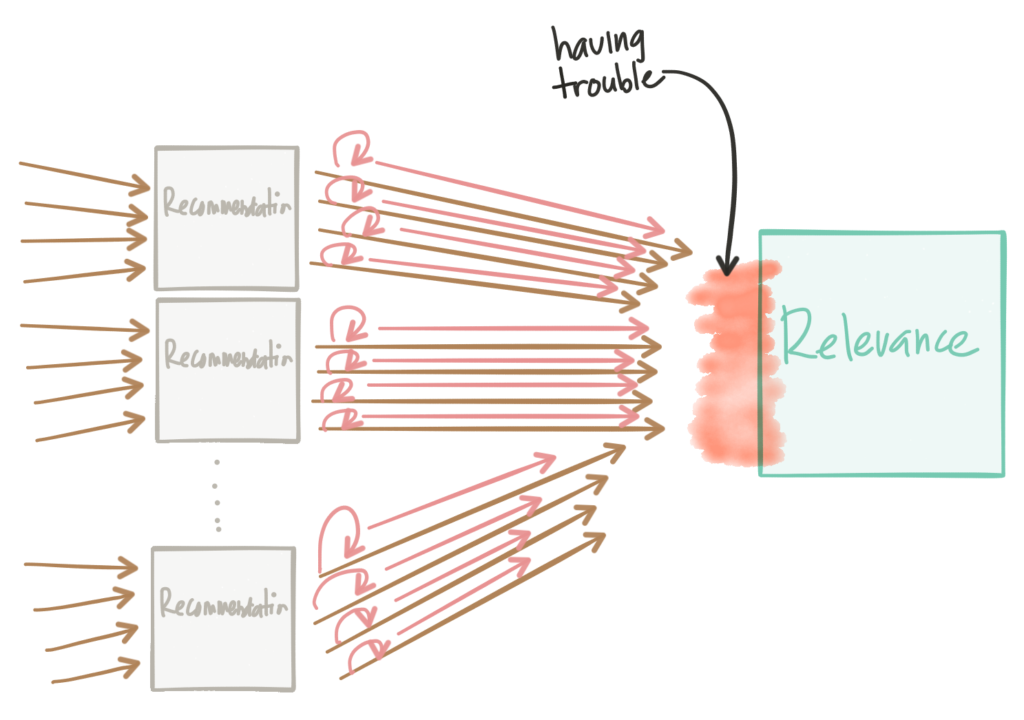
Some things to keep in mind about retries:
- Envoy will do automatic exponential retry with jittering. See the docs for more.
- You can set retry timeouts (timeout for each retry), but the overall route timeout (configured for the routing table; see the
timeoutsdemo for the exact configuration) will still hold/apply; this is to short circuit any run away retry/exponential backoff. - You should always set the circuit breaker retry configuration to limit the amount of quota for retries when you may have large numbers of connections. See the active retries in the circuit breaker section in the Envoy documentation.
Running the timeouts Demo
For the timeouts demo, we’ll be configuring our routing in Envoy like this:
      "routes": [

        {

          "timeout_ms": 0,

          "prefix": "/",

          "auto_host_rewrite": true,

          "cluster": "httpbin_service",

          "timeout_ms": 3000

        }
This configuration is setting a global (that is, includes all retries) 3s timeout for any calls made through this route to the httpbin_service cluster.
Whenever dealing with timeouts, we must be aware of the overall global timeout for requests that originate at the edge. We can find ourselves in very difficult to debug situations where timeouts don’t taper as we get deeper into the network call graph. In other words, as you go through the call graph, the service timeouts for service calls deeper in the call graph should be smaller than the previous service’s calls:
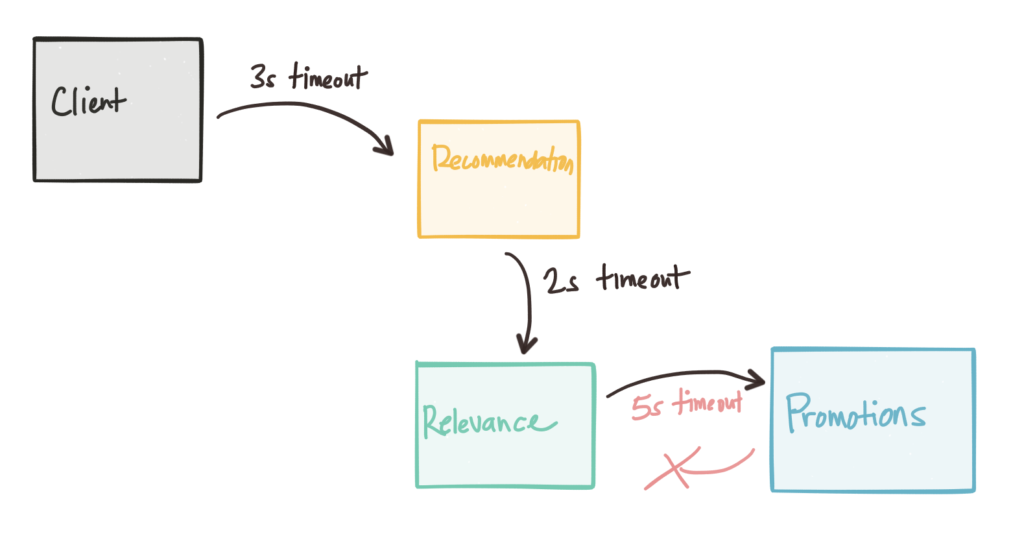
Envoy can help propagate timeout information, and protocols like gRPC can propagate deadline information. As we continue along with this series, we’ll see how we can control the Envoy proxies with Istio Mesh and how a control plane can help us do fault injection to uncover timeout anomalies. If you’ve run previous demos, please make sure to get a clean start for this (or any) demo. We have different Envoy configurations for each demo and want to make sure we start from a clean slate each time. First, stop any existing demos:
./docker-stop.sh
Now let’s get our timeouts demo up:
./docker-run.sh -d timeouts
Now let’s exercise the client with a single call which will hit an HTTP endpoint that should delay the response by about 5s. This delay should be enough to trigger the envoy timeout. We’ll use the curl.sh script which is set up to call curl inside our demo container.
./curl.sh -vvvv localhost:15001/delay/5
We should see output similar to this:
    * Hostname was NOT found in DNS cache

    *   Trying ::1...

    * connect to ::1 port 15001 failed: Connection refused

    *   Trying 127.0.0.1...

    * Connected to localhost (127.0.0.1) port 15001 (#0)

    > GET /delay/5 HTTP/1.1

    > User-Agent: curl/7.35.0

    > Host: localhost:15001

    > Accept: */*

    >

    < HTTP/1.1 504 Gateway Timeout

    < content-length: 24

    < content-type: text/plain

    < date: Thu, 25 May 2017 06:13:53 GMT

    * Server envoy is not blacklisted

    < server: envoy

    <

    * Connection #0 to host localhost left intact

    upstream request timeout
We see that our request was timed out! Let’s check the Envoy stats:
./get-envoy-stats.sh | grep timeout
Here we see 1 request (the one we sent in!) was timed out by Envoy.
    cluster.httpbin_service.upstream_cx_connect_timeout: 0

    cluster.httpbin_service.upstream_rq_per_try_timeout: 0

    cluster.httpbin_service.upstream_rq_timeout: 1

    http.admin.downstream_cx_idle_timeout: 0

    http.egress_http.downstream_cx_idle_timeout: 0
If we send the request in, this time with a smaller delay, we should see the call go through:
./curl.sh -vvvv localhost:15001/delay/2
    * Hostname was NOT found in DNS cache

    *   Trying ::1...

    * connect to ::1 port 15001 failed: Connection refused

    *   Trying 127.0.0.1...

    * Connected to localhost (127.0.0.1) port 15001 (#0)

    > GET /delay/2 HTTP/1.1

    > User-Agent: curl/7.35.0

    > Host: localhost:15001

    > Accept: */*

    >

    < HTTP/1.1 200 OK

    * Server envoy is not blacklisted

    < server: envoy

    < date: Thu, 25 May 2017 06:15:41 GMT

    < content-type: application/json

    < access-control-allow-origin: *

    < access-control-allow-credentials: true

    < x-powered-by: Flask

    < x-processed-time: 2.00246119499

    < content-length: 309

    < via: 1.1 vegur

    < x-envoy-upstream-service-time: 2145

    <

    {

      "args": {},

      "data": "",

      "files": {},

      "form": {},

      "headers": {

        "Accept": "*/*",

        "Connection": "close",

        "Host": "httpbin.org",

        "User-Agent": "curl/7.35.0",

        "X-Envoy-Expected-Rq-Timeout-Ms": "3000"

      },

      "origin": "68.3.84.124",

      "url": "http://httpbin.org/delay/2"

    }

    * Connection #0 to host localhost left intact
Also note that Envoy propagates the timeout headers so that upstream services have an idea about what to expect.
Next Steps
Please stay tuned! Part III on tracing should be landing next week.
The next installments in this series will be added as they’re published:
- Circuit breakers (Part I)
- Retries / Timeouts (Part II)
- Distributed tracing (Part III)
- Metrics collection with Prometheus (Part IV)
- The next parts will cover more of the client-side functionality (Service Discovery, Request Shadowing, TLS, etc.)
저자 소개
유사한 검색 결과
Red Hat 파트너가 최고의 통신 비즈니스 자산인 이유
에이전틱 패러독스와 하이브리드 AI의 필요성
Crack the Cloud_Open | Command Line Heroes
Edge computing covered and diced | Technically Speaking
채널별 검색

오토메이션
기술, 팀, 인프라를 위한 IT 자동화 최신 동향

인공지능
고객이 어디서나 AI 워크로드를 실행할 수 있도록 지원하는 플랫폼 업데이트

오픈 하이브리드 클라우드
하이브리드 클라우드로 더욱 유연한 미래를 구축하는 방법을 알아보세요

보안
환경과 기술 전반에 걸쳐 리스크를 감소하는 방법에 대한 최신 정보

엣지 컴퓨팅
엣지에서의 운영을 단순화하는 플랫폼 업데이트

인프라
세계적으로 인정받은 기업용 Linux 플랫폼에 대한 최신 정보

애플리케이션
복잡한 애플리케이션에 대한 솔루션 더 보기

가상화
온프레미스와 클라우드 환경에서 워크로드를 유연하게 운영하기 위한 엔터프라이즈 가상화의 미래
