
This is the next step in my series on system security hardening and network security. Please check out the previous article on 3 quick ways to reduce your attack surface on Linux.
Flat networks

There was a time when all networks were flat. A flat network is similar to your standard home network today. All of your hosts are neighbors to each other. All are in the same IP scope, with no firewalls or routers between them: Your laptop can see your TV, your TV can see your phone with no barriers.
Flat networks have benefits. They’re simple, and all of your hosts can reach each other without you having to think too hard about how to enable access. If you’ve got an enterprise network instead of a home network, you might have your web server, database server, and enterprise resource planning (ERP) all running on this network. When your web application has to integrate with the ERP or get data from the database, it’s just a matter of writing code or plugging in a configuration with no pesky firewalls in the way. The process is just simpler and everything can talk to everything else, which is what a network is for, right?
Well yes, but in today’s world of cybercrime, and espionage, a flat network means your network is vulnerable. Those networks usually have a firewall at the edge, which is like putting a wall around your castle. The only way in is through the gate, and the gate has guards that don’t let anyone in, so you’re safe inside your castle, right? Sure you are until someone gets past your guards. Maybe they found the servant’s entrance, maybe they fought their way past your guards, or maybe they snuck in with a wagon of supplies. The point is, once they’re inside your castle walls, if you don’t have any other protection, intruders have a good chance of getting from that supply truck over to your food supply, treasury, or armory, all because you’re focused on the wall around the castle.
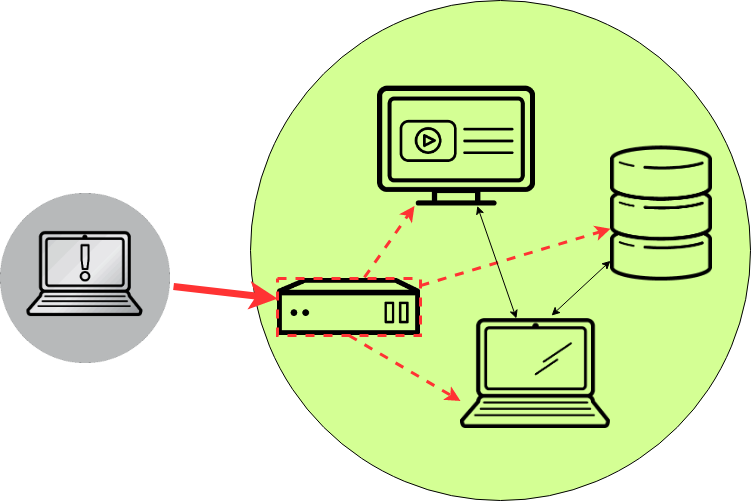
This castle analogy is very much like a perimeter firewall. Sure, having one makes it hard for attackers to get into your network. But once they’re in, you’ve got no other defenses to stop them from hopping from system to system until they find whatever it is they’re looking for. Maybe they compromise your web server through a bug in your web application that lets them execute a remote shell. That shell tunnels out to their system, and now they’ve got a terminal on a server in your network. From there, they do some scanning. Because your network is wide open inside of the firewall, they can see everything in there. They notice the database server and the ERP and start attacking those systems from inside your web server.
There are a few ways to solve this problem. You could keep your flat network and implement host-based firewalls on all of your hosts. This action would be like arming all of your citizens inside your castle and posting more guards at the entrance of the treasury and the armory. An attacker might still sneak in on your supply wagon, but when he climbs out and heads for the treasury, he’s got to deal with a guard at the door before he can walk in and steal your gold. This solution isn’t perfect and it can be hard to manage, but it’s certainly a decent option, and it’s better than having a wide-open network.
Network segmentation
To take this approach even further, you can split up your network and put internal firewalls between those smaller networks. We call this tactic network segmentation. The idea is simple: You group systems together based on their security levels or based on their purposes.
Consider your web server, which runs a web application that many users access all day long. That’s a pretty low-trust system, therefore, you trust this server the least. Behind the web server, there’s probably a database server. Put that in its own isolated network, since no one should be reaching it directly: All requests to the database server are first handled by your web application.
Now, maybe all of your database servers sit right next to each other, or maybe they don’t. You might have highly sensitive data on one database server (for that ERP), and not-so-sensitive data on another. If this is the case, put the ERP database in another, even more secure network. What you end up with is walls between your systems. If your webserver gets popped, the bad guys might have a foothold there, but they can’t just waltz into your database server since there’s a firewall between this web server and your database server, and they may have no access at all to your ERP database. To go even further, you could also limit access to systems on the hosts themselves. Take our example with the web server, the database server, and the ERP database server. Say that your database server has its host-based firewall set up so that only the webserver can reach it on the database port, and the ERP database server has a similar rule so that only the ERP application can reach it. Then, say they’re in the same network segment. Now, if someone pops your web server and jumps from there to your database server, even though they’re in the same network as your ERP database, they still can’t access your ERP database, because the host-based firewall on the ERP database doesn’t allow it.

And all of this, my dear sysadmin, is what we call defense in depth (DiD). Because like ogres (and parfait), well-architected services have layers. When an attacker gets past one layer, they have another line of defense to deal with, and another, and another. It’s impossible to have an unhackable service, so your goal is to make your services more difficult so an attacker gives up, and goes off to find an easier target.
Wrapping up
I hope you’ve learned a bit about defense in depth! Next time we’ll be talking about validating all of this complexity and breaking out the port scanner.
[Need more on networking? Download the Linux networking cheat sheet.]
저자 소개
Nate is a Technical Account Manager with Red Hat and an experienced sysadmin with 20 years in the industry. He first encountered Linux (Red Hat 5.0) as a teenager, after deciding that software licensing was too expensive for a kid with no income, in the late 90’s. Since then he’s run everything from BBS’s (remember those?) to derby hat’s containing raspberry pi’s, to Linux systems in his basement, or in enterprise-class data-centers.
He runs his own blog at undrground.org, hosts the Iron Sysadmin Podcast, and when he’s not at a command line, he’s probably in the garage tinkering on his Jeep, or out on the trails.
유사한 검색 결과
안정적인 코드를 재작성하지 마세요: Lightwell로 귀사의 수익과 개발자의 속도를 보호하는 방법
기업 속도의 새로운 가치 기준
Can Compliance Be A Piece Of Cake? | Compiler
Collaboration In Product Security | Compiler
채널별 검색

오토메이션
기술, 팀, 인프라를 위한 IT 자동화 최신 동향

인공지능
고객이 어디서나 AI 워크로드를 실행할 수 있도록 지원하는 플랫폼 업데이트

오픈 하이브리드 클라우드
하이브리드 클라우드로 더욱 유연한 미래를 구축하는 방법을 알아보세요

보안
환경과 기술 전반에 걸쳐 리스크를 감소하는 방법에 대한 최신 정보

엣지 컴퓨팅
엣지에서의 운영을 단순화하는 플랫폼 업데이트

인프라
세계적으로 인정받은 기업용 Linux 플랫폼에 대한 최신 정보

애플리케이션
복잡한 애플리케이션에 대한 솔루션 더 보기

가상화
온프레미스와 클라우드 환경에서 워크로드를 유연하게 운영하기 위한 엔터프라이즈 가상화의 미래
