
Through our built-in YAML editor, users can create and edit resources right in the Red Hat OpenShift Web Console UI. In the latest release, we’ve upgraded our editor to include language server support.
What is language server support?
The language server support feature uses the OpenAPI schema from Kubernetes to provide content assist inside the YAML editor based on the type of resource you are editing. More specifically, the language server support offers the following capabilities:
- Improved YAML validation: The new editor provides feedback in context, directing you to the exact line and position that requires attention.
- Document outlining: Document outlines offer a quick way to navigate your code.
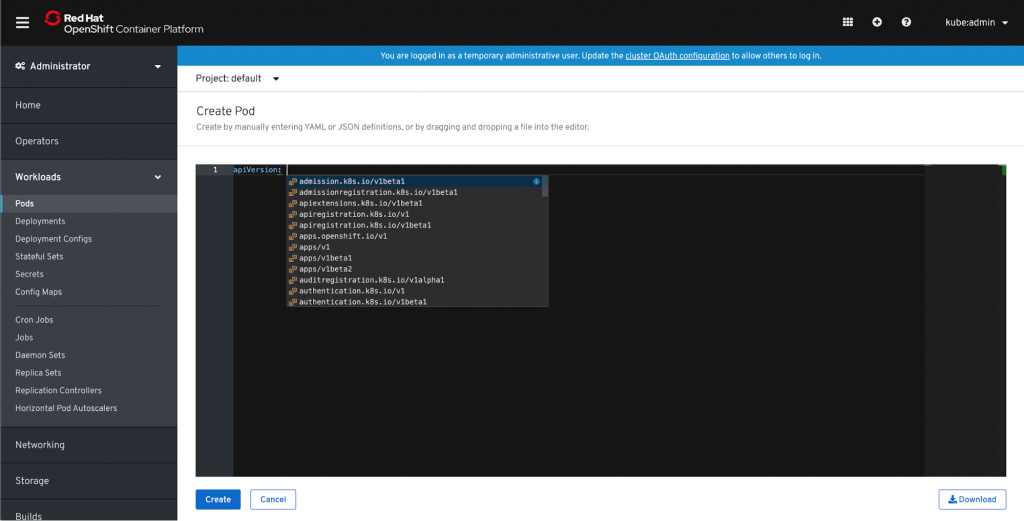
- Auto completion: While in the editor, language server support will provide you with valid configuration information as you type, allowing you to edit faster.
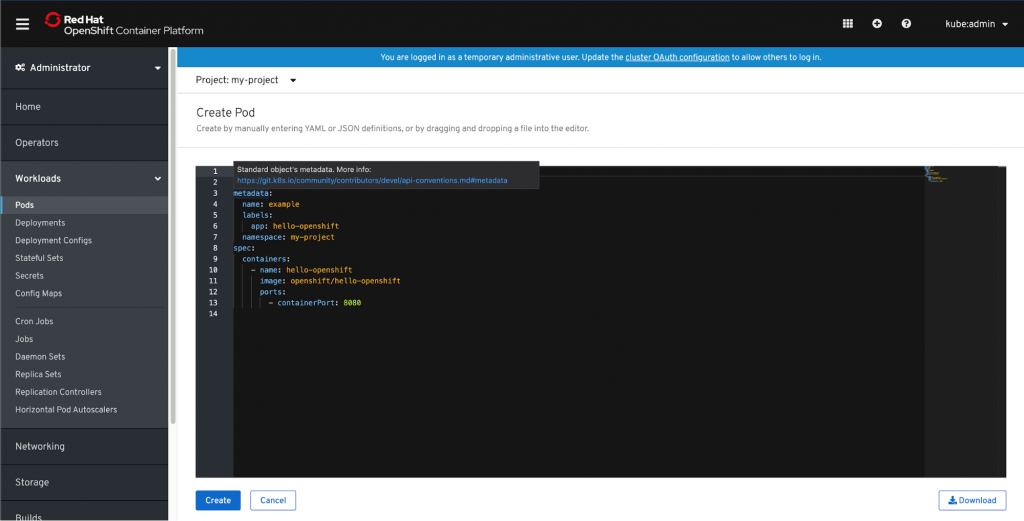
- Hover support: Hovering over a property will show a description of the associated schema.
- Advanced formatting: Format your YAML.
Why did we add language server support?
Because it’s awesome! With language server support, we improve users’ workflow by making it faster and easier to create and edit resources in the YAML editor. Specifically for novice users, these features can accelerate the learnability of Kubernetes concepts. This experience may look familiar; this utilizes the same editor and language server framework that is used in other tools like Eclipse Che or Visual Studio (VS) Code editor.
How can you use language server support?
Language server support is available in all YAML editors in the console, whether you are creating or editing resources.
Hover over a key to see more information. For example, while creating a Pod you can hover over a key such as containers. This will give you more information about the containers in the Pod and how you can define them using YAML.

When available, the property help will link out to more documentation around that property.
Use Ctrl + Space to activate auto complete.
If you’d like to learn more about what the OpenShift team is up to or provide feedback on any of the new 4.2 features, please take this brief 3-minute survey.

저자 소개
유사한 검색 결과
Red Hat 파트너가 최고의 통신 비즈니스 자산인 이유
에이전틱 패러독스와 하이브리드 AI의 필요성
Crack the Cloud_Open | Command Line Heroes
Edge computing covered and diced | Technically Speaking
채널별 검색

오토메이션
기술, 팀, 인프라를 위한 IT 자동화 최신 동향

인공지능
고객이 어디서나 AI 워크로드를 실행할 수 있도록 지원하는 플랫폼 업데이트

오픈 하이브리드 클라우드
하이브리드 클라우드로 더욱 유연한 미래를 구축하는 방법을 알아보세요

보안
환경과 기술 전반에 걸쳐 리스크를 감소하는 방법에 대한 최신 정보

엣지 컴퓨팅
엣지에서의 운영을 단순화하는 플랫폼 업데이트

인프라
세계적으로 인정받은 기업용 Linux 플랫폼에 대한 최신 정보

애플리케이션
복잡한 애플리케이션에 대한 솔루션 더 보기

가상화
온프레미스와 클라우드 환경에서 워크로드를 유연하게 운영하기 위한 엔터프라이즈 가상화의 미래
