
An Operator Lifecycle Manager (OLM) CatalogSource is a collection of operator metadata. OLM uses CatalogSources to build the list of available operators that can be installed from OperatorHub in the OpenShift web console. In OpenShift 4.3, the web console has added support for managing the out-of-the-box CatalogSources as well as adding your own custom CatalogSources.
You can create a custom CatalogSource using the OLM Operator Registry. The operator-framework/operator-registry repository has a Dockerfile to build a minimal registry server image using some example manifests and can be used to create your own custom catalog images. Run the following commands (replacing quay.io/my-organization/example-registry with your own repository) to build the example. You’ll need a repository at an image registry like quay.io for your image.
git clone https://github.com/operator-framework/operator-registry.git

cd operator-registry

docker build -t quay.io/my-organization/example-registry:latest -f upstream-example.Dockerfile .

docker push quay.io/my-organization/example-registry:latest
To add the catalog source in OpenShift console, log in as a cluster administration. Go to the Cluster Settings page under the Administration navigation section and click on the Global Configuration tab. This page lists the configuration resources for various cluster components and is a great place to explore what cluster configuration is available.
Click the OperatorHub link and then click the Sources tab to see the currently installed CatalogSources.
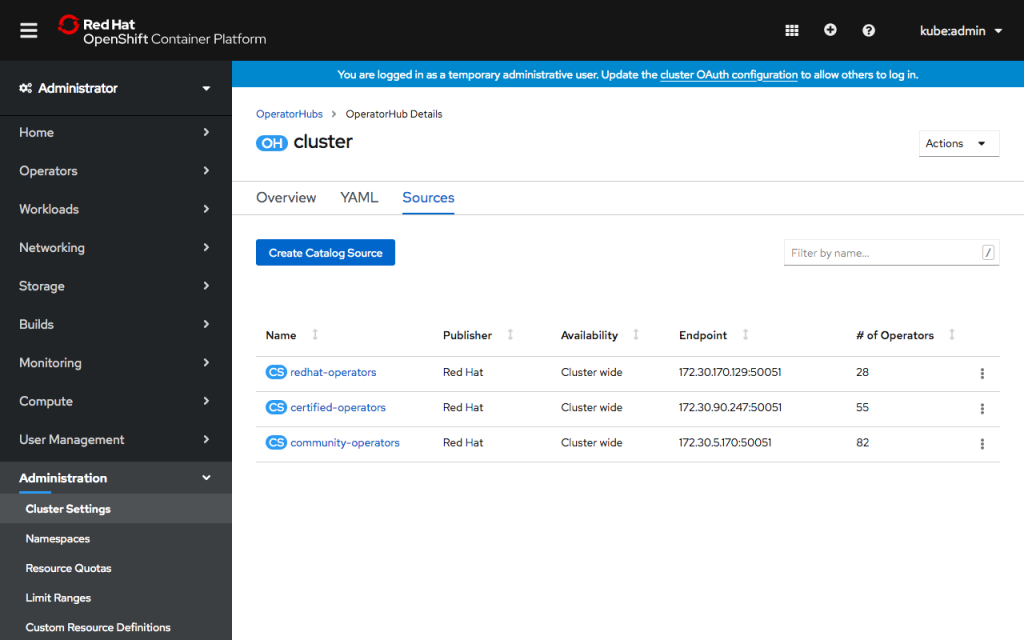
You’ll see several already present on the cluster, which populate OperatorHub with Red Hat, Certified and Community operators. These default catalog sources can now be enabled and disabled inside OpenShift console from the action menu for each table row.
To add a new CatalogSource, click Create Catalog Source. In the form, give the CatalogSource a name and optionally a display name and publisher. Enter the image name you built above. You can choose whether the CatalogSource is available for all namespaces or a single namespace.
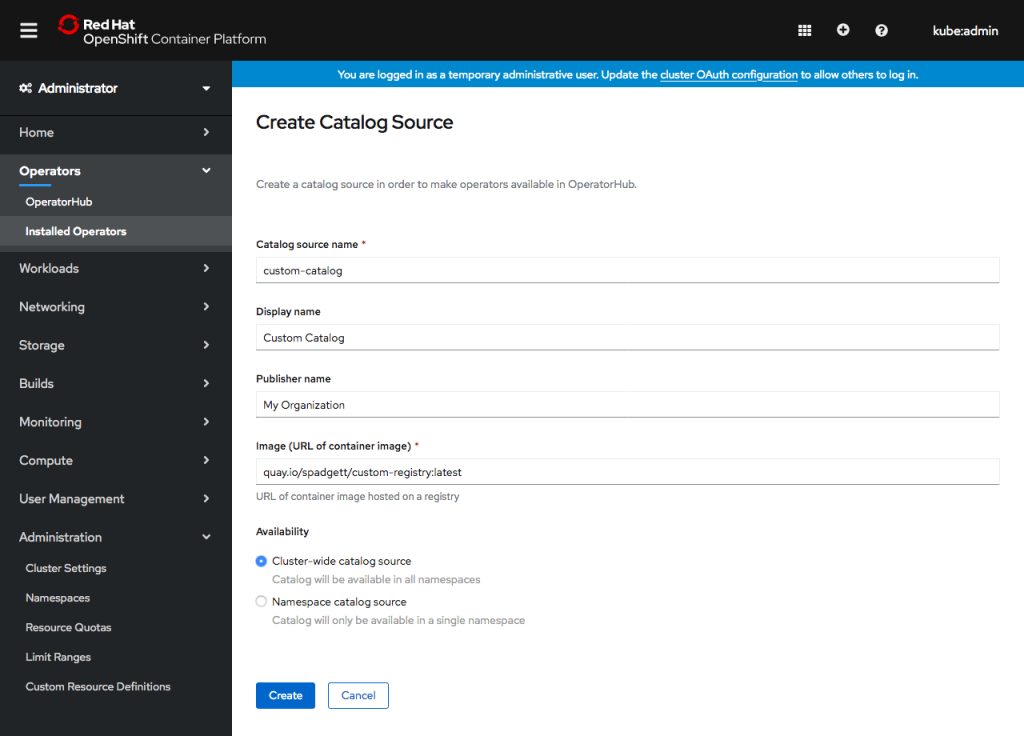
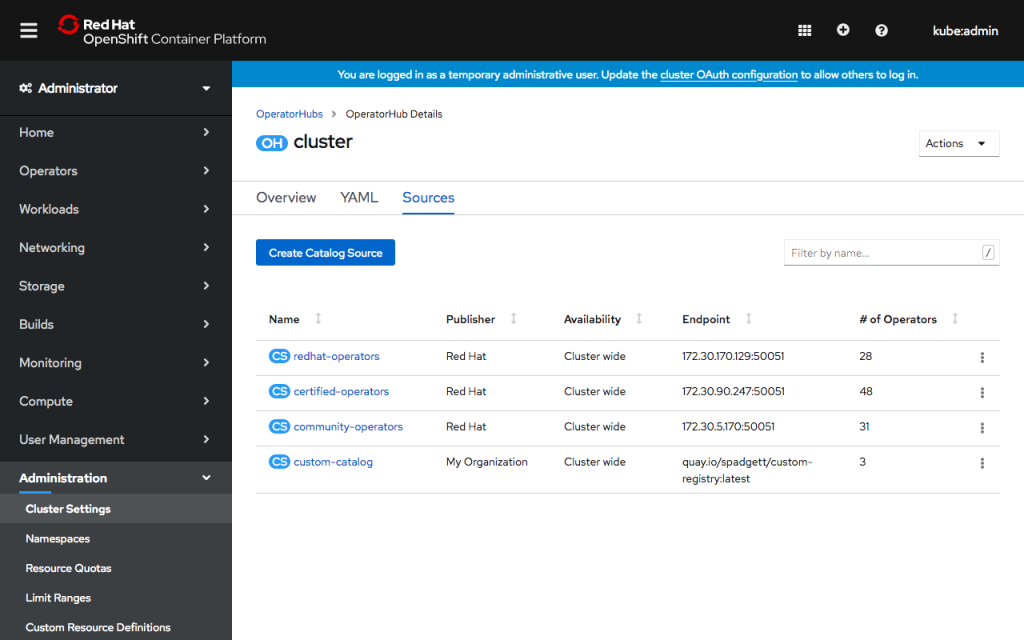
Click Create. You’ll see the new catalog source in the list. After a few minutes, OLM will load the catalog, and console will show the number of operators available.
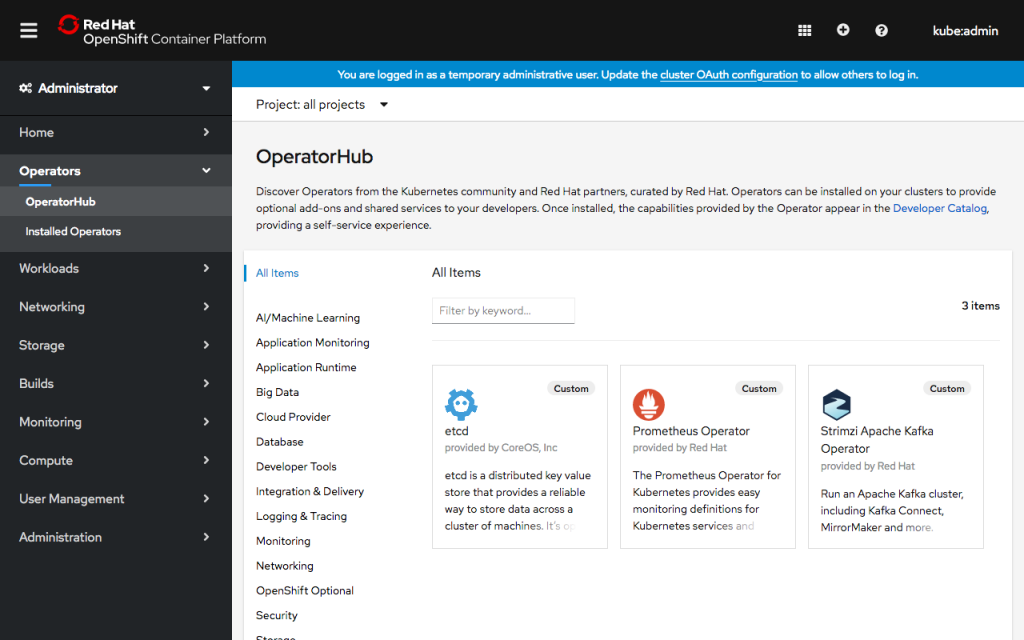
Visit the OperatorHub page under the Operators navigation section to see the new operators! Operators from a custom CatalogSource will be categorized as Provider Type “Custom,” and you can use the click the Provider Type “Custom” filter to the left of the page to see just the new operators.
If you’d like to learn more about what the OpenShift team is up to or provide feedback on any of the new 4.3 features, please take this brief 3-minute survey.
저자 소개
유사한 검색 결과
신속한 패치 적용이 어려우신가요? 최후의 방어선, 제로 트러스트
Red Hat Enterprise Linux의 이미지 모드를 지금 바로 사용해야 하는 4가지 이유
Scaling with Orchestrators | Compiler
Container Roundup | Compiler
채널별 검색

오토메이션
기술, 팀, 인프라를 위한 IT 자동화 최신 동향

인공지능
고객이 어디서나 AI 워크로드를 실행할 수 있도록 지원하는 플랫폼 업데이트

오픈 하이브리드 클라우드
하이브리드 클라우드로 더욱 유연한 미래를 구축하는 방법을 알아보세요

보안
환경과 기술 전반에 걸쳐 리스크를 감소하는 방법에 대한 최신 정보

엣지 컴퓨팅
엣지에서의 운영을 단순화하는 플랫폼 업데이트

인프라
세계적으로 인정받은 기업용 Linux 플랫폼에 대한 최신 정보

애플리케이션
복잡한 애플리케이션에 대한 솔루션 더 보기

가상화
온프레미스와 클라우드 환경에서 워크로드를 유연하게 운영하기 위한 엔터프라이즈 가상화의 미래
