
In Red Hat OpenShift 4.2, we introduced a number of new console customization features, including ConsoleNotifications, ConsoleExternalLogLinks, ConsoleLinks, and ConsoleCLIDownloads. New in 4.3, the ConsoleLink feature has been extended to cover even more use cases. In addition to the User Menu, Help Menu, and Application Menu, users can now add links to specific project dashboards.
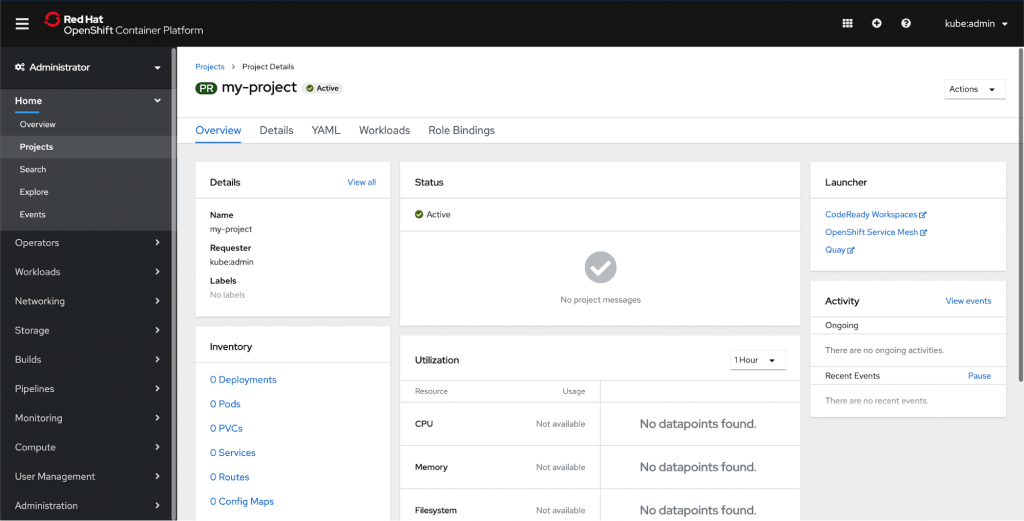
You can add a launcher card to a project dashboard by using the ConsoleLink CRD. Each of the links in the above screenshot is a separate ConsoleLink instance.
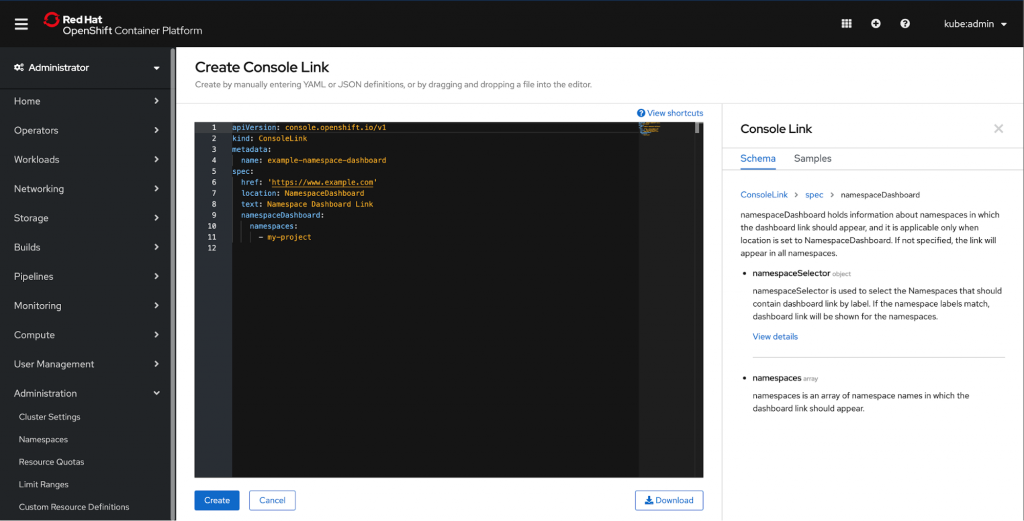
Users can define
namespaceDashboard, namespaceSelector
, and namespaces array to further customize their launcher.
namespaceDashboard
holds information about namespaces in which the dashboard link should appear, and it is applicable only when location is set to NamespaceDashboard. If not specified, the link will appear in all namespaces.
namespaceSelector
is used to select the Namespaces that should contain dashboard link by label. If the namespace labels match, dashboard link will be shown for the namespaces.
namespaces
is an array of namespace names in which the dashboard link should appear.
Take a closer look at the sample. We used namespaceDashboard to show the link in a single namespace; in this case, we’re adding it to the namespace ‘my-project’.
apiVersion: console.openshift.io/v1

kind: ConsoleLink

metadata:

 name: example-namespace-dashboard

spec:

 href: 'https://www.example.com'

 location: NamespaceDashboard

 text: Namespace Dashboard Link

 namespaceDashboard:

   namespaces:

     - my-project
This simple YAML will create the Launcher card below. Remember that you can add multiple links to the launcher card to easily display relevant external links. Operators can also use CRDs to add their own project level links in an automated fashion.

The new ConsoleLink location makes it easier than ever for cluster admins to link to project-specific applications relevant to a particular project. For adding cluster-wide scoped links to the User Menu, Help Menu, and Application Menu, check out our console customization blog.
If you’d like to learn more about what the OpenShift team is up to or provide feedback on any of the new 4.3 features, please take this brief 3-minute survey.
저자 소개
유사한 검색 결과
Red Hat 파트너가 최고의 통신 비즈니스 자산인 이유
에이전틱 패러독스와 하이브리드 AI의 필요성
Crack the Cloud_Open | Command Line Heroes
Edge computing covered and diced | Technically Speaking
채널별 검색

오토메이션
기술, 팀, 인프라를 위한 IT 자동화 최신 동향

인공지능
고객이 어디서나 AI 워크로드를 실행할 수 있도록 지원하는 플랫폼 업데이트

오픈 하이브리드 클라우드
하이브리드 클라우드로 더욱 유연한 미래를 구축하는 방법을 알아보세요

보안
환경과 기술 전반에 걸쳐 리스크를 감소하는 방법에 대한 최신 정보

엣지 컴퓨팅
엣지에서의 운영을 단순화하는 플랫폼 업데이트

인프라
세계적으로 인정받은 기업용 Linux 플랫폼에 대한 최신 정보

애플리케이션
복잡한 애플리케이션에 대한 솔루션 더 보기

가상화
온프레미스와 클라우드 환경에서 워크로드를 유연하게 운영하기 위한 엔터프라이즈 가상화의 미래
