
You can customize the OpenShift Container Platform web console to set a custom logo and product name. This is especially helpful if you need to tailor the web console to meet specific corporate or government requirements.
Add a Custom Logo and Product Name
Prerequisites
Create a file of the logo that you want to use. The logo can be a file in any common image format (e.g. GIF, JPG, PNG, or SVG) and is constrained to a max-height of 60px.
Procedure
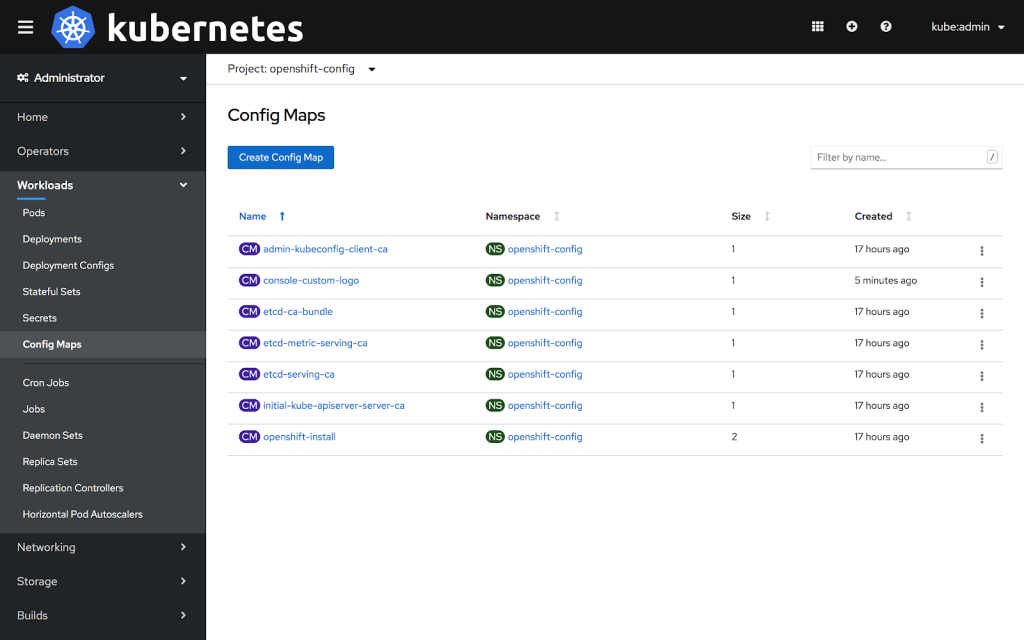
1: Import your logo file into a ConfigMap in the openshift-config namespace:
$ oc create configmap console-custom-logo --from-file=/path/to/console-custom-logo.png -n openshift-config
2: Edit the web console’s Operator configuration to include customLogoFile and customProductName:
$ oc apply -f <file>


apiVersion: operator.openshift.io/v1
kind: Console
metadata:
   name: cluster
spec:
   customization:
      customProductName: MyProduct
      customLogoFile:
         name: console-custom-logo
         key: console-custom-logo.png
Once the Operator configuration is updated, it will sync the custom logo ConfigMap into the console namespace, mount it to the console pod, and redeploy.
3: Check for success. If there are any issues, the console cluster operator will report Degraded, and the console Operator configuration will also report CustomLogoDegraded, but with reasons like KeyOrFilenameInvalid or NoImageProvided.
To check the clusteroperator, run:
$ oc get clusteroperator console -o yaml
To check the console Operator configuration, run:
$ oc get console.operator.openshift.io -o yaml
저자 소개
유사한 검색 결과
Red Hat 파트너가 최고의 통신 비즈니스 자산인 이유
에이전틱 패러독스와 하이브리드 AI의 필요성
Crack the Cloud_Open | Command Line Heroes
Edge computing covered and diced | Technically Speaking
채널별 검색

오토메이션
기술, 팀, 인프라를 위한 IT 자동화 최신 동향

인공지능
고객이 어디서나 AI 워크로드를 실행할 수 있도록 지원하는 플랫폼 업데이트

오픈 하이브리드 클라우드
하이브리드 클라우드로 더욱 유연한 미래를 구축하는 방법을 알아보세요

보안
환경과 기술 전반에 걸쳐 리스크를 감소하는 방법에 대한 최신 정보

엣지 컴퓨팅
엣지에서의 운영을 단순화하는 플랫폼 업데이트

인프라
세계적으로 인정받은 기업용 Linux 플랫폼에 대한 최신 정보

애플리케이션
복잡한 애플리케이션에 대한 솔루션 더 보기

가상화
온프레미스와 클라우드 환경에서 워크로드를 유연하게 운영하기 위한 엔터프라이즈 가상화의 미래
